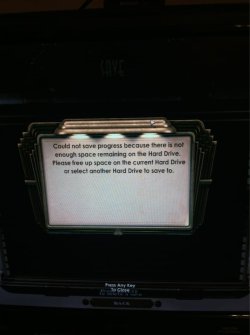
Well I got Bioshock 1 and 2 and borderlands the other day on steam. When I try to save my game progress it gives me the message"your Harddrive is full please free up space or select a different Harddrive". The problem is I have roughly 750GBs of free space .. Ive tried everything I could think of but nothing is working..
O and all the games are 2K games that aren't saving
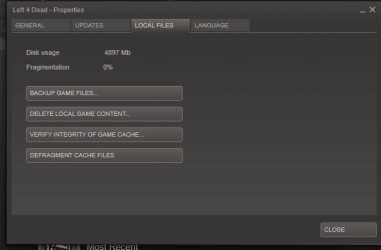
Have you tried the "backup local content" option to see what that does? It sounds like a problem with the Steam install rather then with either of the two games themselves.
If you are using the F key option to save try hitting the escape key to bring up the main options to save a game level to see if that will work. Sometimes the F key quick save option is problematic even for non Steam titles.
W7 Ultimate x64/W10 Pro x64/W11 Pro Triple Bo...AMD Phenom II X4 975 Deneb 3.6ghz - 965 2nd r...Kingston Hyper X DDR3 1600 1.5v 16gb - Hyper ...MSI HD Radeon 5750 1gb - MSI HD Radeon 6450 o...
Computer type
PC/Desktop
Computer Manufacturer/Model Number
Custom builds = 2
OS
W7 Ultimate x64/W10 Pro x64/W11 Pro Triple Boot - Main PC W7 Remote PC Micro ATX W7 Pro x64/W11 Pro
CPU
AMD Phenom II X4 975 Deneb 3.6ghz - 965 2nd remote pc
Motherboard
Gigabyte GA-790XTA-UD4-Gigabyte GA-880GM-D2H remote pc
Memory
Kingston Hyper X DDR3 1600 1.5v 16gb - Hyper X Fury 8gb 2nd
Graphics Card(s)
MSI HD Radeon 5750 1gb - MSI HD Radeon 6450 on mini tower
Sound Card
Creative Labs X-Fi Xtreme Audio P - Realtek onooard 2nd case
Monitor(s) Displays
ASUS VW199T-P 19" HP 2082a Main-HP 2082a 20" remote pc
Screen Resolution
Asus 1440x900 - HP 1600x900
Hard Drives
WD Black 1TB HD per OS W7, W10, and pending W11 presently on 500gb OS Drive - Pending Triple 1TB HDs for Spanned Storage/backup volume
Single 2TB external USB enclosure, single 1TB System 7 Host/Boot drive, Pending 8TB external HD for system image b
PSU
Corsair 750TX - primary / Corsair CX600 - second
Case
Antec 900-2 - SSD compatible / NZXT Vulcan mini tower
I've tried the menu screen that's where I get the message. Haven't tried the quick save. I've "verify integrity of game cache" and "defragment cache files" also done several reinstalls. I've tried running them under system admin... I don't know what's wrong I just noticed its not just those games it's all my games now
My Computer
At a glance
Windows 7 home premium 64bitcore i7 2600K4 GB corsair vengence8600 GT "upgrading"
I would try reinstalling the Steam engine itself not the games. You've already went that route and got nowhere. That's apparently where the bug is being seen.
I have to say I'fve never run into this one having had a number of Steam titles over the years since 2004-5 with Helf Life 2. It's certainly an odd one! Even with the 3rd developer mods(HL2 based addon games - 1-10 levels) they always are able to save while several of those love to crash! Steam Client dll errors and HL2.exe stops responding are the typical errors seen.
The other thought on this would be unfortunately scrolling through the Steam forums threads for anyone else running into this one. it sounds like where the game saves are designated to go is where the problem is however according to the post found on the 2kgames.com site.
With the reinstalls you might be running into a duplicate folder type problem. If that's the case then it would see the drive as being full rather then being able to overwrite things in the first by the same name.
W7 Ultimate x64/W10 Pro x64/W11 Pro Triple Bo...AMD Phenom II X4 975 Deneb 3.6ghz - 965 2nd r...Kingston Hyper X DDR3 1600 1.5v 16gb - Hyper ...MSI HD Radeon 5750 1gb - MSI HD Radeon 6450 o...
Computer type
PC/Desktop
Computer Manufacturer/Model Number
Custom builds = 2
OS
W7 Ultimate x64/W10 Pro x64/W11 Pro Triple Boot - Main PC W7 Remote PC Micro ATX W7 Pro x64/W11 Pro
CPU
AMD Phenom II X4 975 Deneb 3.6ghz - 965 2nd remote pc
Motherboard
Gigabyte GA-790XTA-UD4-Gigabyte GA-880GM-D2H remote pc
Memory
Kingston Hyper X DDR3 1600 1.5v 16gb - Hyper X Fury 8gb 2nd
Graphics Card(s)
MSI HD Radeon 5750 1gb - MSI HD Radeon 6450 on mini tower
Sound Card
Creative Labs X-Fi Xtreme Audio P - Realtek onooard 2nd case
Monitor(s) Displays
ASUS VW199T-P 19" HP 2082a Main-HP 2082a 20" remote pc
Screen Resolution
Asus 1440x900 - HP 1600x900
Hard Drives
WD Black 1TB HD per OS W7, W10, and pending W11 presently on 500gb OS Drive - Pending Triple 1TB HDs for Spanned Storage/backup volume
Single 2TB external USB enclosure, single 1TB System 7 Host/Boot drive, Pending 8TB external HD for system image b
PSU
Corsair 750TX - primary / Corsair CX600 - second
Case
Antec 900-2 - SSD compatible / NZXT Vulcan mini tower
Before you do that, you might want to visit the Steam forums.
I had that happen to me way back. Unfortunately I don't remember which game nor the solution. But, I do remember finding a simple solution in Steam's forum.
My Computer
At a glance
Windows 7 Home Premium 64Bits SP1Intel i7-92012 Gb (6x2GB Corsair XMS TR3X3G1600C9 G) Tri ...ASUS GTX-970 Turbo
Computer type
PC/Desktop
Computer Manufacturer/Model Number
DIY Re-built.
OS
Windows 7 Home Premium 64Bits SP1
CPU
Intel i7-920
Motherboard
ASUS P6TD Deluxe
Memory
12 Gb (6x2GB Corsair XMS TR3X3G1600C9 G) Tri Channels
Graphics Card(s)
ASUS GTX-970 Turbo
Sound Card
ASUS On Board SoundMax
Monitor(s) Displays
Samsung UN46D6500 46" TV
Screen Resolution
1920x1080
Hard Drives
1 OCZ SSD Agility Sata III 120Gb
1 Samsung 1Tb
1 Samsung 750Gb
1 Western Digital 500Gb(Mounted in ext eSata case)
PSU
Enermax CUG-950W
Case
Full ATX (Generic)
Cooling
Fans (6) 80mm
Keyboard
Saitek Eclipse II
Mouse
Cyborg R.A.T-5
Internet Speed
Comcast 105.0 MBPS
Antivirus
AVG
Browser
Waterfox v40.02(x64)
Other Info
- Logitech X-530 5.1 Sound speakers.
- APC ES-1300.
- Arris TG862G/CT Modem/Router.
- Samsung BD-083A Blue Ray Player
- Lite On iHBS212 Blue Ray Burner
- Nippon Labs All-In-One Card Reader/Writer W/USB & eSata
You woulldn't have to uninstall the games but simply uninstall the Steam item itself through the Programs + Features option in the Control Panel to separate that from any games already on. The fresh download, install, and then logging in would see all titles back in the game library without the major hassles for reistalling everything.
The best first move however would be running a search on the Steam forums since that's where most of the problems as well as many solutions would be found. I'm sure someone else has run into this as well while maybe not naming a thread there the same. http://store.steampowered.com/forums/
W7 Ultimate x64/W10 Pro x64/W11 Pro Triple Bo...AMD Phenom II X4 975 Deneb 3.6ghz - 965 2nd r...Kingston Hyper X DDR3 1600 1.5v 16gb - Hyper ...MSI HD Radeon 5750 1gb - MSI HD Radeon 6450 o...
Computer type
PC/Desktop
Computer Manufacturer/Model Number
Custom builds = 2
OS
W7 Ultimate x64/W10 Pro x64/W11 Pro Triple Boot - Main PC W7 Remote PC Micro ATX W7 Pro x64/W11 Pro
CPU
AMD Phenom II X4 975 Deneb 3.6ghz - 965 2nd remote pc
Motherboard
Gigabyte GA-790XTA-UD4-Gigabyte GA-880GM-D2H remote pc
Memory
Kingston Hyper X DDR3 1600 1.5v 16gb - Hyper X Fury 8gb 2nd
Graphics Card(s)
MSI HD Radeon 5750 1gb - MSI HD Radeon 6450 on mini tower
Sound Card
Creative Labs X-Fi Xtreme Audio P - Realtek onooard 2nd case
Monitor(s) Displays
ASUS VW199T-P 19" HP 2082a Main-HP 2082a 20" remote pc
Screen Resolution
Asus 1440x900 - HP 1600x900
Hard Drives
WD Black 1TB HD per OS W7, W10, and pending W11 presently on 500gb OS Drive - Pending Triple 1TB HDs for Spanned Storage/backup volume
Single 2TB external USB enclosure, single 1TB System 7 Host/Boot drive, Pending 8TB external HD for system image b
PSU
Corsair 750TX - primary / Corsair CX600 - second
Case
Antec 900-2 - SSD compatible / NZXT Vulcan mini tower
One thing I did previously before the latest clean install of 7 was backing up the user acount as well as source mod folders over to another drive and one or two mods had to be redownloaded to see them run again while the fresh install of all Steam regular titles have had no problems.
If you create a new save at the beginning of each game map those can be backed up while dumping any duplicates found. You would simply replay to those particular points to save again later anyways while keeping the start of the map type saves.
Another though that came to mind if it would work would be taking ownership over the designated folder in case the System Admin's protection over the user folders is hampering things in any way. Since this is an odd problem I had to think of odd causes since generally the system denies access to certain folders as a rule when browsing the drive. If the game installer created the sub folder under one of those that would explain the error.
W7 Ultimate x64/W10 Pro x64/W11 Pro Triple Bo...AMD Phenom II X4 975 Deneb 3.6ghz - 965 2nd r...Kingston Hyper X DDR3 1600 1.5v 16gb - Hyper ...MSI HD Radeon 5750 1gb - MSI HD Radeon 6450 o...
Computer type
PC/Desktop
Computer Manufacturer/Model Number
Custom builds = 2
OS
W7 Ultimate x64/W10 Pro x64/W11 Pro Triple Boot - Main PC W7 Remote PC Micro ATX W7 Pro x64/W11 Pro
CPU
AMD Phenom II X4 975 Deneb 3.6ghz - 965 2nd remote pc
Motherboard
Gigabyte GA-790XTA-UD4-Gigabyte GA-880GM-D2H remote pc
Memory
Kingston Hyper X DDR3 1600 1.5v 16gb - Hyper X Fury 8gb 2nd
Graphics Card(s)
MSI HD Radeon 5750 1gb - MSI HD Radeon 6450 on mini tower
Sound Card
Creative Labs X-Fi Xtreme Audio P - Realtek onooard 2nd case
Monitor(s) Displays
ASUS VW199T-P 19" HP 2082a Main-HP 2082a 20" remote pc
Screen Resolution
Asus 1440x900 - HP 1600x900
Hard Drives
WD Black 1TB HD per OS W7, W10, and pending W11 presently on 500gb OS Drive - Pending Triple 1TB HDs for Spanned Storage/backup volume
Single 2TB external USB enclosure, single 1TB System 7 Host/Boot drive, Pending 8TB external HD for system image b
PSU
Corsair 750TX - primary / Corsair CX600 - second
Case
Antec 900-2 - SSD compatible / NZXT Vulcan mini tower
On the 2k forums they said that the save error could come from a 0 KB folder within the "saved games" file of Bioshock itself. From what i Was reading is that deleting this file will fix the problem "doubt it". Also read about what you just said but i cant figure out how to allow admin priverages to bioshock when i find its laucher.exe, and click properties it doesnt give me the "run this program as admin" option. I'll see if the first thing works real quick... Hopefully it does..
My Computer
At a glance
Windows 7 home premium 64bitcore i7 2600K4 GB corsair vengence8600 GT "upgrading"
What you would be doing as far as locating and taking ownership would be elevating permissions for your own user account over the individual folder itself. Rather then seeing it being a system protected folder where the game is unable to write to it the elevated permissions giving you full control would allow any program under your account to write to it as well.
Note this is one theory on how to get Bioshock and the others to start saving to each one's own folder. You could also try reniaming the present folder slightly and creating a new one in it's place with full user control to see if the game then starts saving files.
As far as wiping all present game saves in order to see if new ones will be written I would say that would be an unnecessary step which wouldn't solve the actual problem you are running into. But again that would be strictly upto you if you wanted to start everything all over fresh.
W7 Ultimate x64/W10 Pro x64/W11 Pro Triple Bo...AMD Phenom II X4 975 Deneb 3.6ghz - 965 2nd r...Kingston Hyper X DDR3 1600 1.5v 16gb - Hyper ...MSI HD Radeon 5750 1gb - MSI HD Radeon 6450 o...
Computer type
PC/Desktop
Computer Manufacturer/Model Number
Custom builds = 2
OS
W7 Ultimate x64/W10 Pro x64/W11 Pro Triple Boot - Main PC W7 Remote PC Micro ATX W7 Pro x64/W11 Pro
CPU
AMD Phenom II X4 975 Deneb 3.6ghz - 965 2nd remote pc
Motherboard
Gigabyte GA-790XTA-UD4-Gigabyte GA-880GM-D2H remote pc
Memory
Kingston Hyper X DDR3 1600 1.5v 16gb - Hyper X Fury 8gb 2nd
Graphics Card(s)
MSI HD Radeon 5750 1gb - MSI HD Radeon 6450 on mini tower
Sound Card
Creative Labs X-Fi Xtreme Audio P - Realtek onooard 2nd case
Monitor(s) Displays
ASUS VW199T-P 19" HP 2082a Main-HP 2082a 20" remote pc
Screen Resolution
Asus 1440x900 - HP 1600x900
Hard Drives
WD Black 1TB HD per OS W7, W10, and pending W11 presently on 500gb OS Drive - Pending Triple 1TB HDs for Spanned Storage/backup volume
Single 2TB external USB enclosure, single 1TB System 7 Host/Boot drive, Pending 8TB external HD for system image b
PSU
Corsair 750TX - primary / Corsair CX600 - second
Case
Antec 900-2 - SSD compatible / NZXT Vulcan mini tower
Yea I did that and it says everything is there I think I have a idea of what the problem is.. I have a HDD that is my C: and a solid state which is nothing yet. I think if I change to my SSD as My OS/c: and change the HDD to D:/ redundant drive than it will save. From what I was reading the save files save to the my documents folder; which I don't have since I have no D: drive except for the C:. If it works than I will have no problem with the save option. The only thing I'm worried about is have a secondary operating system on my HDD. An the main on my SSD. Do you think this will cause a problem?
My Computer
At a glance
Windows 7 home premium 64bitcore i7 2600K4 GB corsair vengence8600 GT "upgrading"
I could have told you changing the drive where you have everything installed wouldn't help any since you already tried reinstalling each game! But you wanted the SSD to be the OS drive which works in your favor for the effort at least!
As for the other Steam driven titles I have on here never going for Bioshock after seeing a demo the game saves are generally found in sub folder of the game's main folder found on the main top Steam folder. While many programs will tend to stash thing under the user account\AppsData folder like the MS Virtual PC or VM ware storing VM and VHDs there you wouldn't expect pc games to be storing saves under anything but the save folder in the program's main folder.
There's probably a workaround for this since it seems to be a persistent permissions problem where the game is trying to write to one folder while the system admin is simply saying "no way! access denied!" or something on that line of thought. You may want to see if you can email the support staff for that software company to see what they come back with on this.
W7 Ultimate x64/W10 Pro x64/W11 Pro Triple Bo...AMD Phenom II X4 975 Deneb 3.6ghz - 965 2nd r...Kingston Hyper X DDR3 1600 1.5v 16gb - Hyper ...MSI HD Radeon 5750 1gb - MSI HD Radeon 6450 o...
Computer type
PC/Desktop
Computer Manufacturer/Model Number
Custom builds = 2
OS
W7 Ultimate x64/W10 Pro x64/W11 Pro Triple Boot - Main PC W7 Remote PC Micro ATX W7 Pro x64/W11 Pro
CPU
AMD Phenom II X4 975 Deneb 3.6ghz - 965 2nd remote pc
Motherboard
Gigabyte GA-790XTA-UD4-Gigabyte GA-880GM-D2H remote pc
Memory
Kingston Hyper X DDR3 1600 1.5v 16gb - Hyper X Fury 8gb 2nd
Graphics Card(s)
MSI HD Radeon 5750 1gb - MSI HD Radeon 6450 on mini tower
Sound Card
Creative Labs X-Fi Xtreme Audio P - Realtek onooard 2nd case
Monitor(s) Displays
ASUS VW199T-P 19" HP 2082a Main-HP 2082a 20" remote pc
Screen Resolution
Asus 1440x900 - HP 1600x900
Hard Drives
WD Black 1TB HD per OS W7, W10, and pending W11 presently on 500gb OS Drive - Pending Triple 1TB HDs for Spanned Storage/backup volume
Single 2TB external USB enclosure, single 1TB System 7 Host/Boot drive, Pending 8TB external HD for system image b
PSU
Corsair 750TX - primary / Corsair CX600 - second
Case
Antec 900-2 - SSD compatible / NZXT Vulcan mini tower
I went ahead and uninstalled steam and deleted all save files. I'm not to worried about playing the games over again. I'll install it tomorrow and redownload the bioshock and borderlands to see if that works. I had to do a system restore a few weeks ago so I think that might be the problem.
My Computer
At a glance
Windows 7 home premium 64bitcore i7 2600K4 GB corsair vengence8600 GT "upgrading"
That could prove to be one possible source of the problem if something got knocked out but not restored in the registry. Like I was saying this is definitley one for the books since generally any full reinstall would automatically correct any problem similar to this at least.
W7 Ultimate x64/W10 Pro x64/W11 Pro Triple Bo...AMD Phenom II X4 975 Deneb 3.6ghz - 965 2nd r...Kingston Hyper X DDR3 1600 1.5v 16gb - Hyper ...MSI HD Radeon 5750 1gb - MSI HD Radeon 6450 o...
Computer type
PC/Desktop
Computer Manufacturer/Model Number
Custom builds = 2
OS
W7 Ultimate x64/W10 Pro x64/W11 Pro Triple Boot - Main PC W7 Remote PC Micro ATX W7 Pro x64/W11 Pro
CPU
AMD Phenom II X4 975 Deneb 3.6ghz - 965 2nd remote pc
Motherboard
Gigabyte GA-790XTA-UD4-Gigabyte GA-880GM-D2H remote pc
Memory
Kingston Hyper X DDR3 1600 1.5v 16gb - Hyper X Fury 8gb 2nd
Graphics Card(s)
MSI HD Radeon 5750 1gb - MSI HD Radeon 6450 on mini tower
Sound Card
Creative Labs X-Fi Xtreme Audio P - Realtek onooard 2nd case
Monitor(s) Displays
ASUS VW199T-P 19" HP 2082a Main-HP 2082a 20" remote pc
Screen Resolution
Asus 1440x900 - HP 1600x900
Hard Drives
WD Black 1TB HD per OS W7, W10, and pending W11 presently on 500gb OS Drive - Pending Triple 1TB HDs for Spanned Storage/backup volume
Single 2TB external USB enclosure, single 1TB System 7 Host/Boot drive, Pending 8TB external HD for system image b
PSU
Corsair 750TX - primary / Corsair CX600 - second
Case
Antec 900-2 - SSD compatible / NZXT Vulcan mini tower