My hard drive partition wont show!! plzzz help!!

bArbAriAn

New member
Local time
10:51 PM
Messages
3
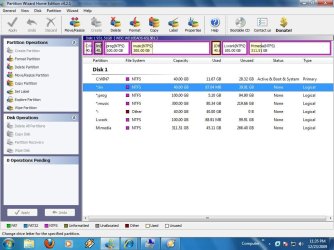
i recently bought 1 tb hard drive and made 7 partition with partition wizard. i dont know why, eventually i opened partition magic althou i knew tht it won't support win7. when i run partition magic it shows some error (which i didn't read it well) and there was the option "let partition magic fix the error" and i clicked ok it came for 4 times then partition magic opened; but it showd my whole hard drive as bad.
when i restarted my computer then my 4 partition are gone,

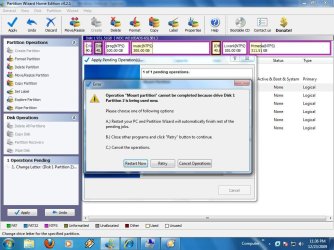
i tried to change the drive letter but following error occur

partition wizard also shows the drive lable bt all the drive letters are '*' and when i tried to change the letter it also shows the following error

what do i do? i dont want to loose my data in it
 

Attachments

  • Clipboard Image-large.jpg
    Clipboard Image-large.jpg
    97 KB · Views: 223
  • Clipboard Image (1)-large.jpg
    Clipboard Image (1)-large.jpg
    92.1 KB · Views: 377
  • Clipboard Image (2)-large.jpg
    Clipboard Image (2)-large.jpg
    106.2 KB · Views: 149

My Computer My Computer

At a glance

Windows 7
OS
Windows 7
Hard Drives
WD10EADS, 1TB
That doesn't sound good.

Partition Magic must not be used on Vista/7.

Download the free FREE Rescue Kit Express | PARAGON Software Group

It burns itself to cd - do not format the cd.

Boot the Paragon cd - select Normal Mode , then File Transfer Wizard.

Transfer off any data you need.

After that, Use the Partition Wizard boot disc to perform "Partition Recovery" - Quick scan the whole drive. tick ALL the partitions you want to recover , OK , Apply.
 

My Computers My Computers

  • At a glance

    7 X64i5 84002x8gb 3200mhz
    Computer type
    PC/Desktop
    OS
    7 X64
    CPU
    i5 8400
    Motherboard
    gigabyte b365m ds3h
    Memory
    2x8gb 3200mhz
    Hard Drives
    various
    PSU
    pure power 11 400w cm
    Case
    Coolermaster
    Cooling
    cryorig m9i
  • At a glance

    7x64g54008gb ddr4 2400
    Computer type
    PC/Desktop
    OS
    7x64
    CPU
    g5400
    Motherboard
    ga b365m ds3h
    Memory
    8gb ddr4 2400
    PSU
    xfx pro 450w
thAnx!
but i have a problem that it seems like rescue kit couldn't load my hard drive... when the progress bar reaches to about 75% then it stops.... it stops hell long.. i don't know if it always takes that long time or not and same goes with safe mode and other mode!!
 

My Computer My Computer

At a glance

Windows 7
OS
Windows 7
Hard Drives
WD10EADS, 1TB
Can you boot into an operating system now?

Did you try restarting as Disk management suggested?

Seems to be a problem with the partition table caused by Partition Magic.
 

My Computers My Computers

  • At a glance

    7 X64i5 84002x8gb 3200mhz
    Computer type
    PC/Desktop
    OS
    7 X64
    CPU
    i5 8400
    Motherboard
    gigabyte b365m ds3h
    Memory
    2x8gb 3200mhz
    Hard Drives
    various
    PSU
    pure power 11 400w cm
    Case
    Coolermaster
    Cooling
    cryorig m9i
  • At a glance

    7x64g54008gb ddr4 2400
    Computer type
    PC/Desktop
    OS
    7x64
    CPU
    g5400
    Motherboard
    ga b365m ds3h
    Memory
    8gb ddr4 2400
    PSU
    xfx pro 450w
Ah..if this were my hard drive I would not be concerned about data at this point. I would go to your HD manufacturers site, dowload THEIR tools and get my drive back...repartition what ever it took. Just my opnion.
 

My Computer My Computer

At a glance

Win7 UltimateCeleron E1400 @ 2 gig dual core4 gig dual channelnVidia 6600LE 512mgs mem
Computer Manufacturer/Model Number
I made it
OS
Win7 Ultimate
CPU
Celeron E1400 @ 2 gig dual core
Motherboard
MSI MS-7529
Memory
4 gig dual channel
Graphics Card(s)
nVidia 6600LE 512mgs mem
Sound Card
On Board Realtek HD
Monitor(s) Displays
1 Sceptre Flat
Screen Resolution
I like 1280x800
Hard Drives
System Drive: 300 gig Maxtor SATA3 (It was cheap)

My Storage: 160 gig WD SATA3
Wife's Storage 160 gig WD SATA3
Keyboard
MS Dgital Media Pro
Mouse
MS Optical 3000
Internet Speed
1.5 DSL
If you can't backup your data - you may have to go ahead anyway.

If you boot the PW cd - you shouldn't get the in use message.

Click Disk1 at the top of PW main screen - then select Partition Recovery in the left pane.
 

My Computers My Computers

  • At a glance

    7 X64i5 84002x8gb 3200mhz
    Computer type
    PC/Desktop
    OS
    7 X64
    CPU
    i5 8400
    Motherboard
    gigabyte b365m ds3h
    Memory
    2x8gb 3200mhz
    Hard Drives
    various
    PSU
    pure power 11 400w cm
    Case
    Coolermaster
    Cooling
    cryorig m9i
  • At a glance

    7x64g54008gb ddr4 2400
    Computer type
    PC/Desktop
    OS
    7x64
    CPU
    g5400
    Motherboard
    ga b365m ds3h
    Memory
    8gb ddr4 2400
    PSU
    xfx pro 450w
thnx guys. im downloading the bootable cd image of partition wizard!!
i'm so worried n i'm more concerning about my harddisk than the data in it coz it's been only 4days i bought my hard drive!!
hope this will help!!
peace!!
 

My Computer My Computer

At a glance

Windows 7
OS
Windows 7
Hard Drives
WD10EADS, 1TB
This is exactly the same problem I have right now.

I made a mistake in letting Partition Magic 8 "repair" my HD. now I have lost my partitions except my C:
D:, E:, F:, G: are gone and I can't even access them in Windows 7 disc management.

Please help, I would really like to recover the data in my lost partitions.

I tried using Testdisk and it can see all the paritions, but it shows all the partitions as deleted. When I tried to change more than one partitions to L (Logical), it shows that the strucutre is Bad. Am I missinf a step here?

Thanks.
 

My Computer My Computer

At a glance

Windows 7
OS
Windows 7
I had a simlar thing happen with PM but it was on an XP machine. Went to add a new partition and it said there was some errors. After it said it fixed them the computer was useless.
To fix it I redid the whole drive from scratch with PM into its partitions and then restored the machine from the backup that I do every week.

For me there was no other way as the data was unreadable by any of the recovery programs I tried at the time.

And what have we learned from this experience? Backup - Backup - Backup
If you cant do without it then you need to back it up in case of disk failure or operator error or whatever.
 

My Computer My Computer

At a glance

Windows 7 Ultimate x64Intel Core I7 980X8GB 4x2GB Corsair DDR3 2000NVidia GEForce GTX480 - Gigabyte GV-N480D5
Computer Manufacturer/Model Number
Selfbuilt
OS
Windows 7 Ultimate x64
CPU
Intel Core I7 980X
Motherboard
Gigabyte GA-X58A-UD7
Memory
8GB 4x2GB Corsair DDR3 2000
Graphics Card(s)
NVidia GEForce GTX480 - Gigabyte GV-N480D5
Sound Card
Creative X-Fi
Monitor(s) Displays
HP LP2475w
Screen Resolution
1920x1200
Hard Drives
2 x 2TB Segate
PSU
SilverStone 1500W
Case
CoolMaster HAF 932
Cooling
Just the Breeze
Keyboard
Standard
Mouse
Razer Mamba
Internet Speed
ADSL
Just looking at those pictures it looks like PM is not reconising the Extended Partition. It should show there but doesnt.
Looking at the Windows DM it sees 3 primary partitions (this is all you can have per disk) so when it goes to mount the 4th it fails.

Possibly you could disable the partitions you are not interested in and Windows may mount the ones you are interested in. Not saying you will see any data in them though.

The disk for Wins 7 must have no more than 3 primary partitions. Then you need an Extended partition and inside of that you create the Logical partitions. Looks like the logicals have come out of the extended or PM has deleted the extended. Try disabling all but 3 of the partitions and see what happens.
 

My Computer My Computer

At a glance

Windows 7 Ultimate x64Intel Core I7 980X8GB 4x2GB Corsair DDR3 2000NVidia GEForce GTX480 - Gigabyte GV-N480D5
Computer Manufacturer/Model Number
Selfbuilt
OS
Windows 7 Ultimate x64
CPU
Intel Core I7 980X
Motherboard
Gigabyte GA-X58A-UD7
Memory
8GB 4x2GB Corsair DDR3 2000
Graphics Card(s)
NVidia GEForce GTX480 - Gigabyte GV-N480D5
Sound Card
Creative X-Fi
Monitor(s) Displays
HP LP2475w
Screen Resolution
1920x1200
Hard Drives
2 x 2TB Segate
PSU
SilverStone 1500W
Case
CoolMaster HAF 932
Cooling
Just the Breeze
Keyboard
Standard
Mouse
Razer Mamba
Internet Speed
ADSL
Thanks everyone for the reply.
Right now I am recovering data by using Easus Recover Wizard and saving them on an external drive. Fingers crossed everything will be good. I would have to format the partitions aftewards.
 

My Computer My Computer

At a glance

Windows 7
OS
Windows 7
Back
Top