

- Local time
- 11:03 AM
- Messages
- 21
sorry for posting out of place,
please do direct me where to go.
I have an odd problem, and was looking for some insight:
I was messing around in the settings for the Start Menu,
and somehow managed to break it.
Particularly, I was using a certain Windows 7 Manager application,
in Customization>Customize System>Start Menu.
[For the record, the application is so-so, not bad just nothing to get excited about.]
Usually, the start menu lists some programs, and expands vertically to accommodate for the size of the list.
just not mine, not anymore.
it expands to the top of the screen, maximum size at all times.
i tried switching over to small icons, even removing items from the start menu entirely.
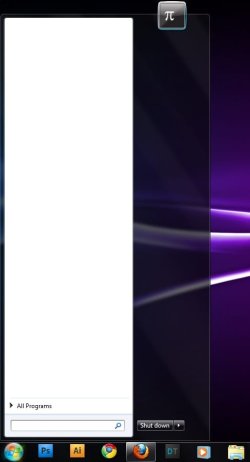
I find the idea of an unnecesarily large, blank start menu pretty funny actually
but still, anyone have any ideas?
please do direct me where to go.
I have an odd problem, and was looking for some insight:
I was messing around in the settings for the Start Menu,
and somehow managed to break it.
Particularly, I was using a certain Windows 7 Manager application,
in Customization>Customize System>Start Menu.
[For the record, the application is so-so, not bad just nothing to get excited about.]
Usually, the start menu lists some programs, and expands vertically to accommodate for the size of the list.
just not mine, not anymore.
it expands to the top of the screen, maximum size at all times.
i tried switching over to small icons, even removing items from the start menu entirely.
I find the idea of an unnecesarily large, blank start menu pretty funny actually
but still, anyone have any ideas?
My Computer
At a glance
Win7x64Intel Core 2 Duo E63005120 MBGeForce GTS 250
- OS
- Win7x64
- CPU
- Intel Core 2 Duo E6300
- Motherboard
- Infinity 975X
- Memory
- 5120 MB
- Graphics Card(s)
- GeForce GTS 250
- Screen Resolution
- 1440x900


