

- Local time
- 6:49 AM
- Messages
- 40
Well it toke me about a week to find out this solution after googling and reading alot of hours....!!!!
Using desktop with XP Host
Laptop 7 Client
LAN on the desktop (2 cards 1 from router -1 to laptop 7)
On XP After enabling ICS u don't need to configure any thing but ther is a little notice wich was the key to end this suffer
Acorrding to microsoft i found that when u enable ICS in XP
It gives ur seconed adapter a unique IP never changes : 192.168.0.1
and the Subnet Mask is always : 255.255.255.0
Well if u enabled ur ICS on XP don't do any thing else
no need to install any protocols or any thing u only go to ur host wich is Seven here
and configure the adapters IP ,Gateway ,DNS like this
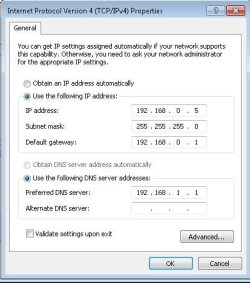
U dont have to copy this offcourse but that was my case for example
but u have to make an IP in the same range provided from ur XP adapter wich connects to Seven
Know why because i think Auto configuring IP's between Seven and XP is not recomnded here as it makes Conflict in IP's and Seven Never fix it
In few words:
Its IP conflict Issue
To have a little background about IP and networks is a good idea:sarc:
so...!
i hope it helps any body in the same situation and i hope to hear from any body who used XP as a HOST.
I know its not a wonder but for me it solved alot of things....

Using desktop with XP Host
Laptop 7 Client
LAN on the desktop (2 cards 1 from router -1 to laptop 7)
On XP After enabling ICS u don't need to configure any thing but ther is a little notice wich was the key to end this suffer
Acorrding to microsoft i found that when u enable ICS in XP
It gives ur seconed adapter a unique IP never changes : 192.168.0.1
and the Subnet Mask is always : 255.255.255.0
Well if u enabled ur ICS on XP don't do any thing else
no need to install any protocols or any thing u only go to ur host wich is Seven here
and configure the adapters IP ,Gateway ,DNS like this
U dont have to copy this offcourse but that was my case for example
but u have to make an IP in the same range provided from ur XP adapter wich connects to Seven
Know why because i think Auto configuring IP's between Seven and XP is not recomnded here as it makes Conflict in IP's and Seven Never fix it
In few words:
Its IP conflict Issue
To have a little background about IP and networks is a good idea:sarc:
so...!
i hope it helps any body in the same situation and i hope to hear from any body who used XP as a HOST.
I know its not a wonder but for me it solved alot of things....
My Computer
- Computer Manufacturer/Model Number
- ECS
- OS
- Windows 7 Ultimate x64 - XP Pro. Sp3
- CPU
- Intel P4 HT 631-OC 3.75-
- Motherboard
- ECS G31T-M7
- Memory
- 2*1GB
- Graphics Card(s)
- Intel GMA3100 - G33/G31 Express Chipset -
- Sound Card
- VIA HD Built-in
- Monitor(s) Displays
- Samsung
- Screen Resolution
- 1152 x 864
- Hard Drives
- WDC320 SATA
- PSU
- 40W
- Cooling
- Stock Fan
- Keyboard
- Media
- Mouse
- Optical
- Internet Speed
- 1Mb
- Other Info
- LAN:
Realtek8139/810x
Atheros L2 10/100
