
My IE11 Google browser has been Hijacked!?

scottls59901

New member
Member
VIP
Local time
9:38 PM
Messages
114
Yesterday when I opened IE11 (fully win updated) after a cold startup, I noticed that the "Install Google Chrome" button was missing (FF27.01 too)?
Then when I went to browse Redbox, nothing was showing properly (very slow/garbled!))?
I rebooted & ran negative KIS2013 Full/Critical/rootkit scans.

Rebooted again, and ran my Full on-demand scans (KIS disabled until Restart)-
MBAM was negative.
Emsisoft-Kit found a High Risk browser hijacker in the registry- Quarantined/reboot twice.


I have since been able to restore FF to normal Google homepage (with Chrome), but Not IE11 (seems OK otherwise?).
I've tried Deleting all web page history, Signing out/In, retyping the URL..., but still no Chrome?

I'm scared to use IE11 now, and wonder how I can restore it!?

Other thoughts- In the past I hated the Chrome nag, but Now I love it!
 

Attachments
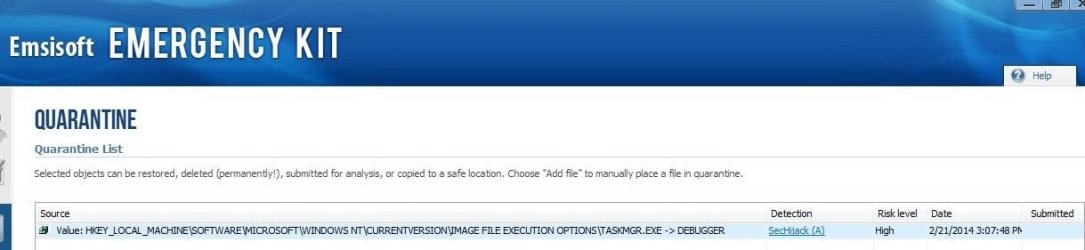
  • BrowserHijacker.JPG
    BrowserHijacker.JPG
    50.5 KB · Views: 4

My Computer My Computer

At a glance

Windows 7 Pro (32)i7/26004gb512mg (add on card was less buggy than Intel ...
Computer Manufacturer/Model Number
ZT Desktop
OS
Windows 7 Pro (32)
CPU
i7/2600
Motherboard
Intel
Memory
4gb
Graphics Card(s)
512mg (add on card was less buggy than Intel direct driver)
Sound Card
Internal
Monitor(s) Displays
19" DELL Ultra Sharp
Hard Drives
C:= WD Raptor Sata6 10k rpm
D:/E:= WD Black Sata 3.0
Case
ZT Full
Cooling
ZT
Internet Speed
8000kbps cable
Other Info
Free Outpost Pro Internet Security, and no other active anti-malware.
Free On-Demand- SpyWareBlaster, MBAM, Emsisoft-Kit, and Kaspersky Anti-rootkit utility TDSSKiller.
Yesterday when I opened IE11 (fully win updated) after a cold startup, I noticed that the "Install Google Chrome" button was missing (FF27.01 too)?


Other thoughts- In the past I hated the Chrome nag, but Now I love it!

I know of No Install Chrome button inside Internet explorer or Firefox,
I'm sure if you opening to Google.com as a home page in either Google would show a popup saying install Chrome...
You love a Chrome Nag to install Chrome even though you say you have Chrome installed ?
Troubleshooting for win-7,
http://www.sevenforums.com/tutorials/220165-troubleshooting-steps-windows-7-a.html
Reset process first opening Internet explorer
 

My Computer My Computer

At a glance

Win-7-Pro64bit 7-H-Prem-64biti7-5930K 2nd i9-9940x both water blocked VRM'...Trident-z 3200C14 2nd Trident-z 3600C16EVGA 1080ti ftw3 2nd Titan Xp both water blocked
Computer type
PC/Desktop
Computer Manufacturer/Model Number
Custom assembled by me :}
OS
Win-7-Pro64bit 7-H-Prem-64bit
CPU
i7-5930K 2nd i9-9940x both water blocked VRM's too
Motherboard
ASUS SABERTOOTH X99 2nd ASUS x299 Apex
Memory
Trident-z 3200C14 2nd Trident-z 3600C16
Graphics Card(s)
EVGA 1080ti ftw3 2nd Titan Xp both water blocked
Sound Card
Built-in Realtek
Monitor(s) Displays
1-AOC G2460PG 24"G-Sync 144Hz/ 2nd 1-ASUS VG248QE 24" 144Hz
Screen Resolution
1920 x 1080 144Hz
Hard Drives
2-Samsung M.2 Evo & Evo Plus
2-Samsung 850 EVO 500GB SSD's/ 3-2.5 W.D. Black 1tb-&3-1tb/3-3.5 WD Black 1tb hdd's
PSU
EVGA SuperNOVA 1000-P2 2nd 1200-P2
Case
2-Corsair Obsidian Series 450D Black ATX Mid Tower
Cooling
Custom water loops
Keyboard
Logitech G710+/ 2nd Logitech G910
Mouse
2-RedDragon M901 Perdition 16400 dpi Gaming mouse = wired
Internet Speed
Comcast Ping 19ms 89.31mbps download speed 6.12mbps upload
Antivirus
Malwarebytes Pro/ Superantispyware Pro
Browser
FireFox & Pale moon
Other Info
2nd ASUS X299 Apex/Intel i9-9940x with Custom water loop/7H-Prem-x64/Corsair 450D case/Ram Trident-z 3600C16 4x8gb / Samsung970Evo plus 500gb SSD/Dual ssd EZ swap evo/PSU EVGA SuperNova 1200w-P2 80+Platinum/GPU Titan Xp /8-ML-140 on push-pull on 2-280GTX rads
Yesterday when I opened IE11 (fully win updated) after a cold startup, I noticed that the "Install Google Chrome" button was missing (FF27.01 too)?


Other thoughts- In the past I hated the Chrome nag, but Now I love it!

I know of No Install Chrome button inside Internet explorer or Firefox,
I'm sure if you opening to Google.com as a home page in either Google would show a popup saying install Chrome...
You love a Chrome Nag to install Chrome even though you say you have Chrome installed ?
Troubleshooting for win-7,
http://www.sevenforums.com/tutorials/220165-troubleshooting-steps-windows-7-a.html
Reset process first opening Internet explorer
-You are correct about No Chrome nag in IE11, but there is one on my FF (I didn't like Chrome's lack of user controls, and uninstalled it!).

-I fixed my computer by reinstalling IE11, and emptying the Huge FF Cache (I wonder if the Zero day Flash 12.0.0.70 update let something in?).
-The reason I love the Chrome nag is that it's absence alerted me that my FF browser had been hijacked!
 

My Computer My Computer

At a glance

Windows 7 Pro (32)i7/26004gb512mg (add on card was less buggy than Intel ...
Computer Manufacturer/Model Number
ZT Desktop
OS
Windows 7 Pro (32)
CPU
i7/2600
Motherboard
Intel
Memory
4gb
Graphics Card(s)
512mg (add on card was less buggy than Intel direct driver)
Sound Card
Internal
Monitor(s) Displays
19" DELL Ultra Sharp
Hard Drives
C:= WD Raptor Sata6 10k rpm
D:/E:= WD Black Sata 3.0
Case
ZT Full
Cooling
ZT
Internet Speed
8000kbps cable
Other Info
Free Outpost Pro Internet Security, and no other active anti-malware.
Free On-Demand- SpyWareBlaster, MBAM, Emsisoft-Kit, and Kaspersky Anti-rootkit utility TDSSKiller.
Your correct about the lack of control in Chrome which it's delete all on exit or none,
This is a great little utility to clear garbage from Java and a bunch of other stuff,
Temp files delete run it as administrator and Start,
Shut down your machine after use so it will clear it's findings,
http://www.geekstogo.com/forum/files/file/187-tfc-temp-file-cleaner-by-oldtimer/

I can't say anything about Chrome nag alerting of anything malicious,
Chrome will run everything without notice good/ bad or ugly,
Cheers.
 

My Computer My Computer

At a glance

Win-7-Pro64bit 7-H-Prem-64biti7-5930K 2nd i9-9940x both water blocked VRM'...Trident-z 3200C14 2nd Trident-z 3600C16EVGA 1080ti ftw3 2nd Titan Xp both water blocked
Computer type
PC/Desktop
Computer Manufacturer/Model Number
Custom assembled by me :}
OS
Win-7-Pro64bit 7-H-Prem-64bit
CPU
i7-5930K 2nd i9-9940x both water blocked VRM's too
Motherboard
ASUS SABERTOOTH X99 2nd ASUS x299 Apex
Memory
Trident-z 3200C14 2nd Trident-z 3600C16
Graphics Card(s)
EVGA 1080ti ftw3 2nd Titan Xp both water blocked
Sound Card
Built-in Realtek
Monitor(s) Displays
1-AOC G2460PG 24"G-Sync 144Hz/ 2nd 1-ASUS VG248QE 24" 144Hz
Screen Resolution
1920 x 1080 144Hz
Hard Drives
2-Samsung M.2 Evo & Evo Plus
2-Samsung 850 EVO 500GB SSD's/ 3-2.5 W.D. Black 1tb-&3-1tb/3-3.5 WD Black 1tb hdd's
PSU
EVGA SuperNOVA 1000-P2 2nd 1200-P2
Case
2-Corsair Obsidian Series 450D Black ATX Mid Tower
Cooling
Custom water loops
Keyboard
Logitech G710+/ 2nd Logitech G910
Mouse
2-RedDragon M901 Perdition 16400 dpi Gaming mouse = wired
Internet Speed
Comcast Ping 19ms 89.31mbps download speed 6.12mbps upload
Antivirus
Malwarebytes Pro/ Superantispyware Pro
Browser
FireFox & Pale moon
Other Info
2nd ASUS X299 Apex/Intel i9-9940x with Custom water loop/7H-Prem-x64/Corsair 450D case/Ram Trident-z 3600C16 4x8gb / Samsung970Evo plus 500gb SSD/Dual ssd EZ swap evo/PSU EVGA SuperNova 1200w-P2 80+Platinum/GPU Titan Xp /8-ML-140 on push-pull on 2-280GTX rads
Back
Top