My Internet WI-FI may be breached

broadcast55

New member
Local time
8:12 PM
Messages
12
Hello,

First post here.

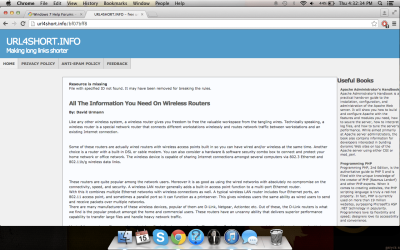
Just recently, I have been noticing suspicious activity on a website I usually visit called "media spy" (about Australian TV). Whenever I clear all browsing history on chrome (cache etc) and re-visit "media spy", I get redirected to "URL4SHORTS". Im worried cause I think my WI-FI has been breached and has infected my mac/pc and I don't know about it.

What especially concerns me, is, I tested out using 4G, not WI-FI to see if i will get redirected to "URL4SHORTS" and didn't so I think my WI-Fi has been breached? Any idea what to do?

Thank you.
 

My Computer My Computer

At a glance

OSX
Computer type
Laptop
OS
OSX
Hey man. First off, Welcome to Seven Forums. You DO realize that his is a forum for Windows 7 users, right? Not trying to be an ass or nothin....

Well, in the interest of solving a prob, my bet is DNS. There's a good chance that the DNS server settings on your wi-fi are different than the server your 4G provider uses. Your router should have an integrated webpage where you can change the DNS settings. I use the servers at OpenDNS (208.67.220.220 and 208.67.222.222). As long as you're at it, you might as well change your wifi password.

Post a copy of the output of the OSX equivelent of ipconfig /all.

In the meantime, run virus scans with the latest definitions if you suspect you need to.

Please post a link to the page you're trying to view. In fact, post a link to the one you get redirected to. :D
 

My Computer My Computer

At a glance

Microsoft Windows 10 Home Build 15036Intel(R) Core(TM) i7-860 @ 2.80GHz4.00 GBNVIDIA GeForce GTX 750
Computer type
PC/Desktop
Computer Manufacturer/Model Number
iBuyPower NZXT
OS
Microsoft Windows 10 Home Build 15036
CPU
Intel(R) Core(TM) i7-860 @ 2.80GHz
Motherboard
Gigabyte Technology Co., Ltd. P55-UD3L
Memory
4.00 GB
Graphics Card(s)
NVIDIA GeForce GTX 750
Sound Card
(1) Line 6 UX2 (2) Realtek High Definition Audio
Monitor(s) Displays
23" acer
Screen Resolution
1920 x 1080 x 32 bits (4294967296 colors) @ 60 Hz
Hard Drives
(1) WDC WD5000AAKS-00D2B0 ATA Device (2) Seagate FreeAgent Go 250G USB Device
Cooling
Corsair H75 liquid cooler (Very easy to install, actually)
Internet Speed
60M cable modem-->Linksys E1200-->1Gbps net card
Browser
Chrome
Other Info
This is probably the longest I've ever had a Windows machine run without having to restore it to scratch. I'm used to restoring to "factory" about every 2 yrs. I've run with Win7 since new in 2009 and only recently (Nov, '14) restored to clean up the machine from all my 'xperimenting. LOL!! I may never need another machine.

Upgraded to 10 when it was still free, then installed 2017 update.
Thank you for the reply. I do apologies, I run both MAC and PC, and thought this issue was a Internet issue/malware. This is the website I visit: Portal - Forums | Media Spy that gets redirected to "URL4SHORTS" every time I clear history, which it really odd. I have a screen shot of the issue


Post a copy of the output of the OSX equivelent of ipconfig /all.

Not sure what you mean.
 

Attachments

  • Screen Shot 2015-01-15 at 4.32.34 PM.png
    Screen Shot 2015-01-15 at 4.32.34 PM.png
    112.6 KB · Views: 1

My Computer My Computer

At a glance

OSX
Computer type
Laptop
OS
OSX
Post a copy of the output of the OSX equivelent of ipconfig /all.

Not sure what you mean.

If you are using your PC at the moment, open a command prompt window using Administrator privileges, then run ipconfig /all then take a screenshot and post it here.

In the meantime, here's another thought... Are you trying to access the site via a shortcut on your desktop that opens a browser window? Or, possibly, through a bookmark from your browser? Try opening your browser and entering "http://www.mediaspy.org/" manually. If it opens correctly, re-bookmark it, or move the new shortcut out to the desktop and discard the old one. I'm thinking that the original link you had is wonky.
 

My Computer My Computer

At a glance

Microsoft Windows 10 Home Build 15036Intel(R) Core(TM) i7-860 @ 2.80GHz4.00 GBNVIDIA GeForce GTX 750
Computer type
PC/Desktop
Computer Manufacturer/Model Number
iBuyPower NZXT
OS
Microsoft Windows 10 Home Build 15036
CPU
Intel(R) Core(TM) i7-860 @ 2.80GHz
Motherboard
Gigabyte Technology Co., Ltd. P55-UD3L
Memory
4.00 GB
Graphics Card(s)
NVIDIA GeForce GTX 750
Sound Card
(1) Line 6 UX2 (2) Realtek High Definition Audio
Monitor(s) Displays
23" acer
Screen Resolution
1920 x 1080 x 32 bits (4294967296 colors) @ 60 Hz
Hard Drives
(1) WDC WD5000AAKS-00D2B0 ATA Device (2) Seagate FreeAgent Go 250G USB Device
Cooling
Corsair H75 liquid cooler (Very easy to install, actually)
Internet Speed
60M cable modem-->Linksys E1200-->1Gbps net card
Browser
Chrome
Other Info
This is probably the longest I've ever had a Windows machine run without having to restore it to scratch. I'm used to restoring to "factory" about every 2 yrs. I've run with Win7 since new in 2009 and only recently (Nov, '14) restored to clean up the machine from all my 'xperimenting. LOL!! I may never need another machine.

Upgraded to 10 when it was still free, then installed 2017 update.
Thanks for the reply.

I just typed in "http://www.mediaspy.org/" manually on chrome and didn't redirect me to "URL4SHORTS", which is confusing me. Did this issue happen to you?

I'm currently on a mac, cause I don't want to infect my PC if this is a serious virus.

Update: I again cleared all history and re-visited media spy by typing it in google chrome and clicking the link, and again redirected me to "URL4SHORTS" with a add pop-up. One moment it opens, then the next it doesn't if manually type the URL or turn of JAVAscript.? I so confused wether its a virus infecting my computer or not.
 

My Computer My Computer

At a glance

OSX
Computer type
Laptop
OS
OSX
Okay. Manually type in the address again, then hit enter. If/When the Media Spy page comes up, drag the doc that shows next to the address out to the desktop and drop. (See Pic) Then, close Chrome.

Once it's out there, right-click the icon and select properties. Click the details tab, and check the URL. If it's correct, try double-clicking the shortcut and see if the correct site comes up.
 

Attachments

  • bookmark.jpg
    bookmark.jpg
    20.7 KB · Views: 23

My Computer My Computer

At a glance

Microsoft Windows 10 Home Build 15036Intel(R) Core(TM) i7-860 @ 2.80GHz4.00 GBNVIDIA GeForce GTX 750
Computer type
PC/Desktop
Computer Manufacturer/Model Number
iBuyPower NZXT
OS
Microsoft Windows 10 Home Build 15036
CPU
Intel(R) Core(TM) i7-860 @ 2.80GHz
Motherboard
Gigabyte Technology Co., Ltd. P55-UD3L
Memory
4.00 GB
Graphics Card(s)
NVIDIA GeForce GTX 750
Sound Card
(1) Line 6 UX2 (2) Realtek High Definition Audio
Monitor(s) Displays
23" acer
Screen Resolution
1920 x 1080 x 32 bits (4294967296 colors) @ 60 Hz
Hard Drives
(1) WDC WD5000AAKS-00D2B0 ATA Device (2) Seagate FreeAgent Go 250G USB Device
Cooling
Corsair H75 liquid cooler (Very easy to install, actually)
Internet Speed
60M cable modem-->Linksys E1200-->1Gbps net card
Browser
Chrome
Other Info
This is probably the longest I've ever had a Windows machine run without having to restore it to scratch. I'm used to restoring to "factory" about every 2 yrs. I've run with Win7 since new in 2009 and only recently (Nov, '14) restored to clean up the machine from all my 'xperimenting. LOL!! I may never need another machine.

Upgraded to 10 when it was still free, then installed 2017 update.
Pardon the interruption, could it be as simple as resetting the router back to the default? Turn off all devices that are connected to your router. Then do a full factory reset on the router itself. Temporally hook up a computer using Ethernet cable to the router. Now, change the default password using that computer. Now turn on each wifi device one at a time and use the WPS switch if you have one to reconnect the wifi. Don't forget to add your computer(s) if Wifi capable. All the instructions should be with your router manual and how to do some of what I mentioned.
 

My Computer My Computer

At a glance

W10 32 bit, XUbuntu 18.xx 64 bitIntel(R) Celeron(R) CPU G1620T @ 2.40GHz, 240...4GBIntel HD graphics
Computer type
PC/Desktop
Computer Manufacturer/Model Number
Dell All in one Inspiron 2020
OS
W10 32 bit, XUbuntu 18.xx 64 bit
CPU
Intel(R) Celeron(R) CPU G1620T @ 2.40GHz, 2400 Mhz
Motherboard
Dell
Memory
4GB
Graphics Card(s)
Intel HD graphics
Sound Card
High Definition Audio Device
Monitor(s) Displays
20 inch Screen
Screen Resolution
W7=1280 x 720 & Linux Mint Xfce=1360 x 768
Hard Drives
500 GB hard drive
Keyboard
Usb
Mouse
Usb
Internet Speed
High-Speed
Antivirus
MSE
Browser
Main Browser Firefox
Other Info
I have done a clean install of Windows 7 using Dell re-installation disk (Dell sent me one). I also use Free Macrium reflect backup and restore.
Okay. Manually type in the address again, then hit enter. If/When the Media Spy page comes up, drag the doc that shows next to the address out to the desktop and drop. (See Pic) Then, close Chrome.

Once it's out there, right-click the icon and select properties. Click the details tab, and check the URL. If it's correct, try double-clicking the shortcut and see if the correct site comes up.

I just followed the steps, and the website opened correctly. It's really confusing what may be causing this to occur. So far this 'URL4SHORTS' opens when I type 'media spy' in google and click the link, not when I enter the website URL manually. Is this a serious issue? what is causing it to occur?

As for 'gorze', I have already reset my router to factory settings which hasn't fixed the problem.
 

My Computer My Computer

At a glance

OSX
Computer type
Laptop
OS
OSX
Okay, I just tried the method you appear to be using (Google search - click top link). I get the same results you do, and this indicates to me that there's a prob with Google's link. I would use a desktop shortcut or bookmark instead.

On that note, I never understood why people would do a google search for someplace they've been over and over once they know the URL. My g/f does this to my constant fury. I tell her, "Go to nbcnews," and she's off to google, search and click the link. Seems like a lot of steps. I tell her, "Type 'nbcnews' in the address bar, then hit ctrl-enter." Easy-peasy.

As for OP, go ahead and start using a bookmark and/or desktop shortcut.
 

My Computer My Computer

At a glance

Microsoft Windows 10 Home Build 15036Intel(R) Core(TM) i7-860 @ 2.80GHz4.00 GBNVIDIA GeForce GTX 750
Computer type
PC/Desktop
Computer Manufacturer/Model Number
iBuyPower NZXT
OS
Microsoft Windows 10 Home Build 15036
CPU
Intel(R) Core(TM) i7-860 @ 2.80GHz
Motherboard
Gigabyte Technology Co., Ltd. P55-UD3L
Memory
4.00 GB
Graphics Card(s)
NVIDIA GeForce GTX 750
Sound Card
(1) Line 6 UX2 (2) Realtek High Definition Audio
Monitor(s) Displays
23" acer
Screen Resolution
1920 x 1080 x 32 bits (4294967296 colors) @ 60 Hz
Hard Drives
(1) WDC WD5000AAKS-00D2B0 ATA Device (2) Seagate FreeAgent Go 250G USB Device
Cooling
Corsair H75 liquid cooler (Very easy to install, actually)
Internet Speed
60M cable modem-->Linksys E1200-->1Gbps net card
Browser
Chrome
Other Info
This is probably the longest I've ever had a Windows machine run without having to restore it to scratch. I'm used to restoring to "factory" about every 2 yrs. I've run with Win7 since new in 2009 and only recently (Nov, '14) restored to clean up the machine from all my 'xperimenting. LOL!! I may never need another machine.

Upgraded to 10 when it was still free, then installed 2017 update.
Back
Top