My laptop is bugged up and I need some help..

freerider4life

New member
Local time
8:24 AM
Messages
7
I do not know a lot about computers, but I'm always looking to learn. I've googled before posting, and not come up with much. I don't really know where to start, and I do know many of you are very knowledgeable with computers. So i'm here asking for some help.

My problems

Upon startup, I receive a black screen with white writing saying my disks need to be scanned for errors, press any key to skip. I let it scan once, and it hung about 24% of the way. Lately I've been skipping it and starting it normally.

Lag. This computer lags like crazy, and it never used to. The first year of ownership were absolutely trouble free, lately It freezes daily and has to be restarted a few times.

Bloatware. What can I remove safely? I just want some speed out of this machine..

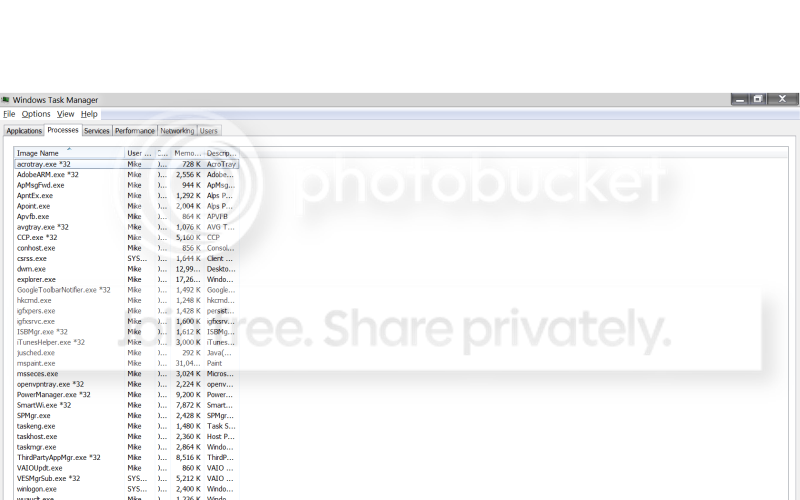
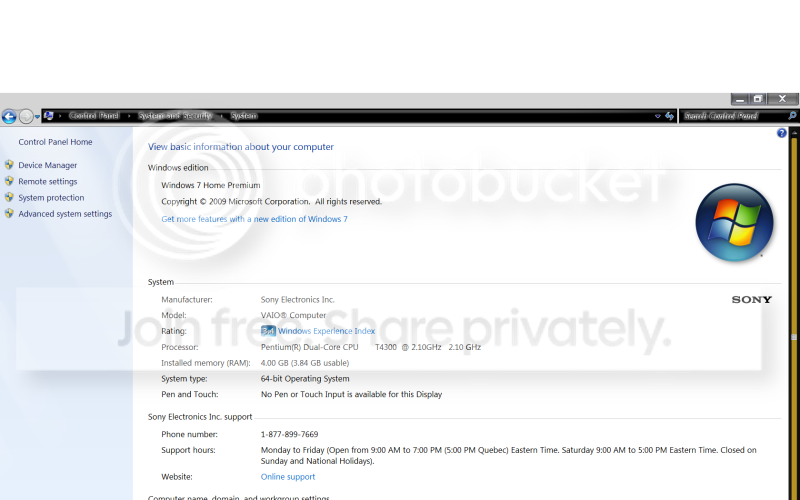
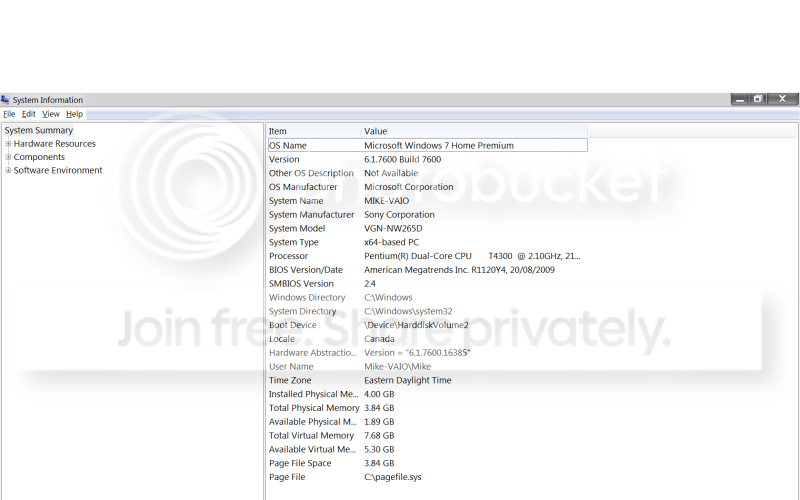
Here are a few pics of what I think might help. If there's anything else that can help you guide me, let me know, I can post more up.

Thanks :thumbsup:
processes-2.png

processes.png

processes-1.png
 

My Computer My Computer

At a glance

win 7 home premium 64bitPentium Dual-Core CPU T4300 @ 2.10GHz, 2 Logi...4.0 gb
Computer Manufacturer/Model Number
VAIO VGN-NW265D
OS
win 7 home premium 64bit
CPU
Pentium Dual-Core CPU T4300 @ 2.10GHz, 2 Logical Processors
Memory
4.0 gb
Sounds like your Hard Drive might be immensely fragmented or corrupted. Go with Theog's idea first. I am not sure if you are familiar with Windows Utilities, but that is a good place to start. Run a Disk Cleanup and then a Disk Defragmentor.

Your best bet is to goto Command Prompt with Admin Privileges by typing in "cmd" in Start Search and then right clicking the "cmd" icon and select "run as administrator". When the window opens, type in: sfc /scannow

That will find all errors that are associated with Windows, if there are any. But it might be a Hardware problem.

When you are at idle, how many processes are running on your computer? We need to see your Programs List if we can help with bloatware.
 

My Computer My Computer

At a glance

Windows 8 ProCore 2 Duo P8600 2.4 ghz4GB DDR2ATI Radeon 4570 512MB
Computer Manufacturer/Model Number
Dell Studiio 1555
OS
Windows 8 Pro
CPU
Core 2 Duo P8600 2.4 ghz
Memory
4GB DDR2
Graphics Card(s)
ATI Radeon 4570 512MB
Sound Card
IDT High Definition
Monitor(s) Displays
15.6"
Screen Resolution
1920x1080
Hard Drives
250GB 7200 RPM SATA
I scanned my disc, did a disc clean up and defragmented it. It's running a lot smoother now. Thanks for all your help everyone, I appreciate it. I'm now trying to find out how to remove the bloatware. Any other performance tweaks? I tweaked the startup applications a little bit, that helped slightly.
 

My Computer My Computer

At a glance

win 7 home premium 64bitPentium Dual-Core CPU T4300 @ 2.10GHz, 2 Logi...4.0 gb
Computer Manufacturer/Model Number
VAIO VGN-NW265D
OS
win 7 home premium 64bit
CPU
Pentium Dual-Core CPU T4300 @ 2.10GHz, 2 Logical Processors
Memory
4.0 gb
Most bloatware that you can remove for example are the battery monitoring/performance crap that comes installed. You don't need those since Windows 7 has been built to manage that itself. Trialware software can be removed if you don't plan on using them, like DVD burning software, Office 2010 trial, and random manufacturer installed themes.

Don't remove anything like Instant On, I don't know if your laptop has anything like that, but that could stay.

ALWAYS MAKE SURE TO CREATE RESTORE POINTS BEFORE UNINSTALLING ANYTHING.
 

My Computer My Computer

At a glance

Windows 7 Ultimate x64AMD Athlon 240 II @ 2.8-4.004 ghzSuperTalent 4gb DDR3ATI Radeon 3000HD
Computer Manufacturer/Model Number
ASUS
OS
Windows 7 Ultimate x64
CPU
AMD Athlon 240 II @ 2.8-4.004 ghz
Motherboard
M4A78LT-M LE
Memory
SuperTalent 4gb DDR3
Graphics Card(s)
ATI Radeon 3000HD
Screen Resolution
1440*900
Case
Re-modded Dell Dimension 4550
Cooling
Vantec 92mm Tornado x2
Other Info
It looks pretty.
As for tweaks, I actually have a nine page, double spaced Word document that has a chunk of stuff that I do on new system installs.

Probably the most common tweak is doing a services config, such as going through the system services and disabling ones you don't need or setting others to Manual or delayed start.

For startup, go to System Properties(right click on My Computer for Start menu), Advanced system settings, under the Advanced tab, go to the Settings for Startup and Recovery. Then uncheck Time to display list of operating systems.

One of many tweaks....:geek:
 

My Computer My Computer

At a glance

Windows 7 Ultimate x64AMD Athlon 240 II @ 2.8-4.004 ghzSuperTalent 4gb DDR3ATI Radeon 3000HD
Computer Manufacturer/Model Number
ASUS
OS
Windows 7 Ultimate x64
CPU
AMD Athlon 240 II @ 2.8-4.004 ghz
Motherboard
M4A78LT-M LE
Memory
SuperTalent 4gb DDR3
Graphics Card(s)
ATI Radeon 3000HD
Screen Resolution
1440*900
Case
Re-modded Dell Dimension 4550
Cooling
Vantec 92mm Tornado x2
Other Info
It looks pretty.
Tweaking Win7 for performance is XP oldthink. Those of us who have been with the OS from earliest beta days learned the hard way that Win7 gradually needed no performance tweaks whatsoever.

All services not needed to start with Win7 are set to Manual on fast triggers. Editing Services will cause unintended consequences, for example if you ever connect to a network. Just don't do it. If your system cannot handle aero or other features, Win7 will default to Basic on its own.
 
Install CCleaner, Redirecting.... Clean up your drive (tick the programs and things you want to clean). Then go into Tools, Startup, and remove everything unnecessary. Just keep your anti-virus, and Sidebar (Gadgets), everything else is generally not needed (such as Adobe Reader start-up). Use Revo Uninstaller Revo Uninstaller Pro - Uninstall Software, Remove Programs easily to uninstall (comprehensively) all the bloatware on your computer. Could you go into CCleaner, Tools, Uninstall, and select Save to text file... and upload the text file so that I can tell you everything unnecessary on your computer.
 

My Computer My Computer

At a glance

Ubuntu 12.10Intel Core i7 720QM4GB RAMNVIDIA GeForce 230M
Computer Manufacturer/Model Number
HP Pavilion dv6-2020ev
OS
Ubuntu 12.10
CPU
Intel Core i7 720QM
Motherboard
Its a HP secret...
Memory
4GB RAM
Graphics Card(s)
NVIDIA GeForce 230M
Sound Card
IDT
Screen Resolution
1366x768
Hard Drives
500 GB
Mouse
HP
Internet Speed
4 Mbps
Back
Top