
My mem usage has gone up

Pial

New member
Local time
7:04 AM
Messages
1
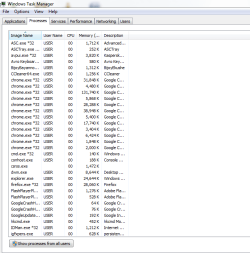
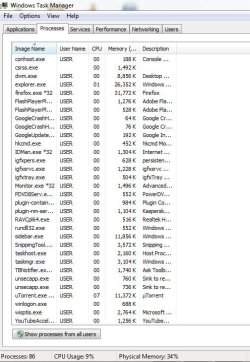
My mem usage has gone up last few weeks, cant figure out why. the programs in task manager dont equal up to 54 percent ram usage.:confused:
what should i do ?
 

Attachments

  • Capture.PNG
    Capture.PNG
    18.1 KB · Views: 12
  • Capture.JPG
    Capture.JPG
    71.5 KB · Views: 0

My Computer

Computer type
PC/Desktop
Computer Manufacturer/Model Number
Custom build
OS
Windows 7 Ultimate x64
CPU
Intel(R) Core(TM) i3-4130 CPU @ 3.40GHz (4 CPUs), ~3.4GHz
Motherboard
Gigabyte Technology Co., Ltd., Model: H81M-S2PV
Memory
4 GB
Hard Drives
500 GB , available 350 GB
Antivirus
Kaspersky
Browser
Google Chrme
What should you do? Nothing. When it reaches 90% then come back. As of now there is no issue.
 

My Computer

Computer type
PC/Desktop
Computer Manufacturer/Model Number
Alienware Aurora ALX R4
OS
Windows 10 Pro (x64)
CPU
Intel Core i7-3930K (3.2GHz - 4.5GHz)
Motherboard
Alienware Aurora-R4 x79
Memory
4x Samsung 4GB PC3-12800 DDR3 (16GB 1600MHz)
Graphics Card(s)
Nvidia Geforce GTX 690
Sound Card
SteelSeries Siberia Elite
Monitor(s) Displays
Dell UltraSharp U3011
Screen Resolution
2560x1600
Hard Drives
Samsung 850 Pro 256 GB, Seagate 1TB Desktop Hybrid HDD, 2x Western Digital 4TB Green HDD
PSU
875W Some Dell PSU <.<
Case
Alienware Aurora ALX
Cooling
Custom Liquid Cooling (EK CPU & GPU blocks) dual EK 480RAD
Keyboard
Logitech G710+ Mechanical
Mouse
Logitech G700s
Internet Speed
Verizon Fios (50 mbps average)
Other Info
Server: Intel NUC D54250WYK: i5-4250U, 16GB, 256 GB mSATA, Windows Server 2012 R2
No wonder, you don't even show processes from all users. One reason the usage grew is probably because you collected more startup programs. Disable all those except the AV program.

The only proper view of RAM usage is in Resource Monitor > Memory tab.
 

My Computer

Computer Manufacturer/Model Number
HP, Dell, Gateway, Toshiba - 4 laptops and 2 desktops
OS
Vista, Windows7, Mint Mate, Zorin, Windows 8
CPU
from 1.6GHz Duo to i7
Monitor(s) Displays
2x HP w2207
Hard Drives
5x HDD, 7x SSD, 12x Externals
Keyboard
with trackball - no mices
Mouse
Trackball mice
Internet Speed
DSL 6000
There is nothing in the screenshots that would indicate a problem. Adding up the memory usage column will never equal total usage. It was never intended that it would. The "Memory (Private Working Set)" column does not show the full usage of the process and there are very significant users of memory that are not processes, not all of which are shown in Task Manager.
 

My Computer

Computer type
PC/Desktop
Computer Manufacturer/Model Number
HP
OS
Windows 7 Pro 64 bit
CPU
Xeon W3520
Memory
8 GB
Graphics Card(s)
Nvidia Geforce 210
Back
Top