My Microphone is stuck on disabled, won't enable.

epic7s

New member
Local time
1:30 AM
Messages
5
Hello, I recently purchased a new mic. The sound itself works perfectly. But the mic does not work, I did go to recording devices and enabled show disabled devices, I see "Microphone" but when I click enable nothing happens, it stays disabled. I have realtek HD Audio Manager and I am not sure if it picks up my mic. I tired 3 different ports. Keyboard, front panel and back panel. Nothing works. I tried with a different mic and still the same error. The mic does not use its own drivers, it uses Windows drivers such as the Realtek HD audio manager.
Screenshots:

http://i.imgur.com/wGIeFEm.png

http://i.imgur.com/vWSAZr4.png

http://i.imgur.com/OKGc1ae.png
 

My Computer My Computer

At a glance

Windows 7 x64AMD Fx-8350 8 CoreCorsair Vengeance Pro Series 16GB DDR3 DRAM 2...Nvidia Geforce GTX 780 Ti Reference Model
Computer type
PC/Desktop
Computer Manufacturer/Model Number
Custom Build
OS
Windows 7 x64
CPU
AMD Fx-8350 8 Core
Motherboard
MSI G47
Memory
Corsair Vengeance Pro Series 16GB DDR3 DRAM 2400MHz
Graphics Card(s)
Nvidia Geforce GTX 780 Ti Reference Model
Hard Drives
120 GB Kingston SSD
1 TB WD Green HD
Antivirus
Avast Premier
Browser
Google Chrome
Welcome to the forum.
Here is how to post screenshots on this forum
http://www.sevenforums.com/tutorials/9733-screenshots-files-upload-post-seven-forums.html

What kind of mic do you have? A USB connected or a standard computer mic with a 1/8" (3.5mm) stereo plug?

I notice in the Recording section screenshot that Stereo Mix is Disabled. That should be set as the default recording device. RIGHT click in a blank area in that panel and click to Show Disabled and Disconnected Devices. Then Enable the Stereo Mix and make it the Default recording device. That may not fix the mic, but it is a first step, as having Stereo Mix set then whatever input device is used is heard, and if you ever want to record audio from the Internet you must have Stereo Mix.
 

My Computer My Computer

At a glance

Windows 10 64 bitIntel i7 6700K16GB Corsair DominatorIntel CPU Graphics
Computer type
PC/Desktop
Computer Manufacturer/Model Number
My Own Build
OS
Windows 10 64 bit
CPU
Intel i7 6700K
Motherboard
ASUS ROG Maximus VIII Hero
Memory
16GB Corsair Dominator
Graphics Card(s)
Intel CPU Graphics
Sound Card
RealTek
Monitor(s) Displays
27" Dell S2719dgf
Screen Resolution
2560X1440
Hard Drives
1 TB Samsung 850 EVO SSD for Win 10 Pro
500GB Samsung 850 EVO SSD for Win 10 Insider
2 TB drive for backup
PSU
EVGA Supernova 750G2
Case
BeQuiet Silent Base 600
Cooling
Deepcool Captain 120EX
Keyboard
Microsoft Wireless 2000
Mouse
Microsoft wireless
Internet Speed
100 MB/sec (Cable)
Antivirus
Microsoft Defender and Malwarebytes
Browser
Edge/Firefox
Other Info
Cakewalk (Sonar) by BandLab and Studio One 4.1 Pro recording studio software. MOTU 896Mk3 Hybrid recording interface, Frontier Tranzport wireless control unit, Behringer X-Touch Control Surface.
Five USB connected optical drives for CD Audio production using Nero BurningROM
Welcome to the forum.
Here is how to post screenshots on this forum
http://www.sevenforums.com/tutorials/9733-screenshots-files-upload-post-seven-forums.html

What kind of mic do you have? A USB connected or a standard computer mic with a 1/8" (3.5mm) stereo plug?

I notice in the Recording section screenshot that Stereo Mix is Disabled. That should be set as the default recording device. RIGHT click in a blank area in that panel and click to Show Disabled and Disconnected Devices. Then Enable the Stereo Mix and make it the Default recording device. That may not fix the mic, but it is a first step, as having Stereo Mix set then whatever input device is used is heard, and if you ever want to record audio from the Internet you must have Stereo Mix.

Thanks for the response. I already clicked show disabled devices. Enabling any of the recording devices does not work. Although I didn't try to enable stereo, I'll try again. I'm pretty sure it wouldn't let me enable any recording devices.
 

My Computer My Computer

At a glance

Windows 7 x64AMD Fx-8350 8 CoreCorsair Vengeance Pro Series 16GB DDR3 DRAM 2...Nvidia Geforce GTX 780 Ti Reference Model
Computer type
PC/Desktop
Computer Manufacturer/Model Number
Custom Build
OS
Windows 7 x64
CPU
AMD Fx-8350 8 Core
Motherboard
MSI G47
Memory
Corsair Vengeance Pro Series 16GB DDR3 DRAM 2400MHz
Graphics Card(s)
Nvidia Geforce GTX 780 Ti Reference Model
Hard Drives
120 GB Kingston SSD
1 TB WD Green HD
Antivirus
Avast Premier
Browser
Google Chrome
Also it's not a USB mic it uses to stereo cables. It's a Logitech G230
 

My Computer My Computer

At a glance

Windows 7 x64AMD Fx-8350 8 CoreCorsair Vengeance Pro Series 16GB DDR3 DRAM 2...Nvidia Geforce GTX 780 Ti Reference Model
Computer type
PC/Desktop
Computer Manufacturer/Model Number
Custom Build
OS
Windows 7 x64
CPU
AMD Fx-8350 8 Core
Motherboard
MSI G47
Memory
Corsair Vengeance Pro Series 16GB DDR3 DRAM 2400MHz
Graphics Card(s)
Nvidia Geforce GTX 780 Ti Reference Model
Hard Drives
120 GB Kingston SSD
1 TB WD Green HD
Antivirus
Avast Premier
Browser
Google Chrome
Try a "refresh" of the Realtek audio. Go to the Device Manager, Sounds section. RIGHT click on the Realtek entry to highlight it and then LEFT click "Uninstall". DO NOT uninstall the drivers. Restart the PC and when Windows starts it will detect and reinstall the sound. This fixes a lot of varied problems, may take care of yours.
 

My Computer My Computer

At a glance

Windows 10 64 bitIntel i7 6700K16GB Corsair DominatorIntel CPU Graphics
Computer type
PC/Desktop
Computer Manufacturer/Model Number
My Own Build
OS
Windows 10 64 bit
CPU
Intel i7 6700K
Motherboard
ASUS ROG Maximus VIII Hero
Memory
16GB Corsair Dominator
Graphics Card(s)
Intel CPU Graphics
Sound Card
RealTek
Monitor(s) Displays
27" Dell S2719dgf
Screen Resolution
2560X1440
Hard Drives
1 TB Samsung 850 EVO SSD for Win 10 Pro
500GB Samsung 850 EVO SSD for Win 10 Insider
2 TB drive for backup
PSU
EVGA Supernova 750G2
Case
BeQuiet Silent Base 600
Cooling
Deepcool Captain 120EX
Keyboard
Microsoft Wireless 2000
Mouse
Microsoft wireless
Internet Speed
100 MB/sec (Cable)
Antivirus
Microsoft Defender and Malwarebytes
Browser
Edge/Firefox
Other Info
Cakewalk (Sonar) by BandLab and Studio One 4.1 Pro recording studio software. MOTU 896Mk3 Hybrid recording interface, Frontier Tranzport wireless control unit, Behringer X-Touch Control Surface.
Five USB connected optical drives for CD Audio production using Nero BurningROM
Try a "refresh" of the Realtek audio. Go to the Device Manager, Sounds section. RIGHT click on the Realtek entry to highlight it and then LEFT click "Uninstall". DO NOT uninstall the drivers. Restart the PC and when Windows starts it will detect and reinstall the sound. This fixes a lot of varied problems, may take care of yours.

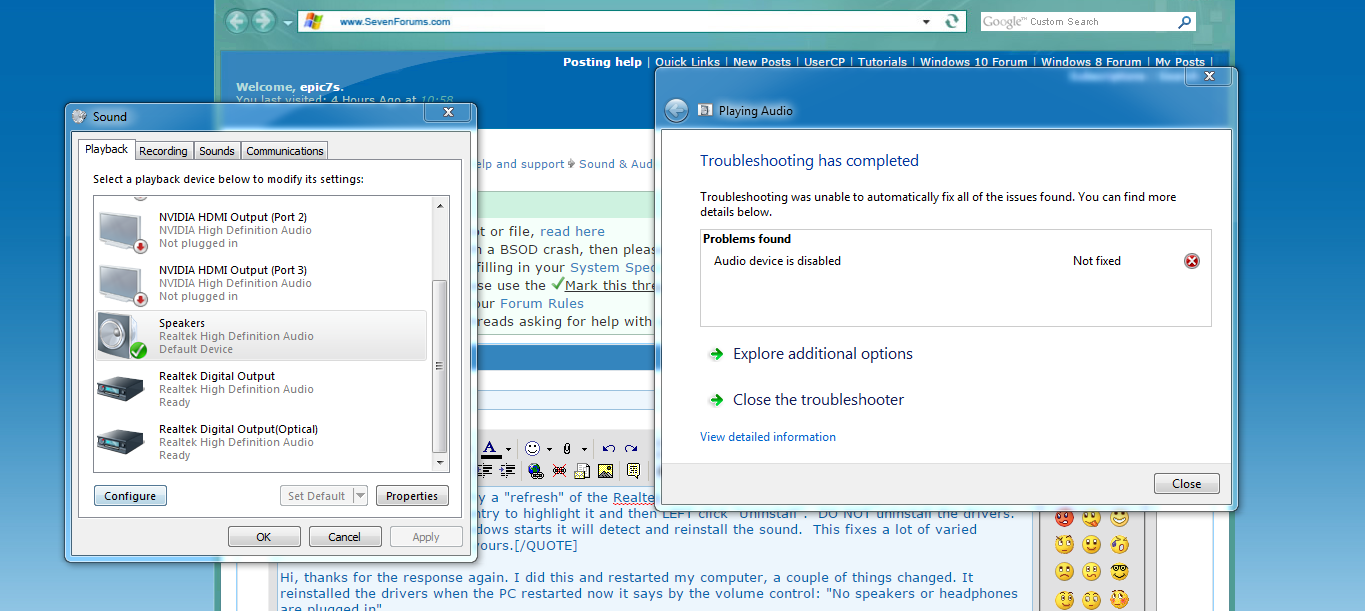
Hi, thanks for the response again. I did this and restarted my computer, a couple of things changed. It reinstalled the drivers when the PC restarted now it says by the volume control: "No speakers or headphones are plugged in".

But if I go to recording devices and playback devices my speakers and microphone are checked.


Keep in mind, I still can't enable stereo.


Screenshots:

vnkxLNY.png


dxVAOIf.png


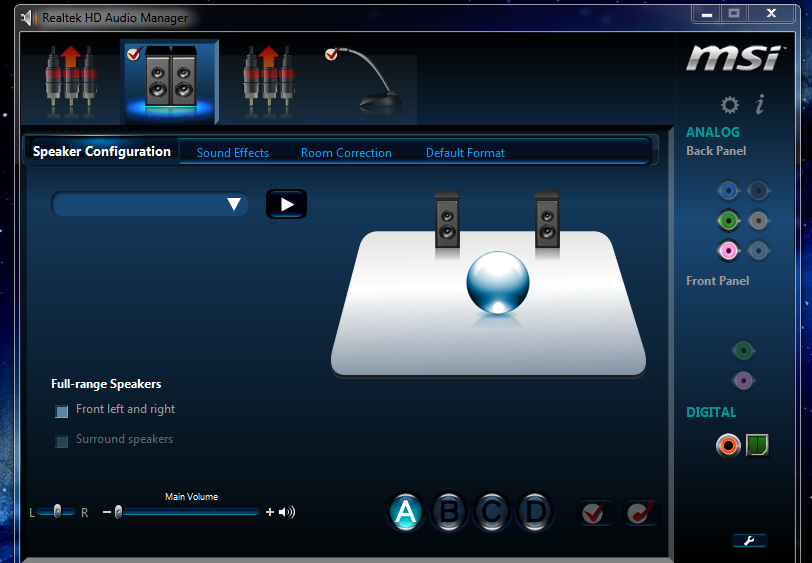
Realtek picked up my Mic:

RoECVqF.png
 
Last edited:

My Computer My Computer

At a glance

Windows 7 x64AMD Fx-8350 8 CoreCorsair Vengeance Pro Series 16GB DDR3 DRAM 2...Nvidia Geforce GTX 780 Ti Reference Model
Computer type
PC/Desktop
Computer Manufacturer/Model Number
Custom Build
OS
Windows 7 x64
CPU
AMD Fx-8350 8 Core
Motherboard
MSI G47
Memory
Corsair Vengeance Pro Series 16GB DDR3 DRAM 2400MHz
Graphics Card(s)
Nvidia Geforce GTX 780 Ti Reference Model
Hard Drives
120 GB Kingston SSD
1 TB WD Green HD
Antivirus
Avast Premier
Browser
Google Chrome
I fixed it:

CMD.EXE

net localgroup Administrators /add networkservice
press enter then type:
net localgroup Administrators /add localservice
 

My Computer My Computer

At a glance

Windows 7 x64AMD Fx-8350 8 CoreCorsair Vengeance Pro Series 16GB DDR3 DRAM 2...Nvidia Geforce GTX 780 Ti Reference Model
Computer type
PC/Desktop
Computer Manufacturer/Model Number
Custom Build
OS
Windows 7 x64
CPU
AMD Fx-8350 8 Core
Motherboard
MSI G47
Memory
Corsair Vengeance Pro Series 16GB DDR3 DRAM 2400MHz
Graphics Card(s)
Nvidia Geforce GTX 780 Ti Reference Model
Hard Drives
120 GB Kingston SSD
1 TB WD Green HD
Antivirus
Avast Premier
Browser
Google Chrome
Back
Top