My mouse doesn't work when I try a Macrium recovery

moana

New member
Local time
2:18 AM
Messages
2
Hello all, sorry if this a dumb question but I can't work it out. Blonde.
I've been using Macrium Reflect to make backups for quite a while but I've never tested it.
Until yesterday, and it didn't work.
Well, it did, sort-of. Like when I restarted the computer I clicked the Macrium option, and it went to the recovery screen, but my mouse and keyboard didn't work, so I couldn't tell it to start.
Help, please :-(
 

My Computer My Computer

Computer type
PC/Desktop
OS
W7 Ultimate 64bit
did you try plugging into a different usb port?
 

My Computers My Computers

System One System Two

  • Computer type
    PC/Desktop
    OS
    7 X64
    CPU
    i5 8400
    Motherboard
    gigabyte b365m ds3h
    Memory
    2x8gb 3200mhz
    Hard Drives
    various
    PSU
    pure power 11 400w cm
    Case
    Coolermaster
    Cooling
    cryorig m9i
  • Computer type
    PC/Desktop
    OS
    7x64
    CPU
    g5400
    Motherboard
    ga b365m ds3h
    Memory
    8gb ddr4 2400
    PSU
    xfx pro 450w
Thanks. Yes, I tried several ports. They were all USB 2.0.
The mouse works fine in the BIOS, by the way.
 

My Computer My Computer

Computer type
PC/Desktop
OS
W7 Ultimate 64bit
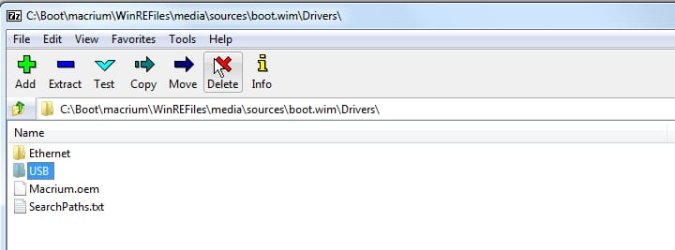
One of the macrium annoyances is that it tries to install drivers which can cause issues such as you describe.

You could try ps2 ports if you have them. Or you could see if you can delete the macrium drivers folder from the boot.wim file.


macrium-annoyance.jpg
 

My Computers My Computers

System One System Two

  • Computer type
    PC/Desktop
    OS
    7 X64
    CPU
    i5 8400
    Motherboard
    gigabyte b365m ds3h
    Memory
    2x8gb 3200mhz
    Hard Drives
    various
    PSU
    pure power 11 400w cm
    Case
    Coolermaster
    Cooling
    cryorig m9i
  • Computer type
    PC/Desktop
    OS
    7x64
    CPU
    g5400
    Motherboard
    ga b365m ds3h
    Memory
    8gb ddr4 2400
    PSU
    xfx pro 450w
Back
Top