Sure...I'll cancel my cable and wait for him to sign on....

If you continue to get bumped off after changing channels, one of these is more likely the case:
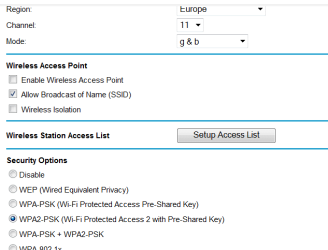
1: Your neighbor's wireless SSID is the same as yours. When you connect, do you connect to a network called "Linksys" or "Netgear" or "DLink"? If so, change that to something personalized.
2: It doesn't make much sense to me that your neighbor's wireless router would ONLY interfere when he is using it. Your neighbor might be using a different wireless device, that he only turns on when he is at home, and you are assuming it is his wifi. Ask him if you can call him when your network goes out, to figure out what causes it. (Could be something like wireless speakers, wireless phone. My microwave likes to blow away my wireless signal when I turn it on.)
3: Network crosstalk is more likely to interfere with your connection if you use the default IP address range. I all but guarantee that your router and your neighbor's router are both using 192.168.1.1. If the routers ever see each other, one or the other (or both) could disable itself because of an IP Conflict. Here are some options for changing it:
192.168.(anything).xxx
10.(anything).(anything).xxx
(anything) is any number from 0 to 254. Do not use 255. Personally I don't like using 0 either, but that's just me.
More information on the ranges you can use here:
Private network - Wikipedia, the free encyclopedia
Suggestion: 10.10.10.xxx
Here's what you do:
- change the router's IP to 10.10.10.1
- Leave the subnet as 255.255.255.0
- Apply the changes.
IMPORTANT: your computer will lose its connection to the internet and the router's web page at this point. Don't worry, you just need to make your computer get the new IP address and sign back on.
- Make your computers retrieve new IP addresses by unplugging the cable, by un-joining and re-joining the wireless, or using "ipconfig /release" and "ipconfig /renew" at the command prompt. (Needs admin priveleges in Vista / 7... press Start, type 'cmd' in the search box, right-click the result and click "run as administrator".
In the command prompt, you can type "ipconfig" by itself to see your IP address. Don't worry about the big list of connections that don't have IP addresses. This does not need admin priveleges.
Network crosstalk should not be happening unless your wireless networks are using the same SSID and the same channel, so try changing the SSID first.
Another option, if your laptop supports it (fairly common but not guaranteed)... Switch to the 5ghz 802.11a. You'll probably need to get a new wireless access point or a new router for that, but it should help a lot with interference since it lives at 5ghz instead of 2.4ghz. Should even be safe against microwaves!
5ghz support is indicated by the 'a' - i.e. 802.11b/g/n are 2.4ghz, 802.11a is 5ghz.

 a
a