
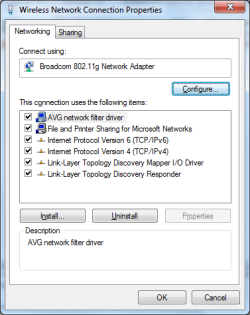
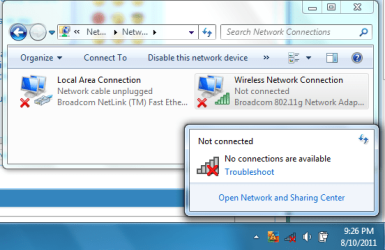
I've just installed Windows 7 onto my laptop (on a new hdd) and I can't seem to connect or even see my wireless network using my built-in wireless network card.
I have used this same laptop to connect to networks with no problem before.
My wireless network has not been changed since I connected to it successfully before. (on my other HDD)
I am able to use the wireless network on other Windows 7 PCs and laptops in my house.
I've been using a usb dongle as my wifi card, but it's very unreliable.
I've tried using windows update to find updated drivers, I've ran it a few times now both with using my usb netgear dongle & a wired connection (I borrowed the cable, I cannot use it permanently).
I've tried uninstalling/deleting the device hoping it would reinstall properly but nothing's changed at all.
Tried disabling/reabling.
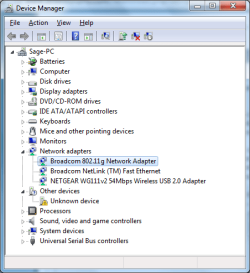
I've checked the Device Manager to see if it had the exclamation mark on it but it doesn't. (Although there seems to be another unknown device which I don't know what would be.)
I was thinking maybe something physical is loose since I took apart my laptop the other day to remove the broken screen. I didn't know what I was doing and I opened it up a bit more that I needed to. I don't think anything got disconnected since I only opened the main big section inside maybe an inch.
My laptop seems to recognise the network card as being there just fine though so I don't think it's damaged or disconnected.
Any help would be very much appreciated as I've just fixed up my laptop and this is the last thing I need for it to be up and running fully.
I have used this same laptop to connect to networks with no problem before.
My wireless network has not been changed since I connected to it successfully before. (on my other HDD)
I am able to use the wireless network on other Windows 7 PCs and laptops in my house.
I've been using a usb dongle as my wifi card, but it's very unreliable.
I've tried using windows update to find updated drivers, I've ran it a few times now both with using my usb netgear dongle & a wired connection (I borrowed the cable, I cannot use it permanently).
I've tried uninstalling/deleting the device hoping it would reinstall properly but nothing's changed at all.
Tried disabling/reabling.
I've checked the Device Manager to see if it had the exclamation mark on it but it doesn't. (Although there seems to be another unknown device which I don't know what would be.)
I was thinking maybe something physical is loose since I took apart my laptop the other day to remove the broken screen. I didn't know what I was doing and I opened it up a bit more that I needed to. I don't think anything got disconnected since I only opened the main big section inside maybe an inch.
My laptop seems to recognise the network card as being there just fine though so I don't think it's damaged or disconnected.
Any help would be very much appreciated as I've just fixed up my laptop and this is the last thing I need for it to be up and running fully.
Attachments

My Computer
At a glance
Windows 7 Ultimate 64bit.
- OS
- Windows 7 Ultimate 64bit.


