My New Gaming PC

logo897

New member
Member
VIP
Local time
6:33 PM
Messages
422
Hey all,

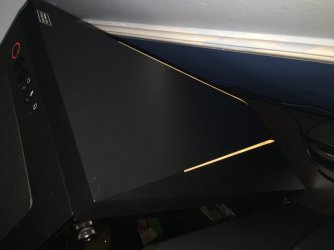
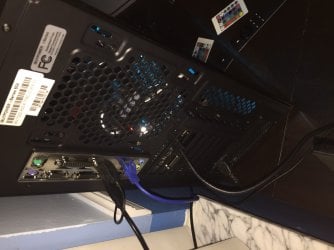
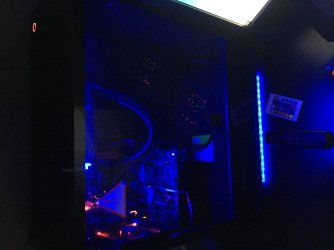
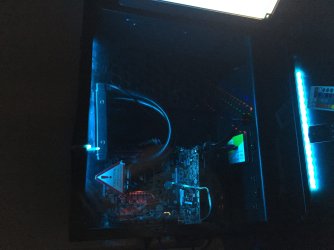
Just thought I'd show my new ibuypower system i got. I know It's not custom built by me, but I've installed a few extra things to it.

Pictures are included.

Specs are

i7 7700 3.6 ghz (4.2 turbo mode)
16gb ddr4 2400
gtx 1060 3gb
corsair cx 600 (600 watt psu)
120gb western digital ssd with a 1tb hdd
Windows 10 home already loaded for me(yes this is a windows 7 forum)

Mods I did:

Took intel stock cooler off and replaced it with a liquid cpu cooler (corsair h60) and applied arctic silver 5.
Took out the 500 watt power supply that came with it, was rather cheap and not reliable, so I used my fairly new corsair 600 watt with the computer, so I can upgrade to a better gpu later on, too.

I hope you like the PC. It's my first true gaming PC that has intel and nvidia as well as ddr4 ram. Had a previous AMD FX series and AMD GPU gaming pc in 2014, but that was too loud and heated up my room way too much even on standby.

Any recommendations for what I should do next with this PC, I'd appreciate it!

Cheers,

Logan
 

Attachments
  • IMG_1436.JPG
    IMG_1436.JPG
    1.4 MB · Views: 0
  • IMG_1437.JPG
    IMG_1437.JPG
    1.1 MB · Views: 0
  • IMG_1438.JPG
    IMG_1438.JPG
    1.4 MB · Views: 0
  • IMG_1439.JPG
    IMG_1439.JPG
    1.1 MB · Views: 0

My Computer

Computer type
PC/Desktop
Computer Manufacturer/Model Number
Maingear Custom PC
OS
Windows 7 Pro
CPU
Intel Core i7 2600k @4.6Ghz
Motherboard
Gigabyte GA-Z68X-UD4-B3
Memory
16 GB DDR3 1600mhz
Graphics Card(s)
EVGA GTX 980Ti
Sound Card
Onboard
Monitor(s) Displays
Curved MSI 144hz 1ms
Screen Resolution
1920x1080
Hard Drives
250GB Samsung 860 Evo SSD
PSU
Seasonic 650 Watts Gold Rating
Case
Custom Maingear Case
Cooling
60mm Maingear Liquid Cooling CPU
Keyboard
Basic Wireless Keyboard
Mouse
Basic Wireless Mouse
Antivirus
Microsoft Security Essentials
Browser
Google Chrome (Latest Version)
I probably should've rotated the pics, sorry! I forgot
 

My Computer

Computer type
PC/Desktop
Computer Manufacturer/Model Number
Maingear Custom PC
OS
Windows 7 Pro
CPU
Intel Core i7 2600k @4.6Ghz
Motherboard
Gigabyte GA-Z68X-UD4-B3
Memory
16 GB DDR3 1600mhz
Graphics Card(s)
EVGA GTX 980Ti
Sound Card
Onboard
Monitor(s) Displays
Curved MSI 144hz 1ms
Screen Resolution
1920x1080
Hard Drives
250GB Samsung 860 Evo SSD
PSU
Seasonic 650 Watts Gold Rating
Case
Custom Maingear Case
Cooling
60mm Maingear Liquid Cooling CPU
Keyboard
Basic Wireless Keyboard
Mouse
Basic Wireless Mouse
Antivirus
Microsoft Security Essentials
Browser
Google Chrome (Latest Version)
Oh and I also added the red LED fan in the back, replaced the plain stock fan :)
 

My Computer

Computer type
PC/Desktop
Computer Manufacturer/Model Number
Maingear Custom PC
OS
Windows 7 Pro
CPU
Intel Core i7 2600k @4.6Ghz
Motherboard
Gigabyte GA-Z68X-UD4-B3
Memory
16 GB DDR3 1600mhz
Graphics Card(s)
EVGA GTX 980Ti
Sound Card
Onboard
Monitor(s) Displays
Curved MSI 144hz 1ms
Screen Resolution
1920x1080
Hard Drives
250GB Samsung 860 Evo SSD
PSU
Seasonic 650 Watts Gold Rating
Case
Custom Maingear Case
Cooling
60mm Maingear Liquid Cooling CPU
Keyboard
Basic Wireless Keyboard
Mouse
Basic Wireless Mouse
Antivirus
Microsoft Security Essentials
Browser
Google Chrome (Latest Version)
Just curious: Does this sort of PC surf the web a lot faster than a "normal" PC? I know that it is a lot faster for stuff that is run locally on the PC, but I'm not sure about stuff that is run online.

Along those same lines, are your games run locally or online? Evidently at least some of the game processing happens locally, on the PC, rather than just online.

(I've never done any of this kind of gaming, nor have I ever used this souped-up of a computer.)
 

My Computer

Computer type
PC/Desktop
Computer Manufacturer/Model Number
Dell
OS
Linux Mint 18.2 xfce 64-bit (VMWare host) / Windows 8.1 Pro 32-bit (VMWare guest)
CPU
Haswell
Memory
4 GB
Monitor(s) Displays
Acer 23"
Screen Resolution
1920 x 1080
Hard Drives
Two hard drives, 1TB each: One for Linux, one for my data.
Keyboard
IBM Model M
Antivirus
Sophos (Linux), Trend Micro (Windows)
Browser
Firefox, Opera
Other Info
I use Samba to share my data drive with the other computers at my house and with my guest session in VMWare Workstation Player.
Just curious: Does this sort of PC surf the web a lot faster than a "normal" PC? I know that it is a lot faster for stuff that is run locally on the PC, but I'm not sure about stuff that is run online.

Along those same lines, are your games run locally or online? Evidently at least some of the game processing happens locally, on the PC, rather than just online.

(I've never done any of this kind of gaming, nor have I ever used this souped-up of a computer.)

Hello,

From my experience, it isn't faster compared to my old PC for surfing the web. To get fast speeds I just recommend you just get an SSD and that will increased loading times, but for intense gaming you'd need more.

The games I run are downloaded to my computer using Steam, so I guess i'd say locally? But I play multiplayer games too, so that requires the internet as well. Not sure what you mean in all honesty.

If you mean games played in a web browser, as far as I'm aware, those aren't nearly as intense compared to games you download.
 

My Computer

Computer type
PC/Desktop
Computer Manufacturer/Model Number
Maingear Custom PC
OS
Windows 7 Pro
CPU
Intel Core i7 2600k @4.6Ghz
Motherboard
Gigabyte GA-Z68X-UD4-B3
Memory
16 GB DDR3 1600mhz
Graphics Card(s)
EVGA GTX 980Ti
Sound Card
Onboard
Monitor(s) Displays
Curved MSI 144hz 1ms
Screen Resolution
1920x1080
Hard Drives
250GB Samsung 860 Evo SSD
PSU
Seasonic 650 Watts Gold Rating
Case
Custom Maingear Case
Cooling
60mm Maingear Liquid Cooling CPU
Keyboard
Basic Wireless Keyboard
Mouse
Basic Wireless Mouse
Antivirus
Microsoft Security Essentials
Browser
Google Chrome (Latest Version)
Thanks for the information.

"Local" refers to whatever is running on your computer; "remote" refers to whatever is running on another computer, and that you are accessing remotely, such as a web site.
 

My Computer

Computer type
PC/Desktop
Computer Manufacturer/Model Number
Dell
OS
Linux Mint 18.2 xfce 64-bit (VMWare host) / Windows 8.1 Pro 32-bit (VMWare guest)
CPU
Haswell
Memory
4 GB
Monitor(s) Displays
Acer 23"
Screen Resolution
1920 x 1080
Hard Drives
Two hard drives, 1TB each: One for Linux, one for my data.
Keyboard
IBM Model M
Antivirus
Sophos (Linux), Trend Micro (Windows)
Browser
Firefox, Opera
Other Info
I use Samba to share my data drive with the other computers at my house and with my guest session in VMWare Workstation Player.
Back
Top