My new PC that was supposed to be super fast is not that impressive...

Fking

New member
Member
Local time
10:04 AM
Messages
35
Well i got a i7, 3.3ghz, 500gb black western digitals on mirror raid, top shelf video card and 4GB of ram since i'm stuck with 32 bit windows 7 because of some software i need to use.

I was expecting it to be blazing fast, especially considering that I come from dual core 2ghz laptop.

It's nothing special and lately (the OS install is few months old now) is infact being pretty slow. (no viruses or stuff like that)

Is there a way to analyze and find the bottle neck in the system? I guess most will say is the RAM but i'm using it mostly for web development, and none of the software is too heavy. Residently open apps are stuff like Chrome, Thunderbird and few other light ones.
The ram usage is at about 70% and the cpu clock is jumping from 1 to 3 ghz with load most of the times at few %.
When occasionally i need to open MS word, excel photoshop or dreamweaver they really take their time to load. And often even jumping between programs is laggish.

Any advice? :)
 

My Computer My Computer

At a glance

Microsoft Windows 7 Enterprise 64-bitIntel(R) Core(TM) i7-2600K CPU @ 3.40GHz12.00 GB Corsair and Samsung DIMM(1) NVIDIA GeForce GTX 460 v2 (2) Intel(R) HD...
OS
Microsoft Windows 7 Enterprise 64-bit
CPU
Intel(R) Core(TM) i7-2600K CPU @ 3.40GHz
Motherboard
ASRock Z68 Extreme3 Gen3
Memory
12.00 GB Corsair and Samsung DIMM
Graphics Card(s)
(1) NVIDIA GeForce GTX 460 v2 (2) Intel(R) HD Graphics Fam
Sound Card
(1) NVIDIA High Definition Audio (2) NVIDIA High Definitio
Monitor(s) Displays
Dell 23" + Acer 21"
Screen Resolution
1920 x 1080 x 32 bits (4294967296 colors) @ 60 Hz
Hard Drives
1x128GB Samsung 830 SSD
2x500gb Western Digital Black on Raid 1
Case
Elite cooler master
Cooling
1 on the back, 1 on the front next to the HDDs
mirror raid is for protection from HDD failure.. only reading speed increases a bit.. i dont know why you are running a RAID1 on home pc maybe it has some very important data and only backup is not enough..
the best way to improve your system speed, is to install SSD for your OS and most uses software.
the other is to look for software/hardware problems. because your specs seems ok.

When occasionally i need to open MS word, excel photoshop or dreamweaver they really take their time to load. And often even jumping between programs is laggish.
SSD greatly improves loading times.
 

My Computer My Computer

At a glance

Windows 7 pro 64bit. (SP1)Intel core I5 24008GB DDR3 KingstonGigabyte GF GTX650OC
Computer type
PC/Desktop
Computer Manufacturer/Model Number
Self Built PC
OS
Windows 7 pro 64bit. (SP1)
CPU
Intel core I5 2400
Motherboard
Gigabyte H61
Memory
8GB DDR3 Kingston
Graphics Card(s)
Gigabyte GF GTX650OC
Sound Card
Realtek HD audio
Monitor(s) Displays
LCD 20"
Screen Resolution
1600x900
Hard Drives
INTEL SSD 320 80GB +Seagate 7200.12 1TBx3
PSU
Coolermaster RX450W
Case
Coolermaster atx case
Cooling
stock cooler
Keyboard
logitech
Mouse
logitech
Internet Speed
FTTD 100mbps
Well i got a i7, 3.3ghz, 500gb black western digitals on mirror raid, top shelf video card and 4GB of ram since i'm stuck with 32 bit windows 7 because of some software i need to use.

I was expecting it to be blazing fast, especially considering that I come from dual core 2ghz laptop.

It's nothing special and lately (the OS install is few months old now) is infact being pretty slow. (no viruses or stuff like that)

Is there a way to analyze and find the bottle neck in the system? I guess most will say is the RAM but i'm using it mostly for web development, and none of the software is too heavy. Residently open apps are stuff like Chrome, Thunderbird and few other light ones.
The ram usage is at about 70% and the cpu clock is jumping from 1 to 3 ghz with load most of the times at few %.
When occasionally i need to open MS word, excel photoshop or dreamweaver they really take their time to load. And often even jumping between programs is laggish.

Any advice? :)
Please fill in your system specs so we can better assist you:http://www.sevenforums.com/tutorials/180324-system-info-see-your-system-specs.html
 

My Computer My Computer

At a glance

Windows 7 Professional x64 Service Pack 1AMD Athlon X4 6456GB DDR3 1066Sapphire Radeon HD 5670 512MB GDDR5
Computer type
PC/Desktop
Computer Manufacturer/Model Number
HP Pavilion P7-1010
OS
Windows 7 Professional x64 Service Pack 1
CPU
AMD Athlon X4 645
Motherboard
Foxxcon N-Alvorix RS880
Memory
6GB DDR3 1066
Graphics Card(s)
Sapphire Radeon HD 5670 512MB GDDR5
Sound Card
Realtek Integrated Audio
Monitor(s) Displays
HP 2011x
Screen Resolution
1600x900
Hard Drives
1. Crucial M4 128GB SSD
2. 1TB Seagate Barracuda 7200.12 RPM
3. 1TB Western Digital Caviar Green 5400RPM
PSU
Seasonic S12 II Bronze 380 Watt
Case
HP OEM
Cooling
Coolermaster Heatsink, AVC Case Fan
Keyboard
HP OEM- Made by Chicony
Mouse
HP OEM- Made by Logitech
Internet Speed
20MBit Down/4 Up
Antivirus
Microsoft Security Essentials
Browser
Internet Explorer 10
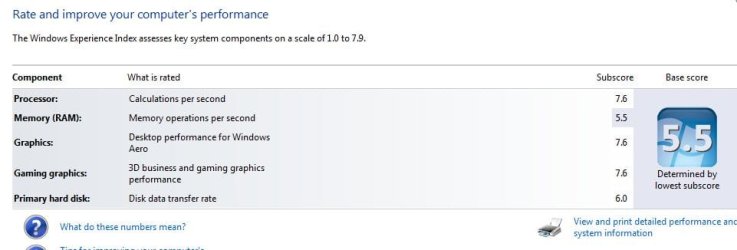
Check your Windows Experience Index. This will show where your computer is lagging.
 

My Computer My Computer

At a glance

MS Windows 7 Ultimate 64-bit SP1i5-2410M 2.3GHz (2.9GHz Turbo-Boost) Sandy Br...4GB+4GB Samsung DDR3 PC3-10700 (1333 MHz)Video Intel(R) HD Graphics Family, 1696MB ava...
Computer Manufacturer/Model Number
Toshiba Satellite P775-S7232
OS
MS Windows 7 Ultimate 64-bit SP1
CPU
i5-2410M 2.3GHz (2.9GHz Turbo-Boost) Sandy Bridge 32nm
Motherboard
Toshiba PHRAA ver. PSBY1U-00F003
Memory
4GB+4GB Samsung DDR3 PC3-10700 (1333 MHz)
Graphics Card(s)
Video Intel(R) HD Graphics Family, 1696MB available memory
Sound Card
Realtek High Definition Audio version=6.0.1.6323
Monitor(s) Displays
17.3 " Trubrite TFT LCD, LED Backlit
Screen Resolution
1600x900 32 bit, Native support for 720P content
Hard Drives
TOSHIBA MK6476GSXN
580.614 [GB] partitioned C: 80GB and D: 500GB with hidden recovery partitons.

Spare bay for 2nd HDD but no SATA connector :-(
PSU
Toshiba AC/DC Adapter
Case
Notebook
Cooling
Built-in Fan
Keyboard
Premium Raised Tile keyboard
Mouse
Logitech M215 wireless mouse
Internet Speed
Not fast enough
Other Info
Built-in Harman Kardon speakers with Dolby Advanced Audio, Waves MaxxAudio® 3. HDMI, 1xUSB3+3xUSB2 ports, WebCam, Battery life 4hrs 11mins, 4GB Readyboost SDHC card, WD My Book Essential Ext HDDs 2 TB, 2x1TB, My Passport SE 1TB and WDTV 1st Gen for Multimedia playing on a Sony Wega 32" LCD.
Recent addition to my toys are Asus Transformer Pad TF300T with 32GB onboard sd card + 32GB microsd card.
and 4GB of ram since i'm stuck with 32 bit windows 7 because of some software i need to use

FYI, In general most 32-bit applications will work just fine in a 64-biit operating system, but there are some exceptions. One easy way to check if your applications will work would be to check the Windows 7 compatibility center: Windows 7 Compatibility: Software Programs & Hardware Devices: Find Updates, Drivers, & Downloads
From the compatibility center you can search for your hardware and applications by name and check both 32-bit and 64-bit compatibility.

Windows 7x64 and a few other x64 Windows OS use a feature called WoW64. WoW64 - Wikipedia, the free encyclopedia

Applications that most commonly have compatibility issues are what are referred to as kernal mode applications and old 16-bit applications. Examples might include old versions of DOS-based applications, anti-virus applications, old hardware which may not support 64-bit, etc.

As previously requested, please completely fill in your system specs and we will be able to help you with much more informed advice.
 

My Computer My Computer

At a glance

Windows 7 Home Premium x64Intel 2500k @4.5ghz 66deg max P95/IBT8 Gigs Patriot Viper 2 Extreme @1600EVGA GTX 580 3 GIG 35degrees idle
Computer Manufacturer/Model Number
Home Made
OS
Windows 7 Home Premium x64
CPU
Intel 2500k @4.5ghz 66deg max P95/IBT
Motherboard
Gigabyte Z68A-D3-B3
Memory
8 Gigs Patriot Viper 2 Extreme @1600
Graphics Card(s)
EVGA GTX 580 3 GIG 35degrees idle
Sound Card
Nvidia HD audio via HDMI to 7.1 Receiver
Monitor(s) Displays
32" Olevia hdtv
Screen Resolution
1080p
Hard Drives
64gig SSD(OS/Apps)
250gig (Files and Dox)
1tb (imaging and backup)
PSU
Corsair vx550w
Case
Thermaltake V3 black
Cooling
CM 212+(push n pull) 4 case fans
Keyboard
Logitech wireless Combo, G13
Mouse
G300
Internet Speed
40mps
Other Info
Two others up and running; C2D E5200/MSI G41M-P26/Corsair XMS3 8gb/GTS 250 1gb and C2D E8200/xFx 750sli/8gb Corsair Dominator/2x EVGA 550ti
Working on; i2600 Build...
HP DV6
@Work I use a Lenovo 5536B8U + Lenovo U300s
It could just be that your CPU was never really a bottleneck and you aren't really taking advantage of the new CPU with the software and such that you run.

Having 4 GB of RAM is not going to really be a bottleneck, without running very heavy apps that need more. So, going from 4GB to 8GB isn't going to make the machine super fast all by itself. In fact,it's most likely the case that you wouldn't notice a difference.

a RAID 1 mirror is going to provide some protection of a hard drive failure allowing you to boot. But it's not going to really improve your hard drive performance. Not sure if you were hoping for an improvement with this setup.

Others have mentioned an SSD drive, and for the biggest bang for the buck upgrade, I cannot disagree with that. It will be far more noticeable then a RAM upgrade.
 

My Computer My Computer

At a glance

Windows 7 Ultimate x64Intel Q9550 2.83Ghz OC'd to 3.40Ghz8GB G.Skill PI DDR2-800, 4-4-4-12 timingsEVGA 1280MB Nvidia GeForce GTX570
Computer Manufacturer/Model Number
Self-Built in July 2009
OS
Windows 7 Ultimate x64
CPU
Intel Q9550 2.83Ghz OC'd to 3.40Ghz
Motherboard
Gigabyte GA-EP45-UD3R rev. 1.1, F12 BIOS
Memory
8GB G.Skill PI DDR2-800, 4-4-4-12 timings
Graphics Card(s)
EVGA 1280MB Nvidia GeForce GTX570
Sound Card
Realtek ALC899A 8 channel onboard audio
Monitor(s) Displays
23" Acer x233H
Screen Resolution
1920x1080
Hard Drives
Intel X25-M 80GB Gen 2 SSD
Western Digital 1TB Caviar Black, 32MB cache. WD1001FALS
PSU
Corsair 620HX modular
Case
Antec P182
Cooling
stock
Keyboard
ABS M1 Mechanical
Mouse
Logitech G9 Laser Mouse
Internet Speed
15/2 cable modem
Other Info
Windows and Linux enthusiast. Logitech G35 Headset.
Well, to tell you the truth, after you buy any pc (mac users should better know this too), the computer does not become impressive after a period of time. Wires start to tear apart, and soon you will find yourself outdated (more pc or mac shopping!)
 

My Computer My Computer

At a glance

-
OS
-
Grab windows 7 64 bit, since you pc is awesome and you can run Adobe full suites and many softwares that require 64 bit.
 

My Computer My Computer

At a glance

-
OS
-
Is there a way to analyze and find the bottle neck in the system? I guess most will say is the RAM but i'm using it mostly for web development, and none of the software is too heavy
Well, 4GB is sufficient for your kind of usage. In fact, most apps. don't use more than 3GB of ram. While people say more RAM is always better, it is only the case when you're working with memory intensive tasks and apps., which isn't the case here.

Onto some suggestions:

-Start off by uninstalling bloatware and other programs you don't need
-Disable programs/services you don't need running at every startup
-Hard drive defragmentation maybe
-Use a program like HWMonitor to see if your CPU/GPU is overheating
-Ensure that you have a well-specc'd PSU for your system (i7 + top of the line gfx card = consumes more power)

I can't imagine anything else slowing down that hardware.

As for the SSD, while it may help with boot times and file transfers, it isn't really going to fix all your problems.

after you buy any pc (mac users should better know this too), the computer does not become impressive after a period of time
By the looks of it, I think he just got the system.
 

My Computer My Computer

At a glance

Windows 7 HP / Ultimate x64Core i5 / X4 955 BE4GB DDR3 1333Mhz / 8GB DDR3 1600MhzHD5470 / HD5670
Computer Manufacturer/Model Number
Dell / Custom
OS
Windows 7 HP / Ultimate x64
CPU
Core i5 / X4 955 BE
Motherboard
OEM / Gigabyte 880GM-USB3
Memory
4GB DDR3 1333Mhz / 8GB DDR3 1600Mhz
Graphics Card(s)
HD5470 / HD5670
Sound Card
Onboard
Monitor(s) Displays
FullHD 15" / Dell 22" WS
Screen Resolution
1920x1080 / 1680x1050
Hard Drives
320GB / 1.5TB
PSU
CM
Case
CM
Cooling
CM, Antec
Keyboard
Logitech
Mouse
Logitech
Mmm, can't disagree. You can use ccleaner, coretemp, and stuff like that. You can also check if the applications are running from the correct location, because if they cannot do so, then the application will slow down. Another good suggestion is to clean your fans once in a while because dust adds 20 degrees C of heat :P

I have no other suggestions, so play with different combinations! I have done this and my pc is running pretty well since 2008 :)
 

My Computer My Computer

At a glance

-
OS
-
It sounds like his PC is new, so it's probably not dust or cruft slowing his box down.

the OP didn't say, but did you build the machine yourself, or did you buy from somewhere? If you built yourself, I doubt you have a ton of bloatware to get rid of.
 

My Computer My Computer

At a glance

Windows 7 Ultimate x64Intel Q9550 2.83Ghz OC'd to 3.40Ghz8GB G.Skill PI DDR2-800, 4-4-4-12 timingsEVGA 1280MB Nvidia GeForce GTX570
Computer Manufacturer/Model Number
Self-Built in July 2009
OS
Windows 7 Ultimate x64
CPU
Intel Q9550 2.83Ghz OC'd to 3.40Ghz
Motherboard
Gigabyte GA-EP45-UD3R rev. 1.1, F12 BIOS
Memory
8GB G.Skill PI DDR2-800, 4-4-4-12 timings
Graphics Card(s)
EVGA 1280MB Nvidia GeForce GTX570
Sound Card
Realtek ALC899A 8 channel onboard audio
Monitor(s) Displays
23" Acer x233H
Screen Resolution
1920x1080
Hard Drives
Intel X25-M 80GB Gen 2 SSD
Western Digital 1TB Caviar Black, 32MB cache. WD1001FALS
PSU
Corsair 620HX modular
Case
Antec P182
Cooling
stock
Keyboard
ABS M1 Mechanical
Mouse
Logitech G9 Laser Mouse
Internet Speed
15/2 cable modem
Other Info
Windows and Linux enthusiast. Logitech G35 Headset.
I strongly suspect the CPU is at fault here. It could be experiencing erratic voltages (swinging around from high to low or could just be a lemon. Or, it could even be that the thermal paste is not applied properly and is prohibiting the heat sink from doing its job, and this can definitely KO it altogether but first present with poor performance slowing the entire system down. And if this is an OEM purchased machine, that's likely what's going on because they literally just glob it on and mash the heat sink down without bothering to evenly distribute it (I re-apply it myself, warranty be damned. I remove the old paste completely, then I take some Arctic Silver 5 and apply a liberal amount in a line and then I take a razor blade and use it as you would a butter knife, gently spreading that paste over the entire surface of the CPU until I get a thin, uniform film of it - shouldn't be more than 1mm thick).

So go check these things out and let us know what you find, if anything. However, I'll caution you if this is an OEM built system under warranty, they could give you crap about opening the case (they put a tamper-sticker on there which tells them) and doing anything with the hardware (it voids the warranty, typically). So, if this is an OEM built system, call technical support and have them deal with the problem in the CPU if your tests and observations glean any results.


I also agree with everyone else's suggestions, get rid of bloat ware if there is any and also utilize apps and utilities like CCleaner to frequently rid the system of junk files, manage start-up applications (only letting crucial system services to load but dumping the rest) and also be sure to perform a regular defrag of the HDD, it helps heaps.
 

My Computer My Computer

At a glance

7 Ultimate SP1 x64AMD FX-8350 4.0GHz8GB Corsair Vengeance LP DDR3 1600EVGA GTX760 SC 2GB GDDR5
Computer type
PC/Desktop
Computer Manufacturer/Model Number
Custom [03/21/2014]
OS
7 Ultimate SP1 x64
CPU
AMD FX-8350 4.0GHz
Motherboard
Asus M5A99FX Pro R2.0
Memory
8GB Corsair Vengeance LP DDR3 1600
Graphics Card(s)
EVGA GTX760 SC 2GB GDDR5
Sound Card
Realtek ALC892
Monitor(s) Displays
23" Syncmaster P2370HD
Screen Resolution
1920 x 1080
Hard Drives
Scorpio Black WD1003FZEX 1TB
PSU
Corsair RM 750W
Case
Gigabyte Sumo Omega
Cooling
Noctua NH-D14 | 6 120mm case.
Keyboard
Tt eSPORTS Poesidon Z - Blue Switch
Mouse
Logitech M510
Internet Speed
FiOS 100/100
Antivirus
MBAM
Browser
WaterFox & Chrome
Other Info
NETWORKING:
FiOS G1100 (v1.03)
Netgear WNDR37AV
Actiontec MI424WR (Rev. I)
PRINTER:
Canon MX340
Thanks for all the feedback guys
I just filled all my system details

here is a benchmark as well:
https://novabench.com/view/251998

and screenshot from Windows Performance tool


p.s.
the cpu temperature is 32-40C

p.p.s
i have bloatware stuff as XfastUSB, XfastLan and PowerNap
not even sure what they are supposed to do except for PowerNap, which is something to stand by the monitors better (i suppose)
 

Attachments

  • performance.jpg
    performance.jpg
    28.5 KB · Views: 25

My Computer My Computer

At a glance

Microsoft Windows 7 Enterprise 64-bitIntel(R) Core(TM) i7-2600K CPU @ 3.40GHz12.00 GB Corsair and Samsung DIMM(1) NVIDIA GeForce GTX 460 v2 (2) Intel(R) HD...
OS
Microsoft Windows 7 Enterprise 64-bit
CPU
Intel(R) Core(TM) i7-2600K CPU @ 3.40GHz
Motherboard
ASRock Z68 Extreme3 Gen3
Memory
12.00 GB Corsair and Samsung DIMM
Graphics Card(s)
(1) NVIDIA GeForce GTX 460 v2 (2) Intel(R) HD Graphics Fam
Sound Card
(1) NVIDIA High Definition Audio (2) NVIDIA High Definitio
Monitor(s) Displays
Dell 23" + Acer 21"
Screen Resolution
1920 x 1080 x 32 bits (4294967296 colors) @ 60 Hz
Hard Drives
1x128GB Samsung 830 SSD
2x500gb Western Digital Black on Raid 1
Case
Elite cooler master
Cooling
1 on the back, 1 on the front next to the HDDs
With 4gb I would run 32 bit Win7 since some memory is reserved for hardware - you can check how much by typing Resource Monitor in Start Search box, look at Memory tab for a chart.

Establish a clean boot as shown in Clean Up Factory Bloatware to see if performance improves with no freeloaders. Allow only a lightweight AV like Microsoft Security Essentials to start up with Windows.

If it's still slow edit Video Effects at Control Panel>System>Advanced Settings>Performance>Settings to uncheck all fading, sliding, dragging intact, Selection Rectangle.

If this improves things then I'd definitely try a test install of 32 bit by shrinking your existing installation and booting the 32 bit installer for your licensed version to install to the shrink space and configure a Dual Boot for testing: Clean Reinstall - Factory OEM Windows 7
 
That machine should be pretty blazing fast. Which particular memory do you have? You don't list the specs.
 

My Computer My Computer

At a glance

XP / Win7 x64 ProIntel Quad-Core Q9450 @ 3.2GHz2x2GB GSkill DDR2NVIDIA GeForce 8600 GTS (EVGA)
OS
XP / Win7 x64 Pro
CPU
Intel Quad-Core Q9450 @ 3.2GHz
Motherboard
Asus P5-E
Memory
2x2GB GSkill DDR2
Graphics Card(s)
NVIDIA GeForce 8600 GTS (EVGA)
Monitor(s) Displays
Dell 2408WFP
Screen Resolution
1920x1200
Wait, your RAM score is pretty low - I got 7.5+ scores with 2x2GB 1333 MHz RAM on a similar configuration.

What is the specification (speed, manufacturer, number of DIMMs)? Did you install it correctly? The motherboard manual lists the correct slots to put RAM in depending on the number of DIMMs.
 

My Computer My Computer

At a glance

Windows 7 Ultimate x64 SP1Intel Core i7-3960X16 GB GSkill DDR3-2133 CL9EVGA SC GTX 680
Computer Manufacturer/Model Number
Custom
OS
Windows 7 Ultimate x64 SP1
CPU
Intel Core i7-3960X
Motherboard
Intel DX79SI
Memory
16 GB GSkill DDR3-2133 CL9
Graphics Card(s)
EVGA SC GTX 680
Sound Card
Onboard Realtek
Monitor(s) Displays
Dell 2005FPW
Screen Resolution
1680x1050
Hard Drives
Intel 520 SSD 240 GB,
2x Seagate 7200.12 1 TB
PSU
Corsair 850W HX
Case
Corsair 500R
Cooling
Corsair H100
Keyboard
Microsoft Natural 4000
Back
Top