
You are using an out of date browser. It may not display this or other websites correctly.
You should upgrade or use an alternative browser.
You should upgrade or use an alternative browser.
My notification arrow is missing
- Thread starter Rose1
- Start date

Hello Rose,
If you mean the arrow like below, then the arrow will only show if you have a notification area icon set to be hidden instead of "Always show all icons and notifications on the taskbar".
http://www.sevenforums.com/tutorial...ons-hide-show-system-icons-notifications.html

Hope this helps,
Shawn
If you mean the arrow like below, then the arrow will only show if you have a notification area icon set to be hidden instead of "Always show all icons and notifications on the taskbar".
http://www.sevenforums.com/tutorial...ons-hide-show-system-icons-notifications.html
Hope this helps,
Shawn
My Computer
- Computer type
- PC/Desktop
- Computer Manufacturer/Model Number
- Self built custom
- OS
- 64-bit Windows 11 Pro for Workstations
- CPU
- Intel i7-8700K OC'd to 5 GHz
- Motherboard
- ASUS ROG Maximus XI Formula Z390
- Memory
- 64 GB (4x16GB) G.SKILL TridentZ RGB DDR4 3600 MHz
- Graphics Card(s)
- ASUS ROG-STRIX-GTX1080TI-O11G-GAMING
- Sound Card
- Integrated
- Monitor(s) Displays
- 2 x Samsung Odyssey G7 27"
- Screen Resolution
- 2560x1440
- Hard Drives
- 1TB Samsung 990 PRO M.2,
4TB Samsung 990 PRO PRO M.2,
TerraMaster F8 SSD Plus NAS
- PSU
- Seasonic Prime Titanium 850W
- Case
- Thermaltake Core P3
- Cooling
- Corsair Hydro H115i
- Keyboard
- Logitech wireless K800
- Mouse
- Logitech MX Master 4
- Internet Speed
- 2 Gb/s Download and 100 Mb/s Upload
- Antivirus
- Malwarebyte Anti-Malware Premium
- Browser
- Google Chrome
- Other Info
- Logitech Z625 speaker system,
Logitech BRIO 4K Pro webcam,
HP Color LaserJet Pro MFP M477fdn,
APC SMART-UPS RT 1000 XL - SURT1000XLI,
Galaxy S23 Plus phone
Please go ahead and post a screenshot showing what you mean by "2 of my icons is not currently active" to see what this is.
My Computer
- Computer type
- PC/Desktop
- Computer Manufacturer/Model Number
- Self built custom
- OS
- 64-bit Windows 11 Pro for Workstations
- CPU
- Intel i7-8700K OC'd to 5 GHz
- Motherboard
- ASUS ROG Maximus XI Formula Z390
- Memory
- 64 GB (4x16GB) G.SKILL TridentZ RGB DDR4 3600 MHz
- Graphics Card(s)
- ASUS ROG-STRIX-GTX1080TI-O11G-GAMING
- Sound Card
- Integrated
- Monitor(s) Displays
- 2 x Samsung Odyssey G7 27"
- Screen Resolution
- 2560x1440
- Hard Drives
- 1TB Samsung 990 PRO M.2,
4TB Samsung 990 PRO PRO M.2,
TerraMaster F8 SSD Plus NAS
- PSU
- Seasonic Prime Titanium 850W
- Case
- Thermaltake Core P3
- Cooling
- Corsair Hydro H115i
- Keyboard
- Logitech wireless K800
- Mouse
- Logitech MX Master 4
- Internet Speed
- 2 Gb/s Download and 100 Mb/s Upload
- Antivirus
- Malwarebyte Anti-Malware Premium
- Browser
- Google Chrome
- Other Info
- Logitech Z625 speaker system,
Logitech BRIO 4K Pro webcam,
HP Color LaserJet Pro MFP M477fdn,
APC SMART-UPS RT 1000 XL - SURT1000XLI,
Galaxy S23 Plus phone

- Local time
- 3:05 AM
- Messages
- 416
I meant when I click on window manager and windows update on notification area I click on the arrows to show icons and notifications on both it says not active.Please go ahead and post a screenshot showing what you mean by "2 of my icons is not currently active" to see what this is.
My Computer
- Computer type
- Laptop
- Computer Manufacturer/Model Number
- compaq
- OS
- windows Ultimate
Go ahead and reset your notification area to see if that may help.
If not, then go ahead and post a screenshot showing this to see if it may help reveal what the issue may be.
If not, then go ahead and post a screenshot showing this to see if it may help reveal what the issue may be.
My Computer
- Computer type
- PC/Desktop
- Computer Manufacturer/Model Number
- Self built custom
- OS
- 64-bit Windows 11 Pro for Workstations
- CPU
- Intel i7-8700K OC'd to 5 GHz
- Motherboard
- ASUS ROG Maximus XI Formula Z390
- Memory
- 64 GB (4x16GB) G.SKILL TridentZ RGB DDR4 3600 MHz
- Graphics Card(s)
- ASUS ROG-STRIX-GTX1080TI-O11G-GAMING
- Sound Card
- Integrated
- Monitor(s) Displays
- 2 x Samsung Odyssey G7 27"
- Screen Resolution
- 2560x1440
- Hard Drives
- 1TB Samsung 990 PRO M.2,
4TB Samsung 990 PRO PRO M.2,
TerraMaster F8 SSD Plus NAS
- PSU
- Seasonic Prime Titanium 850W
- Case
- Thermaltake Core P3
- Cooling
- Corsair Hydro H115i
- Keyboard
- Logitech wireless K800
- Mouse
- Logitech MX Master 4
- Internet Speed
- 2 Gb/s Download and 100 Mb/s Upload
- Antivirus
- Malwarebyte Anti-Malware Premium
- Browser
- Google Chrome
- Other Info
- Logitech Z625 speaker system,
Logitech BRIO 4K Pro webcam,
HP Color LaserJet Pro MFP M477fdn,
APC SMART-UPS RT 1000 XL - SURT1000XLI,
Galaxy S23 Plus phone

- Local time
- 5:05 PM
- Messages
- 6,830
:ar: Click  rb: button, type icons, and then click Notification Area Icons.
:ar: Find the icons for Power and Volume, then make sure both are set to Show icon and notifications.
:ar: Near the bottom of that same window, click Turn system icons on or off.
:ar: Again, find the icons for Power and Volume , and make sure both are set to On.
:ar: Click OK to exit.
Restart PC and let us know the results.
rb: button, type icons, and then click Notification Area Icons.:ar: Find the icons for Power and Volume, then make sure both are set to Show icon and notifications.
:ar: Near the bottom of that same window, click Turn system icons on or off.
:ar: Again, find the icons for Power and Volume , and make sure both are set to On.
:ar: Click OK to exit.
Restart PC and let us know the results.
My Computer
- Computer Manufacturer/Model Number
- Custom Built
- OS
- Windows 7 Ultimate 32-Bit & Windows 7 Ultimate 64-Bit
- CPU
- Intel Core i7 CPU 950 @ 3.07GHz
- Motherboard
- ASUS P6T DELUXE V2
- Memory
- OCZ 6GB (3 x 2GB) 240-Pin DDR3 SDRAM DDR3 1600 OCZ3X1600R2
- Graphics Card(s)
- ATI Radeon HD 5700 Series
- Sound Card
- OnBoard
- Hard Drives
- WD6400AACS-00M3B0 (640GB SATA )
- PSU
- CORSAIR 850w
- Case
- NZXT LEXA
- Cooling
- Intel Stock Heatsink Fan
- Keyboard
- Microsoft Wireless Laser Keyboard 7000
- Mouse
- Microsoft Wireless Laser Mouse 7000

I set mine to show all icons, that way I have no arrow.
Last edited:
My Computer
- Computer type
- PC/Desktop
- Computer Manufacturer/Model Number
- Skylake Special #666
- OS
- Windows 10 Pro x64
- CPU
- Intel Core i7 6700K
- Motherboard
- Asus Sabertooth Z170 Mark 1
- Memory
- GSkill TridentZ RGB 16GB 3600 16-16-16-36
- Graphics Card(s)
- EVGA GTX 980 Ti SC x2
- Sound Card
- Realtek High Definition
- Monitor(s) Displays
- AOC G2460PG
- Screen Resolution
- 1920 x 1080 144Hz
- Hard Drives
- Samsung 860 Pro 256GB, Seagate Barracuda 4TB x2
- PSU
- EVGA 1000 P2, EVGA White Custom Braided Cables
- Case
- Corsair Vengeance C70 Gunmetal Black
- Cooling
- Corsair H100i v2, Corsair ML120 x2, Thermal Grizzly Kryonaut
- Keyboard
- Logitech G910 Orion Spectrum
- Mouse
- Logitech G700s
- Internet Speed
- Verizon Fios Quantum Gateway 75/75
- Antivirus
- Windows Defender, Malwarebytes Free 3.8.3
- Browser
- Chrome
- Other Info
- Corsair SP120 x4, LG Blu-ray Drive, Durabrand HT-395 100 Watt Dolby Digital Amp, Corsair H2100 Wireless 7.1 Headset

According to Microsoft, if you have no arrow there then you have no hidden icons.
http://www.sevenforums.com/tutorial...ons-hide-show-system-icons-notifications.html
Change how icons appear in the notification area
Read the second entry "view hidden icons"
Hope this helps.
http://www.sevenforums.com/tutorial...ons-hide-show-system-icons-notifications.html
Change how icons appear in the notification area
Read the second entry "view hidden icons"
Hope this helps.
My Computer
- Computer type
- Laptop
- Computer Manufacturer/Model Number
- MSI GE72VR Apache Pro-416
- OS
- Windows 10x64 Build 1709
- CPU
- Intel i7 7700HQ Kaby Lake
- Motherboard
- Micro-Star Intl. MS-179B (U3C1)
- Memory
- 16 GB DDR4 @2400
- Graphics Card(s)
- Nvidia Geforce GTX 1060
- Screen Resolution
- 1920x1080 120Hz
- Hard Drives
- 256 GB Nvme M.2 SSD
1TB HDD@7200
- Cooling
- Cooler Blast 4
- Keyboard
- Steel Series
- Antivirus
- Bit Defender Free
- Browser
- Edge
- Local time
- 3:05 AM
- Messages
- 416
Still no arrow.According to Microsoft, if you have no arrow there then you have no hidden icons.
http://www.sevenforums.com/tutorial...ons-hide-show-system-icons-notifications.html
Change how icons appear in the notification area
Read the second entry "view hidden icons"
Hope this helps.
My Computer
- Computer type
- Laptop
- Computer Manufacturer/Model Number
- compaq
- OS
- windows Ultimate
If I uncheck always show all icons, Bam my arrow comes up and works no problem.
Last edited:
My Computer
- Computer type
- PC/Desktop
- Computer Manufacturer/Model Number
- Skylake Special #666
- OS
- Windows 10 Pro x64
- CPU
- Intel Core i7 6700K
- Motherboard
- Asus Sabertooth Z170 Mark 1
- Memory
- GSkill TridentZ RGB 16GB 3600 16-16-16-36
- Graphics Card(s)
- EVGA GTX 980 Ti SC x2
- Sound Card
- Realtek High Definition
- Monitor(s) Displays
- AOC G2460PG
- Screen Resolution
- 1920 x 1080 144Hz
- Hard Drives
- Samsung 860 Pro 256GB, Seagate Barracuda 4TB x2
- PSU
- EVGA 1000 P2, EVGA White Custom Braided Cables
- Case
- Corsair Vengeance C70 Gunmetal Black
- Cooling
- Corsair H100i v2, Corsair ML120 x2, Thermal Grizzly Kryonaut
- Keyboard
- Logitech G910 Orion Spectrum
- Mouse
- Logitech G700s
- Internet Speed
- Verizon Fios Quantum Gateway 75/75
- Antivirus
- Windows Defender, Malwarebytes Free 3.8.3
- Browser
- Chrome
- Other Info
- Corsair SP120 x4, LG Blu-ray Drive, Durabrand HT-395 100 Watt Dolby Digital Amp, Corsair H2100 Wireless 7.1 Headset
Hello Rose,
If you mean the arrow like below, then the arrow will only show if you have a notification area icon set to be hidden instead of "Always show all icons and notifications on the taskbar".
http://www.sevenforums.com/tutorial...ons-hide-show-system-icons-notifications.html
Hope this helps,
Shawn
Arrow didn't come back. The windows manager and windows update not showing on the notificationr area.
Rose,
The arrow like above will not show there unless you have a hidden icon like in the tutorial above.
Windows Update will not display an icon in the notification area unless you have Windows Updates available to install, or have updates currently installing.
Windows Manager (Windows Explorer or Task Manager?) will only display an icon in the notification area if you have an issues with it or message.
My Computer
- Computer type
- PC/Desktop
- Computer Manufacturer/Model Number
- Self built custom
- OS
- 64-bit Windows 11 Pro for Workstations
- CPU
- Intel i7-8700K OC'd to 5 GHz
- Motherboard
- ASUS ROG Maximus XI Formula Z390
- Memory
- 64 GB (4x16GB) G.SKILL TridentZ RGB DDR4 3600 MHz
- Graphics Card(s)
- ASUS ROG-STRIX-GTX1080TI-O11G-GAMING
- Sound Card
- Integrated
- Monitor(s) Displays
- 2 x Samsung Odyssey G7 27"
- Screen Resolution
- 2560x1440
- Hard Drives
- 1TB Samsung 990 PRO M.2,
4TB Samsung 990 PRO PRO M.2,
TerraMaster F8 SSD Plus NAS
- PSU
- Seasonic Prime Titanium 850W
- Case
- Thermaltake Core P3
- Cooling
- Corsair Hydro H115i
- Keyboard
- Logitech wireless K800
- Mouse
- Logitech MX Master 4
- Internet Speed
- 2 Gb/s Download and 100 Mb/s Upload
- Antivirus
- Malwarebyte Anti-Malware Premium
- Browser
- Google Chrome
- Other Info
- Logitech Z625 speaker system,
Logitech BRIO 4K Pro webcam,
HP Color LaserJet Pro MFP M477fdn,
APC SMART-UPS RT 1000 XL - SURT1000XLI,
Galaxy S23 Plus phone
Brink means to say Windows update WON`T show an icon unless there`s an update to install or is installing an update, right Shawn ? But you get the jist of it.
Rose, post us a pic of your notification area, using the snipping tool.
http://www.vistax64.com/tutorials/148532-how-use-snipping-tool-vista.html
Rose, post us a pic of your notification area, using the snipping tool.
http://www.vistax64.com/tutorials/148532-how-use-snipping-tool-vista.html
My Computer
- Computer type
- PC/Desktop
- Computer Manufacturer/Model Number
- Skylake Special #666
- OS
- Windows 10 Pro x64
- CPU
- Intel Core i7 6700K
- Motherboard
- Asus Sabertooth Z170 Mark 1
- Memory
- GSkill TridentZ RGB 16GB 3600 16-16-16-36
- Graphics Card(s)
- EVGA GTX 980 Ti SC x2
- Sound Card
- Realtek High Definition
- Monitor(s) Displays
- AOC G2460PG
- Screen Resolution
- 1920 x 1080 144Hz
- Hard Drives
- Samsung 860 Pro 256GB, Seagate Barracuda 4TB x2
- PSU
- EVGA 1000 P2, EVGA White Custom Braided Cables
- Case
- Corsair Vengeance C70 Gunmetal Black
- Cooling
- Corsair H100i v2, Corsair ML120 x2, Thermal Grizzly Kryonaut
- Keyboard
- Logitech G910 Orion Spectrum
- Mouse
- Logitech G700s
- Internet Speed
- Verizon Fios Quantum Gateway 75/75
- Antivirus
- Windows Defender, Malwarebytes Free 3.8.3
- Browser
- Chrome
- Other Info
- Corsair SP120 x4, LG Blu-ray Drive, Durabrand HT-395 100 Watt Dolby Digital Amp, Corsair H2100 Wireless 7.1 Headset
As stated, if you have no hidden icons there will be no arrow. If you have hidden icons then you will have an arrow. (or if theres an update from windows ready) DO you have hidden icons?
If neither case is true then we need a screenshot to see what you're talking about.
Example, this is what mine looks like with hidden icons, note the arrow:
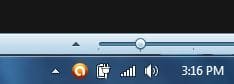
THIS is what it looks like with no hidden icons, no arrow :

If neither case is true then we need a screenshot to see what you're talking about.
Example, this is what mine looks like with hidden icons, note the arrow:
THIS is what it looks like with no hidden icons, no arrow :
Last edited:
My Computer
- Computer type
- Laptop
- Computer Manufacturer/Model Number
- MSI GE72VR Apache Pro-416
- OS
- Windows 10x64 Build 1709
- CPU
- Intel i7 7700HQ Kaby Lake
- Motherboard
- Micro-Star Intl. MS-179B (U3C1)
- Memory
- 16 GB DDR4 @2400
- Graphics Card(s)
- Nvidia Geforce GTX 1060
- Screen Resolution
- 1920x1080 120Hz
- Hard Drives
- 256 GB Nvme M.2 SSD
1TB HDD@7200
- Cooling
- Cooler Blast 4
- Keyboard
- Steel Series
- Antivirus
- Bit Defender Free
- Browser
- Edge