Solved my partitions disappeared..

djshonrock

New member
Member
Local time
2:31 AM
Messages
60
Location
Bahrain
my computer had four partitions. c,d,e and f. i just wanted to try the following method using cmd and diskpart... Install ANY version of Windows 7 by making your own USB install drive | Windows 7 Center .. after some time during the process, while i was on the step --type"ASSIGN"-- i just wanted to hear some songs... i went to my computer and i had the shock of my life. i saw that my partitions, e and f completely disappeared this had my songs and other files which add up to a total of 192 gb. i had this method printed... i tore the whole file and threw it in the dustbin... i was so sad to find the oter partitions disappear... a different day, while i was scanning my computer, i saw that the antivirus was scanning the folders in the lost partitions.. it started with //softwares/ms office 2010/....
then i was happy to know that the files have not been lost but hidden somewhere... then i thought of posting a post in Seven Forums... i have seen so many people coming with a question and goes out solving and getting their answer... i request you, please help me... i thank u so much.. waiting for a positive reply...
 

My Computer

Computer Manufacturer/Model Number
Fujistu
OS
Windows 7 Ultimate 64bit & Windows Consumers Preview
Motherboard
Intel
Memory
8 GB
Graphics Card(s)
7.5 Gb
Sound Card
Realtek Hd Audio Card
Monitor(s) Displays
Nividia
Screen Resolution
1366 x 768 Pixels
Cooling
Lg Interior Cooling System For Laptops
Keyboard
Microsoft
Mouse
Microsoft
Internet Speed
42 mbps
After posting up a screenshot of your maximized Disk Management drive map and listings with all columns showing, using Snipping Tool in Start menu:

Burn to CD free Partition Wizard bootable CD, boot PW CD, highlight Win7 HD, from Wizards tab run Partition Recovery Wizard to see what it finds.
 
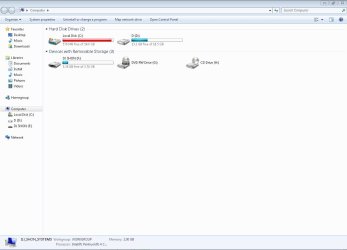
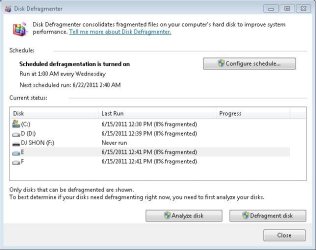
here is the screen shorts.. of my computer, disk defragment and disk management...
 

Attachments

  • my computer.JPG
    my computer.JPG
    56.2 KB · Views: 271
  • disk defragment.JPG
    disk defragment.JPG
    47.7 KB · Views: 323
  • disk management.JPG
    disk management.JPG
    44.9 KB · Views: 212

My Computer

Computer Manufacturer/Model Number
Fujistu
OS
Windows 7 Ultimate 64bit & Windows Consumers Preview
Motherboard
Intel
Memory
8 GB
Graphics Card(s)
7.5 Gb
Sound Card
Realtek Hd Audio Card
Monitor(s) Displays
Nividia
Screen Resolution
1366 x 768 Pixels
Cooling
Lg Interior Cooling System For Laptops
Keyboard
Microsoft
Mouse
Microsoft
Internet Speed
42 mbps
Not those, disk management.


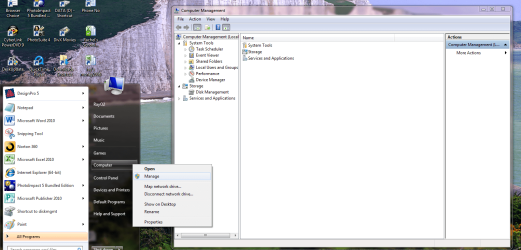
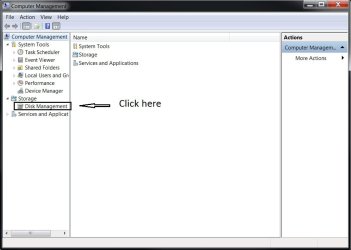
In the Windows start menu right click computer and click manage, in the left pane of the "Computer Management" window that opens click disk management and post a maximized snip of that.
 

My Computer

Computer Manufacturer/Model Number
* BFK Customs *
OS
W 7 64-bit Ultimate
CPU
Intel Q9550 Yorkfield
Motherboard
ASUS P5Q Pro
Memory
8GB Dominator 8500C5D
Graphics Card(s)
ATI : XFX 5870
Sound Card
Realtek HD Audio 7-1
Monitor(s) Displays
1x 47" LCD HDMI & 3x 26" LCD HDMI
Screen Resolution
1920x1080P & 1920x1200
Hard Drives
1x 80GB Intel X25-M G2 SSD : 1x 500GB & 1x 640GB WD Caviar Black(s)
PSU
Corsair 620HX
Case
Cooler Master RC-690
Cooling
Tuniq Tower 120, 2x 140mm and 3x 120mm case fans
Keyboard
Microsoft 500
Mouse
Razer Diamondback 3G
Internet Speed
14 Mb/s
Other Info
1x Koutech 3Gb/s SATA HDD Hot Swap Rack
here it is
 

Attachments

  • disk management.JPG
    disk management.JPG
    44.9 KB · Views: 227

My Computer

Computer Manufacturer/Model Number
Fujistu
OS
Windows 7 Ultimate 64bit & Windows Consumers Preview
Motherboard
Intel
Memory
8 GB
Graphics Card(s)
7.5 Gb
Sound Card
Realtek Hd Audio Card
Monitor(s) Displays
Nividia
Screen Resolution
1366 x 768 Pixels
Cooling
Lg Interior Cooling System For Laptops
Keyboard
Microsoft
Mouse
Microsoft
Internet Speed
42 mbps
Hey dj,

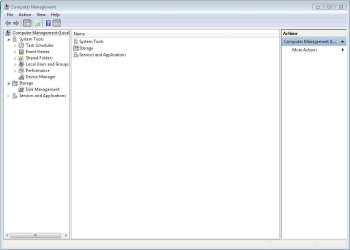
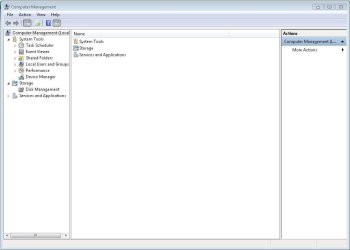
Can you actually "click" on Disk Management, then take the screenshot? It's not actually showing Disk Management.

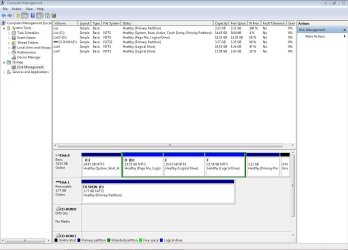
But from what I can see, you have two partitions NAMED E and F, but they don't actually have drive letters.
 

My Computer

Computer Manufacturer/Model Number
Myself
OS
Win7 Ultimate x64, Server 2008 R2
CPU
AMD Phenom II X6 1055T Thuban 2.8GHz
Motherboard
GIGABYTE GA-890FXA-UD5
Memory
8GB G.SKILL Ripjaws Series DDR3 1600 (PC3 12800)
Graphics Card(s)
2x HIS/Sapphire ATI Radeon HD 5830 in CrossfireX
Sound Card
Sound Blaster X-Fi Xtreme
Monitor(s) Displays
Dell 2407WFP 24", Dell 22"
Screen Resolution
1920x1200
Hard Drives
Patriot Torqx 128GB SSD
3TB other HD
PSU
CORSAIR HX Series CMPSU-750HX 750W
Case
Antec Nine Hundred
Cooling
Cooler Master Hyper 212 Plus CPU cooler
Keyboard
SteelSeries MercStealth
Mouse
Razer Lachesis
Internet Speed
HAHA NO MOAR COMCAST. Now, FiOS :D
Other Info
I am a virtualization enthusiast. I like Hyper-V. It's free.
I'm a Windows 7 fangirl. I will teach a class for you or write a custom course for you RIGHT NOW.
I love EVE Online. I'm Sayra Sainer. I play Starcraft II. My gamertag is Tal0nn. I'm trying not to play Minecraft.
I also like coffee. I'll take a basic triple grande extra-hot breve stirred ristretto caramel machiatto.
click to enlarge
d.jpg
 

My Computer

Computer Manufacturer/Model Number
* BFK Customs *
OS
W 7 64-bit Ultimate
CPU
Intel Q9550 Yorkfield
Motherboard
ASUS P5Q Pro
Memory
8GB Dominator 8500C5D
Graphics Card(s)
ATI : XFX 5870
Sound Card
Realtek HD Audio 7-1
Monitor(s) Displays
1x 47" LCD HDMI & 3x 26" LCD HDMI
Screen Resolution
1920x1080P & 1920x1200
Hard Drives
1x 80GB Intel X25-M G2 SSD : 1x 500GB & 1x 640GB WD Caviar Black(s)
PSU
Corsair 620HX
Case
Cooler Master RC-690
Cooling
Tuniq Tower 120, 2x 140mm and 3x 120mm case fans
Keyboard
Microsoft 500
Mouse
Razer Diamondback 3G
Internet Speed
14 Mb/s
Other Info
1x Koutech 3Gb/s SATA HDD Hot Swap Rack
here it is...
 

Attachments

  • diskmanagement.JPG
    diskmanagement.JPG
    103.4 KB · Views: 725

My Computer

Computer Manufacturer/Model Number
Fujistu
OS
Windows 7 Ultimate 64bit & Windows Consumers Preview
Motherboard
Intel
Memory
8 GB
Graphics Card(s)
7.5 Gb
Sound Card
Realtek Hd Audio Card
Monitor(s) Displays
Nividia
Screen Resolution
1366 x 768 Pixels
Cooling
Lg Interior Cooling System For Laptops
Keyboard
Microsoft
Mouse
Microsoft
Internet Speed
42 mbps
Perfect. Dj, can you right-click the "E" partition and does it have an option to "Change drive letters and paths"? If so, use that wizard to change the drive letter to E. Currently, it does not have a drive letter assigned (and neither does F, but you will have to unplug that external drive that is currently using F: to be able to assign your partition F:).
 

My Computer

Computer Manufacturer/Model Number
Myself
OS
Win7 Ultimate x64, Server 2008 R2
CPU
AMD Phenom II X6 1055T Thuban 2.8GHz
Motherboard
GIGABYTE GA-890FXA-UD5
Memory
8GB G.SKILL Ripjaws Series DDR3 1600 (PC3 12800)
Graphics Card(s)
2x HIS/Sapphire ATI Radeon HD 5830 in CrossfireX
Sound Card
Sound Blaster X-Fi Xtreme
Monitor(s) Displays
Dell 2407WFP 24", Dell 22"
Screen Resolution
1920x1200
Hard Drives
Patriot Torqx 128GB SSD
3TB other HD
PSU
CORSAIR HX Series CMPSU-750HX 750W
Case
Antec Nine Hundred
Cooling
Cooler Master Hyper 212 Plus CPU cooler
Keyboard
SteelSeries MercStealth
Mouse
Razer Lachesis
Internet Speed
HAHA NO MOAR COMCAST. Now, FiOS :D
Other Info
I am a virtualization enthusiast. I like Hyper-V. It's free.
I'm a Windows 7 fangirl. I will teach a class for you or write a custom course for you RIGHT NOW.
I love EVE Online. I'm Sayra Sainer. I play Starcraft II. My gamertag is Tal0nn. I'm trying not to play Minecraft.
I also like coffee. I'll take a basic triple grande extra-hot breve stirred ristretto caramel machiatto.
You have more than 30gb of data on D, E and F. You should be able to rightclick on each partition in Disk Mgmt to confirm the data is intact.

I don't know where you had more than 192gb of data because your HD shown in Disk Mgmt is only an 80gb HD judging by the capacity of all partitions. Is this incorrect?

If these readings are known to be incorrect, burn to CD free Partition Wizard bootable CD, boot it to see what the actual disk picture looks like. You can also browse your data from there.

Others may have a method to make the partitions seen in Win7, but if you cannot then copy out the data using the DVD or Repair CD with this method: Copy & Paste - in Windows Recovery Console, or if you want a graphical picture of what you are doing use free Paragon rescue disk; change drive letter; recover data

Once you have your data copied out to external or another HD, use Partition Wizard bootable CD to delete D-F extended Logical Partition and the unused 3.22gb partition, Resize your C drive to the right to give you more space as needed, then create a new Primary data storage partition or two in the space to copy your data into. If you need the exact steps to do this with PW CD, we can give them if you tell us how you want to proceed.
 
thnx a lot guys... u rock man! the credit goes to Seven Forums and the great members like: theog, gregrocker, Bare Foot Kid and hjonesMCT.. thanks a lot.. i don't know hot to thank you... if you are there on face book, add me http://www.facebook.com/Dj.Shon.Productions
 

My Computer

Computer Manufacturer/Model Number
Fujistu
OS
Windows 7 Ultimate 64bit & Windows Consumers Preview
Motherboard
Intel
Memory
8 GB
Graphics Card(s)
7.5 Gb
Sound Card
Realtek Hd Audio Card
Monitor(s) Displays
Nividia
Screen Resolution
1366 x 768 Pixels
Cooling
Lg Interior Cooling System For Laptops
Keyboard
Microsoft
Mouse
Microsoft
Internet Speed
42 mbps
Good to see you got it sorted and thanks for the update.
 

My Computer

Computer Manufacturer/Model Number
* BFK Customs *
OS
W 7 64-bit Ultimate
CPU
Intel Q9550 Yorkfield
Motherboard
ASUS P5Q Pro
Memory
8GB Dominator 8500C5D
Graphics Card(s)
ATI : XFX 5870
Sound Card
Realtek HD Audio 7-1
Monitor(s) Displays
1x 47" LCD HDMI & 3x 26" LCD HDMI
Screen Resolution
1920x1080P & 1920x1200
Hard Drives
1x 80GB Intel X25-M G2 SSD : 1x 500GB & 1x 640GB WD Caviar Black(s)
PSU
Corsair 620HX
Case
Cooler Master RC-690
Cooling
Tuniq Tower 120, 2x 140mm and 3x 120mm case fans
Keyboard
Microsoft 500
Mouse
Razer Diamondback 3G
Internet Speed
14 Mb/s
Other Info
1x Koutech 3Gb/s SATA HDD Hot Swap Rack
all the files were there in the drives.. nothing happend to them.. thanks to your ideas... the worst part is that i don't have an ext hd... i only have a 4 gb flash drive.. ny ways i have a different computer with 4 gb ram 1 gd graphics, 470 gb hdd. i don't know how to thank you...
 

My Computer

Computer Manufacturer/Model Number
Fujistu
OS
Windows 7 Ultimate 64bit & Windows Consumers Preview
Motherboard
Intel
Memory
8 GB
Graphics Card(s)
7.5 Gb
Sound Card
Realtek Hd Audio Card
Monitor(s) Displays
Nividia
Screen Resolution
1366 x 768 Pixels
Cooling
Lg Interior Cooling System For Laptops
Keyboard
Microsoft
Mouse
Microsoft
Internet Speed
42 mbps

My Computer

Computer Manufacturer/Model Number
Fujistu
OS
Windows 7 Ultimate 64bit & Windows Consumers Preview
Motherboard
Intel
Memory
8 GB
Graphics Card(s)
7.5 Gb
Sound Card
Realtek Hd Audio Card
Monitor(s) Displays
Nividia
Screen Resolution
1366 x 768 Pixels
Cooling
Lg Interior Cooling System For Laptops
Keyboard
Microsoft
Mouse
Microsoft
Internet Speed
42 mbps
I'm sorry for posting in a old thread but I'm having the same problem. The only difference, is that my D: partition isn't nowhere to be seen in the Computer Management.

Btw, my C: partition has 130GB with 40GB free.
Untitled.png


Check it out
Untitled.png


Have tried many solutions across the internet with no success. Some programs say the hard drive has 250GB of used space.
Can someone give me a hand here?

EDIT: There's no problem if I can't recovery the data in D: because I have my work in a server. I just need the partition back.

Thank you
 
Last edited:

My Computer

Computer type
Laptop
Computer Manufacturer/Model Number
Dell Latitude E5420
OS
Windows 7 Enterprise x64
CPU
Intel i5 2520M
Motherboard
N/A
Memory
4GB
Graphics Card(s)
Intel(R) HD Graphics Family
Hard Drives
Hitachi 250GB
Antivirus
McAfee
Browser
Mozilla Firefox
What size is your HDD? If you have a 250gb HD then the partition is lost because it's had C resized over it. You'd need to shrink C to create a new partition there.

If you think the HDD is bigger than that, please post back a camera snap of the drive map and listings from Partition Wizard bootable CD, which sometimes will provide a more reliable reading than Disk Mgmt.

Just to be sure run a Disk Check and from PW CD run Partition Wizard HD surface test
 
Sorry, my mistake. The hard drive has 250GB. I already tried to shrink it but I can only shrink like 10MB.
Disk Check returned no problems.
Makes sense when you say C resized over D because there was a time where it only had 20GB free.

EDIT: I'm using Disk Defragmenter. And CCleaner to clean empty space and now suddenly, my C went to 1,8GB free. I guess you were right gregrocker.
 
Last edited:

My Computer

Computer type
Laptop
Computer Manufacturer/Model Number
Dell Latitude E5420
OS
Windows 7 Enterprise x64
CPU
Intel i5 2520M
Motherboard
N/A
Memory
4GB
Graphics Card(s)
Intel(R) HD Graphics Family
Hard Drives
Hitachi 250GB
Antivirus
McAfee
Browser
Mozilla Firefox
If you need more space you can use Partition Wizard bootable CD to resize C, which from boot will allow all the shrink space available since no OS files are running which can block shrinking from Windows.

We've never had PW CD fail on resizing but be sure to back up your files and a Win7 backup image anyway, since you have external backup.
 
Back
Top