my pc is acting strange?

realmadrid25

New member
Local time
7:50 PM
Messages
13
hi guys,im new to this page,and i,m a bit afraid on my situation.I,ve been having problems with my computer,the 1 sign is that the cd/dvd drive opens and closes by itself like when i open the cd/dvd drive it closes by itself,like someone or something is telling to do that,and it happens when i,m connected and when i,m offline to and the thing is that cmd won,t open,it show in task manager but i can,t see it,and the main thing is that i used to have this problem before,but i formatted my pc and now it comes again and i,m worried if somoene is having acces to control my pc and i,ve tried making an antivirus scan,and still no virus found,any suggestions or answers would help,thank you.
 

My Computer My Computer

Computer type
PC/Desktop
Computer Manufacturer/Model Number
hp
OS
windows 7 vista 32 bit
CPU
amd E-300 APU with Radeon hd graphics 1.30ghz
Motherboard
amd E-300 APU with Radeon hd graphics 1.30ghz
Memory
2 ram
Graphics Card(s)
----
Hard Drives
500gb
Antivirus
avast free edition
Browser
google chrome
Did you follow these steps to Clean Reinstall - Factory OEM Windows 7 so you know you have the best install possible? If not I'd do it over deleting all partitions during the reinstall.

Be sure to read the Special Note to HP Owners at the end that will show you how to preserve the onboard Diagnostics triggered by the ESC key, if it will still run. Now would be a good time to try and run it.

Otherwise work through the Troubleshooting Steps for Windows 7
 
thank you for answering greggrocker.Well at first i had reinstall windows all again(formatted) but i still had the believing that my pc wasn,t a 100% virus free,and now my pc has become worse.I,ve readed the article you posted and i,ll try it later.I have a question.1 Lets say if you reinstall windows again wouldn,t all virus go? 2 could a virus last a formatted pc? and thank you again for replying
 

My Computer My Computer

Computer type
PC/Desktop
Computer Manufacturer/Model Number
hp
OS
windows 7 vista 32 bit
CPU
amd E-300 APU with Radeon hd graphics 1.30ghz
Motherboard
amd E-300 APU with Radeon hd graphics 1.30ghz
Memory
2 ram
Graphics Card(s)
----
Hard Drives
500gb
Antivirus
avast free edition
Browser
google chrome
If you correctly deleted all partitions before install, yes, unless the virus is traveling on your network. Run Malwarebytes full scan on all PC's, make sure your router firewall is turned on.

To be extra sure wipe the HD first with Diskpart Clean Command.

Use the latest official installer for your licensed version, burned to disk or stick with tool provided in Clean Reinstall - Factory OEM Wi ndows 7
 
is it possible that the virus could infect an usb internet modem?,because i,m begining to think that it is with the modem,cause now my pc read my usb modem as a dvd/cd drive,and if scanned with malwarebytes but no virus found,and it beggining to change some windows program making them corrupt or acces denied, and another question if my usb internet modem was infected how could i disinfect it?
 

My Computer My Computer

Computer type
PC/Desktop
Computer Manufacturer/Model Number
hp
OS
windows 7 vista 32 bit
CPU
amd E-300 APU with Radeon hd graphics 1.30ghz
Motherboard
amd E-300 APU with Radeon hd graphics 1.30ghz
Memory
2 ram
Graphics Card(s)
----
Hard Drives
500gb
Antivirus
avast free edition
Browser
google chrome
and i didn,t have any partitions,i,ve just formatted the whole pc
 

My Computer My Computer

Computer type
PC/Desktop
Computer Manufacturer/Model Number
hp
OS
windows 7 vista 32 bit
CPU
amd E-300 APU with Radeon hd graphics 1.30ghz
Motherboard
amd E-300 APU with Radeon hd graphics 1.30ghz
Memory
2 ram
Graphics Card(s)
----
Hard Drives
500gb
Antivirus
avast free edition
Browser
google chrome
Where did you get Win7?

I gave you specific steps to try so report back the results of each.
 
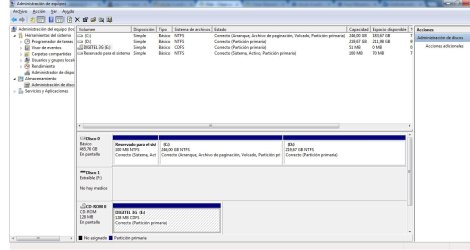
well i used windows 7 ultimate cd from microsoft and i,m not a computer savy and i read the post about how to "Clean" or "Clean All" a Disk with the Diskpart Command does this format the current hardrive connected to my pc or what does it do?? and i currentlly have a strange thing that show my usb modem internet as cd/dvd drive,is there a way that i can show you via a snapshot?
 

My Computer My Computer

Computer type
PC/Desktop
Computer Manufacturer/Model Number
hp
OS
windows 7 vista 32 bit
CPU
amd E-300 APU with Radeon hd graphics 1.30ghz
Motherboard
amd E-300 APU with Radeon hd graphics 1.30ghz
Memory
2 ram
Graphics Card(s)
----
Hard Drives
500gb
Antivirus
avast free edition
Browser
google chrome
my dvd,cd drive had taken the cd drive name,everytime i put my modem it,s take that place and cd/dvd drive icon dissapears Sin título.jpg
 

My Computer My Computer

Computer type
PC/Desktop
Computer Manufacturer/Model Number
hp
OS
windows 7 vista 32 bit
CPU
amd E-300 APU with Radeon hd graphics 1.30ghz
Motherboard
amd E-300 APU with Radeon hd graphics 1.30ghz
Memory
2 ram
Graphics Card(s)
----
Hard Drives
500gb
Antivirus
avast free edition
Browser
google chrome
You have a disk in the CD Rom drive. What is it for?

Please explain again so that we can understand what it is that is changing. How is the modem involved?

There is also a removable DISK1 which is not shown. Is anything plugged in there?
 
well,i don,t have cd inserted in dvd/cd drive,the image showing digitel as cd happens when i connect my usb internet modem called digitel and then the dvd/cd drive icon dissapears,and the disc 1 appears when i connect the usb internet modem,in other word i don,t really know why these things changes when i connect the internet usb modem.

I am weirded out about what is happening to my pc,like some folders appears while i didn,t change anything or downloaded anything,and i,m having some programs problems to open like cmd,and some showing acces denied.

So these were my steps where someone reinstalled my hard drive,and tell me if they were good and cleaned all the hard drive:

1 dvd/cd drive didn,t showed up or neither played or readed any cd or dvd,so a guy booted the windows 7 ultimate cd in boot mode and formatted the pc

2 Well that was how the guy reistalled windows and formatted the pc

3 The pc started up fine,but something wasn,t right,an example is that the "cd/dvd drive opened an closed by itself" and i didn,t had internet that meanwhile,i had my suspicious about that the invection could be there and then the 3 months passed,and it got worse

4 the devices that i connected were my usb internet modem and i didn,t installed or clicked any malicous programs or links in that time

Greg my next question is "what could be the cause that i could be infected till even after formatted my pc"
and "How could i formatt my pc a 100% without leaving any trace behind"
 

My Computer My Computer

Computer type
PC/Desktop
Computer Manufacturer/Model Number
hp
OS
windows 7 vista 32 bit
CPU
amd E-300 APU with Radeon hd graphics 1.30ghz
Motherboard
amd E-300 APU with Radeon hd graphics 1.30ghz
Memory
2 ram
Graphics Card(s)
----
Hard Drives
500gb
Antivirus
avast free edition
Browser
google chrome
What Win7 installation disk was used to reinstall Win7? If he got it off a torrent or someplace else sketchy then it could have crap added to it, even an activation crack that's totally unneeded since you already own a license on that PC and can reinstall whenever you want using the Product Key on the COA sticker.

Look over these steps for doing a Clean Reinstall - Factory OEM Windows 7 which compile everything that works best to get and keep a perrfect install, based on tens of thousands we've helped with here. I would create new installation media, boot it to delete all partitions, then create one big install partition, unless you want a separate data partition, too. THen follow the steps to do the install and set it all up perfectly. We can help you every step of the way. Just back any questions to get started.

Another option is if he didn't wipe the Recovery partition, reboot and tap the F11 key to see if it brings up HP System Recovery. If so sometimes there is a choice for a Minimal Recovery which is almost the same as a Clean Reinstall but does everything for you. It should clean the drive enough that no infection can live on.

Once you decide which approach you're going to take, reset your router to defaults either by signing in and looking for that option or using the reset button, then make sure the router firewall is enabled. This can keep infection from coming from the network. Plug your PC in by wire to do the install as explained in tutorial.
 
Last edited:
Back
Top