My pc not recognising USB flash drives

Muhsin

New member
Local time
3:06 AM
Messages
13
Ok so here it is, my pc is not able to detect usb flash drives.I searched on google and saw some answer about looking into disk management, but it does not show up here either.

I have tried Pendrives, Ipod and PSP.Neither works.The lights in my pen drives light up so its definitely not a problem with the hardware.The weird thing is that i can connect to the internet with my USB DSL.However i noticed that if i reboot my DSL, i have to restart pc again because it wont recognise the USB DSL router.

I have tried inserting my USB flash drives before i start my pc like the router but nothing.It doesnt work.I have also checked in BIOS, and they are all enabled.Im running out of ideas and i cant backup anything in my pendrive.
 

My Computer My Computer

OS
Windows 7 Home 32 bit
Are these the front USB ports ? ?
Some are notoriously under-powered while others are never even connected.
 

My Computer My Computer

Computer Manufacturer/Model Number
Self-Built
OS
Vista Ultimate X64/ Windows 7 Dual-boot
CPU
Q6600
Motherboard
ASUS P5K
Memory
4G OCZ PC2 8500 Platinum
Graphics Card(s)
EVGA 8800GTS Vid Card
Hard Drives
500G Seagate SATA
200G Seagate SATA
100G WD Caviar SATA
80G WD Caviar IDE
PSU
OCZ Elite 800W PSU
Case
RaidMax Smilodon Case
No i tried in all 4 back ports but nothing.My keyboard and mouse works perfectly tho
 

My Computer My Computer

OS
Windows 7 Home 32 bit
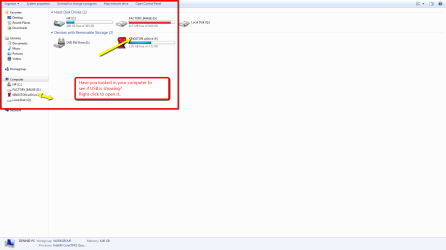
Try looking in My Computer to see if USB is showing.
2011-12-28_0849.png
 

My Computer My Computer

Computer Manufacturer/Model Number
HP M9077c
OS
Windows 7 Home Premium 64bit
CPU
Intel(R)Core(TM)2 quad [email protected] 2.39GHz
Motherboard
ASUSeK
Memory
6GB DDR2 6400
Graphics Card(s)
GeForce 8500/512MB
Sound Card
Realtek High Def Audio
Monitor(s) Displays
HP w2408 LCD 24" widescreen
Screen Resolution
1920x1200
Cooling
6 pack of Bud
Keyboard
MS wireless Inteli
Mouse
MS wireless Inteli

My Computer My Computer

Computer type
PC/Desktop
Computer Manufacturer/Model Number
Self built custom
OS
64-bit Windows 11 Pro for Workstations
CPU
Intel i7-8700K OC'd to 5 GHz
Motherboard
ASUS ROG Maximus XI Formula Z390
Memory
64 GB (4x16GB) G.SKILL TridentZ RGB DDR4 3600 MHz
Graphics Card(s)
ASUS ROG-STRIX-GTX1080TI-O11G-GAMING
Sound Card
Integrated
Monitor(s) Displays
2 x Samsung Odyssey G7 27"
Screen Resolution
2560x1440
Hard Drives
1TB Samsung 990 PRO M.2,
4TB Samsung 990 PRO PRO M.2,
TerraMaster F8 SSD Plus NAS
PSU
Seasonic Prime Titanium 850W
Case
Thermaltake Core P3
Cooling
Corsair Hydro H115i
Keyboard
Logitech wireless K800
Mouse
Logitech MX Master 4
Internet Speed
2 Gb/s Download and 100 Mb/s Upload
Antivirus
Malwarebyte Anti-Malware Premium
Browser
Google Chrome
Other Info
Logitech Z625 speaker system,
Logitech BRIO 4K Pro webcam,
HP Color LaserJet Pro MFP M477fdn,
APC SMART-UPS RT 1000 XL - SURT1000XLI,
Galaxy S23 Plus phone
No thats the problem, i dont see it

EDIT: Didnt see Shawn's post, it solved my problem.Thanks a lot really helped me
 

My Computer My Computer

OS
Windows 7 Home 32 bit
Ok, it worked for one day, but when I restarted my pc today it do the same thing again.And using the registry wont work anymore.Any other fixes for this?
 

My Computer My Computer

OS
Windows 7 Home 32 bit
Go to EVENT VIEWER. Left hand side, Application -> Microsoft-> Windows -> DriverFrameworks-Usermode -> Operational.

Those are the power events for connected USB devices. Scroll through and see what info it provides.
 

My Computer My Computer

Computer type
PC/Desktop
Computer Manufacturer/Model Number
Custom
OS
Windows 7
CPU
AMD Phenom II X2 (dual-core)
Motherboard
GA-MA785GM-US2H
Memory
4G
Graphics Card(s)
integrated ATI HD 4200
Sound Card
integrated
Monitor(s) Displays
Samsung 24"
Screen Resolution
1920x1080
Hard Drives
1 SSD - Samsung 840 - 500 GB - OS and DATA partitions
1 SSD - Intel 320 - 120 GB (used for backups) - Misc/BACKUP
1 SATA HD - WD, 500 GB - BACKUP
PSU
Ultra X4 500W
Case
Ultra X-blaster
Keyboard
Microsoft Digital Media Pro
Mouse
Logitech WIRED!
Internet Speed
15 Mbps FIOS
They all say "Driver Manager service started successfully"
 

My Computer My Computer

OS
Windows 7 Home 32 bit
They all say "Driver Manager service started successfully"

There should be a half dozen events for each connection/disconnection. So, no errors and all looks fine?
 

My Computer My Computer

Computer type
PC/Desktop
Computer Manufacturer/Model Number
Custom
OS
Windows 7
CPU
AMD Phenom II X2 (dual-core)
Motherboard
GA-MA785GM-US2H
Memory
4G
Graphics Card(s)
integrated ATI HD 4200
Sound Card
integrated
Monitor(s) Displays
Samsung 24"
Screen Resolution
1920x1080
Hard Drives
1 SSD - Samsung 840 - 500 GB - OS and DATA partitions
1 SSD - Intel 320 - 120 GB (used for backups) - Misc/BACKUP
1 SATA HD - WD, 500 GB - BACKUP
PSU
Ultra X4 500W
Case
Ultra X-blaster
Keyboard
Microsoft Digital Media Pro
Mouse
Logitech WIRED!
Internet Speed
15 Mbps FIOS
They all say "Driver Manager service started successfully"

There should be a half dozen events for each connection/disconnection. So, no errors and all looks fine?

Yes I uploaded a text file of the log

I think maybe the 1000 event is a service-related event. I was more interested in the 2xxx series. Those are further down and all look good.

However, the last time a 2xxx series came through is 10/11/2011. Meaning, that seems to be the last time any USB device that was connected was fully recognized by Win7. What happened after that 10/11/2011 timeframe???

Do you get the "duh-dump" sound when you connect a USB flash drive?
 

My Computer My Computer

Computer type
PC/Desktop
Computer Manufacturer/Model Number
Custom
OS
Windows 7
CPU
AMD Phenom II X2 (dual-core)
Motherboard
GA-MA785GM-US2H
Memory
4G
Graphics Card(s)
integrated ATI HD 4200
Sound Card
integrated
Monitor(s) Displays
Samsung 24"
Screen Resolution
1920x1080
Hard Drives
1 SSD - Samsung 840 - 500 GB - OS and DATA partitions
1 SSD - Intel 320 - 120 GB (used for backups) - Misc/BACKUP
1 SATA HD - WD, 500 GB - BACKUP
PSU
Ultra X4 500W
Case
Ultra X-blaster
Keyboard
Microsoft Digital Media Pro
Mouse
Logitech WIRED!
Internet Speed
15 Mbps FIOS
actually no, i didnt connect a USB device(except keyboard mouse and router) in that timeframe.Then when i tried to connect like 3-4 days ago i noticed it

and no i dont get the sound, and its not on disk management either
 

My Computer My Computer

OS
Windows 7 Home 32 bit
Play hardball. I assume you connected a keyboard (USB) or mouse (USB) in the 10/11/2011 timeframe?

Just for grins, disconnect your keyboard OR mouse from a USB port and try connecting your USB flash drive there. To make sure we are using a working USB port....
 

My Computer My Computer

Computer type
PC/Desktop
Computer Manufacturer/Model Number
Custom
OS
Windows 7
CPU
AMD Phenom II X2 (dual-core)
Motherboard
GA-MA785GM-US2H
Memory
4G
Graphics Card(s)
integrated ATI HD 4200
Sound Card
integrated
Monitor(s) Displays
Samsung 24"
Screen Resolution
1920x1080
Hard Drives
1 SSD - Samsung 840 - 500 GB - OS and DATA partitions
1 SSD - Intel 320 - 120 GB (used for backups) - Misc/BACKUP
1 SATA HD - WD, 500 GB - BACKUP
PSU
Ultra X4 500W
Case
Ultra X-blaster
Keyboard
Microsoft Digital Media Pro
Mouse
Logitech WIRED!
Internet Speed
15 Mbps FIOS
i did it, it still does it.The weird thing is that when i connect my pen drive in any port, it lights up. So i dont think its a hardware problem
 

My Computer My Computer

OS
Windows 7 Home 32 bit

My Computer My Computer

Computer type
PC/Desktop
Computer Manufacturer/Model Number
Custom
OS
Windows 7
CPU
AMD Phenom II X2 (dual-core)
Motherboard
GA-MA785GM-US2H
Memory
4G
Graphics Card(s)
integrated ATI HD 4200
Sound Card
integrated
Monitor(s) Displays
Samsung 24"
Screen Resolution
1920x1080
Hard Drives
1 SSD - Samsung 840 - 500 GB - OS and DATA partitions
1 SSD - Intel 320 - 120 GB (used for backups) - Misc/BACKUP
1 SATA HD - WD, 500 GB - BACKUP
PSU
Ultra X4 500W
Case
Ultra X-blaster
Keyboard
Microsoft Digital Media Pro
Mouse
Logitech WIRED!
Internet Speed
15 Mbps FIOS
it doesnt do it :(
thanks for the answers tho
 

My Computer My Computer

OS
Windows 7 Home 32 bit

My Computer My Computer

Computer type
PC/Desktop
Computer Manufacturer/Model Number
Custom
OS
Windows 7
CPU
AMD Phenom II X2 (dual-core)
Motherboard
GA-MA785GM-US2H
Memory
4G
Graphics Card(s)
integrated ATI HD 4200
Sound Card
integrated
Monitor(s) Displays
Samsung 24"
Screen Resolution
1920x1080
Hard Drives
1 SSD - Samsung 840 - 500 GB - OS and DATA partitions
1 SSD - Intel 320 - 120 GB (used for backups) - Misc/BACKUP
1 SATA HD - WD, 500 GB - BACKUP
PSU
Ultra X4 500W
Case
Ultra X-blaster
Keyboard
Microsoft Digital Media Pro
Mouse
Logitech WIRED!
Internet Speed
15 Mbps FIOS
Sorry for late response, i went to bed.
No it wasnt detected, I had to restart my PC.
 

My Computer My Computer

OS
Windows 7 Home 32 bit

:)
automount
[enable] [disable] [scrub] [noerr]
When enabled (the default), Windows automatically mounts the file system for a new basic volume when it is added to the system, and then assigns a drive letter to the volume. In system area network configurations, disabling automount prevents Windows from automatically mounting or assigning drive letters to any new basic volumes added to the system.
enable
Enables Windows to automatically mount new basic volumes added to the system and to assign them drive letters.
disable
Prevents Windows from automatically mounting any new basic volumes that are added to the system.
scrub
Removes volume mount point directories and registry settings for volumes that are no longer in the system. This prevents volumes that were previously in the system from being automatically mounted and given their former volume mount point(s) when they are added back to the system.
noerr
For scripting only. When an error is encountered, specifies that DiskPart continues to process commands as if the error did not occur. Without the noerr parameter, an error causes DiskPart to exit with an error code.

DiskPart Command-Line Options
 

My Computer My Computer

OS
Windows 7 Home Premium 32 bit
Back
Top