Solved My PC will not turn on Please help???

InferneX

New member
Local time
6:52 AM
Messages
21
Hello Sevenforums. I have a huge problem right now, but I don't know how to start it so I'll just start the beginning.

I Have a bad Monitor and it has problems detecting My PC I usually have to force shutdown by holding on to the Power button and then turn it back on, then I turn the PC back on again and after a error message the PC is detected on the monitor.I Have been doing this for quite some time, but today when i came home I did the same thing. The Monitor could not detect the PC like it usually says so I hold on to the Power button, and wait then I try turning it on again and it doesn't work, I chance plugs and still doesn't work. I try plugs in other rooms and it still doesn't work, I switch power cords and still nothing. I think my PowerBox Is done, but I don't smell anything burned. I have a light on the back of the powerbox and it lights up if I put the power cord on the wall but once i Press the power button it turns off and does not turn the PC on. I took the PowerBox out and dint see any burned wires or anything, I wonder What could wrong?

Is there a solution or is my Power box done Or is the power button messed up, or is it both??? How can i fix this problem?? Will i have to buy a new PowerBox and or PowerButtom?
 

My Computer My Computer

OS
Windows 7 Ultimate 64bit
do the fans spin inside the pc, or do lights come on the motherboard?

check all the connections from the power supply to motherboard, graphics card (if applicable), hard drives, fans etc

unplug and re-plug all internal components if necessary (with power off!) such as memory chips and pci cards. do the same with all your drives too.

hopefully something may just have worked its way loose. while you're there, give everything a good clean with an old toothbrush and canned air if you can get any.

best of luck!
 

My Computer My Computer

Computer Manufacturer/Model Number
mickey megabyte 1234
OS
ultimate 64 sp1
CPU
i5 2500K [email protected]
Motherboard
MSI P67A-GD53
Memory
8 gigs GSkill Ripjaws 1600
Graphics Card(s)
amd hd6950
Sound Card
creative x-fi gamer
Monitor(s) Displays
samsung 24"
Screen Resolution
1920x1080
Hard Drives
ocz vertex 2e 60 gig, samsung f3 1tb, buffalo 2tb ext
PSU
antec 550
Case
antec three hundred
Cooling
i'm a cooling fan
Keyboard
saitek eclipse ii
Mouse
logitech g3
Internet Speed
about 4 Mbps
Other Info
i love win7
When you press the power button do you hear any beeps?

Regards,
JDobbsy1987
 

My Computer My Computer

Computer type
PC/Desktop
Computer Manufacturer/Model Number
Self Built
OS
Windows 8.1 Pro x64
CPU
Intel Core i5-2500K @ 3.30GHz - S1155
Motherboard
Asus P8P67 LE Rev3, Intel P67, S115
Memory
8GB Corsair DDR3 XMS3, PC3-12800
Graphics Card(s)
NVIDIA GeForce GTX 650
Sound Card
On-Board
Monitor(s) Displays
3 x 24" {Extended Display}
Screen Resolution
1920 x 1080
Hard Drives
300GB Seagate Barracuda 7200
PSU
550W Coolermaster GX550
Case
Silverstone Precision PS04B
Cooling
Stock
Keyboard
Logitech K120
Mouse
World of Warcraft Cataclysm MMO Gaming Mouse
Internet Speed
80 MB
Antivirus
MSE / Windows Defender
Browser
Chrome
I checked out every wire and re plug them after taking them out, nothing still..... I doesn't turn on???? What can i do now???
 

My Computer My Computer

OS
Windows 7 Ultimate 64bit
I checked out every wire and re plug them after taking them out, nothing still..... I doesn't turn on???? What can i do now???

Does it make any beeps at all?
 

My Computer My Computer

Computer type
PC/Desktop
Computer Manufacturer/Model Number
Self Built
OS
Windows 8.1 Pro x64
CPU
Intel Core i5-2500K @ 3.30GHz - S1155
Motherboard
Asus P8P67 LE Rev3, Intel P67, S115
Memory
8GB Corsair DDR3 XMS3, PC3-12800
Graphics Card(s)
NVIDIA GeForce GTX 650
Sound Card
On-Board
Monitor(s) Displays
3 x 24" {Extended Display}
Screen Resolution
1920 x 1080
Hard Drives
300GB Seagate Barracuda 7200
PSU
550W Coolermaster GX550
Case
Silverstone Precision PS04B
Cooling
Stock
Keyboard
Logitech K120
Mouse
World of Warcraft Cataclysm MMO Gaming Mouse
Internet Speed
80 MB
Antivirus
MSE / Windows Defender
Browser
Chrome
No I do here any noises, I usually just hear the PC powering up and the fans start spinning but now Nothing turns on, no lights or anything????
 

My Computer My Computer

OS
Windows 7 Ultimate 64bit
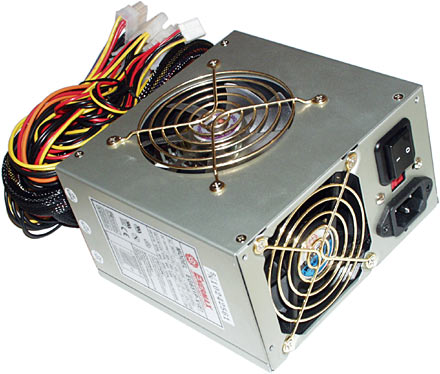
Sounds like the PSU (power supply unit)
Power-Supply-Unit.jpg
 

My Computer My Computer

Computer type
PC/Desktop
Computer Manufacturer/Model Number
Self Built
OS
Windows 7 Ultimate 64bit
CPU
AMD Phenom Quad core 9950 black edition
Motherboard
Gigabyte
Memory
16Gb
Graphics Card(s)
2x XFX Radeon 5850
Sound Card
PCI Express X-Fi Titanium / Logitech G35
Monitor(s) Displays
2x HP 2410i
Screen Resolution
1920x1080
Hard Drives
2x 500Gb Seagate
1x 300Gb Seagate
1x 1Tb Seagate
2x 1Tb Hitatchi
PSU
Jean Tech Storm 700W
Case
Cooler Master COSMOS S
Cooling
Akasa Evo Blue Pro
Keyboard
Logitech G15
Mouse
Mad Catz M.M.O. 7
Internet Speed
12mb
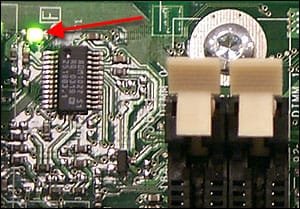
If you look on your motherboard do you see any lights?

something like:
251927410.jpg

If not then it does sound like the PSU has packed up.
 

My Computer My Computer

Computer type
PC/Desktop
Computer Manufacturer/Model Number
Self Built
OS
Windows 8.1 Pro x64
CPU
Intel Core i5-2500K @ 3.30GHz - S1155
Motherboard
Asus P8P67 LE Rev3, Intel P67, S115
Memory
8GB Corsair DDR3 XMS3, PC3-12800
Graphics Card(s)
NVIDIA GeForce GTX 650
Sound Card
On-Board
Monitor(s) Displays
3 x 24" {Extended Display}
Screen Resolution
1920 x 1080
Hard Drives
300GB Seagate Barracuda 7200
PSU
550W Coolermaster GX550
Case
Silverstone Precision PS04B
Cooling
Stock
Keyboard
Logitech K120
Mouse
World of Warcraft Cataclysm MMO Gaming Mouse
Internet Speed
80 MB
Antivirus
MSE / Windows Defender
Browser
Chrome
When I put the power cord into the powerbox a green light turns on but once I press the power buttom the light turns off and nothing inside turns , no lights in the motherboard, no noise from PSU
 

My Computer My Computer

OS
Windows 7 Ultimate 64bit
EDIT:

If the system (PowerBox) powers up and keeps running, try connecting it to a different monitor.

My second suggestion would be to remove and reinstall all the hardware components in your PC case, if you're up for it. You can also try switching the RAM and PSU while you're at it.

On the other hand, if the system Powers up and powers down again, no fans/lights etc., it could very well be the Power Supply acting up.

Let us know how you go.
 

My Computer My Computer

Computer Manufacturer/Model Number
Dell / Custom
OS
Windows 7 HP / Ultimate x64
CPU
Core i5 / X4 955 BE
Motherboard
OEM / Gigabyte 880GM-USB3
Memory
4GB DDR3 1333Mhz / 8GB DDR3 1600Mhz
Graphics Card(s)
HD5470 / HD5670
Sound Card
Onboard
Monitor(s) Displays
FullHD 15" / Dell 22" WS
Screen Resolution
1920x1080 / 1680x1050
Hard Drives
320GB / 1.5TB
PSU
CM
Case
CM
Cooling
CM, Antec
Keyboard
Logitech
Mouse
Logitech
Oh wait i found out ssomething!!!!!

When I press the power buttom the light in the back of the powerbox turns off like it always did, but nothing happens as usual.... but i held the button down to see if something would happen and the light back in the powerbox turned back on, I think that it could be the power buttom because when ever i turned on the pc the light in the back turns off, and once i turned it off the light goes back on, so I think it could be the power buttom thats not sending the pulse to the motherboard? could that be it???
 

My Computer My Computer

OS
Windows 7 Ultimate 64bit
No power from the computer can be caused by any of the below possibilities: Connections not connected properly,Third-party hardware,Bad power cable,Incorrect power supply,Bad battery,Bad power supply, power button, or power board or inverter. Also, check your boot set-up for further information.
 

My Computer My Computer

OS
Australia
You could try this .... but be careful

1st disconnect the power button (pwr sw)

connectedzm9.jpg


then take an insulated screw driver and bridge the pw_on pins and see if it will power up (take the screw driver away if the fans start up)

LL
 

My Computer My Computer

Computer type
PC/Desktop
Computer Manufacturer/Model Number
Self Built
OS
Windows 7 Ultimate 64bit
CPU
AMD Phenom Quad core 9950 black edition
Motherboard
Gigabyte
Memory
16Gb
Graphics Card(s)
2x XFX Radeon 5850
Sound Card
PCI Express X-Fi Titanium / Logitech G35
Monitor(s) Displays
2x HP 2410i
Screen Resolution
1920x1080
Hard Drives
2x 500Gb Seagate
1x 300Gb Seagate
1x 1Tb Seagate
2x 1Tb Hitatchi
PSU
Jean Tech Storm 700W
Case
Cooler Master COSMOS S
Cooling
Akasa Evo Blue Pro
Keyboard
Logitech G15
Mouse
Mad Catz M.M.O. 7
Internet Speed
12mb
Yeah, be very careful for numerous reasons. On my very first build I accidentally broke one of the power button pins off entirely. Didn't mess with solder til years later, heh.
 

My Computer My Computer

Computer Manufacturer/Model Number
Mine
OS
Windows 7 Home Premium x64
CPU
AMD FX-8150
Motherboard
ASUS Sabertooth 990FX
Memory
Corsair Vengeance Dual-Channel 1866MHz 8GB (2x4GB)
Graphics Card(s)
x2 Galaxy GeForce GTX 560 2GB in SLI
Sound Card
(Onboard) Realtek ALC892
Monitor(s) Displays
Dynex 42 inch HDTV
Screen Resolution
1920x1080
Hard Drives
Seagate Barracuda 2TB (SATA);
My Book 300GB (USB);
My Book 3TB (USB)
PSU
Kingwin KX-1000
Case
Corsair Carbide 500R
Cooling
Corsair H100
Keyboard
Logitech Wireless Solar K750
Mouse
Logitech Wireless M305
Internet Speed
DSL (unsure of details)
Other Info
LiteOn iHBS212 Blu-Ray Writer (SATA)
Hey guys, i checked all the wires, took out all the componets and cleaned them, Now i realized that its a connection problem on the PC Main wires.

My PC is working now but I don't know for how long, since its a bad connection, I'll have to take time to get back to the pc and see which one is broken or faulty. Thank you guys again for your help. Much apreciated.
 

My Computer My Computer

OS
Windows 7 Ultimate 64bit
Hey guys It working, after I took out all the cords and wires, and componets cleaned them and then put them back in. I found out that it was a bad connection in the ATX Power supply cable, now I don't know which cable but I'll check each one indivisually later. Thank you guys for your help!!!!!
 

My Computer My Computer

OS
Windows 7 Ultimate 64bit
Back
Top