My Phantom Drive

Datalyss

Banned
Local time
4:30 PM
Messages
34
Location
Gallman, MS
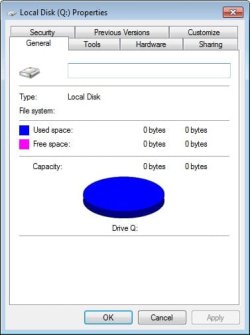
Ok, here's the thing. I gotta drive C. I gotta drive D. My CD drive is E. And my flash drive is F. Within the last 6 hours, a drive Q pops up. I have no idea where it came from. It's an unaccessible 0 byte drive. How can I get rid of it? :confused:
 

My Computer

Computer Manufacturer/Model Number
Dell Dimension E521
OS
Windows 7 Home Premium - 32-bit Version
CPU
AMD Sempron 3400+ running at 1.8GHz
Motherboard
Dell Inc 0HK980 A01
Memory
4GB Total Physical DDR2 SDRAM; 3.44GB recognized by Windows
Graphics Card(s)
NVIDIA GeForce 6150
Sound Card
SigmaTEL
Monitor(s) Displays
Dell E176 Flat Panel
Screen Resolution
1280x1024
Hard Drives
Western Digital 74.5GB (main system drive)
Seagate FreeAgent 1TB USB
PSU
I don't know...Dell, maybe?
Case
MiniTower
Cooling
Umm...a fan.
Keyboard
Dell Standard 104-key
Mouse
Kingston One-button USB
Internet Speed
1.5Mbits (maximum)
Is it a virtual drive, like a CD drive? Did you recently install any software?
 

My Computer

Computer Manufacturer/Model Number
Custom
OS
Windows 7 Professional x64
CPU
Intel i7 2600K OC'd @ 4620 MHz
Motherboard
Asus P8Z68-V Pro
Memory
16GB GSkill Sniper 2133 Mhz (4x4GB)
Graphics Card(s)
EVGA GeForce GTX 480 SuperClocked+
Sound Card
Realtek High Definition Audio
Monitor(s) Displays
2x Acer S273HLbmii 27"
Screen Resolution
2 x 1920x1080
Hard Drives
64GB Crucial M4 SSD

Storage: Hitachi 1TB 5400RPM, Samsung 1.5TB 5400RPM
PSU
Corsair HW Series 750w (modular)
Case
Cooler Master HAF 932 Advanced Blue Edition
Cooling
CM Hyper 212+ CPU cooler, 3x 230mm + 1x 140mm case fans
Keyboard
Logitech MK320 (wireless)
Mouse
Logitech MK320 (wireless)
Internet Speed
30 Mb/s : 2 Mb/s
Is it a virtual drive, like a CD drive?

No.

Did you recently install any software?

Programs currently installed:

  • Adobe Flash Player 10
  • AvG Free 9.0
  • Belarc Advisor 8.1
  • IrfanView 4.25
  • Microsoft Office 2010 Beta
  • Microsoft Visual C++ 2005 Redistributable (which was apparently installed by Windows Update)
  • MozBackup 1.4.9
  • Mozilla Firefox 3.5.6
  • Revo Uninstaller 1.85
 

My Computer

Computer Manufacturer/Model Number
Dell Dimension E521
OS
Windows 7 Home Premium - 32-bit Version
CPU
AMD Sempron 3400+ running at 1.8GHz
Motherboard
Dell Inc 0HK980 A01
Memory
4GB Total Physical DDR2 SDRAM; 3.44GB recognized by Windows
Graphics Card(s)
NVIDIA GeForce 6150
Sound Card
SigmaTEL
Monitor(s) Displays
Dell E176 Flat Panel
Screen Resolution
1280x1024
Hard Drives
Western Digital 74.5GB (main system drive)
Seagate FreeAgent 1TB USB
PSU
I don't know...Dell, maybe?
Case
MiniTower
Cooling
Umm...a fan.
Keyboard
Dell Standard 104-key
Mouse
Kingston One-button USB
Internet Speed
1.5Mbits (maximum)
If you open the properties box, what does it say?
 

My Computer

Computer type
PC/Desktop
Computer Manufacturer/Model Number
LENOVO K450 @3.0GHZ
OS
64-bit Windows 8.1 Pro
CPU
Core(TM) i5 CPU 4330 Haswell @ 3.20GHz
Motherboard
LENOVO
Memory
12.00 GB
Graphics Card(s)
Intel(R) HD Graphics
Sound Card
Intel HD integtrated
Monitor(s) Displays
HP 25' ISP Monitor
Screen Resolution
1900/1020
Hard Drives
(1) ST1000DM003-1CH162 (2) Generic STORAGE DEVICE USB Device (3) Generic STORAGE DEVICE USB Device
Internet Speed
100mb down/10mb up
Ok, here's the thing. I gotta drive C. I gotta drive D. My CD drive is E. And my flash drive is F. Within the last 6 hours, a drive Q pops up. I have no idea where it came from. It's an unaccessible 0 byte drive. How can I get rid of it? :confused:
Its possible that its a virtual drive.
Are you using cloning software by any chance?
 

My Computer

Computer Manufacturer/Model Number
Custom Build
OS
Windows 7 7600 1 X64
CPU
AMD PHENOM II X 550 PROCESSOR 3.1 ghz
Motherboard
ASUS M4A78-TE
Memory
Corsair 4 gig ddr 3
Graphics Card(s)
ati radeon 3300
Sound Card
ati hd
Monitor(s) Displays
syncmaster 2033sw
Screen Resolution
1600X900 60 hz refresh
Hard Drives
twin_seagates SATA's 1 TB & 500 Gig, hitachi_slimline 160 gig
PSU
antec_550 watt
Case
cooler master GLite
Cooling
stock_heat sink
Internet Speed
20mbs up/ 1.5mbs down
Other Info
favorite child "stewie"
favorite dog "brian"
Ok, here's the thing. I gotta drive C. I gotta drive D. My CD drive is E. And my flash drive is F. Within the last 6 hours, a drive Q pops up. I have no idea where it came from. It's an unaccessible 0 byte drive. How can I get rid of it? :confused:
Its possible that its a virtual drive.
Are you using cloning software by any chance?

Im thinking the same Adrian, I just can't remember which program installs it... :devil:
 

My Computer

Computer type
PC/Desktop
Computer Manufacturer/Model Number
LENOVO K450 @3.0GHZ
OS
64-bit Windows 8.1 Pro
CPU
Core(TM) i5 CPU 4330 Haswell @ 3.20GHz
Motherboard
LENOVO
Memory
12.00 GB
Graphics Card(s)
Intel(R) HD Graphics
Sound Card
Intel HD integtrated
Monitor(s) Displays
HP 25' ISP Monitor
Screen Resolution
1900/1020
Hard Drives
(1) ST1000DM003-1CH162 (2) Generic STORAGE DEVICE USB Device (3) Generic STORAGE DEVICE USB Device
Internet Speed
100mb down/10mb up
Ok, here's the thing. I gotta drive C. I gotta drive D. My CD drive is E. And my flash drive is F. Within the last 6 hours, a drive Q pops up. I have no idea where it came from. It's an unaccessible 0 byte drive. How can I get rid of it? :confused:
Its possible that its a virtual drive.
Are you using cloning software by any chance?

Im thinking the same Adrian, I just can't remember which program installs it... :devil:
I beleive it may be disk management. If I remember it uses "Virtual Disk Services" when called up.
 

My Computer

Computer Manufacturer/Model Number
Custom Build
OS
Windows 7 7600 1 X64
CPU
AMD PHENOM II X 550 PROCESSOR 3.1 ghz
Motherboard
ASUS M4A78-TE
Memory
Corsair 4 gig ddr 3
Graphics Card(s)
ati radeon 3300
Sound Card
ati hd
Monitor(s) Displays
syncmaster 2033sw
Screen Resolution
1600X900 60 hz refresh
Hard Drives
twin_seagates SATA's 1 TB & 500 Gig, hitachi_slimline 160 gig
PSU
antec_550 watt
Case
cooler master GLite
Cooling
stock_heat sink
Internet Speed
20mbs up/ 1.5mbs down
Other Info
favorite child "stewie"
favorite dog "brian"

Attachments

  • image0001.jpg
    image0001.jpg
    21.2 KB · Views: 14

My Computer

Computer Manufacturer/Model Number
Dell Dimension E521
OS
Windows 7 Home Premium - 32-bit Version
CPU
AMD Sempron 3400+ running at 1.8GHz
Motherboard
Dell Inc 0HK980 A01
Memory
4GB Total Physical DDR2 SDRAM; 3.44GB recognized by Windows
Graphics Card(s)
NVIDIA GeForce 6150
Sound Card
SigmaTEL
Monitor(s) Displays
Dell E176 Flat Panel
Screen Resolution
1280x1024
Hard Drives
Western Digital 74.5GB (main system drive)
Seagate FreeAgent 1TB USB
PSU
I don't know...Dell, maybe?
Case
MiniTower
Cooling
Umm...a fan.
Keyboard
Dell Standard 104-key
Mouse
Kingston One-button USB
Internet Speed
1.5Mbits (maximum)
Apparently, either Office or C++ was the problem. Not sure which, but I uninstalled them both, and the phantom disappeared.
 

My Computer

Computer Manufacturer/Model Number
Dell Dimension E521
OS
Windows 7 Home Premium - 32-bit Version
CPU
AMD Sempron 3400+ running at 1.8GHz
Motherboard
Dell Inc 0HK980 A01
Memory
4GB Total Physical DDR2 SDRAM; 3.44GB recognized by Windows
Graphics Card(s)
NVIDIA GeForce 6150
Sound Card
SigmaTEL
Monitor(s) Displays
Dell E176 Flat Panel
Screen Resolution
1280x1024
Hard Drives
Western Digital 74.5GB (main system drive)
Seagate FreeAgent 1TB USB
PSU
I don't know...Dell, maybe?
Case
MiniTower
Cooling
Umm...a fan.
Keyboard
Dell Standard 104-key
Mouse
Kingston One-button USB
Internet Speed
1.5Mbits (maximum)
Back
Top