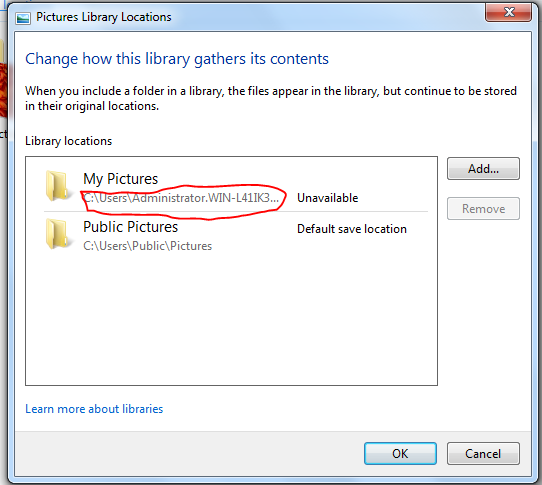
My pictures, which should be located at "C:\Users\Jake\My Pictures" don't show up in library. I tried adding it to the library manually, but every time I do that and close the window showing which folders are included, and I click on pictures, they don't show up. Instead it shows this folder (even though I've removed it, it keeps coming back.)
(Notice it says unavailable)
My Computer
At a glance
Microsoft Windows 7 Professional x64Intel(R) Celeron(R) CPU N2830 @ 2.16GHz4.00 GBIntel(R) HD Graphics
Computer type
Laptop
Computer Manufacturer/Model Number
Lenovo 20390
OS
Microsoft Windows 7 Professional x64
CPU
Intel(R) Celeron(R) CPU N2830 @ 2.16GHz
Motherboard
LENOVO Lenovo B40-30
Memory
4.00 GB
Graphics Card(s)
Intel(R) HD Graphics
Sound Card
(1) Realtek Bluetooth A2dp Device (2) Realtek Bluetooth A2
Win-7-Pro64bit 7-H-Prem-64biti7-5930K 2nd i9-9940x both water blocked VRM'...Trident-z 3200C14 2nd Trident-z 3600C16EVGA 1080ti ftw3 2nd Titan Xp both water blocked
Computer type
PC/Desktop
Computer Manufacturer/Model Number
Custom assembled by me :}
OS
Win-7-Pro64bit 7-H-Prem-64bit
CPU
i7-5930K 2nd i9-9940x both water blocked VRM's too
2nd ASUS X299 Apex/Intel i9-9940x with Custom water loop/7H-Prem-x64/Corsair 450D case/Ram Trident-z 3600C16 4x8gb / Samsung970Evo plus 500gb SSD/Dual ssd EZ swap evo/PSU EVGA SuperNova 1200w-P2 80+Platinum/GPU Titan Xp /8-ML-140 on push-pull on 2-280GTX rads