My screen flips sideways or upside down :(

katey

New member
Local time
5:30 PM
Messages
3
Hallo. Why does my screen flip sideways or upside down when I press ^A-Left, right or down? Where can I disable this behaviour? I need to remap those combinations in my text editor and this is messing my workflow up :mad:
 

My Computer My Computer

Computer type
PC/Desktop
OS
win7
This may be caused by a graphical program installed on the computer.

Download and run CCleaner

Click the Tools button on the left, and then click Uninstall.

Click Save to text file, save it on the Desktop.

Attach the file on your next post
 

My Computer My Computer

Computer type
PC/Desktop
Computer Manufacturer/Model Number
Novatech iRush Pro
OS
Windows 7 Ultimate SP1 - 64 Bit
CPU
Intel Core i5 2500k
Motherboard
Foxconn H67M-S/H67M-V/H67
Memory
2x4GB DDR3 1333Hz
Graphics Card(s)
Ati Radeon 6770
Sound Card
None
Monitor(s) Displays
Samsung S22B150
Screen Resolution
1920x1080
Hard Drives
2x500GB
PSU
500W
Cooling
Fan
Keyboard
HP KU0316
Mouse
Wireless Logitech M185
Internet Speed
20MB/s
Antivirus
Avast Free
Browser
Google Chrome
Other Info
Logitech M185 Mouse
KU-M316 Keyboard
that's a feature of your video card whenever I press ctrl+alt and one of the arrow keys the monitor goes from landscape mode to portrait or vice versa you will have to look in the settings of your monitor or the settings of your video card I have three computers and they all do the same thing but it has never been a problem for me . I used to use it on my old dell xp machine and really liked it because I could turn the monitor around it was great for reading web pages

edit
I would be interested to find out how many of the readers of sevenforums have this ability some video do this while others don't if you press ctrl + alt and any of the arrow keys will change the display to get it back to normal press ctrl + alt and the up arrow even my laptop will do this

 
Last edited:

My Computer My Computer

Computer type
PC/Desktop
Computer Manufacturer/Model Number
Compac
OS
Microsoft Windows 7 Ultimate 32-bit 7601
CPU
Intel(R) Pentium(R) Dual CPU E2160 @ 1.80GHz
Motherboard
MSI Boston
Memory
4.00 GB
Graphics Card(s)
(1) VNC Mirror Driver (2) Intel(R) G33/G31 Express Chipset
Sound Card
Disabled
Monitor(s) Displays
Headless
Screen Resolution
1280 x 960 x 32 bits (4294967296 colors) @ 60 Hz
Hard Drives
ST3320820AS ATA Device
Keyboard
Headless
Mouse
Headless
Antivirus
Malwarebytes pro
Other Info
Also
Windows 8.1 Laptop and Desktop both Acer
First you need to follow Infinite's post in order to know your system specs. However, in the mean time I'll assume you have Intel integrated graphics.

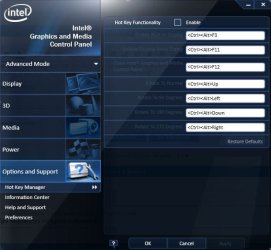
To disable this "^A-Left, right or down?", you need to do the following:

1.) Right click on your desktop and select graphics properties,
Untitled.jpg
2.) On the Intel graphics control panel, click "options and support"
3. ) Make sure that the "Hot Key Functionality is unchecked"

See this screenshot:

Capture.JPG
 

My Computer My Computer

Computer type
Laptop
Computer Manufacturer/Model Number
Dell Optiplex SX270, Lenovo Z470
OS
Windows 7 Professional x64 SP1
CPU
Intel® Pentium® 4 @ 2.26 GHz, Intel Core i7-2670QM @ 2.20 GH
Motherboard
Dell, Lenovo
Memory
512MB Dual channel DDR SDRAM @ 400MHz 2.5-3-3-7, 8 GB DDR3
Graphics Card(s)
Intel 82865G, Nvidia GeForce 520M Graphics
Sound Card
SoundMax Integrated Audio, Integrated HD Audio
Monitor(s) Displays
LG W1952
Screen Resolution
1440x900, 1366 x 768
Hard Drives
40 GB 2.5" IDE 4200 RPM HDD, 500 GB 5400 RPM Sata 1.5 + 32 GB SSD
PSU
Dell 145 Watt, Lenovo 120 Watt Power Adapter
Case
Optiplex SX270 Small Form Factor, Laptop
Cooling
Dell Proprietary Air Cooling, Stock laptop cooling
Keyboard
Dell SK-8125 USB Keyboard
Mouse
Dell PS/2 2 button ball mouse with wheel scroll
Internet Speed
300 Mbit down / 20 Mbps up Time Warner Cable
Antivirus
MSE, Malwarebytes Scanner
Browser
Internet (Aizawa) Explorer 11
Other Info
Running Windows Server 2012 Datacenter on a virtual machine to run Metro Apps.
Back
Top