
My Task Manager Doesn't Show RAM Usage each Program.

RingofCola

New member
Local time
7:11 AM
Messages
3
Location
Earth
See the picture
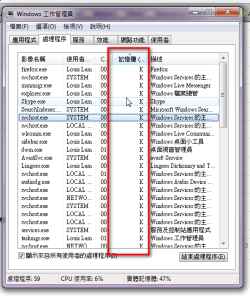
How can I fix this?
Thanks!
 

Attachments

  • 2010-01-20_163552.png
    2010-01-20_163552.png
    22.2 KB · Views: 191

My Computer

Computer Manufacturer/Model Number
Dell Vostro 1500
OS
Windows 7 Ultimate 32bit
CPU
Intel Core 2 Duo T8100
Memory
2x 1GB DDR2-667
Graphics Card(s)
nVidia 8600MGT 256 DDR2 Ram
Screen Resolution
1280 x 800 @ 32bit
Hard Drives
250GB SATA 5200 rpm
Internet Speed
10 Mbps
Hello RingofCola, and welcome to Seven Forums.

You can also check to see if Resource Monitor will show you this under the Memory tab instead.

Hope this helps,
Shawn
 

My Computer

Computer type
PC/Desktop
Computer Manufacturer/Model Number
Self built custom
OS
64-bit Windows 11 Pro for Workstations
CPU
Intel i7-8700K OC'd to 5 GHz
Motherboard
ASUS ROG Maximus XI Formula Z390
Memory
64 GB (4x16GB) G.SKILL TridentZ RGB DDR4 3600 MHz
Graphics Card(s)
ASUS ROG-STRIX-GTX1080TI-O11G-GAMING
Sound Card
Integrated
Monitor(s) Displays
2 x Samsung Odyssey G7 27"
Screen Resolution
2560x1440
Hard Drives
1TB Samsung 990 PRO M.2,
4TB Samsung 990 PRO PRO M.2,
TerraMaster F8 SSD Plus NAS
PSU
Seasonic Prime Titanium 850W
Case
Thermaltake Core P3
Cooling
Corsair Hydro H115i
Keyboard
Logitech wireless K800
Mouse
Logitech MX Master 4
Internet Speed
2 Gb/s Download and 100 Mb/s Upload
Antivirus
Malwarebyte Anti-Malware Premium
Browser
Google Chrome
Other Info
Logitech Z625 speaker system,
Logitech BRIO 4K Pro webcam,
HP Color LaserJet Pro MFP M477fdn,
APC SMART-UPS RT 1000 XL - SURT1000XLI,
Galaxy S23 Plus phone
Hello RingofCola, and welcome to Seven Forums.

You can also check to see if Resource Monitor will show you this under the Memory tab instead.

Hope this helps,
Shawn
Thanks!
However, Resource Monitor is not convenient for me.
I want to fix the problem, I do not want replacement.
 

My Computer

Computer Manufacturer/Model Number
Dell Vostro 1500
OS
Windows 7 Ultimate 32bit
CPU
Intel Core 2 Duo T8100
Memory
2x 1GB DDR2-667
Graphics Card(s)
nVidia 8600MGT 256 DDR2 Ram
Screen Resolution
1280 x 800 @ 32bit
Hard Drives
250GB SATA 5200 rpm
Internet Speed
10 Mbps
Well, you can restart the computer to see if it was just a glitch and work properly afterwards.

If not, then run a sfc /scannow command to see if it find any corrupted system files that may be responsible. If all else fails, then a repair install should be able to fix it.
 

My Computer

Computer type
PC/Desktop
Computer Manufacturer/Model Number
Self built custom
OS
64-bit Windows 11 Pro for Workstations
CPU
Intel i7-8700K OC'd to 5 GHz
Motherboard
ASUS ROG Maximus XI Formula Z390
Memory
64 GB (4x16GB) G.SKILL TridentZ RGB DDR4 3600 MHz
Graphics Card(s)
ASUS ROG-STRIX-GTX1080TI-O11G-GAMING
Sound Card
Integrated
Monitor(s) Displays
2 x Samsung Odyssey G7 27"
Screen Resolution
2560x1440
Hard Drives
1TB Samsung 990 PRO M.2,
4TB Samsung 990 PRO PRO M.2,
TerraMaster F8 SSD Plus NAS
PSU
Seasonic Prime Titanium 850W
Case
Thermaltake Core P3
Cooling
Corsair Hydro H115i
Keyboard
Logitech wireless K800
Mouse
Logitech MX Master 4
Internet Speed
2 Gb/s Download and 100 Mb/s Upload
Antivirus
Malwarebyte Anti-Malware Premium
Browser
Google Chrome
Other Info
Logitech Z625 speaker system,
Logitech BRIO 4K Pro webcam,
HP Color LaserJet Pro MFP M477fdn,
APC SMART-UPS RT 1000 XL - SURT1000XLI,
Galaxy S23 Plus phone
Well, you can restart the computer to see if it was just a glitch and work properly afterwards.

If not, then run a sfc /scannow command to see if it find any corrupted system files that may be responsible. If all else fails, then a repair install should be able to fix it.
Unfortunately, it's not work too....:cry:
 

My Computer

Computer Manufacturer/Model Number
Dell Vostro 1500
OS
Windows 7 Ultimate 32bit
CPU
Intel Core 2 Duo T8100
Memory
2x 1GB DDR2-667
Graphics Card(s)
nVidia 8600MGT 256 DDR2 Ram
Screen Resolution
1280 x 800 @ 32bit
Hard Drives
250GB SATA 5200 rpm
Internet Speed
10 Mbps
Try double click on the white task manager window frame.
 

My Computer

Computer Manufacturer/Model Number
HP, Dell, Gateway, Toshiba - 4 laptops and 2 desktops
OS
Vista, Windows7, Mint Mate, Zorin, Windows 8
CPU
from 1.6GHz Duo to i7
Monitor(s) Displays
2x HP w2207
Hard Drives
5x HDD, 7x SSD, 12x Externals
Keyboard
with trackball - no mices
Mouse
Trackball mice
Internet Speed
DSL 6000
Yeah, I was thinking that maybe the column is too narrow.. try to widen the column and see if that fixes it. If not,, either of Brinks posts should do.
 

My Computer

Computer Manufacturer/Model Number
Self Built
OS
Win 7 Ultimate 32bit
CPU
C2D E6600 2.4Ghz
Motherboard
Intel D965WH
Memory
4G Kingston KHX5400D2
Graphics Card(s)
EVGA GTX 570 HD SC (012-P3-1573-KR)
Sound Card
On-Board
Monitor(s) Displays
Samsung 226BW
Screen Resolution
1680 x 1050
Hard Drives
2 x 250 Seagate Barracuda
2 x 500 Seagate Barracuda (Raid1)
PSU
Corsair TX750W
Case
In-Win C589
Cooling
Stock Intel Cooling
Back
Top