
my themes problem in Personalization

cyletech

New member
Local time
5:47 AM
Messages
54
Location
Islamic Republic of Iran
Hi everybody,

I think if we use troubleshooting tools for unnecessary times it will be BAD for our system. i two times changed my windows for this problem. i do not know does troubleshooting do that with my windows settings or does windows update do it? I have installed all updates for windows 7 ultimate (64-bit) and before i use troubleshooting tonight, the personalization > my themes worked correctly but now it does not work correctly. i can change my theme and i can delete them but there is a custom theme that show the corrent theme and i can not delete it. i select delete for that theme but it does not work. i got a screenshot please see.

Thank you,
Alireza
 

Attachments
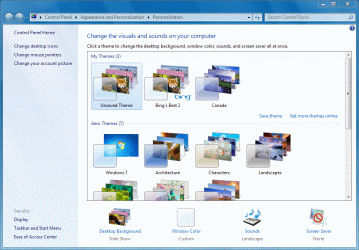
  • My Themes.GIF
    My Themes.GIF
    142.4 KB · Views: 100

My Computer

Computer Manufacturer/Model Number
Microsoft Corporation
OS
Windows 7 Ultimate (64-bit)
CPU
AMD athlon(tm) 64 X2 Dual Core Processor 5000+
Graphics Card(s)
NVIDIA GeForce 8800 GTX

My Computer

Computer Manufacturer/Model Number
Apple Macbook Pro (April 2009)
OS
W7 Ult. x64 | OS X
CPU
Intel Mobile Core 2 Duo 2.93Ghz [T9800 Penryn]
Motherboard
NVIDIA nForce 730i Rev. B1 [Mac-F2268EC8 (U2E1)]
Memory
4096MB Samsung DDR3 Dual Channel [PC3-8500F 1066Mhz]
Graphics Card(s)
NVIDIA GeForce 9600M GT 512MB [G96M Rev. C1]
Sound Card
SB X-Fi Surround 5.1 USB | Onboard Realtek (Disabled)
Monitor(s) Displays
Acer x223wbd 22" | Apple Anti-Glare 17" (Disabled)
Screen Resolution
{Current} 1440x900 {Acer} 1680x1050 {Apple} 1920x1200
Hard Drives
{Internal}
Seagate Momentus 320GB 2.5" 7200RPM [ST9320421AS]

{Externals}
LaCie 320GB USB 2.0 HDD [301284UR]
LaCie 750GB USB 2.0 FW400 eSATA HDD [301314U]
LaCie 1TB USB 2.0 HDD [301304UR]
PSU
Magsafe
Case
Aluminum/Unibody (MBP52)
Cooling
2 x 6000 RPM Fans
Keyboard
Logitech G-15v2 [PN 920-000379]
Mouse
Logitech G-9 [PN 910-000338]
Internet Speed
12Mbps/2.5Mbps w/ 24Mbps Speed Boost [Comcast]
Other Info
Logitech X-540 Speakers [PN 970223-0122]
Sennheiser PC-151 Headset

My Computer

Computer Manufacturer/Model Number
Microsoft Corporation
OS
Windows 7 Ultimate (64-bit)
CPU
AMD athlon(tm) 64 X2 Dual Core Processor 5000+
Graphics Card(s)
NVIDIA GeForce 8800 GTX
Are you talking about that unsaved theme?
Try selecting one of your aero themes, then deleting that unsaved one.
If that's not what you want could you explain more please.
 

My Computer

Computer type
PC/Desktop
Computer Manufacturer/Model Number
Self Built
OS
Win 10 Pro x64
CPU
Intel I5-2500K @3.3GHz
Motherboard
Asrock P67 Extreme4
Memory
16GB G.Skill Ripjaws X (4x4GB)
Graphics Card(s)
EVGA GeForce 750 Ti SC 2GB
Sound Card
ASUS Xonar DG 5.1 Channels 24-bit 96KHz PCI Interface Sound
Monitor(s) Displays
auria eq2367
Screen Resolution
1920 x 1080
Hard Drives
250GB Samsung 850 EVO SSD
1TB WD Blue
1TB Hitachi
PSU
SeaSonic X 650W 80 Plus Gold
Case
Corsair Obsidian 750D
Cooling
Corsair H60, Three 140mm case fans
Keyboard
Logitech Wireless Keyboard K520
Mouse
Logitech Wireless Mouse M310
Internet Speed
Wave Broadband ~ 100 dn 5 up
Antivirus
Windows Defender, Malwarebytes Premium
Browser
Edge, IE11, Chrome
Other Info
Laptop specs: HP g7-1365dx /
CPU: AMD A6-3420M APU with Radeon(tm) HD Graphics /
RAM: Crucial 8Gb (2x4Gb) /
SSD: Crucial M4-CT128M4SSD2 ATA Device/ FW 000F /
GFX: AMD Radeon HD 6520G /
OS: Windows 10 Pro x64
Yes, i am talking about that unsaved theme. i did not select it for my current theme. if i select any themes that will be set on unsaved theme! and when i want to delete it, it will get a copy of itself and send it to recycle bin but that original unsaved theme is exists.

~ I restore a point to before using the troubleshooting, the problem is fixed now but i want to know why when i use troubleshooting to fix exist problems, it break my windows?
 

My Computer

Computer Manufacturer/Model Number
Microsoft Corporation
OS
Windows 7 Ultimate (64-bit)
CPU
AMD athlon(tm) 64 X2 Dual Core Processor 5000+
Graphics Card(s)
NVIDIA GeForce 8800 GTX
Back
Top