
- Local time
- 8:42 PM
- Messages
- 81
I am building a new PC. I had a problem and the MB manufacture asked me to take the board out of the case and run the MB on cardboard so any grounding issue could be eliminated.
My Win7 Ult 64b OS is installed on C: and that is an SSD. I moved my User folder to B: and everything worked fine before I took the MB out.
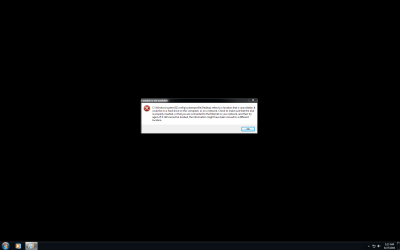
I took the MB out and only hooked up C: and booted the PC. Please refer to the attached screen shot of the error message I got. I assume that this is because B: was not hooked up and that is were my user folder was. The problem is that Win7 can not find information that it is looking for when trying to load the desktop for my user name.
Anyway I got done troubleshooting and put everything back together, all drives are hooked up and I get the same error message. I created another user and Win7 will go into that new user just fine, but will not go into my user name without getting the error message. I started searching and I noticed that B:Users\MyName\AppData does not show up in Windows Explorer. B:\Users\MyName\MyDocuments is there along with other folders, but the AppData folder does not show up. I searched the HD for a folder that I new was in AppData and the Win7 search function finds it and I can access it so the data is there.
Does anyone know how I can get Windows Explorer to again display/recognize the B:\Users\MyName\AppData folder. If not then it looks like I am going to have to just reinstall Win7 and start from scratch.
My Win7 Ult 64b OS is installed on C: and that is an SSD. I moved my User folder to B: and everything worked fine before I took the MB out.
I took the MB out and only hooked up C: and booted the PC. Please refer to the attached screen shot of the error message I got. I assume that this is because B: was not hooked up and that is were my user folder was. The problem is that Win7 can not find information that it is looking for when trying to load the desktop for my user name.
Anyway I got done troubleshooting and put everything back together, all drives are hooked up and I get the same error message. I created another user and Win7 will go into that new user just fine, but will not go into my user name without getting the error message. I started searching and I noticed that B:Users\MyName\AppData does not show up in Windows Explorer. B:\Users\MyName\MyDocuments is there along with other folders, but the AppData folder does not show up. I searched the HD for a folder that I new was in AppData and the Win7 search function finds it and I can access it so the data is there.
Does anyone know how I can get Windows Explorer to again display/recognize the B:\Users\MyName\AppData folder. If not then it looks like I am going to have to just reinstall Win7 and start from scratch.
Attachments
My Computer
- OS
- Win7 Ult 64b
- CPU
- i7 950
- Motherboard
- P6T Deluxe v2
- Memory
- Mushkin Redline #998691 DDR3 1600MHz @ 6-7-6-18
- Graphics Card(s)
- BFG GTX 285OCFU
- Monitor(s) Displays
- Asus VW266H
- Hard Drives
- Seagate 7,200 RPM 750GB
WD VR 10,000 RPM 300GB
WD VR 10,000 PPM 600GB
- PSU
- Corsair 850TX
- Case
- HAF-932
- Cooling
- TRUE Rev C w/ Delta FFB1212EH-PWM Fan

