My Window DISAPEARED... it is in the tile display!

no1ninja

New member
Local time
1:38 PM
Messages
21
My window to dvbdream, a sattelite application, has disapeared. I have dual display.


I maximized it, than it corupted my display, but was still running, i minimized it and now it is in limbo.... somwhere in never never land.


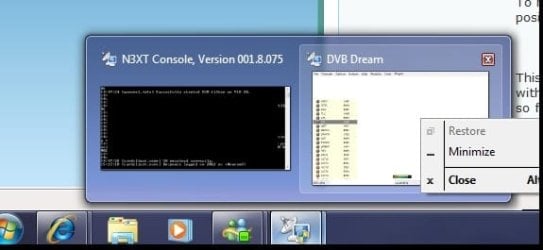
when I mouse over the app in the taskbar, I can see it trucking along in the mini-tile working just fine, but when i click to show nothing happens.

To make things worse, the app remembers its state, so that when i kill it it restarts in the same neverland position.


This is so annoying, how do I physically get the app to move, or give it new start values? I could do this with XP, in win7 I only have the option of mimize and restore no move. argggggghhhhhhhhhhhhh.... so frusrted!
 

My Computer My Computer

At a glance

win7
OS
win7
Hi, welcome to the forums.

Have you somehow changed the 'Projector' settings to display only on 1 display?

Try pressing WIN+P and change the Projector settings.

Hope this helps :)


OS
 

My Computer My Computer

At a glance

Windows 7 Ultimate x64AMD Sempron Dual Core3GBNVIDIA GeForce 6150SE nForce 430
Computer Manufacturer/Model Number
Compaq Desktop
OS
Windows 7 Ultimate x64
CPU
AMD Sempron Dual Core
Memory
3GB
Graphics Card(s)
NVIDIA GeForce 6150SE nForce 430
Screen Resolution
1024x768
Hard Drives
150GB Sata
Also, if the other monitor has timed out, then you will need to 'nudge' it active again :p
 

My Computer My Computer

At a glance

Windows 7 Ultimate x64AMD Sempron Dual Core3GBNVIDIA GeForce 6150SE nForce 430
Computer Manufacturer/Model Number
Compaq Desktop
OS
Windows 7 Ultimate x64
CPU
AMD Sempron Dual Core
Memory
3GB
Graphics Card(s)
NVIDIA GeForce 6150SE nForce 430
Screen Resolution
1024x768
Hard Drives
150GB Sata
no its not the projection, both displays are working just fine, i can move windows between them, its just that one window has lost its start position.


I know i can change it in the registry, but i shouldn't have to there has to be an easier way.


how do i show the window? It thinks its maximized and playing in one of the screens when it is not. I don't want to just minimize it as that does nothing for me, (notice the options i have), i want to move it, or resize it.
 

Attachments

  • window.jpg
    window.jpg
    19.6 KB · Views: 20

My Computer My Computer

At a glance

win7
OS
win7
here is the thing, i can chose to minimize, than the icon apears to my right, but that does nothing for me other than give me the option of "Show" when I chose that nothing happens, but what u see above.

I can exit the app and restart it, the problem is that its saved its windows stated to be outofbounds somhow and i can't see the applicaiton.


so i can start it and run it in the background all i want, but that is not what I want I want to SEE IT. IT was working fine, until the windows postion/state got messed up.


How do I change that? Please people.
 

My Computer My Computer

At a glance

win7
OS
win7
oh... and i can see it running just fine when i mouse over it, in the little window tile.
 

My Computer My Computer

At a glance

win7
OS
win7
Can you try WIN+[direction key] for me please?

Left/Right = Orientation
Up = Maximize
Down = Restore/windowed to middle of screen
 

My Computer My Computer

At a glance

Windows 7 Ultimate x64AMD Sempron Dual Core3GBNVIDIA GeForce 6150SE nForce 430
Computer Manufacturer/Model Number
Compaq Desktop
OS
Windows 7 Ultimate x64
CPU
AMD Sempron Dual Core
Memory
3GB
Graphics Card(s)
NVIDIA GeForce 6150SE nForce 430
Screen Resolution
1024x768
Hard Drives
150GB Sata
...its saved its windows stated to be outofbounds somhow and i can't see the applicaiton...
The secret to resetting it may be - Where does it save this information to? Is it in the Program Files folder in an ini file, or the registry?
 
YESSSSS!!!!!!!!!!!!!!!!!!!!!! SUCCESSS Window position restored!

Orbital Shark's advice hit the nail on the head WIN+Arrow key


Thank you so much, this was so annoying, you saved me from smashing personal items.
 

My Computer My Computer

At a glance

win7
OS
win7
Excellent, glad to hear it :D
 

My Computer My Computer

At a glance

Windows 7 Ultimate x64AMD Sempron Dual Core3GBNVIDIA GeForce 6150SE nForce 430
Computer Manufacturer/Model Number
Compaq Desktop
OS
Windows 7 Ultimate x64
CPU
AMD Sempron Dual Core
Memory
3GB
Graphics Card(s)
NVIDIA GeForce 6150SE nForce 430
Screen Resolution
1024x768
Hard Drives
150GB Sata
Back
Top