
My Windows 8 Concept

dw96

Darkness Warrior ['96]
Pro User
VIP
Local time
8:54 AM
Messages
367
Location
Bulgaria/EU
dw96 said:
Not much to say here. I posted a comment on "If only Windows 8 could look like this..." saying that the concept shown sucks so I made my own. If you want the .psd , please send me a PM. :)
I used the "Century Gothic" font for everything and I added some visuals. Surely Microsoft would never make their OS look like that, but it's OK to have dreams, isn't it?
So here it is:
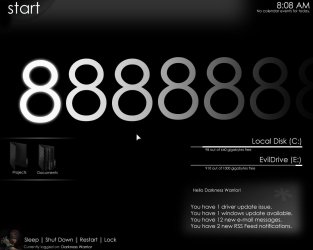
Windows Eight.jpg
   Note
Original post: TheEightForums.com
 

My Computer

Computer type
PC/Desktop
Computer Manufacturer/Model Number
Multirama PC Expert [Bulgaria]
OS
Windows 7 Home Premium [64-Bit]
CPU
Intel Core 2 Quad CPU Q8200 @ 2.33 GHz
Motherboard
GIGABYTE GA-G31M-S2C
Memory
4094 MB DDR2
Graphics Card(s)
SAPPHIRE Radeon HD 6970 (2 GB VRAM)
Sound Card
Realtek ALC883 @ Intel 82801GB ICH7 - High Definition Audio
Monitor(s) Displays
Samsung SyncMaster BX2235 [21.5" LCD with LED Backlight]
Screen Resolution
1920x1080
Hard Drives
Hitachi HDT721075SLA360 - 750 GB
PSU
Cooler Master GX750 - 750W
Case
Multirama (Black / 2010 Revision)
Cooling
Stock + Cooler Master
Keyboard
Logitech G510 (Gaming Keyboard)
Mouse
Razer Lachesis (4000 DPI, Blue Version)
Internet Speed
Vivacom Optical [100 Mbps]
Browser
Chrome [Windows]
its not bad. just not concepted very well, if you think about it.... most of the stuff there is very dark, and unprofesional, i mean, personally, id love that type of envoirnment to work in. but you still have to remember, that children and adults will have to use this for work... this is a great for artists and designers.. it all just seems to big, and lost focus of the average american family computer.
 

My Computer

OS
windows 7
I see what's your point. Do pay more attention, though:
dw96 said:
Surely Microsoft would never make their OS look like that, but it's OK to have dreams, isn't it?
 

My Computer

Computer type
PC/Desktop
Computer Manufacturer/Model Number
Multirama PC Expert [Bulgaria]
OS
Windows 7 Home Premium [64-Bit]
CPU
Intel Core 2 Quad CPU Q8200 @ 2.33 GHz
Motherboard
GIGABYTE GA-G31M-S2C
Memory
4094 MB DDR2
Graphics Card(s)
SAPPHIRE Radeon HD 6970 (2 GB VRAM)
Sound Card
Realtek ALC883 @ Intel 82801GB ICH7 - High Definition Audio
Monitor(s) Displays
Samsung SyncMaster BX2235 [21.5" LCD with LED Backlight]
Screen Resolution
1920x1080
Hard Drives
Hitachi HDT721075SLA360 - 750 GB
PSU
Cooler Master GX750 - 750W
Case
Multirama (Black / 2010 Revision)
Cooling
Stock + Cooler Master
Keyboard
Logitech G510 (Gaming Keyboard)
Mouse
Razer Lachesis (4000 DPI, Blue Version)
Internet Speed
Vivacom Optical [100 Mbps]
Browser
Chrome [Windows]
I think more of the text needs to be some sort of gray, right now there is too much text that is white, thus not enough contrast. I would also experiment with different kinds of usage on the font, like bold, italics, uppercase, or small caps for certain things. I think most typography folks would rather see Futura or Avant Garde used instead of Century Gothic, since its pretty much based on those fonts.

I might sprinkle a few grayish icons for a few other things and make the timeclock a graphical one http://www.todayandtomorrow.net/wp-content/uploads/2009/06/on-time_clock_1.jpg then there wouldnt be as much text on the screen. The menu on the bottom left wouldnt need to be there and could just come up when the user clicks on it, or perhaps the avatar and the avatar would bring up the "start" so that could go away also, making it super clean.

Nice concept :)
 

My Computer

Computer Manufacturer/Model Number
custom built
OS
Windows 7 RC 64bit
CPU
amd
Motherboard
msi
Memory
2gb
Graphics Card(s)
nvidia
Sound Card
audigy 2 zs
Monitor(s) Displays
21" lcd widescreen
Hard Drives
300gb in 3 partitions (1 for winxp, 1 for win7-64, and 1 for data)
Keyboard
old HP
Mouse
5 button
Internet Speed
cable
Other Info
xpmode installed and working :)
dualbooting with xp pro on same hdd
I think more of the text needs to be some sort of gray, right now there is too much text that is white, thus not enough contrast. I would also experiment with different kinds of usage on the font, like bold, italics, uppercase, or small caps for certain things. I think most typography folks would rather see Futura or Avant Garde used instead of Century Gothic, since its pretty much based on those fonts.

I might sprinkle a few grayish icons for a few other things and make the timeclock a graphical one http://www.todayandtomorrow.net/wp-content/uploads/2009/06/on-time_clock_1.jpg then there wouldnt be as much text on the screen. The menu on the bottom left wouldnt need to be there and could just come up when the user clicks on it, or perhaps the avatar and the avatar would bring up the "start" so that could go away also, making it super clean.

Nice concept :)

Thanks ;)
Some people had thought that Windows Seven will have an animated start menu. That was at the time when windows seven concepts were made and we had no clue of that the OS would really be named "Seven" and not "Vienna". The menu style, though, is incredibly tough to explain. It's just that everything on the screen disappears, we get a fading "Start" text and we could scroll through our items, games, programs and files in a cool stylish environment. To say the least, the start menu will be kind of like a media center, only it will be called "Start Center" or "Start 3D"... Who knows. Maybe someone will create a windows program that can mod your system files to make the start menu look 'n' act EXACTLY like that. What if we get that menu in Windows 8, actually? It would kick butt! And since you complained about the start button location, then maybe that "User Shut Down" panel can go in the bottom of the start menu when it is opened. Did you get all that? Surely you didn't. I'm going to make more concepts like that or at least modify this one, but right now I'm too lazy! I've had a tough day at school and I think I deserve my one hour of "Prince of Persia 4"...
 

My Computer

Computer type
PC/Desktop
Computer Manufacturer/Model Number
Multirama PC Expert [Bulgaria]
OS
Windows 7 Home Premium [64-Bit]
CPU
Intel Core 2 Quad CPU Q8200 @ 2.33 GHz
Motherboard
GIGABYTE GA-G31M-S2C
Memory
4094 MB DDR2
Graphics Card(s)
SAPPHIRE Radeon HD 6970 (2 GB VRAM)
Sound Card
Realtek ALC883 @ Intel 82801GB ICH7 - High Definition Audio
Monitor(s) Displays
Samsung SyncMaster BX2235 [21.5" LCD with LED Backlight]
Screen Resolution
1920x1080
Hard Drives
Hitachi HDT721075SLA360 - 750 GB
PSU
Cooler Master GX750 - 750W
Case
Multirama (Black / 2010 Revision)
Cooling
Stock + Cooler Master
Keyboard
Logitech G510 (Gaming Keyboard)
Mouse
Razer Lachesis (4000 DPI, Blue Version)
Internet Speed
Vivacom Optical [100 Mbps]
Browser
Chrome [Windows]
If you do another concept, I would put it in Flash, so you can have the user interactivity to show it off properly rather than a screenshot. I'd be a lot more work, though.
 

My Computer

Computer Manufacturer/Model Number
custom built
OS
Windows 7 RC 64bit
CPU
amd
Motherboard
msi
Memory
2gb
Graphics Card(s)
nvidia
Sound Card
audigy 2 zs
Monitor(s) Displays
21" lcd widescreen
Hard Drives
300gb in 3 partitions (1 for winxp, 1 for win7-64, and 1 for data)
Keyboard
old HP
Mouse
5 button
Internet Speed
cable
Other Info
xpmode installed and working :)
dualbooting with xp pro on same hdd
If you do another concept, I would put it in Flash, so you can have the user interactivity to show it off properly rather than a screenshot. I'd be a lot more work, though.

Yes, I've thought about that and it is possible since I have the Adobe Creative Suite 4 Production Premium, which includes Flash CS4, but I know nothing about it yet. My zero flash knowledge isn't my biggest concern right now. I have other things one my hands. Maybe next time, eh... ;)
 

My Computer

Computer type
PC/Desktop
Computer Manufacturer/Model Number
Multirama PC Expert [Bulgaria]
OS
Windows 7 Home Premium [64-Bit]
CPU
Intel Core 2 Quad CPU Q8200 @ 2.33 GHz
Motherboard
GIGABYTE GA-G31M-S2C
Memory
4094 MB DDR2
Graphics Card(s)
SAPPHIRE Radeon HD 6970 (2 GB VRAM)
Sound Card
Realtek ALC883 @ Intel 82801GB ICH7 - High Definition Audio
Monitor(s) Displays
Samsung SyncMaster BX2235 [21.5" LCD with LED Backlight]
Screen Resolution
1920x1080
Hard Drives
Hitachi HDT721075SLA360 - 750 GB
PSU
Cooler Master GX750 - 750W
Case
Multirama (Black / 2010 Revision)
Cooling
Stock + Cooler Master
Keyboard
Logitech G510 (Gaming Keyboard)
Mouse
Razer Lachesis (4000 DPI, Blue Version)
Internet Speed
Vivacom Optical [100 Mbps]
Browser
Chrome [Windows]
I see what's your point. Do pay more attention, though:
dw96 said:
Surely Microsoft would never make their OS look like that, but it's OK to have dreams, isn't it?
yeah, i know, i guess i rolled a bit off topic, i do that at times, but i was trying to make the point... thats a great interface for designers, rather then your workers.
 

My Computer

OS
windows 7
Back
Top