My Windows folder takes 180giga in disk space!

Ramboboy

New member
Local time
11:22 AM
Messages
4
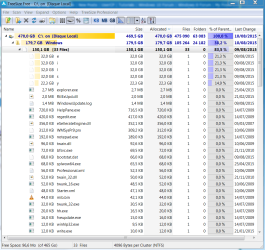
Hello, my Windows folder takes 180giga of disk space! I have weird files (called "y" ...) that ALWAYS grow up whenever I delete something these weird files grow up.... I tried everything I could to delete them and I can't! They're hidden +h and system +s ... Please I need help is this a virus? What is this ? How can I stop these files from growing and how can I delete them?

PIC :
https://gyazo.com/87f023e27eb5b007e24c6708215981b8

I already run malwarebytes anti malware and superantimalwares ....

Help appreciated thanks in advance
 

My Computer My Computer

At a glance

Win 7 Professional x647i 4790k32GB Corsair2x GTX 970
Computer type
PC/Desktop
Computer Manufacturer/Model Number
Custom build
OS
Win 7 Professional x64
CPU
7i 4790k
Motherboard
MSI
Memory
32GB Corsair
Graphics Card(s)
2x GTX 970
Monitor(s) Displays
Iiyama
Screen Resolution
4k
Hard Drives
1SSD 500giga Sandisk 2 TB Seagate & 3TB Seagate
Antivirus
Malwarebytes
Browser
Mozilla Firefox & Chrome
Fill out your system specs at the lower left of your posts so we know what you have under the hood.

Do you use Avast anti-virus?

Download and run Tree Size Free to see what's using space.

TreeSize Free - Quickly Scan Directory Sizes and Find Space Hogs

vssadmin list shadowstorage

Run the above command at a command prompt to find out how much space is being used by System Restore.
 

My Computer My Computer

At a glance

Windows 7 Home Premium SP1, 64-bitIntel Skylake i5-6600K, not overclocked8 GB HyperX DDR4-2666 (2 x 4 GB)none; graphics are integrated on CPU
Computer type
PC/Desktop
Computer Manufacturer/Model Number
Ignatz Special; 4 speed manual gearbox; factory air conditioning; one of one
OS
Windows 7 Home Premium SP1, 64-bit
CPU
Intel Skylake i5-6600K, not overclocked
Motherboard
AsRock Z170M Extreme 4, micro ATX
Memory
8 GB HyperX DDR4-2666 (2 x 4 GB)
Graphics Card(s)
none; graphics are integrated on CPU
Sound Card
onboard: Realtek ALC1150; external: USB Behringer UF0-202
Monitor(s) Displays
Dell S2340M 23 inch IPS
Screen Resolution
1600 x 900
Hard Drives
System: Crucial MX100 series SSD, 128 GB;
Data: Samsung Spinpoint 103SJ, 1 TB;
Backup: WD Caviar Green WD30EZRX-00D8PB0, 3 TB
PSU
Rosewill SilentNight 500 watt fanless, semi-modular
Case
Antec Solo II
Cooling
Noctua NH-U12S; Noctua F12 intake, Noctua S12A exhaust
Keyboard
Microsoft 200 6JH-00001 USB
Mouse
Dell or Microsoft optical wired; USB
Antivirus
Microsoft Security Essentials and Malwarebytes Premium
Browser
Pale Moon
Other Info
All fans PWM; speeds at idle: CPU circa 500 rpm; intake circa 600 rpm; exhaust circa 600 rpm; CPU temps 27 idle and 47 C load in a warm room (27 C/81 F) when running Intel Extreme Tuning Utility stress test.
Thanks for your reply. No i'm not using avast antivirus. I did the following command : vssadmin list shadowstorage and it returns me nothing.

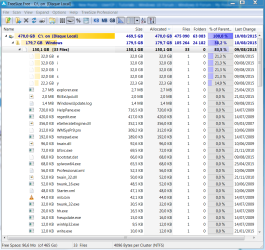
I have treesize here's a pic of it :

386c21e7fc1a55669bd372490e238270.png

These files are really weird! Always eating my disk space whenever I'm deleting something to make me some free space ....
 
Last edited by a moderator:

My Computer My Computer

At a glance

Win 7 Professional x647i 4790k32GB Corsair2x GTX 970
Computer type
PC/Desktop
Computer Manufacturer/Model Number
Custom build
OS
Win 7 Professional x64
CPU
7i 4790k
Motherboard
MSI
Memory
32GB Corsair
Graphics Card(s)
2x GTX 970
Monitor(s) Displays
Iiyama
Screen Resolution
4k
Hard Drives
1SSD 500giga Sandisk 2 TB Seagate & 3TB Seagate
Antivirus
Malwarebytes
Browser
Mozilla Firefox & Chrome
That pic is way too small for me to read.

Don't post it somewhere else. Post the pic right into this thread.

Most likely candidates would be an application doing something you are unaware of---perhaps a backup application, perhaps cloud storage, etc. Could be a lot of things.

But you need to get the picture in a larger size and in this thread.

When you run Tree Size, drill into those larger folders that it shows to see what's in them to get a clue.
 

My Computer My Computer

At a glance

Windows 7 Home Premium SP1, 64-bitIntel Skylake i5-6600K, not overclocked8 GB HyperX DDR4-2666 (2 x 4 GB)none; graphics are integrated on CPU
Computer type
PC/Desktop
Computer Manufacturer/Model Number
Ignatz Special; 4 speed manual gearbox; factory air conditioning; one of one
OS
Windows 7 Home Premium SP1, 64-bit
CPU
Intel Skylake i5-6600K, not overclocked
Motherboard
AsRock Z170M Extreme 4, micro ATX
Memory
8 GB HyperX DDR4-2666 (2 x 4 GB)
Graphics Card(s)
none; graphics are integrated on CPU
Sound Card
onboard: Realtek ALC1150; external: USB Behringer UF0-202
Monitor(s) Displays
Dell S2340M 23 inch IPS
Screen Resolution
1600 x 900
Hard Drives
System: Crucial MX100 series SSD, 128 GB;
Data: Samsung Spinpoint 103SJ, 1 TB;
Backup: WD Caviar Green WD30EZRX-00D8PB0, 3 TB
PSU
Rosewill SilentNight 500 watt fanless, semi-modular
Case
Antec Solo II
Cooling
Noctua NH-U12S; Noctua F12 intake, Noctua S12A exhaust
Keyboard
Microsoft 200 6JH-00001 USB
Mouse
Dell or Microsoft optical wired; USB
Antivirus
Microsoft Security Essentials and Malwarebytes Premium
Browser
Pale Moon
Other Info
All fans PWM; speeds at idle: CPU circa 500 rpm; intake circa 600 rpm; exhaust circa 600 rpm; CPU temps 27 idle and 47 C load in a warm room (27 C/81 F) when running Intel Extreme Tuning Utility stress test.
If you can't delete the "y" file then it's probably locked.
1. Download "Lock Hunter" and install it.
2. Then right click on the "y" file.
3. In the context menu choose "What is locking this file?".
4. Lock Hunter will tell you what program is locking the file. (Repeat for each of the other suspect files.)
5. Tell us what Lock Hunter says.
 

My Computer My Computer

At a glance

Windows 10 x64i7-7700K16 GB 2400 MHzGTX 1060
Computer type
PC/Desktop
Computer Manufacturer/Model Number
Dell
OS
Windows 10 x64
CPU
i7-7700K
Memory
16 GB 2400 MHz
Graphics Card(s)
GTX 1060
Sound Card
Integrated, plus external Presonus Audiobox USB
Monitor(s) Displays
2x AOC 27"
Screen Resolution
1920x1080
Hard Drives
512 GB M.2 SSD
2 TB 7200 RPM disk
Internet Speed
110 Mbps
Browser
Firefox
This is the preferred method of posting pictures on this forum.

Many members including me do not want to wander around the internet to see the need information.

http://www.sevenforums.com/tutorials/9733-screenshots-files-upload-post-seven-forums.html

Filling in your My System Specs is also very helpful.

Use this tutorial by Brink to guide you.

http://www.sevenforums.com/tutorials/180324-system-info-see-your-system-specs.html

Once we have this need information in the proper fashion it should help other members to give guidance.
 

My Computer My Computer

At a glance

Windows 10 Pro. 64/ version 1709 Windows 7 Pr...Intel i7-6800K @ 4.3Corsair Platinum 16 gig @2400EVGA GTX 1070 OC
Computer type
PC/Desktop
Computer Manufacturer/Model Number
Home made Desktop
OS
Windows 10 Pro. 64/ version 1709 Windows 7 Pro/64
CPU
Intel i7-6800K @ 4.3
Motherboard
ASUS X-99 Deluxe II
Memory
Corsair Platinum 16 gig @2400
Graphics Card(s)
EVGA GTX 1070 OC
Monitor(s) Displays
Asus 27" LED LCD/VE278Q
Screen Resolution
1920-1080 or 1280-720 HDMI
Hard Drives
INTEL SSD 730-240 Gb Sata 3.0/
PSU
EVGA Platium 1200W
Case
Phanteks Luxe Tempered Glass 8 fans/ one radiator
Cooling
XSPC/ Water Cooled CPU
Keyboard
Das 4 Professional
Mouse
Logitech M705/MX Anywhere 2-S
Internet Speed
100 mbits
Antivirus
Microsoft Security Essentials/ Malwarebytes Premium 3.0/ SAS
Browser
I.E. 11 default/Firefox/ ISP Time Warner Cable/Spectrum
Other Info
LG BluRay Burner/
Sound system-KLipsch-THX/
Icy Dock ssd Hot Swap bays.
Hi I added them in attachments.

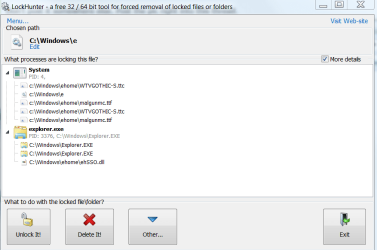
@margrave I tried lock hunter but it doesn't work it says unable to do it/ something is running so he can't ... I can't seem to find what makes these files and which processus is running for it...

https://gyazo.com/40564b9fe5be8d52054ff7eca0b3c3d1
 

Attachments

  • 40564b9fe5be8d52054ff7eca0b3c3d1.png
    40564b9fe5be8d52054ff7eca0b3c3d1.png
    23.3 KB · Views: 1
  • 386c21e7fc1a55669bd372490e238270.png
    386c21e7fc1a55669bd372490e238270.png
    61.4 KB · Views: 1

My Computer My Computer

At a glance

Win 7 Professional x647i 4790k32GB Corsair2x GTX 970
Computer type
PC/Desktop
Computer Manufacturer/Model Number
Custom build
OS
Win 7 Professional x64
CPU
7i 4790k
Motherboard
MSI
Memory
32GB Corsair
Graphics Card(s)
2x GTX 970
Monitor(s) Displays
Iiyama
Screen Resolution
4k
Hard Drives
1SSD 500giga Sandisk 2 TB Seagate & 3TB Seagate
Antivirus
Malwarebytes
Browser
Mozilla Firefox & Chrome
A ttc file extension indicates True Type File collection.

TTF extension is a true type font file.
 

My Computer My Computer

At a glance

Windows 7 Home Premium SP1, 64-bitIntel Skylake i5-6600K, not overclocked8 GB HyperX DDR4-2666 (2 x 4 GB)none; graphics are integrated on CPU
Computer type
PC/Desktop
Computer Manufacturer/Model Number
Ignatz Special; 4 speed manual gearbox; factory air conditioning; one of one
OS
Windows 7 Home Premium SP1, 64-bit
CPU
Intel Skylake i5-6600K, not overclocked
Motherboard
AsRock Z170M Extreme 4, micro ATX
Memory
8 GB HyperX DDR4-2666 (2 x 4 GB)
Graphics Card(s)
none; graphics are integrated on CPU
Sound Card
onboard: Realtek ALC1150; external: USB Behringer UF0-202
Monitor(s) Displays
Dell S2340M 23 inch IPS
Screen Resolution
1600 x 900
Hard Drives
System: Crucial MX100 series SSD, 128 GB;
Data: Samsung Spinpoint 103SJ, 1 TB;
Backup: WD Caviar Green WD30EZRX-00D8PB0, 3 TB
PSU
Rosewill SilentNight 500 watt fanless, semi-modular
Case
Antec Solo II
Cooling
Noctua NH-U12S; Noctua F12 intake, Noctua S12A exhaust
Keyboard
Microsoft 200 6JH-00001 USB
Mouse
Dell or Microsoft optical wired; USB
Antivirus
Microsoft Security Essentials and Malwarebytes Premium
Browser
Pale Moon
Other Info
All fans PWM; speeds at idle: CPU circa 500 rpm; intake circa 600 rpm; exhaust circa 600 rpm; CPU temps 27 idle and 47 C load in a warm room (27 C/81 F) when running Intel Extreme Tuning Utility stress test.
What does this means?
 

My Computer My Computer

At a glance

Win 7 Professional x647i 4790k32GB Corsair2x GTX 970
Computer type
PC/Desktop
Computer Manufacturer/Model Number
Custom build
OS
Win 7 Professional x64
CPU
7i 4790k
Motherboard
MSI
Memory
32GB Corsair
Graphics Card(s)
2x GTX 970
Monitor(s) Displays
Iiyama
Screen Resolution
4k
Hard Drives
1SSD 500giga Sandisk 2 TB Seagate & 3TB Seagate
Antivirus
Malwarebytes
Browser
Mozilla Firefox & Chrome
Back
Top