
I have been using Windows XP mode for quite some time now, but i have never encountered a problem like this before.
Last night when I rebooted my virtual machine I also accidentally closed the VM window at the same time. This sent the virtual machine into hibernation while it was still restarting.
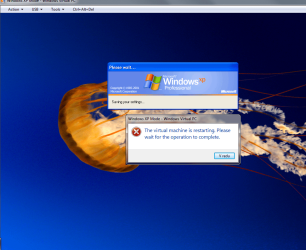
When I turned it back on, I saw the message "Please wait... Saving your settings". I waited for about 10 minutes, and when still nothing happened I tried to reboot the machine myself with the Action|Restart command in the Virtual PC shell.
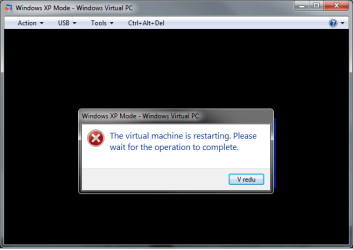
The restart command then invoked the logical response "The virtual machine is restarting. Please wait for the operation to complete".
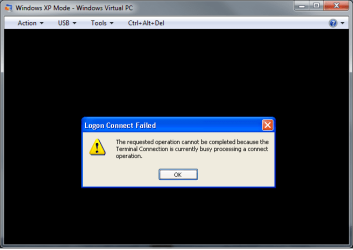
I had an idea, and I tried disabling Integration features. After that I actually came upon the Log On window! But, after entering the password I got the "Logon connect Failed" message (see attached image), and again nothing happened.
I think it would be fairly easy to solve this problem if I had an option to shut down or hard reset the virtual machine. But, AFAIK, that option is not available.
Does any of you kind people out there have a suggestion for me?
Thank you very much!
P.S. I apologise in advance for my English, it is not my native language, I hope you can understand anything from my incoherent writing
Last night when I rebooted my virtual machine I also accidentally closed the VM window at the same time. This sent the virtual machine into hibernation while it was still restarting.
When I turned it back on, I saw the message "Please wait... Saving your settings". I waited for about 10 minutes, and when still nothing happened I tried to reboot the machine myself with the Action|Restart command in the Virtual PC shell.
The restart command then invoked the logical response "The virtual machine is restarting. Please wait for the operation to complete".
I had an idea, and I tried disabling Integration features. After that I actually came upon the Log On window! But, after entering the password I got the "Logon connect Failed" message (see attached image), and again nothing happened.
I think it would be fairly easy to solve this problem if I had an option to shut down or hard reset the virtual machine. But, AFAIK, that option is not available.
Does any of you kind people out there have a suggestion for me?
Thank you very much!
P.S. I apologise in advance for my English, it is not my native language, I hope you can understand anything from my incoherent writing
Attachments
My Computer
At a glance
Windows 7 Ultimate 64-bitIntel Core2 Duo P8600 @ 2.4 GHz2,00 GBMobile Intel 4 Series Express Chipset Family
- Computer Manufacturer/Model Number
- HP EliteBook 6930p
- OS
- Windows 7 Ultimate 64-bit
- CPU
- Intel Core2 Duo P8600 @ 2.4 GHz
- Motherboard
- Hewlett-Packard 30DB KBC Version 87.27
- Memory
- 2,00 GB
- Graphics Card(s)
- Mobile Intel 4 Series Express Chipset Family
- Sound Card
- integrated HDA
- Monitor(s) Displays
- /
- Hard Drives
- 150 GB

 .
.

