My XP can't see win 7 partition

konik

New member
Local time
6:15 AM
Messages
11
Hi,

I am running Win XP home SP3 and now I have installed windows 7 RC 7100 on 2nd partition. I have dual boot now(win7 default).

After instalation(when in XP), I could see win7 partition, but couldn't change any file or copy from or to that partition.

Next day I started my comp in XP again and that time I couldn't even see my win7 partition. I haven't changed anything since previous day.

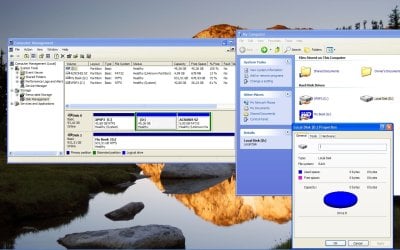
It now says, that my win7 partition is RAW.

Is it normal behaviour of windows 7 and is there any trick, how to make win7 partition visible? Or is something just messed up?

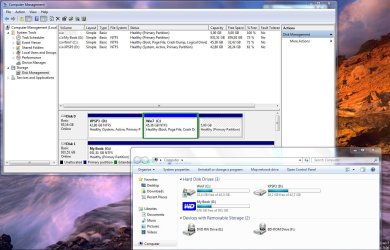
I enclose screens of xp and win7.

Code:
http://postdownload.filefront.com/13764918//7502c1aee7a6d52672c8d38dca52243dcc1e06454bb0b5bf41981945650c8e5d63449547a9388c1a

http://postdownload.filefront.com/13764911//7502c1aee7a6d52672c8d38dca52243dcc1e06454bb0b5bf41981945650c8e5d63449547a9388c1a


Looking forward to any help.

konik

PS: I have checked several forums for my problem, but haven't find solution.
Sorry, if I missed anything.
 

My Computer My Computer

At a glance

Win xp sp3 / Win 7 RC 7100Intel Pentium M 740, 1,73 GHz1 GBATI Mobility Radeon X700, 128 MB
Computer Manufacturer/Model Number
Acer Aspire 9502WSMi
OS
Win xp sp3 / Win 7 RC 7100
CPU
Intel Pentium M 740, 1,73 GHz
Memory
1 GB
Graphics Card(s)
ATI Mobility Radeon X700, 128 MB
Screen Resolution
1440x900
Hi

Think this is normal

I had Vista on Drive C and Windows7 on drive D

Vista could only see drive C but Win7 could see both C & D
 

My Computer My Computer

At a glance

Windows7
OS
Windows7
Hi,
thanks for answer. So you never wonder, if there is any way to make it visible?
But right after installation, I could see it. Now not! It's weird!
Does anybody know?
 

My Computer My Computer

At a glance

Win xp sp3 / Win 7 RC 7100Intel Pentium M 740, 1,73 GHz1 GBATI Mobility Radeon X700, 128 MB
Computer Manufacturer/Model Number
Acer Aspire 9502WSMi
OS
Win xp sp3 / Win 7 RC 7100
CPU
Intel Pentium M 740, 1,73 GHz
Memory
1 GB
Graphics Card(s)
ATI Mobility Radeon X700, 128 MB
Screen Resolution
1440x900

My Computers My Computers

  • At a glance

    7 X64i5 84002x8gb 3200mhz
    Computer type
    PC/Desktop
    OS
    7 X64
    CPU
    i5 8400
    Motherboard
    gigabyte b365m ds3h
    Memory
    2x8gb 3200mhz
    Hard Drives
    various
    PSU
    pure power 11 400w cm
    Case
    Coolermaster
    Cooling
    cryorig m9i
  • At a glance

    7x64g54008gb ddr4 2400
    Computer type
    PC/Desktop
    OS
    7x64
    CPU
    g5400
    Motherboard
    ga b365m ds3h
    Memory
    8gb ddr4 2400
    PSU
    xfx pro 450w
XP is not reading the partitions correctly.

I assume your XP is 32 bit. Download and install this free program on XP:

Free Download Partition Manager software.

From within XP, use it to shrink the Win 7 partition by a couple of gb. Then Extend the Win 7 partition to the full size again. At the end it will say "updating system info".

Reboot into XP.

XP should now recognise 7 as a properly formatted partition and you will be able to see the contents .

Hope it helps.
 

My Computers My Computers

  • At a glance

    7 X64i5 84002x8gb 3200mhz
    Computer type
    PC/Desktop
    OS
    7 X64
    CPU
    i5 8400
    Motherboard
    gigabyte b365m ds3h
    Memory
    2x8gb 3200mhz
    Hard Drives
    various
    PSU
    pure power 11 400w cm
    Case
    Coolermaster
    Cooling
    cryorig m9i
  • At a glance

    7x64g54008gb ddr4 2400
    Computer type
    PC/Desktop
    OS
    7x64
    CPU
    g5400
    Motherboard
    ga b365m ds3h
    Memory
    8gb ddr4 2400
    PSU
    xfx pro 450w
Thanks SIW2, next time I will know, how to post screens. Sorry for that!

Regarding my problem, I followed your advice:

Installed part. manager and shrinked win7 partition about 2 GB, applied changes and it updated informations. Then I increased the same partition about 2 GB and applied changes and again it updated informations.
After rebooting to XP, I still couldn't see my win7 partition.

It is interesting, that partition managers can see it, but win xp cannot!
Yes, I am using 32 bit version.

Is there any other way to do it or did I do something wrong?
 

My Computer My Computer

At a glance

Win xp sp3 / Win 7 RC 7100Intel Pentium M 740, 1,73 GHz1 GBATI Mobility Radeon X700, 128 MB
Computer Manufacturer/Model Number
Acer Aspire 9502WSMi
OS
Win xp sp3 / Win 7 RC 7100
CPU
Intel Pentium M 740, 1,73 GHz
Memory
1 GB
Graphics Card(s)
ATI Mobility Radeon X700, 128 MB
Screen Resolution
1440x900
Your partitions are screwed up. Windows 7 thinks it's on C but it's actually D. It's also in a weird extended partition the contains 1 or 2 logical partitions depending on what OS you look at it.

No matter what you do, you wont be able to correct the drive letter situation so I would trash those extended/logical partitions, create a primary partition (drive D:) for Windows 7 and reinstall it.
 

My Computer My Computer

At a glance

XP / Windows 7 Pro RTM
Computer Manufacturer/Model Number
Haha! You peeked. Why so nosey?
OS
XP / Windows 7 Pro RTM
Hi ten! I did it like you said and nothing changed! Still can't see that partition.
However I installed win 7 on another computer with similar configuration, but didn't use installation DVD, but just mounted iso image and installed directly from XP.
And tadaaaaaaaaa: It works. This is the way. Now drive numbers haven't changed and I can see both partitions.

I always thought, that installation from boot DVD is better, but it isn't!!!
But I am not gonna install it now again. I will just use windows 7 on both computers!
 

My Computer My Computer

At a glance

Win xp sp3 / Win 7 RC 7100Intel Pentium M 740, 1,73 GHz1 GBATI Mobility Radeon X700, 128 MB
Computer Manufacturer/Model Number
Acer Aspire 9502WSMi
OS
Win xp sp3 / Win 7 RC 7100
CPU
Intel Pentium M 740, 1,73 GHz
Memory
1 GB
Graphics Card(s)
ATI Mobility Radeon X700, 128 MB
Screen Resolution
1440x900
Looks like my excitement was too big! On my netbook it works perfectly, like I described above, but on my notebook still doesn't! :cry:

I deleted win7 partition again and made a new one(primary) and formatted in win xp. Then I installed win7 from image in win xp and still can't see my win7 partition from win XP. :mad:
Both computers are same brand with similar configuration.

This will remain a mystery to me! :confused:
 

My Computer My Computer

At a glance

Win xp sp3 / Win 7 RC 7100Intel Pentium M 740, 1,73 GHz1 GBATI Mobility Radeon X700, 128 MB
Computer Manufacturer/Model Number
Acer Aspire 9502WSMi
OS
Win xp sp3 / Win 7 RC 7100
CPU
Intel Pentium M 740, 1,73 GHz
Memory
1 GB
Graphics Card(s)
ATI Mobility Radeon X700, 128 MB
Screen Resolution
1440x900
Did it assign drive letter C to the Windows 7 partition again? If so that could be why. There can't be 2 drive letters C.
 

My Computer My Computer

At a glance

XP / Windows 7 Pro RTM
Computer Manufacturer/Model Number
Haha! You peeked. Why so nosey?
OS
XP / Windows 7 Pro RTM
No, if you install from win xp directly, it gives you another drive letter - in my case D.
 

My Computer My Computer

At a glance

Win xp sp3 / Win 7 RC 7100Intel Pentium M 740, 1,73 GHz1 GBATI Mobility Radeon X700, 128 MB
Computer Manufacturer/Model Number
Acer Aspire 9502WSMi
OS
Win xp sp3 / Win 7 RC 7100
CPU
Intel Pentium M 740, 1,73 GHz
Memory
1 GB
Graphics Card(s)
ATI Mobility Radeon X700, 128 MB
Screen Resolution
1440x900
What happens when you try to look at D from within XP? Is it blank, permission denied, etc.
Maybe post a screen shot of disk management in XP.
 

My Computer My Computer

At a glance

XP / Windows 7 Pro RTM
Computer Manufacturer/Model Number
Haha! You peeked. Why so nosey?
OS
XP / Windows 7 Pro RTM
Hi ten,

I did already, it is on beginning of this post. It is everything the same, except partition win7 is now primary(not extended) and with letter D in both OS.
 

My Computer My Computer

At a glance

Win xp sp3 / Win 7 RC 7100Intel Pentium M 740, 1,73 GHz1 GBATI Mobility Radeon X700, 128 MB
Computer Manufacturer/Model Number
Acer Aspire 9502WSMi
OS
Win xp sp3 / Win 7 RC 7100
CPU
Intel Pentium M 740, 1,73 GHz
Memory
1 GB
Graphics Card(s)
ATI Mobility Radeon X700, 128 MB
Screen Resolution
1440x900
And when you click on D in windows explorer while running XP what happens?
 

My Computer My Computer

At a glance

XP / Windows 7 Pro RTM
Computer Manufacturer/Model Number
Haha! You peeked. Why so nosey?
OS
XP / Windows 7 Pro RTM
Nevermind ten I found the problem!! Problem solved now!!!

Solution: To turn off Windows 7 system protection and don't edit registry in win XP regarding system restore points!

Now I can see both partitions!:rolleyes:
 

My Computer My Computer

At a glance

Win xp sp3 / Win 7 RC 7100Intel Pentium M 740, 1,73 GHz1 GBATI Mobility Radeon X700, 128 MB
Computer Manufacturer/Model Number
Acer Aspire 9502WSMi
OS
Win xp sp3 / Win 7 RC 7100
CPU
Intel Pentium M 740, 1,73 GHz
Memory
1 GB
Graphics Card(s)
ATI Mobility Radeon X700, 128 MB
Screen Resolution
1440x900
Glad you solved it! What is Windows 7 system protection?
 

My Computer My Computer

At a glance

XP / Windows 7 Pro RTM
Computer Manufacturer/Model Number
Haha! You peeked. Why so nosey?
OS
XP / Windows 7 Pro RTM

My Computer My Computer

At a glance

Win xp sp3 / Win 7 RC 7100Intel Pentium M 740, 1,73 GHz1 GBATI Mobility Radeon X700, 128 MB
Computer Manufacturer/Model Number
Acer Aspire 9502WSMi
OS
Win xp sp3 / Win 7 RC 7100
CPU
Intel Pentium M 740, 1,73 GHz
Memory
1 GB
Graphics Card(s)
ATI Mobility Radeon X700, 128 MB
Screen Resolution
1440x900
Oh, system restore. That's weird because I could see Win7 fine on my dual boot and Win7 had system restore on.
I guess it's also that other thing you said about the registry.

Anyways, glad you're ok now.
 

My Computer My Computer

At a glance

XP / Windows 7 Pro RTM
Computer Manufacturer/Model Number
Haha! You peeked. Why so nosey?
OS
XP / Windows 7 Pro RTM
You may have it On, but if you have dual boot with xp and you didn't fix registry in xp, so every time you boot in xp - it will delete all your system restore points in win7.
Then it is useless to have system restore On in win7!
Of course, when win7 will be my only system, I will turn it On.
 

My Computer My Computer

At a glance

Win xp sp3 / Win 7 RC 7100Intel Pentium M 740, 1,73 GHz1 GBATI Mobility Radeon X700, 128 MB
Computer Manufacturer/Model Number
Acer Aspire 9502WSMi
OS
Win xp sp3 / Win 7 RC 7100
CPU
Intel Pentium M 740, 1,73 GHz
Memory
1 GB
Graphics Card(s)
ATI Mobility Radeon X700, 128 MB
Screen Resolution
1440x900
Back
Top