Mysterious activity

xgdude

New member
Member
Local time
8:22 AM
Messages
61
I noticed a lot of blinking lights on my DSL Modem and on my Linksys Router. The modem lights were for Internet and Activity and it looked like a download was in progress. I opened taskmaster and checked applications and there were none listed. Processes had basically no activity. Under performance it reflected CPU usage as 0 percent. Memory was at 1.91GB and physical memory was at 48%. I checked everything in the system tray and nothing was running.

Anyone have any idea what all the activity was and what can I do in the future to identify the activity. This apparent download lasted over an hour.

Running Windows 7 Home, 64 bit

xgdude
 

My Computer My Computer

Computer type
PC/Desktop
Computer Manufacturer/Model Number
HP Pavilion p 6380t
OS
Microsoft Windows 7 Home Premium 64-bit 7601 Multiprocessor Free Service Pack 1
CPU
Intel(R) Core(TM)2 Quad CPU Q8300 @ 2.50GHz
Motherboard
PEGATRON CORPORATION Eureka3
Memory
4.00 GB
Graphics Card(s)
(1) Intel(R) G45/G43 Express Chipset (2) Intel(R) G45/G43
Sound Card
(1) Realtek High Definition Audio (2) USB Audio Device
Screen Resolution
800 x 600 x 32 bits (4294967296 colors) @ 99 Hz
Hard Drives
(1) WDC WD6400AAKS-65A7B2 ATA Device (2) WDC WD50 00AAKS-65A7B2 USB Device
Antivirus
Avast premiere
Browser
IE 10
Was there a BITS operation in progress?
 

My Computer My Computer

Computer Manufacturer/Model Number
Custom built machine
OS
W7 x64
CPU
Intel Q9300 2.5Ghz Quad LGA775 (Would like Q9650)
Motherboard
Gigabyte GA-EP45T-UD3R (F6 Bios)
Memory
4Gb OCZ Gold 1,333Mhz
Graphics Card(s)
Palit HD4850 O/C Sonic 512Mb DDR3, Dual DViD's
Sound Card
Azalia to twin Samson 50w Studio Monitors
Monitor(s) Displays
Twin Dell (E-IPS) U2311H 23.6" Screens
Screen Resolution
1920 x 1080 @ 60Hz
Hard Drives
Crucial M4 SSD, archives on twin Western Digital Caviar Black WD2002FAEX, 2TB, 7200rpm HDD's, Samsung Ritemaster CD/DVD Burner...
PSU
OCZ 600w
Case
Lian-Li PC8 acoustifoamed' aluminium tower
Cooling
Scythe 140mm Zipang
Keyboard
Cherry PS/2 custom model
Mouse
Lenovo USB laser "Thinkpad" Mouse
Internet Speed
ADSL2+ @14Mbps downstream & Cat6 Gigabit Ethernet
Antivirus
NOD32
Browser
Opera
Other Info
Silicon Dust HD Homerun Dual FTA (Ethernet) TV Tuners, Dray Tek Vigor 2850Vn router and 8x HP Gigabit Switch. Lian-Li CR26 Card Reader, Canon MF4430 iSensys laser printer/scanner.
Welcome to Seven Forums xgdude.
Modems and router always have blinking lights to verify they are connected. Was this blinking out of the ordinary?

You can see network activity by typing resmon in the Start Search then click the network tab.
 

My Computer My Computer

Computer type
PC/Desktop
Computer Manufacturer/Model Number
Home Built Desktop By DataTech
OS
Windows 7 Ultimate X64 SP1
CPU
Intel i5-2550K, Differing ~4.4-4.8GHz No built in GPU
Motherboard
ASUS P8Z68-V PRO/GEN3
Memory
16GB G.Skill Sniper 1866MHz @ 2133MHz 2x8GB
Graphics Card(s)
ASUS GTX650TIB-DC2OC-2GD5, (650TI Boost)
Sound Card
Onboard Realtek 5-1
Monitor(s) Displays
Samsung P2570HD
Screen Resolution
1920x1080
Hard Drives
Samsung 840 Pro 256GB SSD for OS, 500GB Seagate Constellation (Enterprise drive) for Data
PSU
Corsair HX650W
Case
Inwin Dragon Rider
Cooling
Hyper 212 EVO w/two Noctua fans, push-pull, @1300 RPM
Keyboard
E-Z Eyes, bright yellow keys with large characters
Mouse
steelseries SENSEI Laser Pro Gaming
Internet Speed
48-51Mbs Mbs down, 11 Mbs up Xfinity Cable
Antivirus
Norton Internet Security 2013
Browser
IE 10, Opera, Pale Moon if needed
Other Info
4 case fans, LG BluRay-RE, ASUS DVD-RW, Mr. Fusion power supply, 1.21 gigawatts.
If your pc was on then there copuld have been activity such as Windows update checking for updates or other programs checking for updates or you could have seen ping request. You may also want to check your Nic settings and disable power on settings and magic packet but as long as your computer is powered on there will always be some kind of network activity if you have RIP enabled on your router.
 

My Computer My Computer

Computer Manufacturer/Model Number
Home build
OS
Windows 7 Pro x64
CPU
AMD FX 4100 4 Core 3.6GHz AM3+
Motherboard
ASROCK 970 Extreme3
Memory
16GB G.Skill RipjawsX
Graphics Card(s)
Radeon 6850
Sound Card
ASUS Xonar D1
Monitor(s) Displays
ASUS 23" LCD
Hard Drives
SSD 120GB
WD 750GB Black series
WD 640GB Black series
PSU
700W
Case
Antec 100
Cooling
Hyper 212 Plus
Internet Speed
50MB
This doesn't sound abnormal at all. Blinking lights on the router are always going to be happening, even when presumably nothing is happening on the computer. Network devices constantly stay in contact with each other. This is nothing to be concerned with.
 

My Computer My Computer

OS
XP / Win7 x64 Pro
CPU
Intel Quad-Core Q9450 @ 3.2GHz
Motherboard
Asus P5-E
Memory
2x2GB GSkill DDR2
Graphics Card(s)
NVIDIA GeForce 8600 GTS (EVGA)
Monitor(s) Displays
Dell 2408WFP
Screen Resolution
1920x1200
I noticed a lot of blinking lights on my DSL Modem and on my Linksys Router. The modem lights were for Internet and Activity and it looked like a download was in progress. I opened taskmaster and checked applications and there were none listed. Processes had basically no activity. Under performance it reflected CPU usage as 0 percent. Memory was at 1.91GB and physical memory was at 48%. I checked everything in the system tray and nothing was running.

Anyone have any idea what all the activity was and what can I do in the future to identify the activity. This apparent download lasted over an hour.
If you are using typical cable modem or DSL ISP arrangements, there's just lots of random external activity on the WAN side of the router, most/all of it worthless network traffic. Perhaps some of it is "malicious", seeking out unprotected machines to do who knows what to them.

If you had a software product that could log and present to you the source IP addresses you would know none of them.

All of it is "foiled" by the firewall in your router, or in the absence of a router by Windows Firewall or other software firewall products.

It's annoying to see all of this, especially if you didn't have a router and your machine itself would need to simply reject all of this nonsense traffic via software (and your machine's CPU resources). Unfortunately it is "perfectly normal" and there's nothing you can do about it.

Not to worry, especially if you've double-checked with Task Manager what your machine is actually doing and it showed nothing active or unusual. That's why you have a router... to protect you from this nonsense.
 

My Computer My Computer

Computer type
PC/Desktop
Computer Manufacturer/Model Number
Home-built, two systems (1) and (2)
OS
Windows 7 Pro x64 (1), Win7 Pro X64 (2)
CPU
i5-3350p 3.1Ghz/6MB-cache (1); E8400 3.0Ghz/6MB-cache (2)
Motherboard
ASUS P8Z77-V Pro (1); ASUS P5Q3 (2)
Memory
8GB PC3-12800 DDR3 (1); 4GB PC3-10600 DDR3 (2)
Graphics Card(s)
ATI HD7750 (1), (see TV cards); ATI R7 250 (2)
Sound Card
Realtek ALC892 HD Audio (1); Realtek ALC1200 HD Audio (2)
Monitor(s) Displays
Eizo HD2441W LCD, Eizo S2433W (1); Eizo 24" S2433W (2)
Screen Resolution
1920x1200, 1920x1200 (1); 1920x1200 (2)
Hard Drives
(1) 1TB SATA-II (7200RPM), 2x2TB SATA-III (7200RPM), 250GB SATA-III (10000RPM) for OS; 2x2TB external USB 3.0

(2) 320GB SATA-II (7200RPM), 750GB SATA-II (7200RPM), 150GB SATA-II (10000RPM) for OS; 2TB external USB 3.0
PSU
Nesteq ECS-6001 600W (1); Nesteq ECS-5001 500W (2)
Case
Acousti-Case 360 (1) and (2)
Cooling
Noctua NH-U12P SE2 for CPU, 2x120mm case fans (1) and (2)
Keyboard
IBM PS/2 (1) and (2)
Mouse
Logitech MX Revolution wireless (1); Microsoft wired (2)
Internet Speed
100mbps down / 10mbps up
Antivirus
Microsoft Security Essentials; Malwarebyte Anti-Malware Pro
Browser
Firefox
Other Info
Ceton InfiniTV 4-tuner cablecard-enabled TV card as well as Hauppauge HVR-2250 OTA/ATSC 2-tuner TV card in (1), running under Win7 WMC
Mysterious Activity

I don't know what a BITS operation is or how to determine if such is in progress. I appreciate all of the responses to my inquiry. It appears that I have been overly cautious and that the activity in question is harmless.

Attached is a screen shot of my network actiivty during one of these Mysterious Activity events.


xgdude
 

Attachments

My Computer My Computer

Computer type
PC/Desktop
Computer Manufacturer/Model Number
HP Pavilion p 6380t
OS
Microsoft Windows 7 Home Premium 64-bit 7601 Multiprocessor Free Service Pack 1
CPU
Intel(R) Core(TM)2 Quad CPU Q8300 @ 2.50GHz
Motherboard
PEGATRON CORPORATION Eureka3
Memory
4.00 GB
Graphics Card(s)
(1) Intel(R) G45/G43 Express Chipset (2) Intel(R) G45/G43
Sound Card
(1) Realtek High Definition Audio (2) USB Audio Device
Screen Resolution
800 x 600 x 32 bits (4294967296 colors) @ 99 Hz
Hard Drives
(1) WDC WD6400AAKS-65A7B2 ATA Device (2) WDC WD50 00AAKS-65A7B2 USB Device
Antivirus
Avast premiere
Browser
IE 10
BITS is the Microsoft 'Background Intelligent Transfer Service' which, for example, services your Windows Update requirements and therefore can happen without express user intervention... ;)
 

My Computer My Computer

Computer Manufacturer/Model Number
Custom built machine
OS
W7 x64
CPU
Intel Q9300 2.5Ghz Quad LGA775 (Would like Q9650)
Motherboard
Gigabyte GA-EP45T-UD3R (F6 Bios)
Memory
4Gb OCZ Gold 1,333Mhz
Graphics Card(s)
Palit HD4850 O/C Sonic 512Mb DDR3, Dual DViD's
Sound Card
Azalia to twin Samson 50w Studio Monitors
Monitor(s) Displays
Twin Dell (E-IPS) U2311H 23.6" Screens
Screen Resolution
1920 x 1080 @ 60Hz
Hard Drives
Crucial M4 SSD, archives on twin Western Digital Caviar Black WD2002FAEX, 2TB, 7200rpm HDD's, Samsung Ritemaster CD/DVD Burner...
PSU
OCZ 600w
Case
Lian-Li PC8 acoustifoamed' aluminium tower
Cooling
Scythe 140mm Zipang
Keyboard
Cherry PS/2 custom model
Mouse
Lenovo USB laser "Thinkpad" Mouse
Internet Speed
ADSL2+ @14Mbps downstream & Cat6 Gigabit Ethernet
Antivirus
NOD32
Browser
Opera
Other Info
Silicon Dust HD Homerun Dual FTA (Ethernet) TV Tuners, Dray Tek Vigor 2850Vn router and 8x HP Gigabit Switch. Lian-Li CR26 Card Reader, Canon MF4430 iSensys laser printer/scanner.
Mysterious Activity

Thanks for the explanation... How do I determine if the activity that I am seeing is the result of a BITS operation?
 

My Computer My Computer

Computer type
PC/Desktop
Computer Manufacturer/Model Number
HP Pavilion p 6380t
OS
Microsoft Windows 7 Home Premium 64-bit 7601 Multiprocessor Free Service Pack 1
CPU
Intel(R) Core(TM)2 Quad CPU Q8300 @ 2.50GHz
Motherboard
PEGATRON CORPORATION Eureka3
Memory
4.00 GB
Graphics Card(s)
(1) Intel(R) G45/G43 Express Chipset (2) Intel(R) G45/G43
Sound Card
(1) Realtek High Definition Audio (2) USB Audio Device
Screen Resolution
800 x 600 x 32 bits (4294967296 colors) @ 99 Hz
Hard Drives
(1) WDC WD6400AAKS-65A7B2 ATA Device (2) WDC WD50 00AAKS-65A7B2 USB Device
Antivirus
Avast premiere
Browser
IE 10
Have a look at the following M$ page which explains BITS in more detail...

About BITS
 

My Computer My Computer

Computer Manufacturer/Model Number
Custom built machine
OS
W7 x64
CPU
Intel Q9300 2.5Ghz Quad LGA775 (Would like Q9650)
Motherboard
Gigabyte GA-EP45T-UD3R (F6 Bios)
Memory
4Gb OCZ Gold 1,333Mhz
Graphics Card(s)
Palit HD4850 O/C Sonic 512Mb DDR3, Dual DViD's
Sound Card
Azalia to twin Samson 50w Studio Monitors
Monitor(s) Displays
Twin Dell (E-IPS) U2311H 23.6" Screens
Screen Resolution
1920 x 1080 @ 60Hz
Hard Drives
Crucial M4 SSD, archives on twin Western Digital Caviar Black WD2002FAEX, 2TB, 7200rpm HDD's, Samsung Ritemaster CD/DVD Burner...
PSU
OCZ 600w
Case
Lian-Li PC8 acoustifoamed' aluminium tower
Cooling
Scythe 140mm Zipang
Keyboard
Cherry PS/2 custom model
Mouse
Lenovo USB laser "Thinkpad" Mouse
Internet Speed
ADSL2+ @14Mbps downstream & Cat6 Gigabit Ethernet
Antivirus
NOD32
Browser
Opera
Other Info
Silicon Dust HD Homerun Dual FTA (Ethernet) TV Tuners, Dray Tek Vigor 2850Vn router and 8x HP Gigabit Switch. Lian-Li CR26 Card Reader, Canon MF4430 iSensys laser printer/scanner.
Honestly, you could spend years of your life investigating "mysterious" activity performed by Windows. I really wouldn't look too far into this. It's not worth spending your time and effort worrying about. It could be BITS. It could be normal network ARP requests and responses. It could be antivirus checking for updates. It could be a bunch of completely normal things.

If your computer starts freezing up or you start seeing activity happening on the screen, then you can start to get concerned.
 

My Computer My Computer

OS
XP / Win7 x64 Pro
CPU
Intel Quad-Core Q9450 @ 3.2GHz
Motherboard
Asus P5-E
Memory
2x2GB GSkill DDR2
Graphics Card(s)
NVIDIA GeForce 8600 GTS (EVGA)
Monitor(s) Displays
Dell 2408WFP
Screen Resolution
1920x1200
It would be more productive to question what we would call an orange if it were blue.
 

My Computer My Computer

Computer type
PC/Desktop
Computer Manufacturer/Model Number
Home Built Desktop By DataTech
OS
Windows 7 Ultimate X64 SP1
CPU
Intel i5-2550K, Differing ~4.4-4.8GHz No built in GPU
Motherboard
ASUS P8Z68-V PRO/GEN3
Memory
16GB G.Skill Sniper 1866MHz @ 2133MHz 2x8GB
Graphics Card(s)
ASUS GTX650TIB-DC2OC-2GD5, (650TI Boost)
Sound Card
Onboard Realtek 5-1
Monitor(s) Displays
Samsung P2570HD
Screen Resolution
1920x1080
Hard Drives
Samsung 840 Pro 256GB SSD for OS, 500GB Seagate Constellation (Enterprise drive) for Data
PSU
Corsair HX650W
Case
Inwin Dragon Rider
Cooling
Hyper 212 EVO w/two Noctua fans, push-pull, @1300 RPM
Keyboard
E-Z Eyes, bright yellow keys with large characters
Mouse
steelseries SENSEI Laser Pro Gaming
Internet Speed
48-51Mbs Mbs down, 11 Mbs up Xfinity Cable
Antivirus
Norton Internet Security 2013
Browser
IE 10, Opera, Pale Moon if needed
Other Info
4 case fans, LG BluRay-RE, ASUS DVD-RW, Mr. Fusion power supply, 1.21 gigawatts.
Mysterious Activity

Just out of curiosity I started looking around in my computer for clues as to what might be the cause of all of the activity previously described. I was looking around in msconfig at the processes list and found one that looked out of place called Akamai Net Sessions Interface. I did a little looking around in Google and discovered that this program is essentially a "peer to peer" file sharing application which was deposited on my computer without my consent with the installation of some other software not identified.

Here is alink to one of the sites I found concerning this program:
Ramblings on discoveries in Task Manager - General Discussion - LEGO Universe Forums at MMORPG.com

Think this could be my answer to my Mysterious Activity ?
 

My Computer My Computer

Computer type
PC/Desktop
Computer Manufacturer/Model Number
HP Pavilion p 6380t
OS
Microsoft Windows 7 Home Premium 64-bit 7601 Multiprocessor Free Service Pack 1
CPU
Intel(R) Core(TM)2 Quad CPU Q8300 @ 2.50GHz
Motherboard
PEGATRON CORPORATION Eureka3
Memory
4.00 GB
Graphics Card(s)
(1) Intel(R) G45/G43 Express Chipset (2) Intel(R) G45/G43
Sound Card
(1) Realtek High Definition Audio (2) USB Audio Device
Screen Resolution
800 x 600 x 32 bits (4294967296 colors) @ 99 Hz
Hard Drives
(1) WDC WD6400AAKS-65A7B2 ATA Device (2) WDC WD50 00AAKS-65A7B2 USB Device
Antivirus
Avast premiere
Browser
IE 10
I had similar issues, Akamai & others were all over the place. Am using the excellent Network Activity Indicator from System utilities, password recovery and network tools, miscellaneous software with source code as visual monitor. Any suspicious activity (or programs phoning home 10 times a day), a quick ip check in Resource Monitor, do some whois, then find the culprit hidden in the pc, cleaning it out or if legitimate (but unwanted), block with firewall. Surely other or better tools out there, but this works perfect.
 

My Computer My Computer

Computer type
Laptop
Computer Manufacturer/Model Number
Dell \ Lenovo\ HP \ Toshiba
OS
W7, W8.1
Antivirus
MSE, Malwarebytes
Browser
FF
Just out of curiosity I started looking around in my computer for clues as to what might be the cause of all of the activity previously described. I was looking around in msconfig at the processes list and found one that looked out of place called Akamai Net Sessions Interface. I did a little looking around in Google and discovered that this program is essentially a "peer to peer" file sharing application which was deposited on my computer without my consent with the installation of some other software not identified.

Here is alink to one of the sites I found concerning this program:
Ramblings on discoveries in Task Manager - General Discussion - LEGO Universe Forums at MMORPG.com

Think this could be my answer to my Mysterious Activity ?
Absolutely, see here About Akamai
It may be a download manager of sorts for games or any of several type of download. I have had bits on my PC in the form of advertising cookies and is not welcome. CCleaner will rid you of its cookies and maybe Revo Uninstaller the program.
EDIT: More info here: http://en.wikipedia.org/wiki/Akamai_Technologies although it sounds like an ad for Akamai it lists some customers they have. Maybe you visited some.

Links for both in my sig. There are links to free versions, they are fine.
 

My Computer My Computer

Computer type
PC/Desktop
Computer Manufacturer/Model Number
Home Built Desktop By DataTech
OS
Windows 7 Ultimate X64 SP1
CPU
Intel i5-2550K, Differing ~4.4-4.8GHz No built in GPU
Motherboard
ASUS P8Z68-V PRO/GEN3
Memory
16GB G.Skill Sniper 1866MHz @ 2133MHz 2x8GB
Graphics Card(s)
ASUS GTX650TIB-DC2OC-2GD5, (650TI Boost)
Sound Card
Onboard Realtek 5-1
Monitor(s) Displays
Samsung P2570HD
Screen Resolution
1920x1080
Hard Drives
Samsung 840 Pro 256GB SSD for OS, 500GB Seagate Constellation (Enterprise drive) for Data
PSU
Corsair HX650W
Case
Inwin Dragon Rider
Cooling
Hyper 212 EVO w/two Noctua fans, push-pull, @1300 RPM
Keyboard
E-Z Eyes, bright yellow keys with large characters
Mouse
steelseries SENSEI Laser Pro Gaming
Internet Speed
48-51Mbs Mbs down, 11 Mbs up Xfinity Cable
Antivirus
Norton Internet Security 2013
Browser
IE 10, Opera, Pale Moon if needed
Other Info
4 case fans, LG BluRay-RE, ASUS DVD-RW, Mr. Fusion power supply, 1.21 gigawatts.

My Computer My Computer

Computer type
PC/Desktop
Computer Manufacturer/Model Number
Custom-built
OS
Windows 7 Professional SP1 32-bit
CPU
Intel Core 2 Duo E6600 2.4GHz
Motherboard
Asus PL5D2
Memory
4GB DDR2-667 (4x1GB in dual-channel config)
Graphics Card(s)
nVidia GeForce 9800 GT
Sound Card
Creative X-Fi XtremeMusic
Monitor(s) Displays
Acer P236H
Screen Resolution
1920x1200 (DVI)
Hard Drives
OCZ SSD Vertex Plus 60GB SATA (Firmware 3.55), 64MB cache
Hitachi HD321KJ SATA, 320GB, 7200rpm, 16MB cache
PSU
Antec TruePower 2.0
Case
Cooler Master Centurion
Cooling
Too many fans
Keyboard
Standard
Mouse
Microsoft wireless optical mouse
Internet Speed
AT&T U-verse (18mbit/sec)
Antivirus
Microsoft Security Essentials
Browser
Firefox
Other Info
Other devices:
Compaq CQ-60 laptop
Google Nexus 7 (2012) tablet
Nvidia SHIELD tablet (US/LTE)
Hardkernel ODROID-XU single-board computer (Samsung Exynos 5420)
Mysterious Activity

I decided to uninstall the Akamai Net Processing program and also uninstall all of the programs I never or seldom use anymore in hopes of getting that one program that gave me Akamai in the first place. This is to prevent it being reinstalled should I open the culprit file. Guess what, no more Mysterious Activity.

I want to thank all who have so generously gave of their time and expertise to help out another who called out for help. You are generouslyappreciated.

Looks like it's time to close this thread..

xgdude
 

My Computer My Computer

Computer type
PC/Desktop
Computer Manufacturer/Model Number
HP Pavilion p 6380t
OS
Microsoft Windows 7 Home Premium 64-bit 7601 Multiprocessor Free Service Pack 1
CPU
Intel(R) Core(TM)2 Quad CPU Q8300 @ 2.50GHz
Motherboard
PEGATRON CORPORATION Eureka3
Memory
4.00 GB
Graphics Card(s)
(1) Intel(R) G45/G43 Express Chipset (2) Intel(R) G45/G43
Sound Card
(1) Realtek High Definition Audio (2) USB Audio Device
Screen Resolution
800 x 600 x 32 bits (4294967296 colors) @ 99 Hz
Hard Drives
(1) WDC WD6400AAKS-65A7B2 ATA Device (2) WDC WD50 00AAKS-65A7B2 USB Device
Antivirus
Avast premiere
Browser
IE 10
Mysterious Activity

not so fast there xgdude, it's alive and well !!!
yep that's correct, I was in the control pane and just happened to notice an item I missed before.there it is "Akamai Netsessions control". Now, my qustion is this, How can I remove the control panel item and why is it there in the first place?
What harm to my system could be the result if I clicked on the control panel item?
should I expect it to really control Akamai Netsessions on my pc and allow me to remove it? has anyoneelse had this run in with this program.
 

My Computer My Computer

Computer type
PC/Desktop
Computer Manufacturer/Model Number
HP Pavilion p 6380t
OS
Microsoft Windows 7 Home Premium 64-bit 7601 Multiprocessor Free Service Pack 1
CPU
Intel(R) Core(TM)2 Quad CPU Q8300 @ 2.50GHz
Motherboard
PEGATRON CORPORATION Eureka3
Memory
4.00 GB
Graphics Card(s)
(1) Intel(R) G45/G43 Express Chipset (2) Intel(R) G45/G43
Sound Card
(1) Realtek High Definition Audio (2) USB Audio Device
Screen Resolution
800 x 600 x 32 bits (4294967296 colors) @ 99 Hz
Hard Drives
(1) WDC WD6400AAKS-65A7B2 ATA Device (2) WDC WD50 00AAKS-65A7B2 USB Device
Antivirus
Avast premiere
Browser
IE 10
Did you give CCleaner or Revo a shot?
 

My Computer My Computer

Computer type
PC/Desktop
Computer Manufacturer/Model Number
Home Built Desktop By DataTech
OS
Windows 7 Ultimate X64 SP1
CPU
Intel i5-2550K, Differing ~4.4-4.8GHz No built in GPU
Motherboard
ASUS P8Z68-V PRO/GEN3
Memory
16GB G.Skill Sniper 1866MHz @ 2133MHz 2x8GB
Graphics Card(s)
ASUS GTX650TIB-DC2OC-2GD5, (650TI Boost)
Sound Card
Onboard Realtek 5-1
Monitor(s) Displays
Samsung P2570HD
Screen Resolution
1920x1080
Hard Drives
Samsung 840 Pro 256GB SSD for OS, 500GB Seagate Constellation (Enterprise drive) for Data
PSU
Corsair HX650W
Case
Inwin Dragon Rider
Cooling
Hyper 212 EVO w/two Noctua fans, push-pull, @1300 RPM
Keyboard
E-Z Eyes, bright yellow keys with large characters
Mouse
steelseries SENSEI Laser Pro Gaming
Internet Speed
48-51Mbs Mbs down, 11 Mbs up Xfinity Cable
Antivirus
Norton Internet Security 2013
Browser
IE 10, Opera, Pale Moon if needed
Other Info
4 case fans, LG BluRay-RE, ASUS DVD-RW, Mr. Fusion power supply, 1.21 gigawatts.
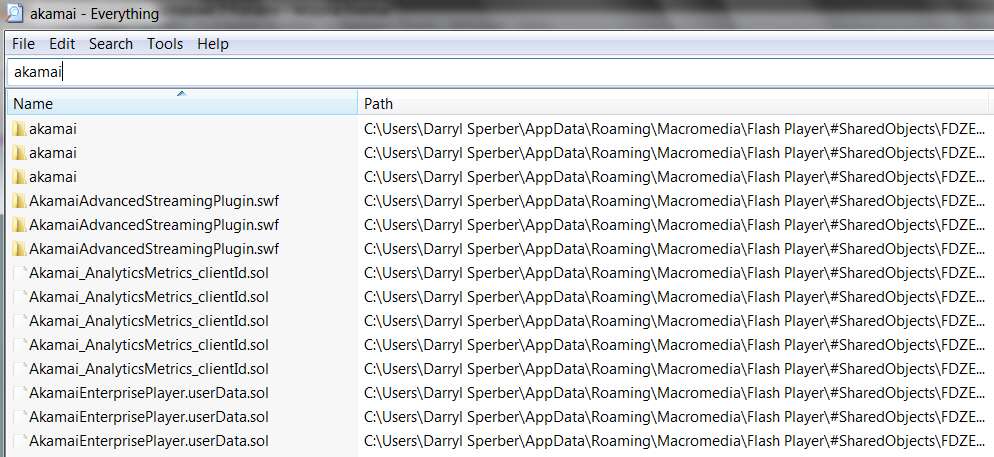
I don't have any "active" Akamai services or threads on my system.

But I do have some "remnants" of Akamai on my machine that appear to have been installed in conjunction with the installation of Adobe Flash in browsers (both Firefox v8 and IE v9).

akamai.jpg


Actually, I don't think Flash is supported in either of these latest browser versions. That's either the reason I don't see any Akamai services on my system, or perhaps you have something else installed on your that's really the underlying culprit.

So perhaps you might try upgrading either/both to the most recent version, if you're using an older version with Flash installed.

Or, maybe uninstall Adobe Flash??
 

My Computer My Computer

Computer type
PC/Desktop
Computer Manufacturer/Model Number
Home-built, two systems (1) and (2)
OS
Windows 7 Pro x64 (1), Win7 Pro X64 (2)
CPU
i5-3350p 3.1Ghz/6MB-cache (1); E8400 3.0Ghz/6MB-cache (2)
Motherboard
ASUS P8Z77-V Pro (1); ASUS P5Q3 (2)
Memory
8GB PC3-12800 DDR3 (1); 4GB PC3-10600 DDR3 (2)
Graphics Card(s)
ATI HD7750 (1), (see TV cards); ATI R7 250 (2)
Sound Card
Realtek ALC892 HD Audio (1); Realtek ALC1200 HD Audio (2)
Monitor(s) Displays
Eizo HD2441W LCD, Eizo S2433W (1); Eizo 24" S2433W (2)
Screen Resolution
1920x1200, 1920x1200 (1); 1920x1200 (2)
Hard Drives
(1) 1TB SATA-II (7200RPM), 2x2TB SATA-III (7200RPM), 250GB SATA-III (10000RPM) for OS; 2x2TB external USB 3.0

(2) 320GB SATA-II (7200RPM), 750GB SATA-II (7200RPM), 150GB SATA-II (10000RPM) for OS; 2TB external USB 3.0
PSU
Nesteq ECS-6001 600W (1); Nesteq ECS-5001 500W (2)
Case
Acousti-Case 360 (1) and (2)
Cooling
Noctua NH-U12P SE2 for CPU, 2x120mm case fans (1) and (2)
Keyboard
IBM PS/2 (1) and (2)
Mouse
Logitech MX Revolution wireless (1); Microsoft wired (2)
Internet Speed
100mbps down / 10mbps up
Antivirus
Microsoft Security Essentials; Malwarebyte Anti-Malware Pro
Browser
Firefox
Other Info
Ceton InfiniTV 4-tuner cablecard-enabled TV card as well as Hauppauge HVR-2250 OTA/ATSC 2-tuner TV card in (1), running under Win7 WMC
Back
Top