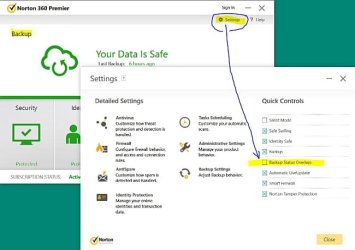
I recently discovered that my thumbnails of photos, files, etc. are being overwritten by icons. This is not the user friendly icon that you can attached to thumbnails to show its type. Rather, it covers from 1/3 to 1/2 of the thumbnail, making the thumbnails nearly useless. Please the snip below:
I have tried:
- Selecting & deselecting the "Display the icon on thumbnails" option at "Folder Options / View /"
- Using Disk Cleanup to remove the existing thumbnail files
- Trying different photo viewers
- Deleted a variety of photo organizing software that I never used (such as came with my Cannon) in case I accidently triggered it.
It only occurs with photos in my C: and E: drives. C: is a SSD drive and I normally put only programs there. E: is a normal hard drive where all my data goes. I do not see the annoying icons when I copy photos from E: and paste them into my backup drive H: or onto a thumb drive.
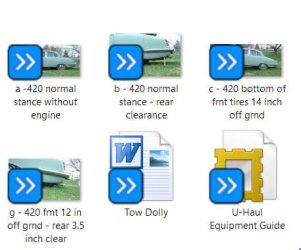
Also, it is not always the same icon - see example below:

I have gone through the images at Google, but all I see are problems with full icons or full thumbnails, not the mutant-large-icons-on-top-of-thumbnails that I'm getting. Has anyone seen something like this before?
Thanks,
- Ron
I have tried:
- Selecting & deselecting the "Display the icon on thumbnails" option at "Folder Options / View /"
- Using Disk Cleanup to remove the existing thumbnail files
- Trying different photo viewers
- Deleted a variety of photo organizing software that I never used (such as came with my Cannon) in case I accidently triggered it.
It only occurs with photos in my C: and E: drives. C: is a SSD drive and I normally put only programs there. E: is a normal hard drive where all my data goes. I do not see the annoying icons when I copy photos from E: and paste them into my backup drive H: or onto a thumb drive.
Also, it is not always the same icon - see example below:
I have gone through the images at Google, but all I see are problems with full icons or full thumbnails, not the mutant-large-icons-on-top-of-thumbnails that I'm getting. Has anyone seen something like this before?
Thanks,
- Ron
My Computer
At a glance
Windows 10Intel Core i7-970 3.2 GHz, 1.5 MB L2 _ 12 MB ...12 GB DDR3-133MHz SDRAM1.5GB NVIDIA GeForce GTX 580
- Computer type
- PC/Desktop
- Computer Manufacturer/Model Number
- HP Desktop - HPE h8se series
- OS
- Windows 10
- CPU
- Intel Core i7-970 3.2 GHz, 1.5 MB L2 _ 12 MB shared L3 cache
- Memory
- 12 GB DDR3-133MHz SDRAM
- Graphics Card(s)
- 1.5GB NVIDIA GeForce GTX 580
- Sound Card
- Integrated sound
- Hard Drives
- 160GB SSD + 2 TB 7200 rpm SATA 3Gb/s
- PSU
- 600W power suppy