Mysterious START Orb

yuhr

New member
Local time
9:29 PM
Messages
13
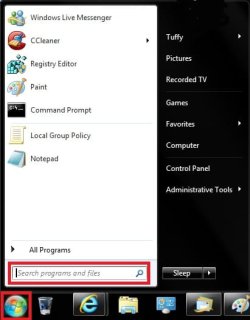
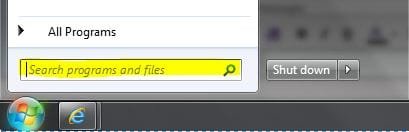
I have a multi-page tutorial (from Windows Secrets), which says "Once you are ready..., simply click the Start orb, type backup in the Search programs and files box, and press Enter".
I have no idea where to look for Start orb, nor the rest of it.
Please help.
 

My Computer

Computer Manufacturer/Model Number
Gateway,SX2840
OS
windows7 Home Premium 64bit
CPU
Intel core i3 530
Motherboard
???????????????
Memory
6GBDDR3
Graphics Card(s)
????????????????????
Sound Card
????????????
Monitor(s) Displays
LG W40
Hard Drives
1TB
PSU
???????????????????
Case
mini
Cooling
fan
The 'Start Orb' is the round circle in the bottom left of your screen.

Something like:
Windows-7-Start-Orb.jpg


Regards,
JDobbsy1987
 

My Computer

Computer type
PC/Desktop
Computer Manufacturer/Model Number
Self Built
OS
Windows 8.1 Pro x64
CPU
Intel Core i5-2500K @ 3.30GHz - S1155
Motherboard
Asus P8P67 LE Rev3, Intel P67, S115
Memory
8GB Corsair DDR3 XMS3, PC3-12800
Graphics Card(s)
NVIDIA GeForce GTX 650
Sound Card
On-Board
Monitor(s) Displays
3 x 24" {Extended Display}
Screen Resolution
1920 x 1080
Hard Drives
300GB Seagate Barracuda 7200
PSU
550W Coolermaster GX550
Case
Silverstone Precision PS04B
Cooling
Stock
Keyboard
Logitech K120
Mouse
World of Warcraft Cataclysm MMO Gaming Mouse
Internet Speed
80 MB
Antivirus
MSE / Windows Defender
Browser
Chrome

My Computer

Computer type
PC/Desktop
Computer Manufacturer/Model Number
Self built custom
OS
64-bit Windows 11 Pro for Workstations
CPU
Intel i7-8700K OC'd to 5 GHz
Motherboard
ASUS ROG Maximus XI Formula Z390
Memory
64 GB (4x16GB) G.SKILL TridentZ RGB DDR4 3600 MHz
Graphics Card(s)
ASUS ROG-STRIX-GTX1080TI-O11G-GAMING
Sound Card
Integrated
Monitor(s) Displays
2 x Samsung Odyssey G7 27"
Screen Resolution
2560x1440
Hard Drives
1TB Samsung 990 PRO M.2,
4TB Samsung 990 PRO PRO M.2,
TerraMaster F8 SSD Plus NAS
PSU
Seasonic Prime Titanium 850W
Case
Thermaltake Core P3
Cooling
Corsair Hydro H115i
Keyboard
Logitech wireless K800
Mouse
Logitech MX Master 4
Internet Speed
2 Gb/s Download and 100 Mb/s Upload
Antivirus
Malwarebyte Anti-Malware Premium
Browser
Google Chrome
Other Info
Logitech Z625 speaker system,
Logitech BRIO 4K Pro webcam,
HP Color LaserJet Pro MFP M477fdn,
APC SMART-UPS RT 1000 XL - SURT1000XLI,
Galaxy S23 Plus phone
Thanks a lot! Apparently, we have different versions of Win7: mine is Home Premium; there is no "Search programs and files", as it was in WinXP; there are only two options - "Search For files and folders..." and "Search For people...". Be as it may, I think I'll find "Backup". On the second thought, I've been happy with EASEUS Todo Home 2.0 , why change?
 

My Computer

Computer Manufacturer/Model Number
Gateway,SX2840
OS
windows7 Home Premium 64bit
CPU
Intel core i3 530
Motherboard
???????????????
Memory
6GBDDR3
Graphics Card(s)
????????????????????
Sound Card
????????????
Monitor(s) Displays
LG W40
Hard Drives
1TB
PSU
???????????????????
Case
mini
Cooling
fan
Yes, you are probably best sticking with something that you know works for you.
 

My Computers

System One System Two

  • Computer type
    PC/Desktop
    OS
    7 X64
    CPU
    i5 8400
    Motherboard
    gigabyte b365m ds3h
    Memory
    2x8gb 3200mhz
    Hard Drives
    various
    PSU
    pure power 11 400w cm
    Case
    Coolermaster
    Cooling
    cryorig m9i
  • Computer type
    PC/Desktop
    OS
    7x64
    CPU
    g5400
    Motherboard
    ga b365m ds3h
    Memory
    8gb ddr4 2400
    PSU
    xfx pro 450w
Thanks a lot! Apparently, we have different versions of Win7: mine is Home Premium; there is no "Search programs and files", as it was in WinXP; there are only two options - "Search For files and folders..." and "Search For people...". Be as it may, I think I'll find "Backup". On the second thought, I've been happy with EASEUS Todo Home 2.0 , why change?

That makes no sense. All versions of Windows 7 have the Search Programs and Files. Are you sure you're not using XP with a Windows 7 theme?
 

My Computer

Computer Manufacturer/Model Number
Self-Built
OS
Windows 7 64 bit SP1
CPU
Core i7 920
Motherboard
Gigabyte GA-X58A-UD3R
Memory
12 GB (6x2GB Corsair)
Graphics Card(s)
nVidia 250GTS
Sound Card
Built-in
Monitor(s) Displays
2x Samsung SyncMaster 2343 (23" Widescreen)
Keyboard
Microsoft Natural Keyboard
Mouse
Logitech Laser
Did you install any custom themes ?
 

My Computer

Computer type
PC/Desktop
Computer Manufacturer/Model Number
Built them myself, Science Experiments !
OS
Win7 Enterprise, Win7 x86 (Ult 7600), Win7 x64 Ult 7600, TechNet RTM on AMD x64 (2.8Ghz)
CPU
AMD fx8350 4ghz, AMD-32 2400mhz, AMD-64 3200mhz, AMDx64 2.8G
Motherboard
SIS 755, ECS-K8M890M-M (Ult 7600), GigaByte & others
Memory
2gb, 4gb on the Ult 7600, 4gb on Technet RTM, 32gb on FX8350
Graphics Card(s)
Draw my own Graphics, several nVidia cards
Sound Card
on motherboard
Monitor(s) Displays
19" flat scr, 28" I-Inc widescr,22" Emprex Widescr, 23" Acer
Screen Resolution
1280 x 1024, 1440 x 900, 1920 x 1080
Hard Drives
6 pata Ide HD's & 2 Sata HD's
added 80gb external on Ult 7600 computer,
numerous extra 1tb, 2TB, 3Tb SATA HD's
A collection of ext HD Docks w/ HDs
PSU
430w, 550w, 600w, 700, 800, etc
Case
All Generic Full Towers
Cooling
Open Air & a few fans, some w/ colored LEDs
Keyboard
Compaq & Dell recycled from GoodWill
Mouse
Made in China Optical Wired Mouse
Internet Speed
Fast Cable InterNet
Antivirus
AVG Free on 24 different Desktops, NO Problems!
Browser
IE 8 is preferred, but use FireFox sometimes
Other Info
Linksys Routers, switches, & Hubs
Too Many USB Flash Drives to count, Biggest is 64GB !
Eight computers in my home network.
Sixteen computers at my business network.
Linked via TeamViewer !
Lots of old used spare computer parts everywhere!
Every time I turn on my PC, I see "Windows7 Home Premium". And I think it is - it's very different from WinXP.
 

My Computer

Computer Manufacturer/Model Number
Gateway,SX2840
OS
windows7 Home Premium 64bit
CPU
Intel core i3 530
Motherboard
???????????????
Memory
6GBDDR3
Graphics Card(s)
????????????????????
Sound Card
????????????
Monitor(s) Displays
LG W40
Hard Drives
1TB
PSU
???????????????????
Case
mini
Cooling
fan

My Computer

Computer type
PC/Desktop
Computer Manufacturer/Model Number
Self built custom
OS
64-bit Windows 11 Pro for Workstations
CPU
Intel i7-8700K OC'd to 5 GHz
Motherboard
ASUS ROG Maximus XI Formula Z390
Memory
64 GB (4x16GB) G.SKILL TridentZ RGB DDR4 3600 MHz
Graphics Card(s)
ASUS ROG-STRIX-GTX1080TI-O11G-GAMING
Sound Card
Integrated
Monitor(s) Displays
2 x Samsung Odyssey G7 27"
Screen Resolution
2560x1440
Hard Drives
1TB Samsung 990 PRO M.2,
4TB Samsung 990 PRO PRO M.2,
TerraMaster F8 SSD Plus NAS
PSU
Seasonic Prime Titanium 850W
Case
Thermaltake Core P3
Cooling
Corsair Hydro H115i
Keyboard
Logitech wireless K800
Mouse
Logitech MX Master 4
Internet Speed
2 Gb/s Download and 100 Mb/s Upload
Antivirus
Malwarebyte Anti-Malware Premium
Browser
Google Chrome
Other Info
Logitech Z625 speaker system,
Logitech BRIO 4K Pro webcam,
HP Color LaserJet Pro MFP M477fdn,
APC SMART-UPS RT 1000 XL - SURT1000XLI,
Galaxy S23 Plus phone
Every time I turn on my PC, I see "Windows7 Home Premium". And I think it is - it's very different from WinXP.

Well, something isn't right, because the Windows Boot screen does not say Windows 7, it just says "Starting Windows". Or do you mean the login screen at the bottom?
 

My Computer

Computer Manufacturer/Model Number
Self-Built
OS
Windows 7 64 bit SP1
CPU
Core i7 920
Motherboard
Gigabyte GA-X58A-UD3R
Memory
12 GB (6x2GB Corsair)
Graphics Card(s)
nVidia 250GTS
Sound Card
Built-in
Monitor(s) Displays
2x Samsung SyncMaster 2343 (23" Widescreen)
Keyboard
Microsoft Natural Keyboard
Mouse
Logitech Laser
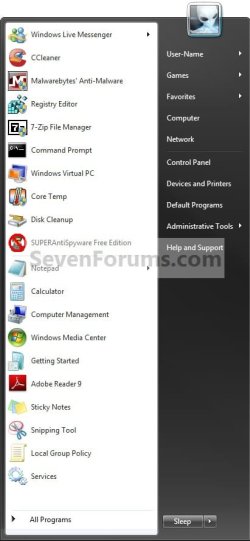
My start menu is just one light column with ten lines.
The boot screen says Win7 Home Premium Edition; I am the only user of this PC, I do NOT have to log in or out; no login screen appears at any time, anywhere.
 

My Computer

Computer Manufacturer/Model Number
Gateway,SX2840
OS
windows7 Home Premium 64bit
CPU
Intel core i3 530
Motherboard
???????????????
Memory
6GBDDR3
Graphics Card(s)
????????????????????
Sound Card
????????????
Monitor(s) Displays
LG W40
Hard Drives
1TB
PSU
???????????????????
Case
mini
Cooling
fan
Hello yuhr and welcome to Seven Forums.

Are you saying that once your computer shows the desktop and you click on the start orb in the lower left corner of the screen, you are not seeing the start menu search feature like this?

start menu.JPG

Can you post a snip of your desktop so we can see what you're seeing.
 

My Computer

Computer type
Laptop
Computer Manufacturer/Model Number
Sony Vaio VPCEB47GM Laptop
OS
Win 7 Pro 64-bit
CPU
Intel i5 2.4 Ghz
Memory
8GB DDR3
Graphics Card(s)
Intel HD 3000
Sound Card
IDT High Definition
Monitor(s) Displays
15.6 WGXA Anti-Glare LED
Screen Resolution
1280x800
Hard Drives
640Gb 7200rpm
Antivirus
MSE
Browser
Opera (primary) with IE9 backup
I have a friend with a sony lappy running Home Premium.

The start menu on that looks the same as the one you get with the classic start menu app. ( can't remember the exact name of the app. )

I think the oem ( or maybe the shop - you know some places do customizations , usually for a fee ) supplied it like that - strange, but true.

Looks very similar to this - can't remember if there is an orb - I think so


classicstartmenu.png

@yuhr

Can you take a screenshot of your start menu and post it up?

If there is no orb - what do you click to get the start menu to pop up?

Is it just a square box that says start on it?

Are you asleep?
 
Last edited by a moderator:

My Computers

System One System Two

  • Computer type
    PC/Desktop
    OS
    7 X64
    CPU
    i5 8400
    Motherboard
    gigabyte b365m ds3h
    Memory
    2x8gb 3200mhz
    Hard Drives
    various
    PSU
    pure power 11 400w cm
    Case
    Coolermaster
    Cooling
    cryorig m9i
  • Computer type
    PC/Desktop
    OS
    7x64
    CPU
    g5400
    Motherboard
    ga b365m ds3h
    Memory
    8gb ddr4 2400
    PSU
    xfx pro 450w
I am not asleep! My PC was crashing; yesterday it crashed many times, before Win started, during, and shortly thereafter. I was offered Sys Recovery, with 3 CDs. I restored to "Factory specs with full Backup to C:\\". Now it's OKay, I can open Backup folder but do not know how to restore it.
Please help. :sarc::sick:
 

My Computer

Computer Manufacturer/Model Number
Gateway,SX2840
OS
windows7 Home Premium 64bit
CPU
Intel core i3 530
Motherboard
???????????????
Memory
6GBDDR3
Graphics Card(s)
????????????????????
Sound Card
????????????
Monitor(s) Displays
LG W40
Hard Drives
1TB
PSU
???????????????????
Case
mini
Cooling
fan
Falling asleep, sort of...

One mystery is solved: after I did Sys. Recovery to factory specs (with personal data backed up, yet not recoverable so far), I have two column Start Menu with Search for Files and Programs as was described above; it even works as Run... command - I had to reconfig my IP. I guess that initially, over two years ago, I did not like it and changed it to Classic Look; now it looks better, so I'll stick to it.
On top of everything, we started messy cosmetic renovations (painting and wallpaper hanging), so I had to disconnect everything, put my PC., etc. in plastic bags and move them to less dusty areas of the house, at least for a few days. I contacted Gateway about my Backup, the tech informed me that he is trained in hardware only, which in my case, was Okay. He referred me to an English-speacking software tech, who informed me of my two options: for $199 the problem can be fixed, for $299 I'll get some extended service. I said that I could buy a new PC in that price range and terminated the chat.
If I will not be able to restore my backup, I'll try to restore my old (~1-2 month) backup from external HD.
This post was typed at my work PC. My next workday is next Fri.
Thanks.
 
Last edited:

My Computer

Computer Manufacturer/Model Number
Gateway,SX2840
OS
windows7 Home Premium 64bit
CPU
Intel core i3 530
Motherboard
???????????????
Memory
6GBDDR3
Graphics Card(s)
????????????????????
Sound Card
????????????
Monitor(s) Displays
LG W40
Hard Drives
1TB
PSU
???????????????????
Case
mini
Cooling
fan
Back
Top