Mystery 3MB Partition still showing after full disk wipe

Tyler335

New member
Local time
5:54 PM
Messages
5
Hi all,

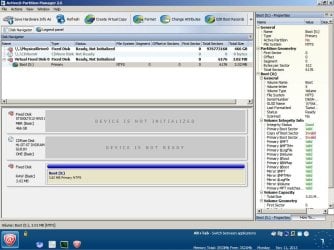
I used Killdisk from LSoft to erase my harddrive and everything seemed to work fine. Then I opened Active@ Partition Manager and it's showing a 3MB partition labelled X:BOOT. This partition doesn't show in Killdisk, just in Partition Manager, and Partition Manager can't delete it without giving an error. Does anyone know what this might be?

Googling hasn't turned up much, but could it be related to the virus problem these people were having:

http://www.sevenforums.com/system-security/247502-partition-virus-non-system-drive-virus.html
Kaspersky Lab Forum > Alureon.E

The partition doesn't show up in Parted Magic either. I'll attach a screenshot from Active@ Partition Manager.

Please help
 

Attachments
  • mysterypartition.JPG
    mysterypartition.JPG
    105.8 KB · Views: 7

My Computer My Computer

At a glance

Windows 7 Ultimate x64
Computer type
PC/Desktop
OS
Windows 7 Ultimate x64
I ran into that bugaboo on a HDD I salvaged from my old XP machine that had the OS installed on it. I tried everything I could think of and actually managed to reduce it 9MB but it wouldn't completely go away until I tried formatting it, then deleting it or merging it with the rest of the HDD (I don't remember which now).
 

My Computer My Computer

At a glance

Win 7 Ultimate 64 bitIntel i7-3930KKingston HyperX Genesis 32GB Kit (8x4GB Modul...MSI R7850 Twin Frozr 2GD5/OC Radeon HD 7850 2...
Computer type
PC/Desktop
Computer Manufacturer/Model Number
Custom Build
OS
Win 7 Ultimate 64 bit
CPU
Intel i7-3930K
Motherboard
ASUS P9X79 WS
Memory
Kingston HyperX Genesis 32GB Kit (8x4GB Modules) 1600MHz DDR
Graphics Card(s)
MSI R7850 Twin Frozr 2GD5/OC Radeon HD 7850 2GB 256-bit GDDR
Sound Card
Asus Xonar Essence STX
Monitor(s) Displays
3x Asus VG248QE 24", Vizio 32" TV
Screen Resolution
1920 x 1080, ?
Hard Drives
Samsung 128GB 840 Pro SSD (1),
Samsung 4TB 850 EVO SSDs (4)
Samsung 4TB 850 EVO SSDs (16) external backup drives used in 2.5" hot swap bays in the computer.
PSU
Corsair HX750w
Case
Antec Two Hundred v2 (modified)
Cooling
Cooler Master GeminII S524 120mm (fan replaced with a 140mm)
Keyboard
Logitech G510s
Mouse
Logitech M525 (two in use)
Internet Speed
=< 32Mbps down, 8Mbps up
Antivirus
AVAST!, MBAM, SAS, Spybot S&D (all but MBAM free) Glary Util
Browser
IE11
Other Info
LSI 9211-8i HBA card (8 SATA III ports), 2.5" & 3.5" Hot Swap Bays, HooToo HT-CR001 PCI-E to USB 3.0 Internal Hub + 6 Slot Card Reader, and LG Model CH12LS28 BD-ROM Optical Drive. Also, ScanSnap S1500 ADF duplexing scanner, Canon 9000F flat bed scanner, Corsair SP2500 2.1 speakers, Samsung CLP 415nw laser color printer, Cyberpower PP2200SW UPS
Hi Lady Fitz, thanks for the reply. This partition has resisted all attempts to delete it, or modify it in any way. I was running Windows 7 on the drive before I wiped it.
 

My Computer My Computer

At a glance

Windows 7 Ultimate x64
Computer type
PC/Desktop
OS
Windows 7 Ultimate x64
Download Windows Executable ver 4.30 (works without installation) from http://hddguru.com/software/HDD-LLF-Low-Level-Format-Tool/

Try to low level format the full disk with it. ( Be careful to select the correct drive.)

Once low level format is completed - which you can monitor in the progress bar - format it with Windows 7.

Let us see whether it helps to get rid of the 3MB partition.

(If you have a Seagate or Western Digital HDD, zeroing it with the manufacturer's diagnostic/repair tool/utility will be a better option.)
 

My Computer My Computer

At a glance

Windows 7 Home Premium 32 bit
OS
Windows 7 Home Premium 32 bit
does it show up in diskpart in windows?
EDIT: im surprised it does not appear in gparted in parted magic.
 

My Computer My Computer

At a glance

10 Pro x64Ryzen 9 3900X64GB(4x16GB) DDR4EVGA 1080ti FTW3
Computer type
PC/Desktop
Computer Manufacturer/Model Number
Custom
OS
10 Pro x64
CPU
Ryzen 9 3900X
Motherboard
Asrock x370 Tachi
Memory
64GB(4x16GB) DDR4
Graphics Card(s)
EVGA 1080ti FTW3
Sound Card
ASUS Xonar Essence STX (V4 Bursons), ODAC rev B, NFB-11, O2
Monitor(s) Displays
3xASUS PB278Q/R, Optoma HD142X
Screen Resolution
3x1440p, 1080p
Hard Drives
512GB 850 EVO(OS, Programs)
4TB (Movies)
3TB (Downloads)
3TB (Programs)
1TB HDD (Games)
2x6TB R1 (videos)
PSU
AX760
Case
Fractal Define R5
Cooling
NH-D15S
Keyboard
Massdrop Ctrl with Box Navy's
Mouse
G903, Alioth XXL Mat
Internet Speed
280/40
Antivirus
MBAM, ESET
Browser
Canary 64 Bit
Other Info
I also own a Thinkpad P50 Xeon 4K, X220T, X1C5
Keep in mind: Windows, and some other OS, use and need a small unallocated portion of a hard drive before and sometimes after the main volume. These are usually 2 to 6 MB in size.
However these small sections are supposed to be invisible and definitely should not have a drive letter assigned, so I would remain suspicious that it could be something else.

If you use DISKPART with the "Clean All" command it will (should) wipe the drive of everything. Then if you initialize it using Windows then those "working" sectors will be created as Windows likes it.
 

My Computer My Computer

At a glance

Windows 7 64 Bit Home Premium SP1i7-3820GSkill F3-14900CL9Q - 16GBEVGA GeForce GTX660 - Driver 352.86
Computer type
PC/Desktop
Computer Manufacturer/Model Number
Home Built - Jan 2013
OS
Windows 7 64 Bit Home Premium SP1
CPU
i7-3820
Motherboard
Asus P9X79-PRO - Bios 4608
Memory
GSkill F3-14900CL9Q - 16GB
Graphics Card(s)
EVGA GeForce GTX660 - Driver 352.86
Sound Card
On board Realtek ALC898
Monitor(s) Displays
Acer S271HL
Screen Resolution
1920 x 1080
Hard Drives
#1- Samsung 840 Pro Series
#2- Western Digital WD1002FAEX Sata3 Black
#3- Western Digital WD1002FAEX Sata3 Black
PSU
Corsair CMPSU-850TX-V2 - 850 watt (by Seasonic)
Case
Corsair Obsidian 550D
Cooling
Standard 3 120mm case fans, Cooler Master Hyper 212 EVO
Keyboard
MS KC-0405
Mouse
Intellimouse 5-button
Internet Speed
56 Mbits/Sec (on a good day)
Antivirus
Avast & Malwarebytes
Browser
Firefox
Other Info
Asus DVD - DRW-24B1ST 24X
I downloaded the HDD Low Level Format tool, but it gave a system error when I tried to run it: "Can't start because SHFolder.dll is missing". So I booted DBAN from USB and ran an "autonuke" that took 10+ hours to fully wipe the drive. The partition seems to have survived even that.

The partition doesn't show in diskpart.

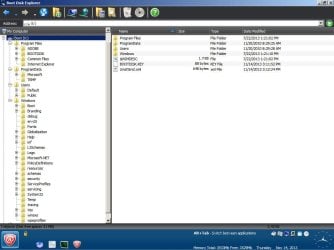
I was able to open the partition using the Boot Disk Explorer from LSoft, and I'll attach a screenshot of what I found:
 

Attachments

  • 3mbdiskexplorer.JPG
    3mbdiskexplorer.JPG
    68.8 KB · Views: 5

My Computer My Computer

At a glance

Windows 7 Ultimate x64
Computer type
PC/Desktop
OS
Windows 7 Ultimate x64
If a hard drive survives a dban nuke that lasts 10 hours, I am thinking bad sectors or rootkit.
 

My Computer My Computer

At a glance

Windows 7 Ultimate x64FX 8350 @ 4.8ghz, turbo clocked to 5.4ghzMushkin Enhanced Blackline 16GB 1760mhz 10-10...Gigabyte-660 Windforce OC- GPU Clock 1212MHz ...
Computer type
PC/Desktop
Computer Manufacturer/Model Number
Custom Build
OS
Windows 7 Ultimate x64
CPU
FX 8350 @ 4.8ghz, turbo clocked to 5.4ghz
Motherboard
Asus Sabertooth FX990 Gen 3.0 R2.0
Memory
Mushkin Enhanced Blackline 16GB 1760mhz 10-10-9-24 T1
Graphics Card(s)
Gigabyte-660 Windforce OC- GPU Clock 1212MHz /3504MHz ram
Sound Card
Creative Sound Blaster Recon3D PCIe Sound Card
Monitor(s) Displays
Samsung SyncMaster S27B350H (HDMI)
Screen Resolution
1920x1080 60HZ
Hard Drives
1 x SSD Crucial M4 256GB (Primary OS)
3 x HDD WD 1TB
4 x HDD 2TB
1 x HDD 160GB (Secondary Backup OS)
Raid SATA III 6GB/s 4-port PCI-e Controller Card, Marvel 88SE9215 chipset
PSU
Chieftec-650-14CS (Modular) 80 Plus Gold-650 Watt
Case
Akasa Venom Toxic Gaming Big tower ( Custom Black ) Ver 2.0
Cooling
Water 2.0 PRO / GEIL Cyclone VRM / 6x120mm 2x220mm 2x140mm
Keyboard
Logitech G19
Mouse
Wireless Notebook Presenter Mouse 8000
Internet Speed
Fiber GBS
Antivirus
Don't Announce it to the world :)
Browser
Gotta have at least 1!
Hi Tyler,
1. The problem of missing shfolder.dll has to be tackled as an entirely different problem.

2. What is the history of the HDD that has this 3 MB partition?

3.That even DBAN wouldn't touch it gives a clue that that partition remains in the HPA/DCO area.( You now know how important is the history.)

4. The easiest way to kill that partition and restore the full capacity of your hard drive is to use Atola's HDD capacity Restore Tool Restoring Factory Hard Drive Capacity » Official Atola Technology Blog This works only on 32bit system and so you have to hook up your HDD as a second internal drive on a desktop running 32 bit Windows 7 and do the procedure.

5. Otherwise you have to use HDAT2 HDAT2 Download. There is a cookbook on using it. Find it and download it.

( I am allowed to sit stand and move about only for two or three hours a day. So I am not able to elaborate. My quota for the day is over.:) )
 

My Computer My Computer

At a glance

Windows 7 Home Premium 32 bit
OS
Windows 7 Home Premium 32 bit
Alright, I've downloaded Hdat2 and the cookbook. Under the "Hidden Areas>>Overview of Hidden Areas" menu, there is nothing listed next to HPA or DCO. I wasn't able to take a screenshot, but the program is definitely saying there are no hidden areas on the disk.

The partition still shows in Active@ Partition Manager, though. Could another wiping program other than DBAN nuke the drive more thoroughly? Or are there any settings in DBAN Interactive mode that would force the program to wipe absolutely every single sector on the disk? I'll admit I'm getting a little frustrated...this partition seems to be immortal.
 

My Computer My Computer

At a glance

Windows 7 Ultimate x64
Computer type
PC/Desktop
OS
Windows 7 Ultimate x64
Have you tried DISKPART "Clean All" yet?
 

My Computer My Computer

At a glance

Windows 7 64 Bit Home Premium SP1i7-3820GSkill F3-14900CL9Q - 16GBEVGA GeForce GTX660 - Driver 352.86
Computer type
PC/Desktop
Computer Manufacturer/Model Number
Home Built - Jan 2013
OS
Windows 7 64 Bit Home Premium SP1
CPU
i7-3820
Motherboard
Asus P9X79-PRO - Bios 4608
Memory
GSkill F3-14900CL9Q - 16GB
Graphics Card(s)
EVGA GeForce GTX660 - Driver 352.86
Sound Card
On board Realtek ALC898
Monitor(s) Displays
Acer S271HL
Screen Resolution
1920 x 1080
Hard Drives
#1- Samsung 840 Pro Series
#2- Western Digital WD1002FAEX Sata3 Black
#3- Western Digital WD1002FAEX Sata3 Black
PSU
Corsair CMPSU-850TX-V2 - 850 watt (by Seasonic)
Case
Corsair Obsidian 550D
Cooling
Standard 3 120mm case fans, Cooler Master Hyper 212 EVO
Keyboard
MS KC-0405
Mouse
Intellimouse 5-button
Internet Speed
56 Mbits/Sec (on a good day)
Antivirus
Avast & Malwarebytes
Browser
Firefox
Other Info
Asus DVD - DRW-24B1ST 24X
Hi TVeblen, I'm sorry I didn't respond to your original post. I've run Clean All in Diskpart a few times now, but it didn't have any effect on the partition, I'm afraid.

The more trouble I have removing this partition, the more convinced I become it's part of a rootkit.
 

My Computer My Computer

At a glance

Windows 7 Ultimate x64
Computer type
PC/Desktop
OS
Windows 7 Ultimate x64
I am surprised to learn that HDAT2 did not find anything.

The only thing left for you to try is to use Atola's HDD Capacity Restore Tool - my post #9 - hooking up the HDD onto a 32bit system.

(If you have no means to do it, you may seek help from a neighbourhood computer shop to do it for you.)
 

My Computer My Computer

At a glance

Windows 7 Home Premium 32 bit
OS
Windows 7 Home Premium 32 bit
I looked back at your first post and noticed that this mystery drive is Virtual Hard Disk.

Does this 3MB partition show up in any other program or utility? If not, it may be a virtual drive created for the use of Active Partition Manager.

Just a guess. But seeing it is a virtual drive just makes me think it does not really exist at all on the physical hard drive.
 

My Computer My Computer

At a glance

Windows 7 64 Bit Home Premium SP1i7-3820GSkill F3-14900CL9Q - 16GBEVGA GeForce GTX660 - Driver 352.86
Computer type
PC/Desktop
Computer Manufacturer/Model Number
Home Built - Jan 2013
OS
Windows 7 64 Bit Home Premium SP1
CPU
i7-3820
Motherboard
Asus P9X79-PRO - Bios 4608
Memory
GSkill F3-14900CL9Q - 16GB
Graphics Card(s)
EVGA GeForce GTX660 - Driver 352.86
Sound Card
On board Realtek ALC898
Monitor(s) Displays
Acer S271HL
Screen Resolution
1920 x 1080
Hard Drives
#1- Samsung 840 Pro Series
#2- Western Digital WD1002FAEX Sata3 Black
#3- Western Digital WD1002FAEX Sata3 Black
PSU
Corsair CMPSU-850TX-V2 - 850 watt (by Seasonic)
Case
Corsair Obsidian 550D
Cooling
Standard 3 120mm case fans, Cooler Master Hyper 212 EVO
Keyboard
MS KC-0405
Mouse
Intellimouse 5-button
Internet Speed
56 Mbits/Sec (on a good day)
Antivirus
Avast & Malwarebytes
Browser
Firefox
Other Info
Asus DVD - DRW-24B1ST 24X
I've got current and ample knowledge on what you are trying to get rid of. It's the almost impossible to actually impossible to get rid of bootkit originally made by the NSA that's written outside of the writable area of the disk that's why you can't delete it. I'm a little rusty but if memory serves correctly its built by the hard drive firmware rootkit that is the real "kit" involved here. Basically you erase it when you format that drive but as soon as the write heads are done cleaning or binary writing the disks depending on which format version you go with, the firmware malware hijacks the drive and rebuilds it. That folder called unattend is the innocent name for the house that holds the malicious base level payload. Once an os is booted that partition hooks the os in one of a few ways depending on windows version in your case it's for sure from xp and eventually gets itself kernal level access at least and has instructions to get the rest of whichever exploit was intended from a remote server.. meet EQUATIONDRUG and GRAYFISH... they can be modified but on a base level drug writes into the firmware of the drive and grayfish is the 3mb little bastard it creates with those steel hooks it likes to stab into your digital realm maintaining persistence on it's own i.e. unattended by any human presence.
 

My Computer My Computer

At a glance

Ultimate 64 in this context.Amd.. continued from above-- which is why I m...
Computer type
PC/Desktop
Computer Manufacturer/Model Number
Hp and hp... one has a firmware rootkit that has kitted strapped hooked amd rewritten everything
OS
Ultimate 64 in this context.
CPU
Amd.. continued from above-- which is why I made an account
Motherboard
To answer this question mulberry motherboard
Actually I think depending on the drive brand and setup in some cases it's actually written on the disk outside of the user level write head operating distance. Most would call it the service area or manufacturer only area and essentially the write heads are overextended to write the payload using parameters normally only accessible by the factory. My guess is the jumper setting labeled factory use is what enables that function and true low level formatting and that jumper can be selected via electricity no physical object needed.. when . P.s. doesn't mean the nsa put it on your drive. Hackers got their hands on the code when kaspersky went public with it and there is an associated worm that lives to find other systems to infect autonomously
 

My Computer My Computer

At a glance

Ultimate 64 in this context.Amd.. continued from above-- which is why I m...
Computer type
PC/Desktop
Computer Manufacturer/Model Number
Hp and hp... one has a firmware rootkit that has kitted strapped hooked amd rewritten everything
OS
Ultimate 64 in this context.
CPU
Amd.. continued from above-- which is why I made an account
Motherboard
To answer this question mulberry motherboard
Back
Top