Solved Mystery File Found

Roderunner

Exterminator
Guru
Gold Member
VIP
Local time
5:14 AM
Messages
2,362
Location
Scotland
Hi Folks, I found a file (un_report.dat) on my Laptop, any suggestions?
RR.png
 

My Computer

Computer Manufacturer/Model Number
Look in my Signature.
OS
Win7 H.Prem. 32bit+SP1
If you launch notepad and use the file menu in notepad to browse to the file you might be able to open it and read some of the contents. Research indicates that it might be Revo Uninstaller database.

EDIT: I installed REVO and there's no trace of that file. Your best bet is to try opening it with notepad (vie notepad.exe > File > Open and see if any of it is readable.
 
Last edited:

My Computer

Computer type
Laptop
Computer Manufacturer/Model Number
ASUS
OS
Microsoft Windows 7 Home Premium 64-bit 7601 Multiprocessor Free Service Pack 1
CPU
AMD C-60 APU with Radeon(tm) HD Graphics
Motherboard
ASUSTeK COMPUTER INC. X501U
Memory
4.00 GB
Graphics Card(s)
AMD Radeon HD 6290 Graphics
Sound Card
(1) AMD High Definition Audio Device (2) Realtek High Defi
Screen Resolution
1366 x 768 x 32 bits (4294967296 colors) @ 60 Hz
Hard Drives
Hitachi HTS545050A7E380 SATA Disk Device
Antivirus
Comodo CIS & FW, SecureAplus App Whitelisting, Threatfire
Browser
Cyberfox 64bit, Opera 64bit, Airfox
Other Info
Spy-The-Spy, HitmanPro.Alert, Norton Connect Safe, MJRegWatcher, BitDefender TrafficLight, Voodoo Shield, Zemana AntiMalware
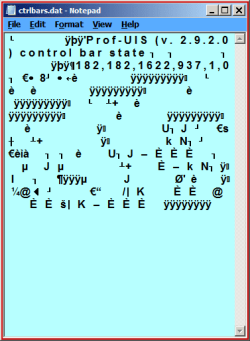
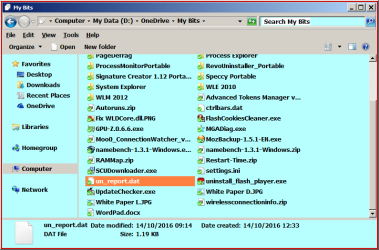
Hi Callendar, this is what I got when trying to open with Notepad + another file in the same location.

RR.png

RR1.png

I don't have Revouninstaller installed but I do use the portable version. It was last used to remove WOT.(both my pc's)
These images were taken on my Desktop PC.
 

My Computer

Computer Manufacturer/Model Number
Look in my Signature.
OS
Win7 H.Prem. 32bit+SP1
As searches show an association with Revo, and nothing else (google "un_report.dat" including the quotes) and you have indeed used the portable version it is very likely that it was saved by Revo. It also looks like you don't need that file - to be on the safe side, archive it somewhere not directly accessible such as a flash drive, zip file, or another folder, and see if any problems show up - if not it's probably safe to delete.
 

My Computer

Computer type
PC/Desktop
Computer Manufacturer/Model Number
Custom, various
OS
Windows 7 Pro 64 bit
CPU
Various
Motherboard
Various
Memory
Various
Graphics Card(s)
Various
Hard Drives
Various
Antivirus
Various
Browser
Firefox
Well there's nothing "Revo" in your screenshots - no text that identifies the program that created it. Personally I'd be tempted to leave it alone unless someone else can confirm that they have the same file.

Another option would be to rename the file with .bak extension and see if you experience any issues.
 

My Computer

Computer type
Laptop
Computer Manufacturer/Model Number
ASUS
OS
Microsoft Windows 7 Home Premium 64-bit 7601 Multiprocessor Free Service Pack 1
CPU
AMD C-60 APU with Radeon(tm) HD Graphics
Motherboard
ASUSTeK COMPUTER INC. X501U
Memory
4.00 GB
Graphics Card(s)
AMD Radeon HD 6290 Graphics
Sound Card
(1) AMD High Definition Audio Device (2) Realtek High Defi
Screen Resolution
1366 x 768 x 32 bits (4294967296 colors) @ 60 Hz
Hard Drives
Hitachi HTS545050A7E380 SATA Disk Device
Antivirus
Comodo CIS & FW, SecureAplus App Whitelisting, Threatfire
Browser
Cyberfox 64bit, Opera 64bit, Airfox
Other Info
Spy-The-Spy, HitmanPro.Alert, Norton Connect Safe, MJRegWatcher, BitDefender TrafficLight, Voodoo Shield, Zemana AntiMalware
From your screenshot it looks to be related to this:

Prof-UIS Feature Samples

The file contains the text "Prof-UIS"
 

My Computer

Computer type
Laptop
Computer Manufacturer/Model Number
ASUS
OS
Microsoft Windows 7 Home Premium 64-bit 7601 Multiprocessor Free Service Pack 1
CPU
AMD C-60 APU with Radeon(tm) HD Graphics
Motherboard
ASUSTeK COMPUTER INC. X501U
Memory
4.00 GB
Graphics Card(s)
AMD Radeon HD 6290 Graphics
Sound Card
(1) AMD High Definition Audio Device (2) Realtek High Defi
Screen Resolution
1366 x 768 x 32 bits (4294967296 colors) @ 60 Hz
Hard Drives
Hitachi HTS545050A7E380 SATA Disk Device
Antivirus
Comodo CIS & FW, SecureAplus App Whitelisting, Threatfire
Browser
Cyberfox 64bit, Opera 64bit, Airfox
Other Info
Spy-The-Spy, HitmanPro.Alert, Norton Connect Safe, MJRegWatcher, BitDefender TrafficLight, Voodoo Shield, Zemana AntiMalware
Prof-UIS (v2.9.2.0) Control Bar

Does this give any clue to anyone Technical Support for Prof-UIS ?

Edit; (OOps .... I didn't see Callender's post :))

Adding now "Prof-UIS is an MFC-extension library that enables developers to provide their applications with state-of-the-art customized graphical user interface. With the library, you can easily produce rich-featured, user-friendly and reliable interface that has a fresh look and feel" Prof-UIS Feature Tour( See also "Control Bar" in it )

So it seems to be associated with some program's User Interface and harmless.

As Callender suggested OP can rename it as *.bak and then check which program's User Interface is affected and then restore the extension to *.dat , if he is still curious.
 
Last edited:

My Computer

OS
Windows 7 Home Premium 32 bit
I sent an email to Revo Support, this is there reply:-
-
Revo Uninstaller Support Team (VS Revo Group Ltd)

Nov 25, 10:58 EET

Thank you for contacting us!

Revo Uninstaller Free Portable is creating ctrlbars.dat and un_report.dat files but those files should be located in the folder RevoUninstaller_Portable which is visible on the screenshot.
If the files are not located in the folder, Revo Uninstaller will recreate them because they are missing.
Open the folder RevoUninstaller_Portable to verify that the files are there. If not start Revo Uninstaller Free Portable and close it.
In case the files are missing, return to My Bits folder and check modify date of the ctrlbars.dat and un_report.dat
If they are being created by the Free Portable version they should be modified when you start the program.

Thank you!

Best regards,
Tihomir Hinchev
Revo Uninstaller Support Team
Revo Uninstaller Pro - Uninstall Software, Remove Programs easily, Forced Uninstall, Leftovers Uninstaller, Portable Uninstaller
 

My Computer

Computer Manufacturer/Model Number
Look in my Signature.
OS
Win7 H.Prem. 32bit+SP1
Okay it's confirmed. I downloaded Revo Uninstaller portable and it does indeed create those files in the directory where the revo executable is located. which suggests that you must have placed it in root of C drive. It's better to create a directory for portable apps or else make a folder for each app somewhere.

EDIT: I see the file in the root of D drive. I suppose you could check in RevoUninstaller_Portable folder to see if the same file exists inside the folder.

Inspecting those files shows similar information. I can open them in Notepad++ but on my machine if I run notepad.exe it's been configured to launch a different text editor in it's place.
 
Last edited:

My Computer

Computer type
Laptop
Computer Manufacturer/Model Number
ASUS
OS
Microsoft Windows 7 Home Premium 64-bit 7601 Multiprocessor Free Service Pack 1
CPU
AMD C-60 APU with Radeon(tm) HD Graphics
Motherboard
ASUSTeK COMPUTER INC. X501U
Memory
4.00 GB
Graphics Card(s)
AMD Radeon HD 6290 Graphics
Sound Card
(1) AMD High Definition Audio Device (2) Realtek High Defi
Screen Resolution
1366 x 768 x 32 bits (4294967296 colors) @ 60 Hz
Hard Drives
Hitachi HTS545050A7E380 SATA Disk Device
Antivirus
Comodo CIS & FW, SecureAplus App Whitelisting, Threatfire
Browser
Cyberfox 64bit, Opera 64bit, Airfox
Other Info
Spy-The-Spy, HitmanPro.Alert, Norton Connect Safe, MJRegWatcher, BitDefender TrafficLight, Voodoo Shield, Zemana AntiMalware
Portable Apps_RevoUninstaller_Portable_ctrlbars.dat - Notepad++ [Administrat.jpg
 

My Computer

Computer type
Laptop
Computer Manufacturer/Model Number
ASUS
OS
Microsoft Windows 7 Home Premium 64-bit 7601 Multiprocessor Free Service Pack 1
CPU
AMD C-60 APU with Radeon(tm) HD Graphics
Motherboard
ASUSTeK COMPUTER INC. X501U
Memory
4.00 GB
Graphics Card(s)
AMD Radeon HD 6290 Graphics
Sound Card
(1) AMD High Definition Audio Device (2) Realtek High Defi
Screen Resolution
1366 x 768 x 32 bits (4294967296 colors) @ 60 Hz
Hard Drives
Hitachi HTS545050A7E380 SATA Disk Device
Antivirus
Comodo CIS & FW, SecureAplus App Whitelisting, Threatfire
Browser
Cyberfox 64bit, Opera 64bit, Airfox
Other Info
Spy-The-Spy, HitmanPro.Alert, Norton Connect Safe, MJRegWatcher, BitDefender TrafficLight, Voodoo Shield, Zemana AntiMalware
After getting the reply from Revo Support, I was unsure exactly where the files in question should be located, so I deleted the 2 .dat files and the Revo folder, Downloaded a fresh copy and it is perfect.
 

My Computer

Computer Manufacturer/Model Number
Look in my Signature.
OS
Win7 H.Prem. 32bit+SP1
Back
Top