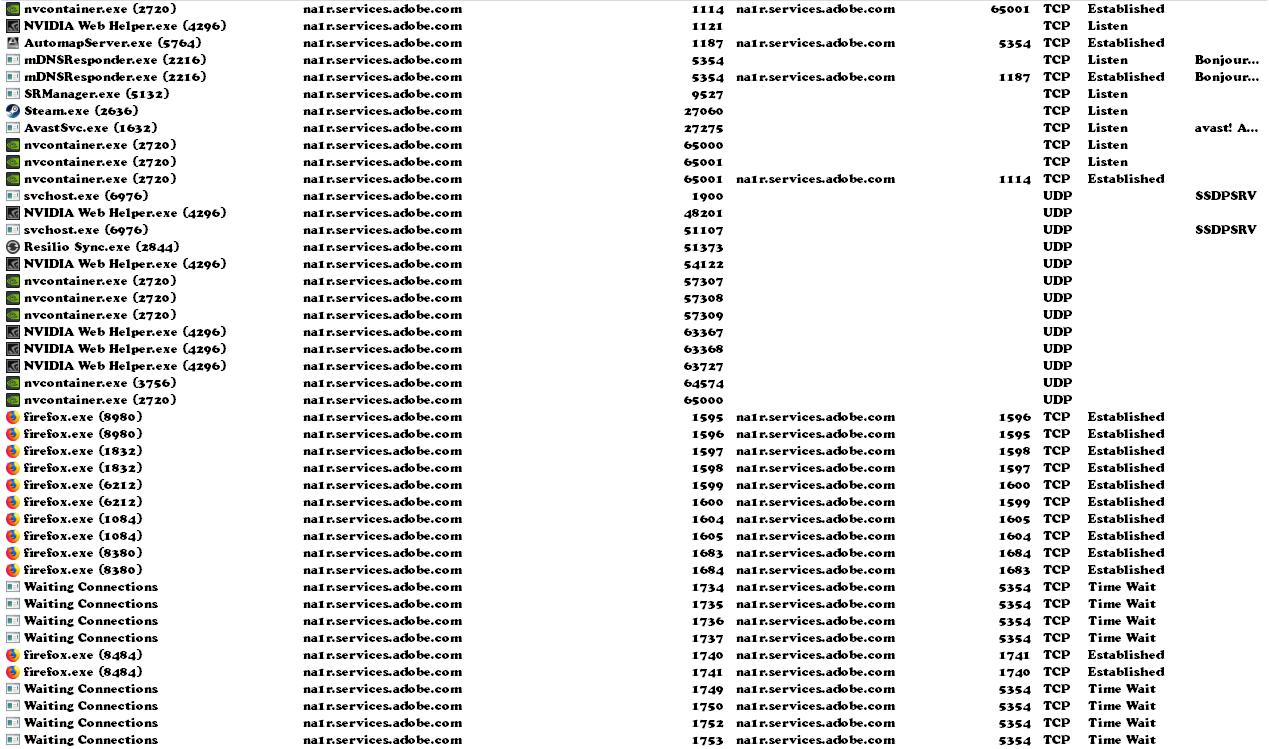
I've seen something very similar to you and have a reasonable idea of what's going on.
All those strange things boil down to one single thing. Look at your
hosts file, and you'll likely found an entry like this:
Code:
127.0.0.1 na1r.services.adobe.com
Since you said you have some Adobe software, and that's an activation server for such programs, all that indicates that you have some
cracked Adobe software. That entry in the hosts file in fact nulifies their activation server, by redirecting all trafic to your own computer (and dying there), thus bypassing activation and phone-home. It's a widely known trick to hack software that requires activation into ilegally working without marking itself as hacked.
A legitimate use of this very same trick could be blocking advertising servers and bundled spyware.
Now, what has all that to do with your screenshot?
Network traffic can originate to/from your own computer and any other device. Each one, even yours is identified by an IP address. Additionally, IP addresses can be assigned a name for ease of use (you don't type "50.23.246.167" in your browser, you type "www.sevenforums.com"). Process hacker tries to be helpful here by showing you names of each host involved in connections, so you see friendly names instead of IPs, so it tries to do a
reverse DNS lookup. As the DNS system involves the hosts files as taking priority over anything else, and your host file says that
127.0.0.1 is na1r.services.adobe.com (so you can ilegally use Adobe software) it also means that your computer is now na1r.services.adobe.com, so that's why Process Hacker shows you that. When you see that, it's in fact your own computer.
And why specifically na1r.services.adobe.com instead of any other entry? Likely it's the very first entry in the hosts file, so it just picks anything it finds.
So, should you be worried? Not at all, it's an expectable side effect of blocking computers with the hosts file. Worry instead of why are you blocking an activation server