
Naming CDA files on Windows 7 Media Player

Joseph L

New member
Local time
12:27 PM
Messages
4
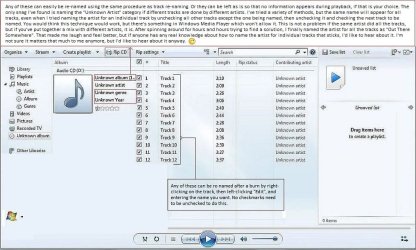
So, you've burned a CD and all the names show up as the CDA files that have become so annoying to so many people, including myself obviously. Well, after many hours of trial and error, I've found that naming the song titles is not a problem. Naming other categories is also not a problem, but one of them is, so I've put together the following screenshot. Have a look and see if you have the same difficulty with the same category (naming the "Unknown Artist" for individual tracks). If you don't, I'd like to hear about it as stated near the end of the larger dialogue box. As for the rest, I hope it clears up any difficulties others may have had naming other categories.

Other than that, cheers and happy trails.

Note: Click on screenshot thumbnail to enlarge.
 

Attachments
  • wmp.jpg
    wmp.jpg
    107.9 KB · Views: 7

My Computer My Computer

At a glance

Windows 7 Home Premium 64 bit
Computer type
Laptop
OS
Windows 7 Home Premium 64 bit
Those .cda files on a music CD are only pointers to the tracks holding the actual music data which is hidden, nothing can be done with them. When CDs are ripped the music is saved as a changeable format, default may be .wma but I change them to .mp3 and don't have to convert later for use on MP3 players. A playlist can be burned to CD but again, all one will see on the CD is the .cda files. One can Copy the .mp3 files directly from a Folder to a CD to play in a computer but may not work in older devices such as a Sony Discman or any number of competitor players such as my Durabrand CD/AM/FM unit that used to be sold by Wal*Mart.

You can rename the songs in the Playlist but quite tedious and may keep the names when used to burn a new CD.
 

My Computer My Computer

At a glance

Windows 7 Ultimate 64-bit, Windows 8.1 64-bit...
Computer type
PC/Desktop
Computer Manufacturer/Model Number
Customs, Dell, Gateway, HP, Toshiba, Acer, ASUS
OS
Windows 7 Ultimate 64-bit, Windows 8.1 64-bit, Mac OS X 10.10, Linux Mint 17, Windows 10 Pro TP
Keyboard
Microsoft
Mouse
Microsoft
Actually, I've found that I could rename the songs by doing it on the tracks listed directly under the main title list as indicated in the screenshot rather than those listed in the playlist. Doing that, then ripping those, then burning those to disc resulted in the song names displayed during playback rather than displayed as cda's. I found that very satisfying, and I know what you mean about trying to do that through the playlist. That just goes round and round and goes nowhere.

Anyway, I was having the most frustration with listing individual artist names. But no worries. I found my own solution entertaining enough to take the pressure right off my concern.

Thanks for your reply Berton. Take care.
 

My Computer My Computer

At a glance

Windows 7 Home Premium 64 bit
Computer type
Laptop
OS
Windows 7 Home Premium 64 bit
Back
Top