Naming Convention under Windows Explorer

LargeAllen

New member
Local time
10:11 PM
Messages
2
Is there some way around the ridiculous naming of folders in Windows Explorer? Example: Libraries->Music->MyMusic BUT Music "is" MyMusic BUT neither can I figure out how to eliminate. Others in the same formatting. Documents=My Documents, huh?
 

My Computer

Computer Manufacturer/Model Number
Lenovo netbook
OS
Windows 7 Startup 32bit
Is there some way around the ridiculous naming of folders in Windows Explorer? Example: Libraries->Music->MyMusic BUT Music "is" MyMusic BUT neither can I figure out how to eliminate. Others in the same formatting. Documents=My Documents, huh?

Libraries are a feature that a lot of us hate. They dont have to be used. check the tutorial section here for how not to have to use that ridiculous naming convention.
 

My Computer

Computer Manufacturer/Model Number
HP Pavillion dv-7 1005 Tx
OS
Win 8 Release candidate 8400
CPU
[email protected]
Memory
4 gigs
Graphics Card(s)
Nvidia 9600M
Sound Card
HD built-in
Monitor(s) Displays
17" Wxga
Screen Resolution
1440x900
Cooling
none
Internet Speed
45Mb down 5Mb up
Actually this has absolutely nothing to do with Libraries. If you click your user name in the left hand navigation panel, you'll see "My Documents," "My Pictures," etc., but the actual path is c:\users\username\documents, c:\users\username\pictures, etc.

FYI...all you have to do is rename "My Documents" to whatever you want.
 

My Computer

Computer Manufacturer/Model Number
Custom
OS
Windows 7 Ultimate RTM (Technet)
CPU
3.00 gigahertz Intel Core2 Duo E8400
Motherboard
ASUSTeK Computer INC. P5K/EPU Rev 1.xx
Memory
4GB
Graphics Card(s)
ATI Radeon X1950 Pro
Sound Card
Built in HD Audio
Monitor(s) Displays
22" Gateway LCD
Screen Resolution
1920 x 1200
Hard Drives
ST3160023A [Hard drive] (160.04 GB) -- drive 0, rev 8.01, ST3500630AS [Hard drive] (500.11 GB) -- drive 2, rev 3.AAK
ST3500630AS [Hard drive] (500.11 GB) -- drive 1, rev 3.AAK
Keyboard
Logitech G11
Mouse
Microsoft Wireless Laser Mouse 5000
Internet Speed
13.44 Mbps
Actually this has absolutely nothing to do with Libraries. If you click your user name in the left hand navigation panel, you'll see "My Documents," "My Pictures," etc., but the actual path is c:\users\username\documents, c:\users\username\pictures, etc.

FYI...all you have to do is rename "My Documents" to whatever you want.

Can't rename My Documents. Windows doesn't allow that. But I did try one thing. I tried to copy the files in My Documents and put them in Documents, so I could rename or delete the folder My Documents. Guess what Windows Explorer stated I was moving files (from My Documents) into My Documents.... then of course it said I couldn't do that. Yes, maybe in the Starter Edition of Win7 only, Documents=myDocuments. Music = My Music Pictures = My Pictures, but I can't seem to change anything. Just another one of those MS deals where "they" know best so that's the way it shall be.
 

My Computer

Computer Manufacturer/Model Number
Lenovo netbook
OS
Windows 7 Startup 32bit
That is because MyDocuments isn't a real folder. It is a junction point which is like a super shortcut built in to the NTFS filesystem. This "shortcut" points to your documents folder. This is done for backwards compatibility with older Windows systems so that older programs with hard coded references to documents still work.

Oh! You can rename it but not to documents as this would cause duplicate filename problems.
 
Last edited:

My Computer

Computer type
Laptop
Computer Manufacturer/Model Number
Hewlett-Packard/G62-107SA Notebook
OS
Microsoft Windows 7 Home Premium 64-bit Service Pack 1
CPU
Intel(R) Core(TM) i3 CPU M 330 @ 2.13GHz
Motherboard
Hewlett-Packard 1425
Memory
8 GB DDR3
Graphics Card(s)
Intel(R) HD Graphics
Sound Card
Realtek High Definition Audio
Monitor(s) Displays
Builtin
Screen Resolution
1366 x 768 x 32 bits (4294967296 colors) @ 60 Hz
Hard Drives
250 GB SATA Hard Disk Drive 7200 rpm
2TB Seagate GoFlex USB 2 Drive
1TB Iomega Prestige USB 2 Drive
1.5TB Iomega Prestige USB 2 Drive (Samsung)
2TB WD MyBook Live NAS.
Mouse
Logitech Anywhere MX
Internet Speed
152 Mbs download 10 Mbs upload
Antivirus
Norton 360
Browser
Chrome
An easy way out of the "ridiculous naming convention" is to place your own files to a folder that you have created yourself rather than into C:\Users\YourUserName. This way you can use whatever naming convention and folder structure you want. You can still use Libraries if you want too - just create your own libraries and populate them with your own folders.

Just to elaborate a little bit: any OS will try to provide you with a standard place to put user files. This makes more sense for a multi-user environment where administrators need to automate account management, but these days both Windows and Linux are widely used both in multi- and single-user scenarios. Therefore, even if your machine has only one user in it (you) the OS will initially create the standard location for your files.

Now, in Windows backwards compatibility is an important feature. In older versions of Windows user files were supposed to be placed in "My Documents". This was around for so long, that many programmers hard-coded that location into their apps, i.e. they use explicit paths rather than the environmental variables pointing there. Therefore in Windows 7 where the explicit path changed (no more "My" in the documents folder), they had to create a junction named "My Documents" in order to keep those badly coded programs working.

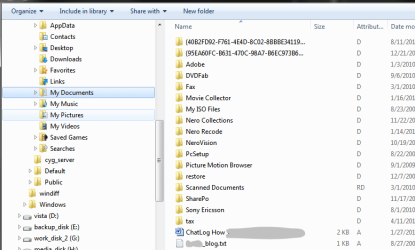
If you are the only user of your PC, then there is no reason to use this default structure rather than the fact that it is already there for you. Personally I never use it. My main reason for this is that lots of programs create their temporary folders there and fill the "My Documents" folder with lots of junk that has actually nothing to do with my documents. The snapshot below illustrates this. Again - I have never put anything into this folder myself. Therefore I just let it be. The programs fill this folder with whatever they need, and my own files, including the files that I work on with those same programs, are nicely located on another hard drive.
 

Attachments

  • Capture.PNG
    Capture.PNG
    20.6 KB · Views: 26

My Computer

Computer Manufacturer/Model Number
Dell Inspiron 530
OS
Windows 7 Ultimate (x64)
CPU
Q6600
Memory
8 GB
Graphics Card(s)
ATI Radeon HD 2600 XT
Monitor(s) Displays
Samsung Syncmaster P2450
Screen Resolution
1920x1080
Hard Drives
Samsung HD103UJ
Samsung HD501LJ
Internet Speed
25 Mb/s
Maybe if you understand the reasoning for the naming, you might find it less ridiculous.

"My Documents" is there to differentiate it from other "Documents" folders. Libraries allows you to group multiple folders into a single "view". For instance, suppose you had 2 external hard disks that contain music files. You can map both of them to a single "Music" library and treat them as one.

The system has two "Documents" folders by default, "Public Documents" and "My Documents". By default, the system maps them both to the same library. "My Documents" is actually mapped to C:\Users\Username\Documents, and "Public Documents" is mapped to C:\Users\Public\Documents. "My Documents" differentiates between Public and Your documents. If there are other users on the system, then you will see "Joe's Documents" or "Sue's Documents", but they won't by default be mapped to your Documents Library. You could add them though.

The whole point is to make it easier for you, the user, to identify the real place your documents are.
 

My Computer

Computer Manufacturer/Model Number
Self-Built
OS
Windows 7 64 bit SP1
CPU
Core i7 920
Motherboard
Gigabyte GA-X58A-UD3R
Memory
12 GB (6x2GB Corsair)
Graphics Card(s)
nVidia 250GTS
Sound Card
Built-in
Monitor(s) Displays
2x Samsung SyncMaster 2343 (23" Widescreen)
Keyboard
Microsoft Natural Keyboard
Mouse
Logitech Laser
Mystere, why do you think I need anyone to tell me where my documents are? Do you really think I don't know where I put my stuff?

What I find ridiculous, is not the fact that the OS provides a default place for user files, that's OK, that's what any OS should do. What I find ridiculous, is that it's relatively hard to move this location around and then even if you manage to move it, then lots of programs will still write stuff to "My Documents" in its original location simply because the programmers use the explicit path in their code!

In addition, I do find the name "My Documents" for the default location of user files rather strange. Clearly, not every file I place on my computer is actually a document. From Wikipedia :

"A document is a work of non-fiction writing intended to store and communicate information, thus acting as a recording. Documents are often the focus and concern of business administration and government administration."
 

My Computer

Computer Manufacturer/Model Number
Dell Inspiron 530
OS
Windows 7 Ultimate (x64)
CPU
Q6600
Memory
8 GB
Graphics Card(s)
ATI Radeon HD 2600 XT
Monitor(s) Displays
Samsung Syncmaster P2450
Screen Resolution
1920x1080
Hard Drives
Samsung HD103UJ
Samsung HD501LJ
Internet Speed
25 Mb/s
What I find ridiculous, is that it's relatively hard to move this location around

I suppose I'm missing something important, but going into the folders properties then "Location" tab is really hard?

then lots of programs will still write stuff to "My Documents" in its original location simply because the programmers use the explicit path in their code!
Which is Windows' fault in some way?


Anyways...the "My Documents" name you see is actually done via the desktop.ini file within. It is providing a localized name for Explorer to display along with an icon. Allmost all the directories in the user's folder have a desktop.ini file with a localized name provided. You can edit the desktop.ini files to remove the localized name.
 

My Computer

Computer type
PC/Desktop
Computer Manufacturer/Model Number
Alienware Aurora ALX R4
OS
Windows 10 Pro (x64)
CPU
Intel Core i7-3930K (3.2GHz - 4.5GHz)
Motherboard
Alienware Aurora-R4 x79
Memory
4x Samsung 4GB PC3-12800 DDR3 (16GB 1600MHz)
Graphics Card(s)
Nvidia Geforce GTX 690
Sound Card
SteelSeries Siberia Elite
Monitor(s) Displays
Dell UltraSharp U3011
Screen Resolution
2560x1600
Hard Drives
Samsung 850 Pro 256 GB, Seagate 1TB Desktop Hybrid HDD, 2x Western Digital 4TB Green HDD
PSU
875W Some Dell PSU <.<
Case
Alienware Aurora ALX
Cooling
Custom Liquid Cooling (EK CPU & GPU blocks) dual EK 480RAD
Keyboard
Logitech G710+ Mechanical
Mouse
Logitech G700s
Internet Speed
Verizon Fios (50 mbps average)
Other Info
Server: Intel NUC D54250WYK: i5-4250U, 16GB, 256 GB mSATA, Windows Server 2012 R2
I take it that anything requiring a tutorial is not easy. To what degree is it hard is of course subjective.

I did not say that the poor programming is specifically Windows' fault. I did not point fingers at anyone. I merely explained, why I came to the decision not to use the default user folder in Windows at all. It's a personal choice, where to put your files on your own hard drive and not a very important choice at that. However, it seemed relevant to the OP's question to share mine.
 

My Computer

Computer Manufacturer/Model Number
Dell Inspiron 530
OS
Windows 7 Ultimate (x64)
CPU
Q6600
Memory
8 GB
Graphics Card(s)
ATI Radeon HD 2600 XT
Monitor(s) Displays
Samsung Syncmaster P2450
Screen Resolution
1920x1080
Hard Drives
Samsung HD103UJ
Samsung HD501LJ
Internet Speed
25 Mb/s
Mystere, why do you think I need anyone to tell me where my documents are? Do you really think I don't know where I put my stuff?

Many, many, many people actually do NOT know where they store their documents. Really.

But, be that as it may, Windows is a multi-user OS. And the purpose of the "my" is to differentiate between other document foldres, so you can easily see which ones are Yours, which are public, which are Joe's, or Sue's or Phil's, or whoever else may share your computer.

Do you really think Windows should assume that YOU are the only one that uses it? That would truly be ridiculous.

There is no need to be self-rightious because the OS has to assume that more than one person might use it, and that some of those people may not be as computer literate as you are.

What I find ridiculous, is that it's relatively hard to move this location around and then even if you manage to move it, then lots of programs will still write stuff to "My Documents" in its original location simply because the programmers use the explicit path in their code!

I didn't need any help whatsoever to figure out how to move the documents folder. I just right clicked on it and chose properties and changed the location. It was in exactly the place that one would assume it would be. If you find that "hard" then maybe the OS should be talking down to you.

I find it quite humorous that in one paragraph you're up in arms because the OS is holding your hand, and in another you complain that it's not holding your hand enough. In other words, the OS should be psychic and magically know what you know, and should never assume you don't know something you don't, but if you don't know it then it should assume you don't know it.

That's pretty ridiculous ;) Then again, I don't let myself get bent out of shape over inanimate objects.

In addition, I do find the name "My Documents" for the default location of user files rather strange. Clearly, not every file I place on my computer is actually a document. From Wikipedia :

"A document is a work of non-fiction writing intended to store and communicate information, thus acting as a recording. Documents are often the focus and concern of business administration and government administration."

Now you're just being nit picky. The term "document" has many meanings. From the Wikipedia article you reference (but somehow missed):

"The term document may be applied to any discrete representation of meaning, but usually it refers to something physical like one or more printed pages, or to a "virtual" document in electronic (digital) format."

Also, from the dictionary:

Document | Define Document at Dictionary.com

1. a written or printed paper furnishing information or evidence, as a passport, deed, bill of sale, or bill of lading; a legal or official paper.

2. any written item, as a book, article, or letter, especially of a factual or informative nature.

3. a computer data file.

Note that #3 refers to what we're talking about.

 

My Computer

Computer Manufacturer/Model Number
Self-Built
OS
Windows 7 64 bit SP1
CPU
Core i7 920
Motherboard
Gigabyte GA-X58A-UD3R
Memory
12 GB (6x2GB Corsair)
Graphics Card(s)
nVidia 250GTS
Sound Card
Built-in
Monitor(s) Displays
2x Samsung SyncMaster 2343 (23" Widescreen)
Keyboard
Microsoft Natural Keyboard
Mouse
Logitech Laser
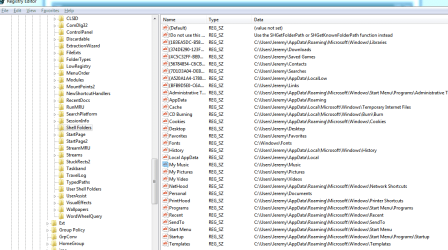
Ah hey guru guys isn't HKEY_CURRENT_USER\Software\Microsoft\Windows\CurrentVersion\Explorer\Shell Folders like where that stuff is and he can rename move whatever if he first uses regedit to change and any installer worth it's beans would then just use whatever he changed them to.
 

Attachments

  • shell folders.PNG
    shell folders.PNG
    31.4 KB · Views: 7

My Computer

OS
Windows 7 Profesional 64 Bit
CPU
AMD Athlon II X4 620
Motherboard
GA-MA770-UD3
Memory
6 Gigs
Graphics Card(s)
gts 450
Sound Card
built in
Monitor(s) Displays
HP w2338h
Screen Resolution
1920 X 1080
Hard Drives
sata barracuda 1tb seagate X2 IDE Mode
PSU
huh
Case
generic
Cooling
box w/cpu
Internet Speed
LOL 3mbs
Back
Top