NAS-Server only accessable with \\ - How to show it in Win 7 Network

winster

New member
Local time
9:39 PM
Messages
1
Hi,

I have multiple Win 7 Pro x64 machines and an Synology NAS "DS 122+"
I have Comodo Free Firewall installed on my PCs.

I can't see the NAS-Server under "Network". I have to connect via \\HomeNas\
Then a Window shows up and I can login.

My Question:
What is the reason that the NAS doesn't show up in "Network".

I have disconnected the internet from my router and deactived the Comodo firewall on my PC to see what happens. But no luck.

Thanks for your help.
 

My Computer My Computer

At a glance

Windows 7 Home Pro 64bit
Computer type
PC/Desktop
OS
Windows 7 Home Pro 64bit
Antivirus
Avira AntiVir Free
Have you made sure that the NAS server is in the same workgroup or domain as the Win 7 machines? This could be a reason why it doesn't appear.

http://www.sevenforums.com/tutorials/51711-workgroup-name-view-change.html

Follow the above tutorial to find out the workgroup and to change it if necessary.

Unfortunately I couldn't find any appropriate steps on how to check or change the workgroup on the NAS itself :(

Hope This Helps,
Josh :)
 

My Computer My Computer

At a glance

Windows 7 Professional x64 SP1 ; Windows Serv...Intel Core i5 2400 @ 3.10GHz8.0GB DDR3 @ 665MHz (2GBx4)AMD Radeon HD 6870
Computer type
PC/Desktop
Computer Manufacturer/Model Number
Custom Built
OS
Windows 7 Professional x64 SP1 ; Windows Server 2012 R2 Standard
CPU
Intel Core i5 2400 @ 3.10GHz
Motherboard
Foxconn H67MP-S/-V/H67MP
Memory
8.0GB DDR3 @ 665MHz (2GBx4)
Graphics Card(s)
AMD Radeon HD 6870
Sound Card
Realtek High Definition Audio
Monitor(s) Displays
AOC 2243W & SMB1930NW
Screen Resolution
1440x900 & 1920x1080
Hard Drives
977GB Seagate ST31000524AS ATA Drive (SATA)
250GB WD iSCSI attached Drive
PSU
750W Gaming PSU
Case
Novatech Night
Cooling
Fan
Keyboard
Dell Standard PS/2 Keyboard
Mouse
R.A.T 07 Gaming Mouse
Internet Speed
Download: 10 Mbps Ping: 30ms Upload: 0.81 Mbps
Browser
Google Chrome
Other Info
Optiarc DVD RW AD-5260S ATA Device
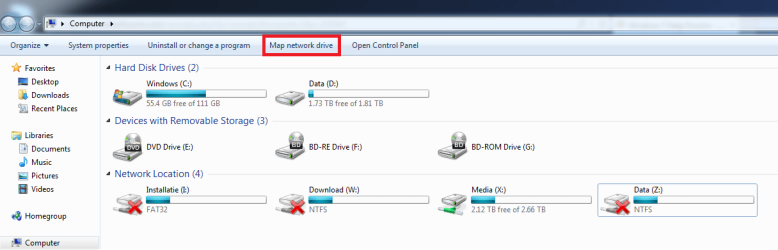
I may be mistaken but do you just want the shares of the NAS to be added as a network drive you can remember the user login and password so you don`t have to keep re-entering them.

You can add it on this computer with "Map Network Drive".

As seen in the attachment.

Hope I helped.
 

Attachments

  • network drive.png
    network drive.png
    27.6 KB · Views: 2

My Computer My Computer

At a glance

Windows 7 Ultimate Edition (64-bit) Service P...Intel(R) Core(TM) i7 CPU 4820K @ 3.70GHz16 GBNVIDIA GeForce GTX 760
Computer type
PC/Desktop
Computer Manufacturer/Model Number
Custom build
OS
Windows 7 Ultimate Edition (64-bit) Service Pack 1
CPU
Intel(R) Core(TM) i7 CPU 4820K @ 3.70GHz
Motherboard
Asus X79 Deluxe
Memory
16 GB
Graphics Card(s)
NVIDIA GeForce GTX 760
Sound Card
None
Monitor(s) Displays
SyncMaster P2270HD
Screen Resolution
1920 x 1080
Hard Drives
C:\ 128 GB SSD
D:\ 2 TB HDD
PSU
550 Watt
Cooling
Water Cooling
Keyboard
Microsoft Natural Ergonomic Keyboard 4000
Mouse
8 Button Wheel Mouse Present
Internet Speed
Low
Antivirus
Microsoft security essentials
Browser
IE11
First post here, I have had this issue after loading a fresh OS on a home built computer. Could not get the network to work and access any of the NAS devices. Tried all of the "fixes" listed here and elsewhere. Pulled my hair out and said bad words. :D

I then compared all of the settings with a known good computer and everything was the same.

Here is where I kick myself, if you are having trouble with accessing network resources, check the computer name.

yep, the computer I was using to verify the settings was the same name as the problem child. Noob mistake. Changed the computer name and all is working fine.

I really hope this helps someone else!!

T3
 

My Computer My Computer

At a glance

Windows 7 Pro 64bit
Computer type
PC/Desktop
OS
Windows 7 Pro 64bit
Back
Top