NAS320 Folders not found in Media Sharing

vanwin

New member
Local time
4:08 AM
Messages
3
Hi

am have major difficulties getting my Ellion 110 Media Sharing device to see the contents of my NAS storage.

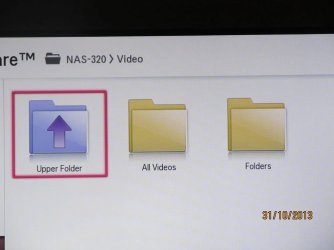
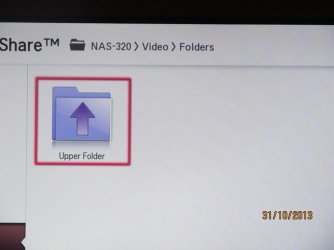
It sees the NAS-320 if I click on it it shows two entries All Videos and Folders, clicking on either of these, it comes up empty, no files shown.

I am pretty sure it is to do with File Sharing and permissions, but to be honest, I am completely out of my depth on this.

If anybody can help on this, I would really appreciate it.

I know so little about networks and sharing that I do not even know what information is relevant, so if anyone would like to help, please ask all the questions you want, I will try to answer them.

Thank You
 

My Computer My Computer

At a glance

Windows 7 Ultimate X64Intel Q66008G DDR2HD2400
Computer type
PC/Desktop
Computer Manufacturer/Model Number
Custom Build
OS
Windows 7 Ultimate X64
CPU
Intel Q6600
Motherboard
Asus p5 DeLuxe
Memory
8G DDR2
Graphics Card(s)
HD2400
Hard Drives
WD 1TByte X 2
Antivirus
Windows Defender
Browser
IE10
Welcome to Seven Forums,

Did you create an identical User Name and Password in your NAS and computer(s)? Assign full permission for now, and see if you can access the files/folders in your NAS.
 

My Computer My Computer

At a glance

Win7 & Win8 64bitIntel i5
Computer Manufacturer/Model Number
Lenovo Desktop/Samsung Laptop
OS
Win7 & Win8 64bit
CPU
Intel i5
Internet Speed
Charter-20 Mbps
Antivirus
Avast
Browser
FF, IE9 and Chrome
2xg

Thank you for giving your time to reply.

If I remember correctly, there was no requirement to give either, in setting up this device. I had to select whether I wanted a dynamic or fixed IP and had to give the drives a letter, but was not required to give a name.

From your question is it implied that if there was a discrepancy between the two, that the files would not be accessible?

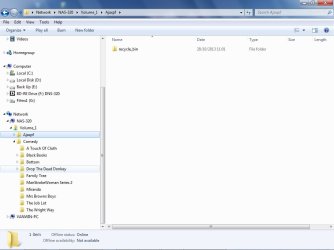
The reason I ask is that from the PC the file structure of the NAD is seen ie NAS-320 > Volume_1 > Comedy > then the various folders and finally the files. These are all accessible.

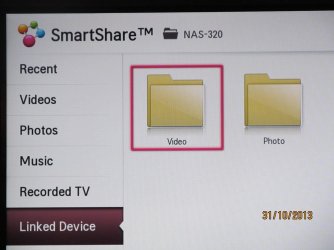
From here I have two methods of viewing these files, 1 by connecting via the router to the TVs Ethernet port and 2 via the router to the Ellion media player and then via HDMI to the TV. Both of these routes give basically the same result. I have attached a few pix which may help.

It seems that both methods find the NAS-320 but then the structure given above and in the first pic is not the same. Both seem to be looking at something different. The attached pics 1-4 taken using the first method and go from the 1st into the NAS320 and following through. You see in the last that there are now files just the option to return

What I can do if it helps is to go through the setting up of the NAS again this time noting the steps taken. In the meantime thanks again for your time

NAS Structure.jpg

1.JPG

2.JPG

3.JPG

4.JPG
 

My Computer My Computer

At a glance

Windows 7 Ultimate X64Intel Q66008G DDR2HD2400
Computer type
PC/Desktop
Computer Manufacturer/Model Number
Custom Build
OS
Windows 7 Ultimate X64
CPU
Intel Q6600
Motherboard
Asus p5 DeLuxe
Memory
8G DDR2
Graphics Card(s)
HD2400
Hard Drives
WD 1TByte X 2
Antivirus
Windows Defender
Browser
IE10
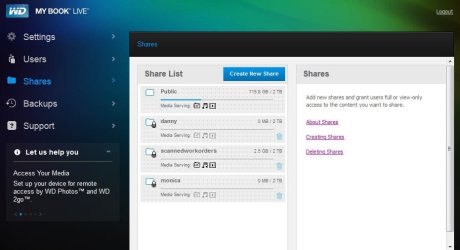
When setting up NAS it is important to give proper access permission to the Users if you want to restrict them otherwise they can access them in Public Folder (which I do not recommend). Please go through the setting again, I've attached one of my NAS'es image and you may see the User and Shares where you can setup your Users and Folders that you'd like to share. Again, you'll have to create the same User Name and Password that they are using to log on to their computers in your NAS, then it's all yours to determine what permission you'll have to grant them.

I'd view and access the shared folders from NAS by clicking on the Start button, then type \\NAS Name\ or \\NAS IP Address\ then press enter if you'd like to see all the folders.
 

Attachments

  • NAS-WD.JPG
    NAS-WD.JPG
    49.9 KB · Views: 1

My Computer My Computer

At a glance

Win7 & Win8 64bitIntel i5
Computer Manufacturer/Model Number
Lenovo Desktop/Samsung Laptop
OS
Win7 & Win8 64bit
CPU
Intel i5
Internet Speed
Charter-20 Mbps
Antivirus
Avast
Browser
FF, IE9 and Chrome
Thanks once again for taking the time to help me. What you have said clarifies a lot.

I have reset up the NAS and it is showing signs of working correctly.

What your attachment shows, is your NAS being used by different users, and I would imagine each one would have different permissions set according to need.

Where my situation seems to be different, is that the NAS is not really being (shared) as such, more just being viewed by the TV (acting as a remote viewer), and it does not make sense to give it a user name/password, as there is no way for it to sign in.

Further reading, searching, etc, indicates that what service is in play here is uPnP, and in the NAS setup pages there is an option for setting this, whereby additional folders can be added such that they are viewable on the TV, which is exactly what I wanted.

So with your excellent help and my perserverance, between us it looks like I have arrived.

I am very grateful for your help, thanks very much.
 

My Computer My Computer

At a glance

Windows 7 Ultimate X64Intel Q66008G DDR2HD2400
Computer type
PC/Desktop
Computer Manufacturer/Model Number
Custom Build
OS
Windows 7 Ultimate X64
CPU
Intel Q6600
Motherboard
Asus p5 DeLuxe
Memory
8G DDR2
Graphics Card(s)
HD2400
Hard Drives
WD 1TByte X 2
Antivirus
Windows Defender
Browser
IE10
Back
Top