Solved Nav Button Changer

danfyee332

New member
Member
Local time
4:44 PM
Messages
32
Hi. Can anyone help me with this simple problem? I've tried to use the Nav Button Changer, and I've changed every .bmp, and nothing changes. I've tried a similar program from a differennt developer and it still stays the same... Does anybody know how to fix this? :(
 

My Computer

OS
Windows 7 Home Premium x64
Which programs did you try? Links please.

Have you ever change a system file or if you want to know how, you can edit the Bitmaps in the Explorerframe.dll with a resource hacker of some kind to change the navigation buttons.

Let me know
Jerry
 

My Computer

Computer type
Laptop
Computer Manufacturer/Model Number
Sager NP9170
OS
Win 7 Pro x64 / Win 10 Pro
CPU
Intel(R) Core(TM) i7-3630QM CPU @ 2.40GHz
Motherboard
CLEVO P170EM
Memory
12 GB
Graphics Card(s)
(1) Intel(R) HD Graphics 4000 (2) NVIDIA GeForce GTX 675M
Sound Card
(1) Realtek High Definition Audio (2) Intel(R) Display Aud
Monitor(s) Displays
17.3
Screen Resolution
1920x1080
Hard Drives
(1) Samsung 860 EVO 500GB(OS) (1) Samsung 860 EVO 500GB(Data)
Keyboard
Backlite
Antivirus
MSE, Malwarebytes Pro
Browser
Firefox
Other Info
DESKTOP: Custom-built.
OS: Win 10 Pro x64.
CASE: Rosewill R5.
CPU: Intel I5 4670K CPU @ 3.40GHz.
CPU COOLER: Cool Master Hyper 212 EVO.
MOTHERBOARD: Asus Z87-A.
MEMORY: Kingston HyperX 2x4 GB.
GPU: Nvidia Geforce 650 TI.
PSU: Corsair TX750.
DRIVES: (1) Samsung 840 120 GB SSD (2) Western Digital blue 500 GB 7200 RPM.
So how would I go about editing the bitmaps in a resource hacker???
 

My Computer

OS
Windows 7 Home Premium x64
Here is the resource hacker I used, it is free Anolis Resourcer - Resource Hacker Software - Anolis

The ExploreFrame.dll is in C:\Windows\System32 and if you are using 64-bit it will also be in C:\Windows\SysWOW64 so you would need to edit both.

Here are the image numbers for the button's
280 - frame
577 - default
578 - hover
579 - disable
581 - pressed
These are if you have your DPI set at 100% if you have it set higher you will have to do the other buttons.
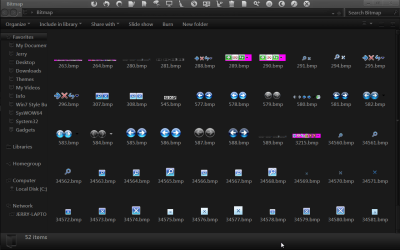
Bitmap.png

#1
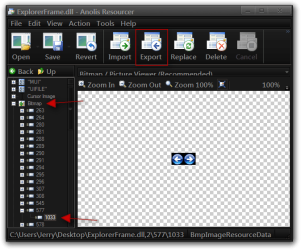
Open the ExploreFrame.dll (Use a copy of the original so you do not corrupt the original) click on the + sign where it says Bitmap scroll down to in this example 577 click on the + sign then click on 1033 then click on the Export button.
1.png

#2
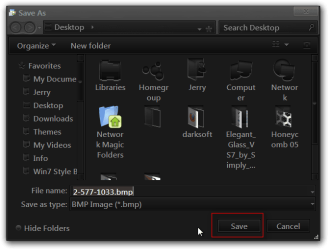
Save that bitmap to your desktop that you will need a image editor to edit the image to your liking.
2.png

#3
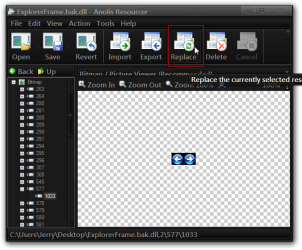
After you have edited the bitmap or if you already have a set of buttons that you will need to click on the Replace button.
3.png

#4
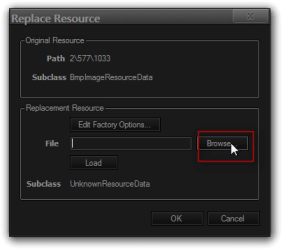
Click on the Browse button.
4.png

#5
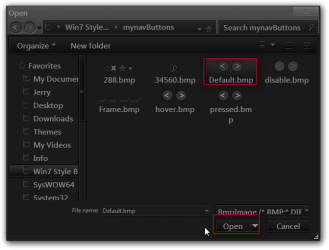
Navigate to the button that you just edited or if you have a set of buttons and select it and then click Open.
5.png

#6
Click the Load button then click the OK button.
6.png

Repeat the above steps until you have all the bitmaps changed.

#7
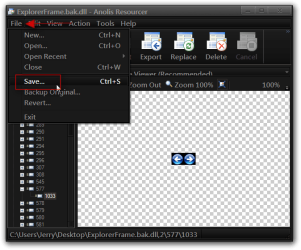
Click on File then Save, you will not see the changes in the resource hacker window unless you close the program and then open it back up again and click on the images #and then you can see the changes.
7.png


Jerry
 

My Computer

Computer type
Laptop
Computer Manufacturer/Model Number
Sager NP9170
OS
Win 7 Pro x64 / Win 10 Pro
CPU
Intel(R) Core(TM) i7-3630QM CPU @ 2.40GHz
Motherboard
CLEVO P170EM
Memory
12 GB
Graphics Card(s)
(1) Intel(R) HD Graphics 4000 (2) NVIDIA GeForce GTX 675M
Sound Card
(1) Realtek High Definition Audio (2) Intel(R) Display Aud
Monitor(s) Displays
17.3
Screen Resolution
1920x1080
Hard Drives
(1) Samsung 860 EVO 500GB(OS) (1) Samsung 860 EVO 500GB(Data)
Keyboard
Backlite
Antivirus
MSE, Malwarebytes Pro
Browser
Firefox
Other Info
DESKTOP: Custom-built.
OS: Win 10 Pro x64.
CASE: Rosewill R5.
CPU: Intel I5 4670K CPU @ 3.40GHz.
CPU COOLER: Cool Master Hyper 212 EVO.
MOTHERBOARD: Asus Z87-A.
MEMORY: Kingston HyperX 2x4 GB.
GPU: Nvidia Geforce 650 TI.
PSU: Corsair TX750.
DRIVES: (1) Samsung 840 120 GB SSD (2) Western Digital blue 500 GB 7200 RPM.
Thanks Alot Jerry. :D
 

My Computer

OS
Windows 7 Home Premium x64
You're Welcome
 

My Computer

Computer type
Laptop
Computer Manufacturer/Model Number
Sager NP9170
OS
Win 7 Pro x64 / Win 10 Pro
CPU
Intel(R) Core(TM) i7-3630QM CPU @ 2.40GHz
Motherboard
CLEVO P170EM
Memory
12 GB
Graphics Card(s)
(1) Intel(R) HD Graphics 4000 (2) NVIDIA GeForce GTX 675M
Sound Card
(1) Realtek High Definition Audio (2) Intel(R) Display Aud
Monitor(s) Displays
17.3
Screen Resolution
1920x1080
Hard Drives
(1) Samsung 860 EVO 500GB(OS) (1) Samsung 860 EVO 500GB(Data)
Keyboard
Backlite
Antivirus
MSE, Malwarebytes Pro
Browser
Firefox
Other Info
DESKTOP: Custom-built.
OS: Win 10 Pro x64.
CASE: Rosewill R5.
CPU: Intel I5 4670K CPU @ 3.40GHz.
CPU COOLER: Cool Master Hyper 212 EVO.
MOTHERBOARD: Asus Z87-A.
MEMORY: Kingston HyperX 2x4 GB.
GPU: Nvidia Geforce 650 TI.
PSU: Corsair TX750.
DRIVES: (1) Samsung 840 120 GB SSD (2) Western Digital blue 500 GB 7200 RPM.
HI.
I followed the above process but could not get it to work. The DPI is set to 113. Is this the problem?
If yes what additional images are to be replaced apart from
280 - frame
577 - default
578 - hover
579 - disable
581 - pressed
 

My Computer

Computer type
PC/Desktop
OS
Windows 7 Ultimate X86
HI.
I followed the above process but could not get it to work. The DPI is set to 113. Is this the problem?
If yes what additional images are to be replaced apart from
280 - frame
577 - default
578 - hover
579 - disable
581 - pressed

Welcome to the Seven Forums

Try
281 - frame
582 - default
583 - hover
584 - disable
585 - pressed

Jerry
 

My Computer

Computer type
Laptop
Computer Manufacturer/Model Number
Sager NP9170
OS
Win 7 Pro x64 / Win 10 Pro
CPU
Intel(R) Core(TM) i7-3630QM CPU @ 2.40GHz
Motherboard
CLEVO P170EM
Memory
12 GB
Graphics Card(s)
(1) Intel(R) HD Graphics 4000 (2) NVIDIA GeForce GTX 675M
Sound Card
(1) Realtek High Definition Audio (2) Intel(R) Display Aud
Monitor(s) Displays
17.3
Screen Resolution
1920x1080
Hard Drives
(1) Samsung 860 EVO 500GB(OS) (1) Samsung 860 EVO 500GB(Data)
Keyboard
Backlite
Antivirus
MSE, Malwarebytes Pro
Browser
Firefox
Other Info
DESKTOP: Custom-built.
OS: Win 10 Pro x64.
CASE: Rosewill R5.
CPU: Intel I5 4670K CPU @ 3.40GHz.
CPU COOLER: Cool Master Hyper 212 EVO.
MOTHERBOARD: Asus Z87-A.
MEMORY: Kingston HyperX 2x4 GB.
GPU: Nvidia Geforce 650 TI.
PSU: Corsair TX750.
DRIVES: (1) Samsung 840 120 GB SSD (2) Western Digital blue 500 GB 7200 RPM.
Back
Top