
need advice formatting drives

When "repairing" bad sectors with Seatools, is it fixing bad sectors or is it just marking them bad like full format does? That's what I'm still confused about.

See my post 16.

That's the best I can do.

Where I come from, "repair" and "fix" are synonyms.

But I don't think bad sectors are ever actually "fixed" or "repaired". They are identified and sent out of the game, permanently, and cannot later be used for data or Windows or at all.

Ah, okay - that's what I'm trying to understand. It seems then that running Seatools will let me know if there are bad sectors, and then if I run repair it will mark them as bad, whereas full format will do the same thing automatically, but not tell me if it found any?

Should I be concerned if Seatools finds any bad sectors? From what I understand it won't say bad sectors - it will just say failed. So then if it does fail should I replace it to be safe? Some people say they replace the drive if a single bad sector is found, others say every drive has some bad sectors.

Does Seatools fix the bad sectors as in, they aren't bad anymore, or does it just mark them as bad like full format so they aren't used?

See my previous post.

I seriously doubt that bad sectors are ever truly "fixed" or "repaired". If you raked a screwdriver across a disk platter, how could software possibly fix it?

That's what confused me - they say it repairs bad sectors but I don't see how that's possible. I wish it would be more upfront and just say it marks the bad sectors if that's what it's doing.

EDIT: I read CHKDSK /R can attempt to recover a bad sector, so maybe they can be repaired? I wish full format would just give a report if it found any bad sectors. That would make it easy on me.
 

My Computer

Computer type
PC/Desktop
Computer Manufacturer/Model Number
custom build
OS
Windows 7 32bit Home Premium
CPU
Intel Core I7 920 Bloomfield
Motherboard
Asus P6T Deluxe v1
Memory
3 GB Corsair DDR3 (3x1GB)
Graphics Card(s)
NVidia GTX 570 (1 GB RAM)
Sound Card
on board
Monitor(s) Displays
Dell P2314H
Screen Resolution
1920x1080
Hard Drives
Western Digital Black 1TB (main OS)
PSU
XION Supernova XON-800R14N 800W
Case
Antec 1200
Cooling
Arctic Freezer 7 Pro Rev. 2
Keyboard
AZIO Prism
Mouse
Logitech G700S
Internet Speed
Verizon FiOS 85/85
Antivirus
Avast
Browser
Firefox/Chrome
Other Info
SansDigital rr622 RocketRaid (with non-raid Driver)
Renesas USB 3.0 card
see comments

Ah, okay - that's what I'm trying to understand. It seems then that running Seatools will let me know if there are bad sectors, and then if I run repair it will mark them as bad, whereas full format will do the same thing automatically, but not tell me if it found any?

I'm not sure of the finer points of that distinction. It may be a distinction without a practical difference.

Should I be concerned if Seatools finds any bad sectors? Form what I understand it won't say bad sectors - it will just say failed. So then if it does fail should I replace it to be safe? Some people say they replace the drive if a single bad sector is found, others say every drive has some bad sectors.

My understanding is that if Seatools finds X amount of bad sectors and there is at least X replacements on the sidelines that can be substituted, it will make the substitution (if in repair mode) and likely tell you it found and repaired X bad sectors. If it finds X amount of bad sectors and there is X minus 1 replacement sectors, the test will fail.

Any bad sectors is not a good sign. I've never had a drive with any bad sectors, but I have had drives just drop dead and not start spinning at all. Bad sectors can be a sign of problems developing, so watch to see if they increase. If they do, I'd get rid of the drive. You could wait for outright failure if you want. That's up to you. I would not.

Since drives can drop dead right now with no bad sectors, I don't know that I'd obsess over that issue.

No big deal if they do fail. All devices do eventually. You just buy another and move on.
 

My Computer

Computer type
PC/Desktop
Computer Manufacturer/Model Number
Ignatz Special; 4 speed manual gearbox; factory air conditioning; one of one
OS
Windows 7 Home Premium SP1, 64-bit
CPU
Intel Skylake i5-6600K, not overclocked
Motherboard
AsRock Z170M Extreme 4, micro ATX
Memory
8 GB HyperX DDR4-2666 (2 x 4 GB)
Graphics Card(s)
none; graphics are integrated on CPU
Sound Card
onboard: Realtek ALC1150; external: USB Behringer UF0-202
Monitor(s) Displays
Dell S2340M 23 inch IPS
Screen Resolution
1600 x 900
Hard Drives
System: Crucial MX100 series SSD, 128 GB;
Data: Samsung Spinpoint 103SJ, 1 TB;
Backup: WD Caviar Green WD30EZRX-00D8PB0, 3 TB
PSU
Rosewill SilentNight 500 watt fanless, semi-modular
Case
Antec Solo II
Cooling
Noctua NH-U12S; Noctua F12 intake, Noctua S12A exhaust
Keyboard
Microsoft 200 6JH-00001 USB
Mouse
Dell or Microsoft optical wired; USB
Antivirus
Microsoft Security Essentials and Malwarebytes Premium
Browser
Pale Moon
Other Info
All fans PWM; speeds at idle: CPU circa 500 rpm; intake circa 600 rpm; exhaust circa 600 rpm; CPU temps 27 idle and 47 C load in a warm room (27 C/81 F) when running Intel Extreme Tuning Utility stress test.
Okay so then I guess I can either run Windows quick format and then a checkdisk with the option "Scan for and attempt recovery of bad sectors", or run a quick format and then run Seatools? Either one would tell me if it finds bad sectors?

I don't want to just run a full format because apparently it won't give me a log so then I won't know if it found any during format. I want to now because i think I'd feel better just exchanging the disk if it's already got bad sectors brand new out of the box.
 

My Computer

Computer type
PC/Desktop
Computer Manufacturer/Model Number
custom build
OS
Windows 7 32bit Home Premium
CPU
Intel Core I7 920 Bloomfield
Motherboard
Asus P6T Deluxe v1
Memory
3 GB Corsair DDR3 (3x1GB)
Graphics Card(s)
NVidia GTX 570 (1 GB RAM)
Sound Card
on board
Monitor(s) Displays
Dell P2314H
Screen Resolution
1920x1080
Hard Drives
Western Digital Black 1TB (main OS)
PSU
XION Supernova XON-800R14N 800W
Case
Antec 1200
Cooling
Arctic Freezer 7 Pro Rev. 2
Keyboard
AZIO Prism
Mouse
Logitech G700S
Internet Speed
Verizon FiOS 85/85
Antivirus
Avast
Browser
Firefox/Chrome
Other Info
SansDigital rr622 RocketRaid (with non-raid Driver)
Renesas USB 3.0 card
If all you want to do is find out if there are any bad sectors, run something like Crystal Disk Info.

Do a quick format.

If it shows bad sectors, send the drive back.

If it doesn't show bad sectors, put it to work and move on.
 

My Computer

Computer type
PC/Desktop
Computer Manufacturer/Model Number
Ignatz Special; 4 speed manual gearbox; factory air conditioning; one of one
OS
Windows 7 Home Premium SP1, 64-bit
CPU
Intel Skylake i5-6600K, not overclocked
Motherboard
AsRock Z170M Extreme 4, micro ATX
Memory
8 GB HyperX DDR4-2666 (2 x 4 GB)
Graphics Card(s)
none; graphics are integrated on CPU
Sound Card
onboard: Realtek ALC1150; external: USB Behringer UF0-202
Monitor(s) Displays
Dell S2340M 23 inch IPS
Screen Resolution
1600 x 900
Hard Drives
System: Crucial MX100 series SSD, 128 GB;
Data: Samsung Spinpoint 103SJ, 1 TB;
Backup: WD Caviar Green WD30EZRX-00D8PB0, 3 TB
PSU
Rosewill SilentNight 500 watt fanless, semi-modular
Case
Antec Solo II
Cooling
Noctua NH-U12S; Noctua F12 intake, Noctua S12A exhaust
Keyboard
Microsoft 200 6JH-00001 USB
Mouse
Dell or Microsoft optical wired; USB
Antivirus
Microsoft Security Essentials and Malwarebytes Premium
Browser
Pale Moon
Other Info
All fans PWM; speeds at idle: CPU circa 500 rpm; intake circa 600 rpm; exhaust circa 600 rpm; CPU temps 27 idle and 47 C load in a warm room (27 C/81 F) when running Intel Extreme Tuning Utility stress test.
Crystal Disk Info will show if there are any bad sectors without doing a full disk scan? Is that "05 Re-allocated sectors count"? My 4 current disks in my tower all say 200 current, 200 worst, 140 threshold, 0 raw values - for all 4 drives.

So if raw values is greater than 0 in "raw values", then that means a bad sector was found and mapped?
 

My Computer

Computer type
PC/Desktop
Computer Manufacturer/Model Number
custom build
OS
Windows 7 32bit Home Premium
CPU
Intel Core I7 920 Bloomfield
Motherboard
Asus P6T Deluxe v1
Memory
3 GB Corsair DDR3 (3x1GB)
Graphics Card(s)
NVidia GTX 570 (1 GB RAM)
Sound Card
on board
Monitor(s) Displays
Dell P2314H
Screen Resolution
1920x1080
Hard Drives
Western Digital Black 1TB (main OS)
PSU
XION Supernova XON-800R14N 800W
Case
Antec 1200
Cooling
Arctic Freezer 7 Pro Rev. 2
Keyboard
AZIO Prism
Mouse
Logitech G700S
Internet Speed
Verizon FiOS 85/85
Antivirus
Avast
Browser
Firefox/Chrome
Other Info
SansDigital rr622 RocketRaid (with non-raid Driver)
Renesas USB 3.0 card
Crystal Disk Info will show if there are any bad sectors without doing a full disk scan? Is that "05 Re-allocated sectors count"? My current discs in my tower all say 200 for that entry - all 4 drives.

Look at the raw values for pending sector count and reallocated sector count and uncorrectable sector count.

My drives show zero on all cases for those 3 attributes.

Yes that is SMART data.

Go to function/advanced feature/raw values and set that to 10 DEC.

Then read the raw values.

It may be set to 16 Hex by default.
 

My Computer

Computer type
PC/Desktop
Computer Manufacturer/Model Number
Ignatz Special; 4 speed manual gearbox; factory air conditioning; one of one
OS
Windows 7 Home Premium SP1, 64-bit
CPU
Intel Skylake i5-6600K, not overclocked
Motherboard
AsRock Z170M Extreme 4, micro ATX
Memory
8 GB HyperX DDR4-2666 (2 x 4 GB)
Graphics Card(s)
none; graphics are integrated on CPU
Sound Card
onboard: Realtek ALC1150; external: USB Behringer UF0-202
Monitor(s) Displays
Dell S2340M 23 inch IPS
Screen Resolution
1600 x 900
Hard Drives
System: Crucial MX100 series SSD, 128 GB;
Data: Samsung Spinpoint 103SJ, 1 TB;
Backup: WD Caviar Green WD30EZRX-00D8PB0, 3 TB
PSU
Rosewill SilentNight 500 watt fanless, semi-modular
Case
Antec Solo II
Cooling
Noctua NH-U12S; Noctua F12 intake, Noctua S12A exhaust
Keyboard
Microsoft 200 6JH-00001 USB
Mouse
Dell or Microsoft optical wired; USB
Antivirus
Microsoft Security Essentials and Malwarebytes Premium
Browser
Pale Moon
Other Info
All fans PWM; speeds at idle: CPU circa 500 rpm; intake circa 600 rpm; exhaust circa 600 rpm; CPU temps 27 idle and 47 C load in a warm room (27 C/81 F) when running Intel Extreme Tuning Utility stress test.
Excellent - I just set it to 10 DEC - it was set to 16 Hex.

So then I can just run a full format to let Windows check and mark any bad sectors, and then run crystal disk info to see if any are marked. If I have a bad sector, exchange the drive.

That's what I wanted to do - check to see if any bad sectors are marked after the full format. This is perfect. Thank you very much!
 

My Computer

Computer type
PC/Desktop
Computer Manufacturer/Model Number
custom build
OS
Windows 7 32bit Home Premium
CPU
Intel Core I7 920 Bloomfield
Motherboard
Asus P6T Deluxe v1
Memory
3 GB Corsair DDR3 (3x1GB)
Graphics Card(s)
NVidia GTX 570 (1 GB RAM)
Sound Card
on board
Monitor(s) Displays
Dell P2314H
Screen Resolution
1920x1080
Hard Drives
Western Digital Black 1TB (main OS)
PSU
XION Supernova XON-800R14N 800W
Case
Antec 1200
Cooling
Arctic Freezer 7 Pro Rev. 2
Keyboard
AZIO Prism
Mouse
Logitech G700S
Internet Speed
Verizon FiOS 85/85
Antivirus
Avast
Browser
Firefox/Chrome
Other Info
SansDigital rr622 RocketRaid (with non-raid Driver)
Renesas USB 3.0 card
I would hope there are no bad sectors on a brand new drive.

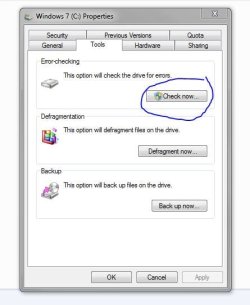
There`s no reason to do a full format on a brand new drive, just create and format the partitions however you want, then run check disk
 

Attachments

  • Capture.JPG
    Capture.JPG
    34.4 KB · Views: 5

My Computer

Computer type
PC/Desktop
Computer Manufacturer/Model Number
Skylake Special #666
OS
Windows 10 Pro x64
CPU
Intel Core i7 6700K
Motherboard
Asus Sabertooth Z170 Mark 1
Memory
GSkill TridentZ RGB 16GB 3600 16-16-16-36
Graphics Card(s)
EVGA GTX 980 Ti SC x2
Sound Card
Realtek High Definition
Monitor(s) Displays
AOC G2460PG
Screen Resolution
1920 x 1080 144Hz
Hard Drives
Samsung 860 Pro 256GB, Seagate Barracuda 4TB x2
PSU
EVGA 1000 P2, EVGA White Custom Braided Cables
Case
Corsair Vengeance C70 Gunmetal Black
Cooling
Corsair H100i v2, Corsair ML120 x2, Thermal Grizzly Kryonaut
Keyboard
Logitech G910 Orion Spectrum
Mouse
Logitech G700s
Internet Speed
Verizon Fios Quantum Gateway 75/75
Antivirus
Windows Defender, Malwarebytes Free 3.8.3
Browser
Chrome
Other Info
Corsair SP120 x4, LG Blu-ray Drive, Durabrand HT-395 100 Watt Dolby Digital Amp, Corsair H2100 Wireless 7.1 Headset
Yeah, me too. But after reading so many horror stories about acceptable drive failure rates, I'd feel better putting the new drives through its paces first thing and verify that all is well instead of finding out later.
 

My Computer

Computer type
PC/Desktop
Computer Manufacturer/Model Number
custom build
OS
Windows 7 32bit Home Premium
CPU
Intel Core I7 920 Bloomfield
Motherboard
Asus P6T Deluxe v1
Memory
3 GB Corsair DDR3 (3x1GB)
Graphics Card(s)
NVidia GTX 570 (1 GB RAM)
Sound Card
on board
Monitor(s) Displays
Dell P2314H
Screen Resolution
1920x1080
Hard Drives
Western Digital Black 1TB (main OS)
PSU
XION Supernova XON-800R14N 800W
Case
Antec 1200
Cooling
Arctic Freezer 7 Pro Rev. 2
Keyboard
AZIO Prism
Mouse
Logitech G700S
Internet Speed
Verizon FiOS 85/85
Antivirus
Avast
Browser
Firefox/Chrome
Other Info
SansDigital rr622 RocketRaid (with non-raid Driver)
Renesas USB 3.0 card
Back
Top