Need advice-I think I made C: partition too small!

tfcolligan

New member
Local time
1:43 PM
Messages
10
Location
New York State
Hello, new here. Good site.

I installed Win 7RC 32 onto a 160 GB hard disk which I partitioned. I allocated about 25 GB to C: system, and formatted the rest on to a D: drive for data. I've found that this may have been a mistake, as getting program installations to default over to D: are problematic (and not recommended by Microsoft, as per some previous threads I've read here).

And so I am running out of C space, and have several programs "manually" installed over to D. Quite frankly this is a pain, and I am about ready to throw in the towel and just try to extend the C drive. But maybe there is a way to avoid?

My question is this: what's my best approach to correct all this? Specifically, I'd like (if it is possible) for all my libraries/directories to default to D: so that I can readily reinstall Windows 7 (or downgrade) the C: System drive should it become necessary. This was my original goal and hope. I was able to have this with XP, although that was some time ago and I forgot the steps.

Anyone have an good suggestions for me, or should I just extend C: and give up this idea?
 

My Computer My Computer

At a glance

Windows 7 RC
OS
Windows 7 RC
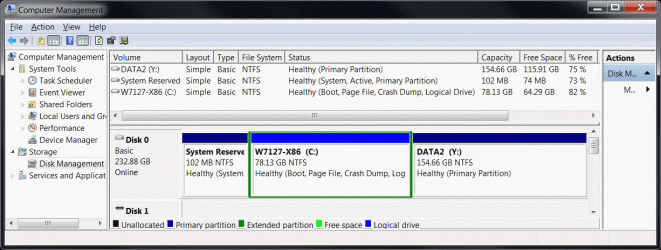
I store all my data in another partition .. do not use Documents ..
and try to keep my desktop stuff to a minimum.
I figured 50 gig should be enough .. so I made an 80 gig C drive.

Currently showing ~14 gig used and ~64 free
 

Attachments

  • Clip.gif
    Clip.gif
    84.3 KB · Views: 253

My Computer My Computer

At a glance

XP MCE .... XP Pro 64 .... W7 U x64E6750, 2.67GHz C2D4GB, PC2 6400GeForce 9400GT
Computer Manufacturer/Model Number
HP d4996t (upgraded)
OS
XP MCE .... XP Pro 64 .... W7 U x64
CPU
E6750, 2.67GHz C2D
Memory
4GB, PC2 6400
Graphics Card(s)
GeForce 9400GT
Monitor(s) Displays
Twin Samsung 2443BWT
Screen Resolution
1920x1200
Hard Drives
Many .. 3 Installed
PSU
460W
Internet Speed
Cable
I remember several years ago, shrinking D drive with partitioning software. Moving the unallocated space next to the C drive. Then expanding the C drive to a larger size. Maybe somebody with more recent experience will read this and help us out, since Old-Timers disease affects "Doc's" flash memory :confused:
 

My Computer My Computer

At a glance

Win7 Enterprise, Win7 x86 (Ult 7600), Win7 x6...AMD fx8350 4ghz, AMD-32 2400mhz, AMD-64 3200m...2gb, 4gb on the Ult 7600, 4gb on Technet RTM,...Draw my own Graphics, several nVidia cards
Computer type
PC/Desktop
Computer Manufacturer/Model Number
Built them myself, Science Experiments !
OS
Win7 Enterprise, Win7 x86 (Ult 7600), Win7 x64 Ult 7600, TechNet RTM on AMD x64 (2.8Ghz)
CPU
AMD fx8350 4ghz, AMD-32 2400mhz, AMD-64 3200mhz, AMDx64 2.8G
Motherboard
SIS 755, ECS-K8M890M-M (Ult 7600), GigaByte & others
Memory
2gb, 4gb on the Ult 7600, 4gb on Technet RTM, 32gb on FX8350
Graphics Card(s)
Draw my own Graphics, several nVidia cards
Sound Card
on motherboard
Monitor(s) Displays
19" flat scr, 28" I-Inc widescr,22" Emprex Widescr, 23" Acer
Screen Resolution
1280 x 1024, 1440 x 900, 1920 x 1080
Hard Drives
6 pata Ide HD's & 2 Sata HD's
added 80gb external on Ult 7600 computer,
numerous extra 1tb, 2TB, 3Tb SATA HD's
A collection of ext HD Docks w/ HDs
PSU
430w, 550w, 600w, 700, 800, etc
Case
All Generic Full Towers
Cooling
Open Air & a few fans, some w/ colored LEDs
Keyboard
Compaq & Dell recycled from GoodWill
Mouse
Made in China Optical Wired Mouse
Internet Speed
Fast Cable InterNet
Antivirus
AVG Free on 24 different Desktops, NO Problems!
Browser
IE 8 is preferred, but use FireFox sometimes
Other Info
Linksys Routers, switches, & Hubs
Too Many USB Flash Drives to count, Biggest is 64GB !
Eight computers in my home network.
Sixteen computers at my business network.
Linked via TeamViewer !
Lots of old used spare computer parts everywhere!
Yeah, I had the same thoughts. But then I realized I am defeating my own purpose by not getting myself adapted to the whole "libraries" concept, since I may be in job environments in the future where I'll need to be able to support Windows 7 with all its newfangled functionality, and so forth.

I'm an old XP hound myself, and used your strategy on my Vista box to try to keep it all familiar and cozy. But now that 7 is out, and a lot of companies seem raring to roll, I figured I had better learn the stuff in its entirety. I am envisioning future corporate rollouts where the images will be set up in typical "small system c / large data d" fashion. I was just trying to emulate that kind of scenario to get a jump. Go figure.
 

My Computer My Computer

At a glance

Windows 7 RC
OS
Windows 7 RC
Welcome to sevenforums tfcolligan, I would recommend the smallest c: to be around 80GB for various reasons. It seems that with the large disks out there nowadays microsoft looks at 80GB perhaps as a XP guru would look at 25GB.
 

My Computer My Computer

At a glance

Windows 7 Build 7100Core 2 Duo T72502GB PC2-5300NVIDIA 8400M GS
Computer Manufacturer/Model Number
Dell M1330 XPS - Laptop
OS
Windows 7 Build 7100
CPU
Core 2 Duo T7250
Motherboard
Dell Inc. 0U8042
Memory
2GB PC2-5300
Graphics Card(s)
NVIDIA 8400M GS
Sound Card
Standard HD Audio
Monitor(s) Displays
13" LCD Widescreen
Screen Resolution
1280x800
Hard Drives
160GB
Internet Speed
25 Mbit

My Computer My Computer

At a glance

XP MCE .... XP Pro 64 .... W7 U x64E6750, 2.67GHz C2D4GB, PC2 6400GeForce 9400GT
Computer Manufacturer/Model Number
HP d4996t (upgraded)
OS
XP MCE .... XP Pro 64 .... W7 U x64
CPU
E6750, 2.67GHz C2D
Memory
4GB, PC2 6400
Graphics Card(s)
GeForce 9400GT
Monitor(s) Displays
Twin Samsung 2443BWT
Screen Resolution
1920x1200
Hard Drives
Many .. 3 Installed
PSU
460W
Internet Speed
Cable
This might be slightly OT here but just wanted to say that I was initially very skeptical about the library organizational feature, but let me tell you, it is just awesome and has really simplified my life. For example, now I can see all the video files I have scattered on various drives in one "folder" view. This is really a convenience for me.

I would suggest not trying to emulate patterns of organization from previous iterations of the OS and just being open minded about giving the new structure and features a fair trial. You might be pleasantly surprised as I was. Now I wouldn't want to go back to working without libraries, that's for sure, and I really thought it was a screwed up idea at first glance.
 

My Computer My Computer

At a glance

Windows 7 Ultimate x64 (Retail)i7-Q 7206 GBnVidia GeForce GT 230M (1GB)
Computer Manufacturer/Model Number
HP DV8t quad
OS
Windows 7 Ultimate x64 (Retail)
CPU
i7-Q 720
Motherboard
Motherboard Chipset Intel Ibex Peak-M PM55, Intel Lynnfield
Memory
6 GB
Graphics Card(s)
nVidia GeForce GT 230M (1GB)
Sound Card
IDT High Definition Audio CODEC
Monitor(s) Displays
18.4 inch HP Infinity FHD (Samsung 184HT03-001)
Screen Resolution
1920 x 1080
Hard Drives
Hitachi 500GB 7200 rpm (x2)
Seagate FreeAgent 1.5 TB External USB (x2)
Thermaltake BlacX eSATA/USB 2.0 3.5/2.5 HD dock
Cooling
Zalman NC-2000 notebook cooling pad
Keyboard
laptop
Mouse
Logitech VX Revolution
Other Info
Backup Unit: Lenovo T61p
My drive is partitioned with a 30 GB C drive (logical) and 566 GB on the primary partition (D) . I moved "My Documents" to my D drive because of all my music, DVDs and pictures I had.

Even with a bunch of programs installed on C (I'm installing everything to see what works) I'm only using about 19 GB.

I'll eventually try W7 without partitions, or perhaps 80 GB for the logical as suggested.

Oh yeah, I love the Libraries feature.
 

My Computer My Computer

At a glance

Windows 7 RC
OS
Windows 7 RC
Hi tfcolligan & mtnsteve, welcome to the forums.

You might want to have a look in the registry (run regedit from the start menu).

HKEY_LOCAL_MACHINE\SOFTWARE\Microsoft\Windows\CurrentVersion

You will find the default setting for Program Files & %ProgramFiles%

Note: Be warned I have not tried this and it would be best to backup your registry before attempting this. Also, a clean install with nothing else at all installed would be the best environment to try these settings.

How to backup your registry
Within regedit, right-click 'Computer' and select 'Export' and save the .reg file to any specified location. You can then double-click this file to fully restore your registry.

Hope this helps :)


Jeff
 

My Computer My Computer

At a glance

Windows 7 Ultimate x64AMD Sempron Dual Core3GBNVIDIA GeForce 6150SE nForce 430
Computer Manufacturer/Model Number
Compaq Desktop
OS
Windows 7 Ultimate x64
CPU
AMD Sempron Dual Core
Memory
3GB
Graphics Card(s)
NVIDIA GeForce 6150SE nForce 430
Screen Resolution
1024x768
Hard Drives
150GB Sata
Hello, new here. Good site.

I installed Win 7RC 32 onto a 160 GB hard disk which I partitioned. I allocated about 25 GB to C: system, and formatted the rest on to a D: drive for data. I've found that this may have been a mistake, as getting program installations to default over to D: are problematic (and not recommended by Microsoft, as per some previous threads I've read here).

And so I am running out of C space, and have several programs "manually" installed over to D. Quite frankly this is a pain, and I am about ready to throw in the towel and just try to extend the C drive. But maybe there is a way to avoid?

My question is this: what's my best approach to correct all this? Specifically, I'd like (if it is possible) for all my libraries/directories to default to D: so that I can readily reinstall Windows 7 (or downgrade) the C: System drive should it become necessary. This was my original goal and hope. I was able to have this with XP, although that was some time ago and I forgot the steps.

Anyone have an good suggestions for me, or should I just extend C: and give up this idea?

I would try this...

Since vista, ms has put in some new tools to allow a user to extend and shrink volumes in disk management. I would try and shrink drive D: and if it gets you enough space to add to C: try extending that newly freed up space to C:. What might happen though is the free space created will be on the wrong side of D: so, you might have to use the "extend the drive" option for c: to use that space.

Another option if you have another hard drive is to temporarily move everything off of D:, delete that partition, and then, right click on C: and choose extend. Extend it, but leave enough for you to recreate a D Drive to move everything back to it that you copied off.

Lastly, and I have no idea how much you've installed onto D: as "programs files", but uninstall those programs, temporarily move the rest off, delete partition D, extend c:, recreate d: copy everything back onto it.

Good Luck
 

My Computer My Computer

At a glance

OS3.5celerymemory never forgetsOB
Computer Manufacturer/Model Number
POS
OS
OS3.5
CPU
celery
Motherboard
Good Question ...Unknown
Memory
memory never forgets
Graphics Card(s)
OB
Sound Card
OB
Monitor(s) Displays
HUGE
Screen Resolution
168000000x105000000
Hard Drives
full
PSU
OEM 65watt
Case
N/A
Cooling
OB
Keyboard
OB
Mouse
mouse
Internet Speed
1 Trillion MBps
Other Info
Still An Awesome Forum!
Thanks to one and all for your responses. I'll sort this all out and report back on what I did. Meanwhile, let me just say that I've found sevenforums and everyone here to be most helpful and informative. I've been browsing some of the threads, etc. Fantastic place to be. Glad I found you. Tom
 

My Computer My Computer

At a glance

Windows 7 RC
OS
Windows 7 RC
haha, ok well i was thinking, if you make your C drive 50gb, and leave the D drive for your files, In the D drive make the dcouments, pictures, videos and music, and set the library to add those folders into the library, so when you go to look for music, go to the library, and to music, and it will have your music from D drive in it..

I hope ive come to it correctly..

EDIT: and if you have like downloads, and other custom folders, add them into the library as well, and set the D drive downloads folder for default downloads :P


Enzo.
 
Last edited:

My Computer My Computer

At a glance

W7 RTM Ultimate x64Intel Q8400 @ 2.66GHZ4GB DDR2-800Gainward GTS 450 GLH 1GB Edition
Computer Manufacturer/Model Number
Custom Build
OS
W7 RTM Ultimate x64
CPU
Intel Q8400 @ 2.66GHZ
Motherboard
Gigabyte GA-EG45M-UD2H
Memory
4GB DDR2-800
Graphics Card(s)
Gainward GTS 450 GLH 1GB Edition
Sound Card
Integrated 8 Channel
Monitor(s) Displays
AOC 23.6 Inch Widescreen LCD
Screen Resolution
1920x1080
Hard Drives
Seagate 500GB Internal
Western Digital 1TB Internal

Hitachi 1TB External
PSU
Apevia Java Power 500W
Case
Cooler Master HAF 922 Black
Cooling
Stock Intel CPU Fan
Keyboard
HP SK-2960 Multimedia Keyboard
Mouse
Logitech M350 Wireless Gaming Mouse
Internet Speed
1.5MB
Thanks Enzo and Harpua

Thanks Enzo. Based on what I am hearing from both you and Harpua, I am coming around on this whole library thing. Still, I'm going to need to expand C: a bit for program installations. I am glad that I caught all this now, before I installed too many applications on D:. Not that I mind a total Windows 7 reinstall, mind you. Right now it's the experimental phase. My old laptop is great for working with this. Fortunately, I've only got my Skype and one or two other easily downloaded apps on D.

What is bothering me now is that I like 7 so much, I am actually pondering wiping Vista from my good laptop, even though it's only about 9 months old. Must find strength. It's still under warranty.
 

My Computer My Computer

At a glance

Windows 7 RC
OS
Windows 7 RC
haha, well as long as youve made a recovery disc for vista, if it all goes pare shaped, format it with the recovery :P, and its a bit confusing installing programs on different drives, just gets too messy, trying to figure out where uve installed firefox, or what ever program.., and as a few have said, w7 boots quicker then vista, tbh, i find w7 more stable, with vista i was formatting once a month.. S:

Enzo.
 

My Computer My Computer

At a glance

W7 RTM Ultimate x64Intel Q8400 @ 2.66GHZ4GB DDR2-800Gainward GTS 450 GLH 1GB Edition
Computer Manufacturer/Model Number
Custom Build
OS
W7 RTM Ultimate x64
CPU
Intel Q8400 @ 2.66GHZ
Motherboard
Gigabyte GA-EG45M-UD2H
Memory
4GB DDR2-800
Graphics Card(s)
Gainward GTS 450 GLH 1GB Edition
Sound Card
Integrated 8 Channel
Monitor(s) Displays
AOC 23.6 Inch Widescreen LCD
Screen Resolution
1920x1080
Hard Drives
Seagate 500GB Internal
Western Digital 1TB Internal

Hitachi 1TB External
PSU
Apevia Java Power 500W
Case
Cooler Master HAF 922 Black
Cooling
Stock Intel CPU Fan
Keyboard
HP SK-2960 Multimedia Keyboard
Mouse
Logitech M350 Wireless Gaming Mouse
Internet Speed
1.5MB

My Computer My Computer

At a glance

XP Pro SP3 x86/Vista SP2 x64/Win7 x64 Triple-...AMD64 X2 AM2 5000+Corsair TWX 2Gb (2x1Gb) DDR2 800MhzPCI-X 2.0 Inno3D (NVidia) 9500GT 1Gb DDR2
Computer Manufacturer/Model Number
Self Built
OS
XP Pro SP3 x86/Vista SP2 x64/Win7 x64 Triple-boot
CPU
AMD64 X2 AM2 5000+
Motherboard
Asus MSN-X Plus
Memory
Corsair TWX 2Gb (2x1Gb) DDR2 800Mhz
Graphics Card(s)
PCI-X 2.0 Inno3D (NVidia) 9500GT 1Gb DDR2
Sound Card
Onboard Realtec ALC662-GR
Monitor(s) Displays
Relisys 17' CRT (model unknown)
Screen Resolution
1024x768
Hard Drives
750Gb Samsung 7200-3Gb/s 32Mb Cache SATA
PSU
500W
Cooling
Standard AMD CPU Fan, One side, front and rear case fan.
Keyboard
Microsoft Multimedia Keyboard
Mouse
Samsung Optical
Internet Speed
10M
Duly noted Enzo! And now back to our own humble hemisphere, and Generator's thoughts (although I must admit, all this good will amongst we colonists and folks from the land of our mother tongue makes me just a wee bit misty and nostalgic-like).

Generator, you've provided what looks to be an intriguing link. I only glanced it over. Sadly, I must now secure a night's sleep before I embark upon further ponderings or actions. I will indeed check this out tomorrow. Thanks! :)
 

My Computer My Computer

At a glance

Windows 7 RC
OS
Windows 7 RC
No problems :)

Don't forget to post back your findings :)

Enzo.
 

My Computer My Computer

At a glance

W7 RTM Ultimate x64Intel Q8400 @ 2.66GHZ4GB DDR2-800Gainward GTS 450 GLH 1GB Edition
Computer Manufacturer/Model Number
Custom Build
OS
W7 RTM Ultimate x64
CPU
Intel Q8400 @ 2.66GHZ
Motherboard
Gigabyte GA-EG45M-UD2H
Memory
4GB DDR2-800
Graphics Card(s)
Gainward GTS 450 GLH 1GB Edition
Sound Card
Integrated 8 Channel
Monitor(s) Displays
AOC 23.6 Inch Widescreen LCD
Screen Resolution
1920x1080
Hard Drives
Seagate 500GB Internal
Western Digital 1TB Internal

Hitachi 1TB External
PSU
Apevia Java Power 500W
Case
Cooler Master HAF 922 Black
Cooling
Stock Intel CPU Fan
Keyboard
HP SK-2960 Multimedia Keyboard
Mouse
Logitech M350 Wireless Gaming Mouse
Internet Speed
1.5MB
I'll post my result as soon as my data is secure on another drive.

I'm fed up with un-installing just so I can install something else, I made my partition 60Gb thinking it was enough but how wrong I was!
 

My Computer My Computer

At a glance

XP Pro SP3 x86/Vista SP2 x64/Win7 x64 Triple-...AMD64 X2 AM2 5000+Corsair TWX 2Gb (2x1Gb) DDR2 800MhzPCI-X 2.0 Inno3D (NVidia) 9500GT 1Gb DDR2
Computer Manufacturer/Model Number
Self Built
OS
XP Pro SP3 x86/Vista SP2 x64/Win7 x64 Triple-boot
CPU
AMD64 X2 AM2 5000+
Motherboard
Asus MSN-X Plus
Memory
Corsair TWX 2Gb (2x1Gb) DDR2 800Mhz
Graphics Card(s)
PCI-X 2.0 Inno3D (NVidia) 9500GT 1Gb DDR2
Sound Card
Onboard Realtec ALC662-GR
Monitor(s) Displays
Relisys 17' CRT (model unknown)
Screen Resolution
1024x768
Hard Drives
750Gb Samsung 7200-3Gb/s 32Mb Cache SATA
PSU
500W
Cooling
Standard AMD CPU Fan, One side, front and rear case fan.
Keyboard
Microsoft Multimedia Keyboard
Mouse
Samsung Optical
Internet Speed
10M
haha, depends how much many programs you intend to run.., if its not alot 60gb can be enough. :)

Enzo.
 

My Computer My Computer

At a glance

W7 RTM Ultimate x64Intel Q8400 @ 2.66GHZ4GB DDR2-800Gainward GTS 450 GLH 1GB Edition
Computer Manufacturer/Model Number
Custom Build
OS
W7 RTM Ultimate x64
CPU
Intel Q8400 @ 2.66GHZ
Motherboard
Gigabyte GA-EG45M-UD2H
Memory
4GB DDR2-800
Graphics Card(s)
Gainward GTS 450 GLH 1GB Edition
Sound Card
Integrated 8 Channel
Monitor(s) Displays
AOC 23.6 Inch Widescreen LCD
Screen Resolution
1920x1080
Hard Drives
Seagate 500GB Internal
Western Digital 1TB Internal

Hitachi 1TB External
PSU
Apevia Java Power 500W
Case
Cooler Master HAF 922 Black
Cooling
Stock Intel CPU Fan
Keyboard
HP SK-2960 Multimedia Keyboard
Mouse
Logitech M350 Wireless Gaming Mouse
Internet Speed
1.5MB

My Computer My Computer

At a glance

XP Pro SP3 x86/Vista SP2 x64/Win7 x64 Triple-...AMD64 X2 AM2 5000+Corsair TWX 2Gb (2x1Gb) DDR2 800MhzPCI-X 2.0 Inno3D (NVidia) 9500GT 1Gb DDR2
Computer Manufacturer/Model Number
Self Built
OS
XP Pro SP3 x86/Vista SP2 x64/Win7 x64 Triple-boot
CPU
AMD64 X2 AM2 5000+
Motherboard
Asus MSN-X Plus
Memory
Corsair TWX 2Gb (2x1Gb) DDR2 800Mhz
Graphics Card(s)
PCI-X 2.0 Inno3D (NVidia) 9500GT 1Gb DDR2
Sound Card
Onboard Realtec ALC662-GR
Monitor(s) Displays
Relisys 17' CRT (model unknown)
Screen Resolution
1024x768
Hard Drives
750Gb Samsung 7200-3Gb/s 32Mb Cache SATA
PSU
500W
Cooling
Standard AMD CPU Fan, One side, front and rear case fan.
Keyboard
Microsoft Multimedia Keyboard
Mouse
Samsung Optical
Internet Speed
10M
Back
Top