
Solved Need big help with backup error 0x81000038

soho1

New member
Power User
Local time
9:34 PM
Messages
458
Location
Earth, Mostly Chicago and London
I am getting this error now on backups, where I did not used to have this problem. My Toshiba Portege is several months old Backups were running fine. However, recently, I have installed and uninstalled various utilties, and can no longer backup.

The error code is 0x81000038.

Microsoft has a KB article for this "0x81000038" error message when you back up files in Windows 7

So begins, the trip down the rabbit hole.

Know first, that this is an upgraded system, now running Windows 7 Pro. All the upates are applied, There are no viruses, as MSE watches over the system constantly.

The KB article says:
This problem occurs because the following registry key value is missing:
HKEY_USERS\<User ID>\Software\Microsoft\Windows\CurrentVersion\Explorer\Shell Folders\AppData
So, I go to the registry and find that there are no user IDs that match anything I expect to see (like my windows login). (See the attachment.)

So, I decide to add the key(s) listed in the KB article. But I cnanot edit that part of the registry, permission denied. Nor can I add myself to the permisisoons list for the KEY_USERS key.

Suggestions?
 

Attachments
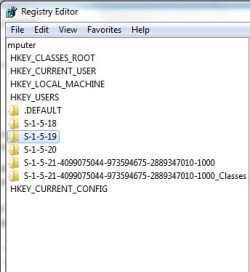
  • HKEY_Users.jpg
    HKEY_Users.jpg
    16.9 KB · Views: 4

My Computer My Computer

Computer type
Laptop
Computer Manufacturer/Model Number
Dell Insprion 7559 next to a Toshiba Portege
OS
Win 7 Pro 64-bit
CPU
Intel Core i5
Motherboard
Intel
Memory
16 GB Dell, 6 GB Toshiba
Graphics Card(s)
Intel crap on both but Dell also has nVidia GeForce GTX960M
Sound Card
RealTek
Monitor(s) Displays
internal and external ACER KA270H 27"
Screen Resolution
1920x1080
Hard Drives
SSD 256 GB plus numerous WD Red or Purple on USB3 docks. Used to buy a lot of Seagate but tossed them the second time I got unrecoverable disc corruption in the midst of use.
Keyboard
Garage Mouse SW and some cheap Amazon China made USB device
Mouse
Garage Mouse and some cheap Amazon China made USB device
Internet Speed
50 Mbps (allegedly, depends on server)
Antivirus
Defender, Malwarebytes Premium and Kaspersky
Browser
IE 11, and Chrome something
First,
go to a command prompt, that is,
WIN | type cmd.exe | ENTER
then enter following:
wmic sysaccount get Domain,LocalAccount,Name,SID,Status /format:table > %userprofile%\desktop\SystemAccounts.txt

this will put a file, systemaccounts.txt on your desktop.

karl
 

My Computer My Computer

Computer Manufacturer/Model Number
Toshiba Satellite S875D-S7239 laptop
OS
MS Windows 7 Ultimate SP1 64-bit
CPU
AMD A10-4600M
Motherboard
AMD Pumori (Socket FT1)
Memory
6.00 GB Dual-Channel DDR3 @ 798MHz (11-11-12-28)
Graphics Card(s)
AMD Radeon HD 7660G
Sound Card
High Definition Audio Device
Monitor(s) Displays
Generic PnP Monitor (1600x900@60Hz)
Screen Resolution
1600x900@60Hz
Hard Drives
SSD 119GB Corsair CSSD-V128GB2 ATA Device
Keyboard
Standard PS/2 Keyboard
Mouse
HP Wireless Optical Mobile Mouse Model FHA-3410
Internet Speed
What the local pub, local coffee shop offers.
Other Info
Optical Drive:MATSHITA BD-CMB UJ160B ATA Device


Also have an Asus ha1002xp netbook with Win 7 Ultimate installed.
  • Like
Reactions: mjf
Now,
go to a command prompt and run:
wmic useraccount list full /format:table > %userprofile%\desktop\UserAccountsFull.txt

which will put a file called useraccountsfull.txt onto your desktop.

Now you should be able to spot the account of interest to you.
 

My Computer My Computer

Computer Manufacturer/Model Number
Toshiba Satellite S875D-S7239 laptop
OS
MS Windows 7 Ultimate SP1 64-bit
CPU
AMD A10-4600M
Motherboard
AMD Pumori (Socket FT1)
Memory
6.00 GB Dual-Channel DDR3 @ 798MHz (11-11-12-28)
Graphics Card(s)
AMD Radeon HD 7660G
Sound Card
High Definition Audio Device
Monitor(s) Displays
Generic PnP Monitor (1600x900@60Hz)
Screen Resolution
1600x900@60Hz
Hard Drives
SSD 119GB Corsair CSSD-V128GB2 ATA Device
Keyboard
Standard PS/2 Keyboard
Mouse
HP Wireless Optical Mobile Mouse Model FHA-3410
Internet Speed
What the local pub, local coffee shop offers.
Other Info
Optical Drive:MATSHITA BD-CMB UJ160B ATA Device


Also have an Asus ha1002xp netbook with Win 7 Ultimate installed.
Karl, Thank you.

Following your instructions helped me both find the account and also to understand that Microsoft was referring to the SID not the Name. So, other readers should understand that the KB article might have been clearer if it had said:

HKEY_USERS\<User SID>\Software\Microsoft\Windows\CurrentVersion\Explorer\Shell Folders\AppData

However, backups still failed. Following the instructions in the KB article to turn off the AppData in the Windows selections and turn it on in the "let me choose" section did not work. I tried turning off all default selections and turned on "let me choose" my entire system disk ( C: ). Still errrored.

Then I remembered something I encountered in another Microsoft problem.
So, I used file explorer to change the %userprofile%\AppData folder to visible instead of hidden (that folder only).
Repeating the backup, it worked!

As implied by the KB article, the root cause only applied to the account running the backup, not for each user on the system. So, I only had to unhide mine. I hope our thread helps someone else with this problem.

Final answer: change %userprofile%\AppData to visible (not hidden).
 
Last edited:

My Computer My Computer

Computer type
Laptop
Computer Manufacturer/Model Number
Dell Insprion 7559 next to a Toshiba Portege
OS
Win 7 Pro 64-bit
CPU
Intel Core i5
Motherboard
Intel
Memory
16 GB Dell, 6 GB Toshiba
Graphics Card(s)
Intel crap on both but Dell also has nVidia GeForce GTX960M
Sound Card
RealTek
Monitor(s) Displays
internal and external ACER KA270H 27"
Screen Resolution
1920x1080
Hard Drives
SSD 256 GB plus numerous WD Red or Purple on USB3 docks. Used to buy a lot of Seagate but tossed them the second time I got unrecoverable disc corruption in the midst of use.
Keyboard
Garage Mouse SW and some cheap Amazon China made USB device
Mouse
Garage Mouse and some cheap Amazon China made USB device
Internet Speed
50 Mbps (allegedly, depends on server)
Antivirus
Defender, Malwarebytes Premium and Kaspersky
Browser
IE 11, and Chrome something
Soho,
Thanks for getting back to us with how you solved the problem.

Glad to be of assistance.

Changing some of the Win 7 default configuration can sure turn around and bite us in strange ways.
 

My Computer My Computer

Computer Manufacturer/Model Number
Toshiba Satellite S875D-S7239 laptop
OS
MS Windows 7 Ultimate SP1 64-bit
CPU
AMD A10-4600M
Motherboard
AMD Pumori (Socket FT1)
Memory
6.00 GB Dual-Channel DDR3 @ 798MHz (11-11-12-28)
Graphics Card(s)
AMD Radeon HD 7660G
Sound Card
High Definition Audio Device
Monitor(s) Displays
Generic PnP Monitor (1600x900@60Hz)
Screen Resolution
1600x900@60Hz
Hard Drives
SSD 119GB Corsair CSSD-V128GB2 ATA Device
Keyboard
Standard PS/2 Keyboard
Mouse
HP Wireless Optical Mobile Mouse Model FHA-3410
Internet Speed
What the local pub, local coffee shop offers.
Other Info
Optical Drive:MATSHITA BD-CMB UJ160B ATA Device


Also have an Asus ha1002xp netbook with Win 7 Ultimate installed.
Yes indeed. The hard part is knowing what changed. Installed application? Windows upgrade? Who knows? Nobody can effectively assure that all working functions (like backup was) continue to work after making a system change.

Thus, we need to be able to solve problems from whatever the current working state is.

As in this case, I didn't run backups enough to know whether any of a dozen software changes might have caused the problem, whether the registry (which I didn't end up changing, just came to better undertand) was modified by the upgrade or a software install, but something changed.

Sometimes it's a grey line between fix and work-around. At least I feel a good correlation between the reported KB root cause of "not finding" AppData and the "fix" of making the AppData directory visible.

In any case, it worked and I can get on to new things, with backups running again. Thanks again for the help!
 

My Computer My Computer

Computer type
Laptop
Computer Manufacturer/Model Number
Dell Insprion 7559 next to a Toshiba Portege
OS
Win 7 Pro 64-bit
CPU
Intel Core i5
Motherboard
Intel
Memory
16 GB Dell, 6 GB Toshiba
Graphics Card(s)
Intel crap on both but Dell also has nVidia GeForce GTX960M
Sound Card
RealTek
Monitor(s) Displays
internal and external ACER KA270H 27"
Screen Resolution
1920x1080
Hard Drives
SSD 256 GB plus numerous WD Red or Purple on USB3 docks. Used to buy a lot of Seagate but tossed them the second time I got unrecoverable disc corruption in the midst of use.
Keyboard
Garage Mouse SW and some cheap Amazon China made USB device
Mouse
Garage Mouse and some cheap Amazon China made USB device
Internet Speed
50 Mbps (allegedly, depends on server)
Antivirus
Defender, Malwarebytes Premium and Kaspersky
Browser
IE 11, and Chrome something
Back
Top