I had to reinstall Windows 7 Home Premium 64-bit on a computer I had built for me a year ago and was surprised that I couldn't get on the internet. In my Device Manager I am missing:
Ethernet Controller
HP Scanjet
PCI Simple Communications Controller
SM Bus Controller
2 - Universal Serial Bus (USB) Controllers
I assume I need the Ethernet Controller to get on the internet but I don't know where to find it I have a AsRock Z68 Extreme3 Gen3 Motherboard... could someone give me a hand? Thanks!
Mike
My Computer
Computer type
PC/Desktop
Computer Manufacturer/Model Number
Home Build
OS
Windows 7 Home Premium 64-bit; SP1
CPU
Intel Core i5 2500K
Motherboard
ASRock Z68 Extreme3 Gen3
Memory
Corsair Vengeance 16GB DDR3
Graphics Card(s)
Intel HD Graphics 3000
Sound Card
Integrated
Monitor(s) Displays
Samsung SyncMaster 943BX
Screen Resolution
1280x1024
Hard Drives
Western Digital Caviar Black WD1002FAEX 1TB 7200 RPM 64MB Cache SATA 6.0Gb/s 3.5" Internal
Western Digital Caviar Black WD7501AALS 750GB 7200 RPM 32MB Cache SATA 3.0Gb/s 3.5" Internal
PSU
SeaSonic S12ll 520W Bronze
Case
Cooler Master Haf 912 Advanced
Cooling
Cooler Master Hyper 212 EVO
Keyboard
Logitech Wireless K800
Mouse
Logitech Wireless Performance MX
Internet Speed
5.0 mb
Other Info
LG WH12LS30 Black SATA 12X Blu-ray
ASUS DRW-24B1ST/BLK/B/AS
AFT XM-5UE Card Reader
Thanks VistaKing the Ethernet Controller driver got me up and going on the internet! The PCI Controller & the USB Controller drivers didn't work but I can use SlimDrivers to find them now that I'm on the net.
My Computer
Computer type
PC/Desktop
Computer Manufacturer/Model Number
Home Build
OS
Windows 7 Home Premium 64-bit; SP1
CPU
Intel Core i5 2500K
Motherboard
ASRock Z68 Extreme3 Gen3
Memory
Corsair Vengeance 16GB DDR3
Graphics Card(s)
Intel HD Graphics 3000
Sound Card
Integrated
Monitor(s) Displays
Samsung SyncMaster 943BX
Screen Resolution
1280x1024
Hard Drives
Western Digital Caviar Black WD1002FAEX 1TB 7200 RPM 64MB Cache SATA 6.0Gb/s 3.5" Internal
Western Digital Caviar Black WD7501AALS 750GB 7200 RPM 32MB Cache SATA 3.0Gb/s 3.5" Internal
PSU
SeaSonic S12ll 520W Bronze
Case
Cooler Master Haf 912 Advanced
Cooling
Cooler Master Hyper 212 EVO
Keyboard
Logitech Wireless K800
Mouse
Logitech Wireless Performance MX
Internet Speed
5.0 mb
Other Info
LG WH12LS30 Black SATA 12X Blu-ray
ASUS DRW-24B1ST/BLK/B/AS
AFT XM-5UE Card Reader
If you right click on the device with the :warn: icon on it and choose Properties . Click on the Details tab on the drop down menu choose Hardware Ids and take a prntscrn of that and upload .
My Computer
Computer Manufacturer/Model Number
Custom Built
OS
Windows 7 Ultimate 32-Bit & Windows 7 Ultimate 64-Bit
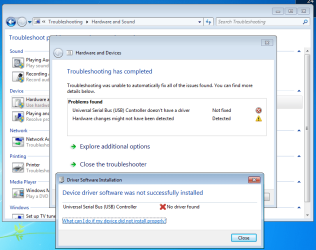
VistaKing when I installed the file you provided it installs it with no problem but when I go to the Device Manager there is still a yellow exclamation in front of Universal Serial Bus (BUS) Controller. If I right-click on Properties under General tab it says "The drivers for this device are not installed. (Code 28)"
I ran Microsoft Fix it and it pointed me to Windows 7 built-in Troubleshooting and it came up with the screen below... what's strange is I never had this problem before I did a Clean Install of Windows 7.
Any more ideas this is a little over my head?
Attachments
2013-03-26_122007.png
34.5 KB
· Views: 8
Last edited:
My Computer
Computer type
PC/Desktop
Computer Manufacturer/Model Number
Home Build
OS
Windows 7 Home Premium 64-bit; SP1
CPU
Intel Core i5 2500K
Motherboard
ASRock Z68 Extreme3 Gen3
Memory
Corsair Vengeance 16GB DDR3
Graphics Card(s)
Intel HD Graphics 3000
Sound Card
Integrated
Monitor(s) Displays
Samsung SyncMaster 943BX
Screen Resolution
1280x1024
Hard Drives
Western Digital Caviar Black WD1002FAEX 1TB 7200 RPM 64MB Cache SATA 6.0Gb/s 3.5" Internal
Western Digital Caviar Black WD7501AALS 750GB 7200 RPM 32MB Cache SATA 3.0Gb/s 3.5" Internal
PSU
SeaSonic S12ll 520W Bronze
Case
Cooler Master Haf 912 Advanced
Cooling
Cooler Master Hyper 212 EVO
Keyboard
Logitech Wireless K800
Mouse
Logitech Wireless Performance MX
Internet Speed
5.0 mb
Other Info
LG WH12LS30 Black SATA 12X Blu-ray
ASUS DRW-24B1ST/BLK/B/AS
AFT XM-5UE Card Reader
I just tried it and it says like before it can't find the driver what exactly is the Universal Serial Bus (BUS) Controller and what does it control?
Does it have anything to do with my Dvd drives because they were working fine this morning before I re-installed my printer and scanner but now they don't seem to detect when I put in a disc in or it takes forever?
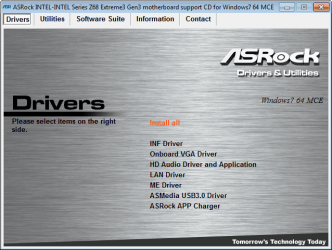
I found a disc that came with my computer that has some drivers on it but which one is the one I need?
Attachments
2013-03-26_171419.png
96.2 KB
· Views: 8
My Computer
Computer type
PC/Desktop
Computer Manufacturer/Model Number
Home Build
OS
Windows 7 Home Premium 64-bit; SP1
CPU
Intel Core i5 2500K
Motherboard
ASRock Z68 Extreme3 Gen3
Memory
Corsair Vengeance 16GB DDR3
Graphics Card(s)
Intel HD Graphics 3000
Sound Card
Integrated
Monitor(s) Displays
Samsung SyncMaster 943BX
Screen Resolution
1280x1024
Hard Drives
Western Digital Caviar Black WD1002FAEX 1TB 7200 RPM 64MB Cache SATA 6.0Gb/s 3.5" Internal
Western Digital Caviar Black WD7501AALS 750GB 7200 RPM 32MB Cache SATA 3.0Gb/s 3.5" Internal
PSU
SeaSonic S12ll 520W Bronze
Case
Cooler Master Haf 912 Advanced
Cooling
Cooler Master Hyper 212 EVO
Keyboard
Logitech Wireless K800
Mouse
Logitech Wireless Performance MX
Internet Speed
5.0 mb
Other Info
LG WH12LS30 Black SATA 12X Blu-ray
ASUS DRW-24B1ST/BLK/B/AS
AFT XM-5UE Card Reader
It said I had a newer version of INF Driver so I skipped it and moved on to the Asmedia USB 3.0 Driver and it said it installed successfully this time but I still have the yellow exclamation in the Device Manager. When I run Troubleshooting I get the same as above the Universal Serial Bus (BUS) Controller doesn't have a driver.
It seems all my USB 2.0 ports on the front and back of case work fine and the rear USB 3.0 also work. Since my case didn't have front-mounted USB 3.0 ports I added a Silverstone ECO4 USB 3.0 Express card but unfortunately those don't seem to be working now. I had to download their own driver again so I re-installed it but it didn't help.
VistaKing I'm thinking the yellow exclamation mark in front of Other Devices > Universal Serial Bus (USB) Controller is my front-mounted USB 3.0 which isn't working... the main listing for Universal Serial Bus (USB) show all the different USB's are fine. The reason I think this is because the Texas Instruments driver for the Silverstone card isn't showing up.
Any ideas why my Dvd drives would suddenly start acting up and how to troubleshoot?
Last edited:
My Computer
Computer type
PC/Desktop
Computer Manufacturer/Model Number
Home Build
OS
Windows 7 Home Premium 64-bit; SP1
CPU
Intel Core i5 2500K
Motherboard
ASRock Z68 Extreme3 Gen3
Memory
Corsair Vengeance 16GB DDR3
Graphics Card(s)
Intel HD Graphics 3000
Sound Card
Integrated
Monitor(s) Displays
Samsung SyncMaster 943BX
Screen Resolution
1280x1024
Hard Drives
Western Digital Caviar Black WD1002FAEX 1TB 7200 RPM 64MB Cache SATA 6.0Gb/s 3.5" Internal
Western Digital Caviar Black WD7501AALS 750GB 7200 RPM 32MB Cache SATA 3.0Gb/s 3.5" Internal
PSU
SeaSonic S12ll 520W Bronze
Case
Cooler Master Haf 912 Advanced
Cooling
Cooler Master Hyper 212 EVO
Keyboard
Logitech Wireless K800
Mouse
Logitech Wireless Performance MX
Internet Speed
5.0 mb
Other Info
LG WH12LS30 Black SATA 12X Blu-ray
ASUS DRW-24B1ST/BLK/B/AS
AFT XM-5UE Card Reader