Need external sound card

PvtMatter

New member
Local time
11:47 PM
Messages
62
Location
GA
I have an Alienware Area-51 7500-R4 with intergrated Nvidia C-55-MB. I recently installed Windows 7 (Custom, clean installation) and I only have sound on my two front speakers, no center or rear speakers. Alienware support is unable to help and I was told I could not install an internal soundcard in the computer (no space, no cables).

Does anyone know of an external soundcard, USB, that will work in Windows 7?
 

My Computer

Computer Manufacturer/Model Number
Alienware Area-51 7500-R4
OS
Windows 7
CPU
D-Core 2 Duo Extreme 2.66GHZ QX6700 8M
Motherboard
EVGA nForce 680I
Memory
8GB DDR2 PC-6400
Graphics Card(s)
2 nVidia dual SLI configured, 280
Sound Card
Creative Augigy 4 w/driver 6.01.1371 w/Dell 5.1 speakers
Monitor(s) Displays
Samsung Syncmaster 24T
Screen Resolution
1900X1200
Hard Drives
2 Seagate 250GB SATA 3G 7200RPM 8MB Cache running Raid 0
1 Seagate 250GB SATA 3G 7200RPM 8MB Cache (Data drive)
Cooling
liquid
Mouse
Logitek
What's the hardware id of your current onboard audio device?

Rt click in device manager, properties, details tab, change dropdown to hardware ids.

Copy and paste here please. Decent chance that I could locate a working driver for you through an alternate vendor.
 

My Computer

Computer Manufacturer/Model Number
self built
OS
7600.20510 x86
CPU
P4 550 3.4 GHz HT running at 3.5 GHz
Motherboard
MSI PM8M3-V (MS-7211 v1.x) Micro-ATX mainboard
Memory
OCZ 2 GB(2x1GB) DDR400mHz running @ 414 mHz
Graphics Card(s)
HIS Radeon HD 3850 IceQ 3 Turbo HDMI Dual DL-DVI AGP
Sound Card
MOTU Traveler firewire studio interface 192 kHz 24 bit
Monitor(s) Displays
22" widescreen Acer X223W LCD, 17" Compaq P75 CRT
Screen Resolution
1680x1050 and 1280x1024
Hard Drives
SATA I x2 WD, 400 GB and 120 GB, SATA 2 WD Caviar Black 1 TB
PSU
350W generic
Case
Cybertronpc, it glows blue
Cooling
stock cpu fan, Ice-Q 3 gpu and system, many case fans
Keyboard
Logitch Classical Keyboard 200
Mouse
Logitech Mediaplay cordless
Internet Speed
1792/448 kbits/sec
Other Info
SATA II PCI fake RAID adapter, 1 GB Readyboost, original ATI Remote Wonder (even works with WMC perfectly), Logitech Rumblepad 2 game controller x2
Alienware support is unable to help and I was told I could not install an internal soundcard in the computer (no space, no cables).

Can I just as politely as possible say Alienware is full of bull. Here is a nice little review of your computer,

Introduction - Alienware Aurora 7500-R4 | [H]ard|OCP

including a very nice shot of the inside,

Screenshots | [H]ard|OCP

Unless you had yours customized beyond what is shown for the specs in that review, there is lots of room. Here are the specs for the motherboard shown in the review,

Foxconn - Products: Motherboard

and it has the Realtek ALC882D (HDA) on it. Just because Alienware doesn't have drivers for it doesn't mean there aren't any. You can find links to the latest Realtek HD driver here,

http://www.sevenforums.com/sound-audio/3756-latest-realtek-hd-audio-driver-version.html
 

My Computer

Computer type
PC/Desktop
Computer Manufacturer/Model Number
Me
OS
Win 7 Ultimate x64
CPU
FX-8350 @ 4.6 GHz so far
Motherboard
Asus M5A97 EVO
Memory
ADATA XPG V1 Series Black 8GB DDR3 1600
Graphics Card(s)
Sapphire R9 270x Dual-X
Sound Card
Xonar DGX w/ Corsair Vengence 1300
Monitor(s) Displays
Acer S232HL Abid
Screen Resolution
1920x1080
Hard Drives
120 GB OCZ Vertex 3
500 GB Seagate 7200.12
PSU
Antec Earthwatts 650W Green
Case
Antec Three Hundred
Cooling
Cooler Master 212 EVO
Keyboard
Logitech G510
Mouse
Logitech G500s
Internet Speed
35000/3000
Ailenware Area51 Desktop Sound Card

Thanks Stormy for the info. My computer was fully customized and the big problem is I have dual nVidia 280 vid cards running in SLI config. There is one short MB slot between them but no other slots.

I am still looking for a Win 7 external. Know of one?
Thanks again
 

My Computer

Computer Manufacturer/Model Number
Alienware Area-51 7500-R4
OS
Windows 7
CPU
D-Core 2 Duo Extreme 2.66GHZ QX6700 8M
Motherboard
EVGA nForce 680I
Memory
8GB DDR2 PC-6400
Graphics Card(s)
2 nVidia dual SLI configured, 280
Sound Card
Creative Augigy 4 w/driver 6.01.1371 w/Dell 5.1 speakers
Monitor(s) Displays
Samsung Syncmaster 24T
Screen Resolution
1900X1200
Hard Drives
2 Seagate 250GB SATA 3G 7200RPM 8MB Cache running Raid 0
1 Seagate 250GB SATA 3G 7200RPM 8MB Cache (Data drive)
Cooling
liquid
Mouse
Logitek

My Computer

Computer Manufacturer/Model Number
self built
OS
7600.20510 x86
CPU
P4 550 3.4 GHz HT running at 3.5 GHz
Motherboard
MSI PM8M3-V (MS-7211 v1.x) Micro-ATX mainboard
Memory
OCZ 2 GB(2x1GB) DDR400mHz running @ 414 mHz
Graphics Card(s)
HIS Radeon HD 3850 IceQ 3 Turbo HDMI Dual DL-DVI AGP
Sound Card
MOTU Traveler firewire studio interface 192 kHz 24 bit
Monitor(s) Displays
22" widescreen Acer X223W LCD, 17" Compaq P75 CRT
Screen Resolution
1680x1050 and 1280x1024
Hard Drives
SATA I x2 WD, 400 GB and 120 GB, SATA 2 WD Caviar Black 1 TB
PSU
350W generic
Case
Cybertronpc, it glows blue
Cooling
stock cpu fan, Ice-Q 3 gpu and system, many case fans
Keyboard
Logitch Classical Keyboard 200
Mouse
Logitech Mediaplay cordless
Internet Speed
1792/448 kbits/sec
Other Info
SATA II PCI fake RAID adapter, 1 GB Readyboost, original ATI Remote Wonder (even works with WMC perfectly), Logitech Rumblepad 2 game controller x2
Alienware onboard audio

Sorry I didn't answer your question. I have an integrated High-Def audio Nvidia C55-MB. I have read several postings about compatibility issues (it's still very early in general public use) between Windows 7 and USB audio.
 

My Computer

Computer Manufacturer/Model Number
Alienware Area-51 7500-R4
OS
Windows 7
CPU
D-Core 2 Duo Extreme 2.66GHZ QX6700 8M
Motherboard
EVGA nForce 680I
Memory
8GB DDR2 PC-6400
Graphics Card(s)
2 nVidia dual SLI configured, 280
Sound Card
Creative Augigy 4 w/driver 6.01.1371 w/Dell 5.1 speakers
Monitor(s) Displays
Samsung Syncmaster 24T
Screen Resolution
1900X1200
Hard Drives
2 Seagate 250GB SATA 3G 7200RPM 8MB Cache running Raid 0
1 Seagate 250GB SATA 3G 7200RPM 8MB Cache (Data drive)
Cooling
liquid
Mouse
Logitek
Nah, should be fine. Even my firewire interface is great since beta testing last year. If you're looking high end, I can definitely recommend MOTU gear.


http://www.motu.com/products/motuaudio

I need hardware id strings to find driver for what you have now. Did you try Stormy's?
 

My Computer

Computer Manufacturer/Model Number
self built
OS
7600.20510 x86
CPU
P4 550 3.4 GHz HT running at 3.5 GHz
Motherboard
MSI PM8M3-V (MS-7211 v1.x) Micro-ATX mainboard
Memory
OCZ 2 GB(2x1GB) DDR400mHz running @ 414 mHz
Graphics Card(s)
HIS Radeon HD 3850 IceQ 3 Turbo HDMI Dual DL-DVI AGP
Sound Card
MOTU Traveler firewire studio interface 192 kHz 24 bit
Monitor(s) Displays
22" widescreen Acer X223W LCD, 17" Compaq P75 CRT
Screen Resolution
1680x1050 and 1280x1024
Hard Drives
SATA I x2 WD, 400 GB and 120 GB, SATA 2 WD Caviar Black 1 TB
PSU
350W generic
Case
Cybertronpc, it glows blue
Cooling
stock cpu fan, Ice-Q 3 gpu and system, many case fans
Keyboard
Logitch Classical Keyboard 200
Mouse
Logitech Mediaplay cordless
Internet Speed
1792/448 kbits/sec
Other Info
SATA II PCI fake RAID adapter, 1 GB Readyboost, original ATI Remote Wonder (even works with WMC perfectly), Logitech Rumblepad 2 game controller x2
Audigy 4 missing speakers

Just installed a new Creative Audigy sound card (Alienware said there was no room due to my dual SLI video installation) and I have the same problem I had with the on board sound setup and the Audigy 2 ZS sound card I installed later. All have the latest drivers and on board sound is disabled. I am using a 5.1 speaker setup.

I have sound on all speakers in the Creative panel sound test. However, when I play a CD I only have sound on the LF and RF (No center or rear sound) speakers. I can't find anything on the forum to try. Any other suggestions would be appreciated
 

My Computer

Computer Manufacturer/Model Number
Alienware Area-51 7500-R4
OS
Windows 7
CPU
D-Core 2 Duo Extreme 2.66GHZ QX6700 8M
Motherboard
EVGA nForce 680I
Memory
8GB DDR2 PC-6400
Graphics Card(s)
2 nVidia dual SLI configured, 280
Sound Card
Creative Augigy 4 w/driver 6.01.1371 w/Dell 5.1 speakers
Monitor(s) Displays
Samsung Syncmaster 24T
Screen Resolution
1900X1200
Hard Drives
2 Seagate 250GB SATA 3G 7200RPM 8MB Cache running Raid 0
1 Seagate 250GB SATA 3G 7200RPM 8MB Cache (Data drive)
Cooling
liquid
Mouse
Logitek
That would be because the CD is recorded in stereo only. You want it to play out of all the speakers you need to enable CMSS3D in the Creative controls (or stereo mix on Realtek).
 

My Computer

Computer type
PC/Desktop
Computer Manufacturer/Model Number
Me
OS
Win 7 Ultimate x64
CPU
FX-8350 @ 4.6 GHz so far
Motherboard
Asus M5A97 EVO
Memory
ADATA XPG V1 Series Black 8GB DDR3 1600
Graphics Card(s)
Sapphire R9 270x Dual-X
Sound Card
Xonar DGX w/ Corsair Vengence 1300
Monitor(s) Displays
Acer S232HL Abid
Screen Resolution
1920x1080
Hard Drives
120 GB OCZ Vertex 3
500 GB Seagate 7200.12
PSU
Antec Earthwatts 650W Green
Case
Antec Three Hundred
Cooling
Cooler Master 212 EVO
Keyboard
Logitech G510
Mouse
Logitech G500s
Internet Speed
35000/3000
Audugy 4 lack of EAX

Thanks Stormy for you persistence in helping me work on the sound problem. I checked under my DVDs in Device manager and the feature you mentioned is missing, I have done research on Creative's forum and ran across the following that seems to relate to my problem. This advice is listed under the question of no sound on center and rear speakers:
How to enable CMSS in Creative MediaSource for Sound Blaster Audigy 2 NX


  1. Click Start, (All) Programs, Creative, Creative MediaSource, and click on the Creative MediaSource Player or the Creative MediaSource Organizer.
  2. Click on the EAX button to enable EAX. The button should now be highlighted in green.
  3. Next, click on the little buttons next to the EAX button, which will bring up the Creative EAX Console.
  4. In the EAX Console, check the CMSS 3D tab, then check the box next to Enable CMSS 3D.
  5. Select ether CMSS or Stereo Surround and close the EAX Console.
You can also open the EAX Console by clicking Start, (All) Programs, Creative, USB Sound Blaster Audigy 2 NX, EAX Console. You also can press the CMSS button on the remote to enable CMSS however you will still have to use the EAX Console to select Stereo Surround if you want to use Stereo Surround.


I have an Audigy 4 board but believe the same instructions apply for activating the rear speakers. The only problem is, I don't have an EAX button to click in the Creative Media Source Player. When I go into the Creative files under EAX, I get the following message: "Audio device supplied by this application is not detected". If they are referring to the sound card, it is definitely in the Device Manager with the latest driver (6.01.1371)


So it seems I need the EAX console and reading from my Blaster Audigy 4 box, I am supposed to be able to "Immerse yourself in Amazingly Realistic Gaming Audio with EAX advanced HD 4.0". However, I can not find the EAX console on the web, it wasn't with my CD and I am very frustrated.
 
Last edited:

My Computer

Computer Manufacturer/Model Number
Alienware Area-51 7500-R4
OS
Windows 7
CPU
D-Core 2 Duo Extreme 2.66GHZ QX6700 8M
Motherboard
EVGA nForce 680I
Memory
8GB DDR2 PC-6400
Graphics Card(s)
2 nVidia dual SLI configured, 280
Sound Card
Creative Augigy 4 w/driver 6.01.1371 w/Dell 5.1 speakers
Monitor(s) Displays
Samsung Syncmaster 24T
Screen Resolution
1900X1200
Hard Drives
2 Seagate 250GB SATA 3G 7200RPM 8MB Cache running Raid 0
1 Seagate 250GB SATA 3G 7200RPM 8MB Cache (Data drive)
Cooling
liquid
Mouse
Logitek
Can't really help with what does and doesn't work with the 2 NX as I have never had or used one, for the most part everything is guess work on what works with other cards. As to the Audigy 4 that I can do.

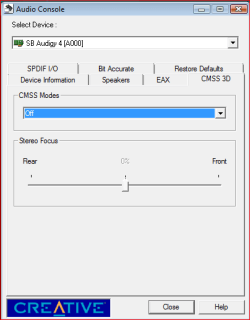
You shouldn't need the EAX Console but instead assuming it installed (and it should as it gets installed with the driver) you can make those settings in the Audio Console,

audioconsole.PNG

That is from Vista (haven't gotten around to moving that computer to 7 yet), but it should give you an idea what to look for.
 

My Computer

Computer type
PC/Desktop
Computer Manufacturer/Model Number
Me
OS
Win 7 Ultimate x64
CPU
FX-8350 @ 4.6 GHz so far
Motherboard
Asus M5A97 EVO
Memory
ADATA XPG V1 Series Black 8GB DDR3 1600
Graphics Card(s)
Sapphire R9 270x Dual-X
Sound Card
Xonar DGX w/ Corsair Vengence 1300
Monitor(s) Displays
Acer S232HL Abid
Screen Resolution
1920x1080
Hard Drives
120 GB OCZ Vertex 3
500 GB Seagate 7200.12
PSU
Antec Earthwatts 650W Green
Case
Antec Three Hundred
Cooling
Cooler Master 212 EVO
Keyboard
Logitech G510
Mouse
Logitech G500s
Internet Speed
35000/3000
Joy!!! Audigy 4 has rear speaker sound!!

I've been searching the web...talking to teckies and have even been to the Oracle of Delphi twice looking for a way to get sound out of ALL my speakers, not just the LF and LR in my 5.1 setup. I thought I had narrowed the problem down after reading about the problem and solutions on the Creative support page. Still, I was frustrated because whe instructions for all speaker sound required the installation of the EAX console which apparently is not installed (at least not on my machine after 3 re-installs) with the Audigy 4 disk/web update on my Windows 7 64 bit system. Quiet frankly I was ready to ditch Windows 7 due to the speaker problem and a persistent system problem I have with Windows Explorer periodically stopping.

And then your suggestion on where I should look. Great...I do have an EAX function in my Creative Audio Console...one of the places I had not explored.
I just didn't know EAX selections for the environment of the computer (or at least the audio effects I was trying to immolate) were controlled by selecting an EAX condition: small room, Auditorium, etc.

Now to the good part....following the instructions in your last post, I have found the EAX function now and have sound on all speakers. Gold stars to you!! Now if I could just solve that pesky "Windows Explorer Stopping" problem, I might even keep Windows 7.

Thanks again Stormy. You know your S@#$
 

My Computer

Computer Manufacturer/Model Number
Alienware Area-51 7500-R4
OS
Windows 7
CPU
D-Core 2 Duo Extreme 2.66GHZ QX6700 8M
Motherboard
EVGA nForce 680I
Memory
8GB DDR2 PC-6400
Graphics Card(s)
2 nVidia dual SLI configured, 280
Sound Card
Creative Augigy 4 w/driver 6.01.1371 w/Dell 5.1 speakers
Monitor(s) Displays
Samsung Syncmaster 24T
Screen Resolution
1900X1200
Hard Drives
2 Seagate 250GB SATA 3G 7200RPM 8MB Cache running Raid 0
1 Seagate 250GB SATA 3G 7200RPM 8MB Cache (Data drive)
Cooling
liquid
Mouse
Logitek
Back
Top