Need guidance to dual boot win7/8 in laptop that is the spawn of satan

windows7sixty4

New member
Local time
12:38 AM
Messages
16
Hey guys,

Spent (wasted) 3 entire days trying to get something that seemed a no brainer to set up but gradually became some of the most infuriating/frustrating days that I have ever spent on computers

Lenovo W520 (bios 1.34)
i7 2820QM
Win 7 x64 pro (on samsung 650 gb sata drive)
24gb ram (8 x 8 x 4 x 4)
1 x 7200 rpm samsung 650gb hdd
1 x 7200 rpm scorpio black (data drive in ultra bay adaptor)
1 x 240 gb crucial mSATA m500 (win 8.1)

All I wanted was to add in a win 8.1 installation on an msata drive and dual boot with my existing win 7 installation on the spindle hdd. Seemed simple enough. It took me quite a while to figure out that win 8.1 seemed to have severe issues installing on an msata ssd on this laptop whilst there was another bootable drive in there.

I removed the other drives and still faced a lot of problems booting from the msata after the first reboot that windows requires. After much trial and error and googling as well as combining a bunch of solutions
(disabling VT-d, enabling diagnostics at boot up, setting bios to defaults etc), I finally managed to install windows and get it up and running.

Then the second I attached the other drives back into the laptop, and although the laptop booted up, it refused to detect the win 7 drive in windows (it was visible and bootable from bios). It was also nowhere to be found in disk management tools. I made the mistake of trying to re-install win 8 with drives attached. Nothing worked.

I had to repeat the whole aforementioned process again to get 8.1 running on msata.

I then reattached the remaining 2 drives (one in the laptops primary hdd bay, and the other in the optical drive ultra bay). This time I inserted the data drive into the laptops primary hdd bay and the windows 7 drive in the ultra bay.

Although I can see and use the win 7 drive from win 8, I cannot boot windows from an ultrabay adaptor. I am too scared of trying to switch the drives back around in the fear that they will mess up the win 8 installation again.

Is there a fix to this? I would prefer one that did not involve a bios update as the laptops warranty period has ended.

Thanks in advance and for reading this lenghty tale of woe.
 

My Computer My Computer

At a glance

Windows 7 pro x642820qm8gbQuadro 2000m, intel hd3000
Computer type
Laptop
Computer Manufacturer/Model Number
Lenovo
OS
Windows 7 pro x64
CPU
2820qm
Memory
8gb
Graphics Card(s)
Quadro 2000m, intel hd3000
Hard Drives
2 x 7200RPM
Antivirus
Avira
Browser
Firefox
I would prefer one that did not involve a bios update as the laptops warranty period has ended.
There should be no need to flash the BIOS to reinstall Win7. You did make the Factory Restore discs as prompted when setting up the computer, didn't you? The reason I ask is it might be more productive to get the computer back to the condition it was first received.
 

My Computer My Computer

At a glance

Windows 7 Ultimate 64-bit, Windows 8.1 64-bit...
Computer type
PC/Desktop
Computer Manufacturer/Model Number
Customs, Dell, Gateway, HP, Toshiba, Acer, ASUS
OS
Windows 7 Ultimate 64-bit, Windows 8.1 64-bit, Mac OS X 10.10, Linux Mint 17, Windows 10 Pro TP
Keyboard
Microsoft
Mouse
Microsoft
I would prefer one that did not involve a bios update as the laptops warranty period has ended.
There should be no need to flash the BIOS to reinstall Win7. You did make the Factory Restore discs as prompted when setting up the computer, didn't you? The reason I ask is it might be more productive to get the computer back to the condition it was first received.

Really appreciate the quick response.

I can make the recovery usb, but my goal is to have a dual boot setup. I would like to keep the win7 installation as it is because I have it set up very nicely. I can still use it if i swap the win 7 drive back to the primarry hdd bay of the laptop.


But the last time I did that wrecked the win8.1 install on the ssd.

Basically, windows 8.1 was installed whilst the msata was the sole drive in the laptop. adding in the drive with win 7 installed into the primary hdd bay somehow makes booting up the win 8 install impossible.

There seems to some issue with this laptop where it has trouble recognizing the msata drive easily at boot.
 

My Computer My Computer

At a glance

Windows 7 pro x642820qm8gbQuadro 2000m, intel hd3000
Computer type
Laptop
Computer Manufacturer/Model Number
Lenovo
OS
Windows 7 pro x64
CPU
2820qm
Memory
8gb
Graphics Card(s)
Quadro 2000m, intel hd3000
Hard Drives
2 x 7200RPM
Antivirus
Avira
Browser
Firefox
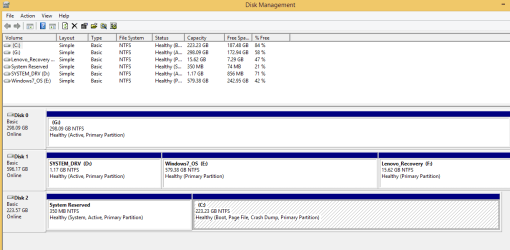
Please post back a screenshot of Disk Management - Post a Screen Capture Image with both OS drives attached and working.

Both HD's need to be System Active to boot independently via the BIOS Boot Priority order (for one) and the BIOS Boot Menu key (for the other). This should be the case if you correctly installed with all other drives unplugged.

You can still add the secondary HD OS to a Windows Dual Boot menu using EasyBCD from the Primary HD OS if you prefer the Windows Boot Menu - and each will still remain independently bootable.

It is unclear when you refer to Win8 and Win7 drives and then another data drive. How were you planning to juggle what sounds like 3 drives with only bays for two? Please clarify.

To install to MSATA you should be following whichever one of these applies to that MSATA:
Install Windows on MSATA (SSD) Drive - Windows 7 Help Forums
Install Windows on System with MSATA and ISRT - Windows 7 Help Forums
 
hey. thanks for the detailed reply.

I am making this post to clarify and post the very simple solution I found.

My w520 can hold upto 3 hdds.

1 msata slot (installed win 8.1 onto it)
1 hdd bay (drive with windows 7 on it)
1 ultra bay adaptor (replaced the optical drive to add another hdd)

Windows 8.1 would only be usable without any bootable drive attached to the system. Even in diskmanagement tools, only the ultrabay drive (without any OS) and msata was visible. The win7 drive was not.

The solution was, I switched the places of the ultrabay drive with the win7 os drive and booted.

Then all drives were visible and usable, with the exception that my win7 installation was useless now.

I installed EasyBCD, went into the startup editor to the OS selection menu, pointed it to where my win 7 install was, and pressed apply to input the registry entry in win 8.1 boot manager to allow OS selection at boot.

now whenever i boot, i get the option to boot between win 8.1 and win 7 from win 8.1's boot manager.

Both drives are perfectly bootable and usable.

Thanks for pointing me to those very helpful guides for proper installation on SSD's. I may have been spared the incredible misery of the last 3 days.

Will definitely refer to these guides when doing a clean install of 10.
 
Last edited:

My Computer My Computer

At a glance

Windows 7 pro x642820qm8gbQuadro 2000m, intel hd3000
Computer type
Laptop
Computer Manufacturer/Model Number
Lenovo
OS
Windows 7 pro x64
CPU
2820qm
Memory
8gb
Graphics Card(s)
Quadro 2000m, intel hd3000
Hard Drives
2 x 7200RPM
Antivirus
Avira
Browser
Firefox
Sounds like the Win7 HD was no longer bootable until added by EasyBCD? When booted into it now is it marked System Active. Still would like to see a screenshot of Disk Management - Post a Screen Capture Image.


It appears so. Here is the attached image.

Unfortunately, a new issue has sprung up. :cry:

I have an external Transcend USB3 2TB drive. Whenvever it is hooked up to the USB3 port, the laptop cannot boot from either OS if I try restarting. I have tried restarting a couple of times. However, with the drive attached, it is not possible to boot.

I have to remove the drive to reboot.

The drive has no OS installed and is a pure data drive.
 

Attachments

  • disk_management.png
    disk_management.png
    17.5 KB · Views: 2

My Computer My Computer

At a glance

Windows 7 pro x642820qm8gbQuadro 2000m, intel hd3000
Computer type
Laptop
Computer Manufacturer/Model Number
Lenovo
OS
Windows 7 pro x64
CPU
2820qm
Memory
8gb
Graphics Card(s)
Quadro 2000m, intel hd3000
Hard Drives
2 x 7200RPM
Antivirus
Avira
Browser
Firefox
I've read that the BIOS does not have the wherewithal to boot devices on the USB 3.0 ports, only 2.0. The 3.0 ports/devices need drivers which don't load until the OS loads. I have a USB 3.0 HDD connected that isn't seen until Win7 is loaded, the 2 USB 2.0 HDDs are seen by the BIOS. Try your device in a USB 2.0 port.
 

My Computer My Computer

At a glance

Windows 7 Ultimate 64-bit, Windows 8.1 64-bit...
Computer type
PC/Desktop
Computer Manufacturer/Model Number
Customs, Dell, Gateway, HP, Toshiba, Acer, ASUS
OS
Windows 7 Ultimate 64-bit, Windows 8.1 64-bit, Mac OS X 10.10, Linux Mint 17, Windows 10 Pro TP
Keyboard
Microsoft
Mouse
Microsoft
I realize I may not have explained this properly.

Windows 8.1 and 7 are set up on 2 internal drives in a dual boot in the laptop.

There is an external 2TB USB3 Transcend branded drive that is just for data. If that drive is attached to the USB port and I try to reboot either through Win 7 or win 8, I get an error that the OS could not started due to an error.

The laptop boots perfectly fine without that drive attached.
 

My Computer My Computer

At a glance

Windows 7 pro x642820qm8gbQuadro 2000m, intel hd3000
Computer type
Laptop
Computer Manufacturer/Model Number
Lenovo
OS
Windows 7 pro x64
CPU
2820qm
Memory
8gb
Graphics Card(s)
Quadro 2000m, intel hd3000
Hard Drives
2 x 7200RPM
Antivirus
Avira
Browser
Firefox
The G drive which appears to have no OS on it should not be marked Active. Only the partition booting the Dual Boot should be marked Active. So Mark Partition as Inactive - Windows 7 Forums. If that's the problem data drive that might be the reason why. Another reason for a data drive blocking boot is that it accidentally had boot code written to it if attached during a repair or reinstall.

So if G is not the problem drive, plug it in and boot the Win7 disk to determine if it is Partition Marked Active (Option Two) to mark it Inactive. If this is not enough to stop it from interfering then move its data off to wipe it with Diskpart Clean Command to clear boot code and partition table, then repartition in Disk Mgmt and move data back on.

Next we see Windows 8 is the booted OS signified by the Boot flag on it, and that it is correctly being booted by its System Reserved partition as signified by the System Active flags there.

Now boot into Win7 to see which partition is now marked System Active. This will tell us if the drives still remain independently bootable via the BIOS even if EasyBCD configured a Windows Boot menu.
 
The G drive which appears to have no OS on it should not be marked Active. Only the partition booting the Dual Boot should be marked Active. So Mark Partition as Inactive - Windows 7 Forums. If that's the problem data drive that might be the reason why. Another reason for a data drive blocking boot is that it accidentally had boot code written to it if attached during a repair or reinstall.

So if G is not the problem drive, plug it in and boot the Win7 disk to determine if it is Partition Marked Active (Option Two) to mark it Inactive. If this is not enough to stop it from interfering then move its data off to wipe it with Diskpart Clean Command to clear boot code and partition table, then repartition in Disk Mgmt and move data back on.

Next we see Windows 8 is the booted OS signified by the Boot flag on it, and that it is correctly being booted by its System Reserved partition as signified by the System Active flags there.

Now boot into Win7 to see which partition is now marked System Active. This will tell us if the drives still remain independently bootable via the BIOS even if EasyBCD configured a Windows Boot menu.


I think you may be correct.

Attached is the disk management image taken from windows 7. This time the 2tb external data drive was attached. And the problem is that it is marked active. The SSD with windows 8 is G: in this.
 

Attachments

  • disk_management2.png
    disk_management2.png
    20.2 KB · Views: 1

My Computer My Computer

At a glance

Windows 7 pro x642820qm8gbQuadro 2000m, intel hd3000
Computer type
Laptop
Computer Manufacturer/Model Number
Lenovo
OS
Windows 7 pro x64
CPU
2820qm
Memory
8gb
Graphics Card(s)
Quadro 2000m, intel hd3000
Hard Drives
2 x 7200RPM
Antivirus
Avira
Browser
Firefox
you must be install first windows 7 in your hard drive after that you able to install windows 8.1 version. Windows never allow to install a lower version on upgraded version so first windows 7 then windows 8.1
 

My Computer My Computer

At a glance

Windows 7 32bit
Computer type
PC/Desktop
OS
Windows 7 32bit
you must be install first windows 7 in your hard drive after that you able to install windows 8.1 version. Windows never allow to install a lower version on upgraded version so first windows 7 then windows 8.1

Actually it is possible and i have more or less been able to do it, just working out on some remaining minor issues. Please read my previous posts for details.
 

My Computer My Computer

At a glance

Windows 7 pro x642820qm8gbQuadro 2000m, intel hd3000
Computer type
Laptop
Computer Manufacturer/Model Number
Lenovo
OS
Windows 7 pro x64
CPU
2820qm
Memory
8gb
Graphics Card(s)
Quadro 2000m, intel hd3000
Hard Drives
2 x 7200RPM
Antivirus
Avira
Browser
Firefox

My Computer My Computer

At a glance

Win-7-Pro64bit 7-H-Prem-64biti7-5930K 2nd i9-9940x both water blocked VRM'...Trident-z 3200C14 2nd Trident-z 3600C16EVGA 1080ti ftw3 2nd Titan Xp both water blocked
Computer type
PC/Desktop
Computer Manufacturer/Model Number
Custom assembled by me :}
OS
Win-7-Pro64bit 7-H-Prem-64bit
CPU
i7-5930K 2nd i9-9940x both water blocked VRM's too
Motherboard
ASUS SABERTOOTH X99 2nd ASUS x299 Apex
Memory
Trident-z 3200C14 2nd Trident-z 3600C16
Graphics Card(s)
EVGA 1080ti ftw3 2nd Titan Xp both water blocked
Sound Card
Built-in Realtek
Monitor(s) Displays
1-AOC G2460PG 24"G-Sync 144Hz/ 2nd 1-ASUS VG248QE 24" 144Hz
Screen Resolution
1920 x 1080 144Hz
Hard Drives
2-Samsung M.2 Evo & Evo Plus
2-Samsung 850 EVO 500GB SSD's/ 3-2.5 W.D. Black 1tb-&3-1tb/3-3.5 WD Black 1tb hdd's
PSU
EVGA SuperNOVA 1000-P2 2nd 1200-P2
Case
2-Corsair Obsidian Series 450D Black ATX Mid Tower
Cooling
Custom water loops
Keyboard
Logitech G710+/ 2nd Logitech G910
Mouse
2-RedDragon M901 Perdition 16400 dpi Gaming mouse = wired
Internet Speed
Comcast Ping 19ms 89.31mbps download speed 6.12mbps upload
Antivirus
Malwarebytes Pro/ Superantispyware Pro
Browser
FireFox & Pale moon
Other Info
2nd ASUS X299 Apex/Intel i9-9940x with Custom water loop/7H-Prem-x64/Corsair 450D case/Ram Trident-z 3600C16 4x8gb / Samsung970Evo plus 500gb SSD/Dual ssd EZ swap evo/PSU EVGA SuperNova 1200w-P2 80+Platinum/GPU Titan Xp /8-ML-140 on push-pull on 2-280GTX rads
So did setting the External Inactive resolve your problem?

I notice that the Win8 System Reserved partition is still System even when Win7 is booted, likely because you added 7 to Dual Boot menu from Win8. This is okay but I'd want to know that 7 can boot on its own without the 8 drive attached. It should since 7 was booting itself before, correct? EasyBCD does not remove the 7 Boot files, only configures 7 to boot from the Win8 boot files on its SysRserved partiton. So try unplugging all other drives except 7 to see if it boots on its own. If not you'd need to confirm 7 is marked Active and run Startup Repair - Run 3 Separate Times.
 
After setting the external drive as inactive, i get a new error upon boot with the drive connected: 'Invalid partition table'

Everything works fine if the external drive is unplugged while booting/rebooting/switching OS's

So did setting the External Inactive resolve your problem?

I notice that the Win8 System Reserved partition is still System even when Win7 is booted, likely because you added 7 to Dual Boot menu from Win8. This is okay but I'd want to know that 7 can boot on its own without the 8 drive attached. It should since 7 was booting itself before, correct? EasyBCD does not remove the 7 Boot files, only configures 7 to boot from the Win8 boot files on its SysRserved partiton. So try unplugging all other drives except 7 to see if it boots on its own. If not you'd need to confirm 7 is marked Active and run Startup Repair - Run 3 Separate Times.


I will have to remove the keyboard to remove win 8 msata so i would like to keep that as a last resort. Popped off the trackpoints scroll button while installing the msata ssd
 

My Computer My Computer

At a glance

Windows 7 pro x642820qm8gbQuadro 2000m, intel hd3000
Computer type
Laptop
Computer Manufacturer/Model Number
Lenovo
OS
Windows 7 pro x64
CPU
2820qm
Memory
8gb
Graphics Card(s)
Quadro 2000m, intel hd3000
Hard Drives
2 x 7200RPM
Antivirus
Avira
Browser
Firefox
Back
Top