Need help ASAP

jessejw

New member
Member
VIP
Local time
11:32 AM
Messages
157
Location
New York
Ok well my windows explorer keeps crashing then it restarts and crashes again it just started to happen so i just ended it and started a new task with firefox to post here!
Please help ASAP thanks!
 

My Computer

Computer Manufacturer/Model Number
Lenovo
OS
Windows 7 Home Premium 32bit
CPU
Intel(R) Core(TM)2 Quad CPU
Memory
3GB DDR2
Graphics Card(s)
Geforce 9800GTX+
Monitor(s) Displays
Dell 22"
Screen Resolution
1440x900
Hard Drives
1TB, 120GB External
Mouse
Razer Death Adder
sounds viral, especially if it just popped up out of nowhere, something is killing the process and barring you having done something very recently to a system file or the registry. Virus is about the only thought I have.
Safe boot with MBAM time I think.
 

My Computer

Computer Manufacturer/Model Number
Insane hobo technologies. ;-)
OS
Windows 7 x64
CPU
Intel i7 2600k
Motherboard
Asrock z68 extreme 4 gen 3
Memory
G.skill Ripjaw 16gigs @ 1866
Graphics Card(s)
Nvidia gtx580 (evga)
Sound Card
Integrated HD audio + hdmi
Monitor(s) Displays
24" ASUS widescreen + 42" insignia
Screen Resolution
1080p (1920x1080)
Hard Drives
128 Samsung 830
256 Samsung 840
3 x 1tb storage drive (various)
1 western digital 1tb (eSATA)
1 Seagate 1tb (eSATA)
PSU
1 kilowatt SLI/Crossfire rated Silverstone modular
Case
NZXT Phantom + additional 220 fan
Cooling
Zalmann
Keyboard
Microsoft wireless 3000 (v2)
Mouse
MS - wireless 5000 (bluetrack)
Internet Speed
depends on if you ask me or my provider.
Other Info
The above information is provided as is, and the author assumes no responsibility for issues it may cause with your sanity or fanboyism.
Which means install, update and run a Full scan: Malwarebytes

Study the Event Viewer>Custom>Admin view for repeat errors to google text and ID# for resolution. Check also the Performance log on Advanced Tools page accessed by clicking your WEI score link at Computer>Properties. Check for cued issues at top of Tools page, Generate A System Health Report.

Type "Solutions" in Start Search box to see if any have been sent for Problems reported or not. Always report problems when asked as Windows 7 is interactive this way.

Test your hardware by running memtest86 CD for 5-6 passes or overnight: RAM - Test with Memtest86+ then test the HD using maker's diag/repair full CD scan: Hard Drive Diagnostics Tools and Utilities (Storage) - TACKtech Corp..

Check temps for overheating by installing SpeedFan, blow dust out of the case using canned air, check all connections carefully avoiding static discharge to components by touching case first, reseat RAM.

Try a Clean Boot Procedure to learn what programs are running unseen which can be causing problems. Turn off all Startup items except AV and gadgets: Startup Programs - Change

Some of these steps suggested for cleaning up or clean reinstalling a factory bloatware install might help.

Run SFC /SCANNOW Command - System File Checker to repair any damaged or corrupt OS files.

As a last resort before reinstall try a Repair Install which can fix most problems as it reinstalls the OS while keeping all programs, files and settings in place.

Tips for a clean reinstall, which is actually better than getting a new computer with today's bloated factory pre-installs.

 
sounds viral, especially if it just popped up out of nowhere, something is killing the process and barring you having done something very recently to a system file or the registry. Virus is about the only thought I have.
Safe boot with MBAM time I think.

Which means install, update and run a Full scan: Malwarebytes

Study the Event Viewer>Custom>Admin view for repeat errors to google text and ID# for resolution. Check also the Performance log on Advanced Tools page accessed by clicking your WEI score link at Computer>Properties. Check for cued issues at top of Tools page, Generate A System Health Report.

Type "Solutions" in Start Search box to see if any have been sent for Problems reported or not. Always report problems when asked as Windows 7 is interactive this way.

Test your hardware by running memtest86 CD for 5-6 passes or overnight: RAM - Test with Memtest86+ then test the HD using maker's diag/repair full CD scan: Hard Drive Diagnostics Tools and Utilities (Storage) - TACKtech Corp..

Check temps for overheating by installing SpeedFan, blow dust out of the case using canned air, check all connections carefully avoiding static discharge to components by touching case first, reseat RAM.

Try a Clean Boot Procedure to learn what programs are running unseen which can be causing problems. Turn off all Startup items except AV and gadgets: Startup Programs - Change

Some of these steps suggested for cleaning up or clean reinstalling a factory bloatware install might help.

Run SFC /SCANNOW Command - System File Checker to repair any damaged or corrupt OS files.

As a last resort before reinstall try a Repair Install which can fix most problems as it reinstalls the OS while keeping all programs, files and settings in place.

Tips for a clean reinstall, which is actually better than getting a new computer with today's bloated factory pre-installs.

So far so good I ran a system check with the repair disc and had no problems it said. It started up and had the same issue so I remembered I just deleted some fonts and moved some files to desktop so I deleted the files and then it topped. Maybe it was a corrupted file?

Edit--
Still going to run a full scan and ill post back if anything shows up!

Capture1.png


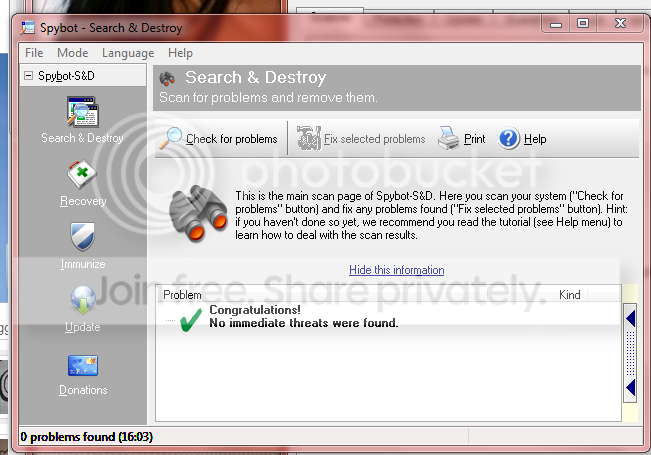
one more scan going with malwarebytes
 

My Computer

Computer Manufacturer/Model Number
Lenovo
OS
Windows 7 Home Premium 32bit
CPU
Intel(R) Core(TM)2 Quad CPU
Memory
3GB DDR2
Graphics Card(s)
Geforce 9800GTX+
Monitor(s) Displays
Dell 22"
Screen Resolution
1440x900
Hard Drives
1TB, 120GB External
Mouse
Razer Death Adder
First and most obvious in a situation like this is what you just changed.
Which is why I included this bit in my first post " something is killing the process and barring you having done something very recently to a system file or the registry."
 

My Computer

Computer Manufacturer/Model Number
Insane hobo technologies. ;-)
OS
Windows 7 x64
CPU
Intel i7 2600k
Motherboard
Asrock z68 extreme 4 gen 3
Memory
G.skill Ripjaw 16gigs @ 1866
Graphics Card(s)
Nvidia gtx580 (evga)
Sound Card
Integrated HD audio + hdmi
Monitor(s) Displays
24" ASUS widescreen + 42" insignia
Screen Resolution
1080p (1920x1080)
Hard Drives
128 Samsung 830
256 Samsung 840
3 x 1tb storage drive (various)
1 western digital 1tb (eSATA)
1 Seagate 1tb (eSATA)
PSU
1 kilowatt SLI/Crossfire rated Silverstone modular
Case
NZXT Phantom + additional 220 fan
Cooling
Zalmann
Keyboard
Microsoft wireless 3000 (v2)
Mouse
MS - wireless 5000 (bluetrack)
Internet Speed
depends on if you ask me or my provider.
Other Info
The above information is provided as is, and the author assumes no responsibility for issues it may cause with your sanity or fanboyism.
and crashes again it just started to happen so i just ended it and started a new task with firefox to post here!

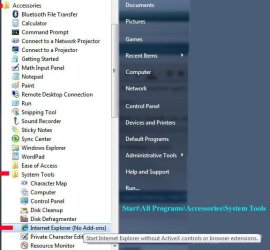
It sounds as though you are referring to Internet Explorer (not Windows Explorer). If your issue is with IE, try running without addons:

James

IE No Addons.JPG
 

My Computer

OS
Win7U 64 RTM
CPU
Q9550
Motherboard
GA-EP45-UD3R
Memory
8GB Gskill
Graphics Card(s)
ASUS|EAH4850/HTDI/1GD3/A
Sound Card
xfi Plat
Monitor(s) Displays
Dell 2405fpw
Screen Resolution
1920x1200
Hard Drives
Seagate & WD sata Drives
PSU
Antec
Case
Antec
Keyboard
MS Natural Ergonomic 4000
Mouse
Logitech MX610 USB Cordless
Back
Top