Solved Need Help ASAP

Cornholio

New member
Member
Local time
12:24 AM
Messages
86
Hi all,
SO I want to dual boot Vista and Seven Ultimate on the same machine.
I have 2 HDDs, one with Vista, and the other with some programs I installed in Vista.
I want to install Seven on the 2nd HDD
It is marked as a logical drive.
DO I delete everything on that drive and install 7 on it?
Or.....
Do I partition the 2nd drive?
Or.......
Do I format the 2nd drive?
Thanks in advance!
 

My Computer

OS
W7
CPU
i7 2600k
Motherboard
Sabertooth P67 B3
Memory
G.Skill 8GB DDR3 1600Mhz CL9
Graphics Card(s)
580 DCUII
Sound Card
onboard
PSU
tx850v2
Case
HAF X
Cooling
H70
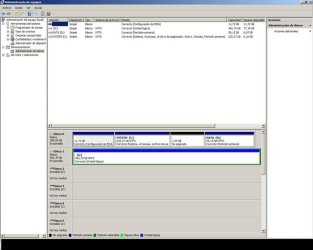
HEre goes the Screenie. I read that tuorial, it's very nice. Can I reformat from the Win7 USB?
 

My Computer

OS
W7
CPU
i7 2600k
Motherboard
Sabertooth P67 B3
Memory
G.Skill 8GB DDR3 1600Mhz CL9
Graphics Card(s)
580 DCUII
Sound Card
onboard
PSU
tx850v2
Case
HAF X
Cooling
H70
I personally would delete the partition, Clean, & reformat.
http://www.sevenforums.com/tutorials/52129-disk-clean-clean-all-diskpart-command.html
http://www.sevenforums.com/tutorials/2668-partition-volume-delete.html?ltr=P
http://www.sevenforums.com/tutorials/2674-partition-volume-create-new.html?ltr=P

or
from command prompt,
Type in command line
DISKPART
LIST DISK
SELECT DISK # (2nd HD)
CLEAN
CREATE PARTITION PRIMARY
SELECT PARTITION 1
FORMAT fs=NTFS
ASSIGN
EXIT
EXIT

or
http://www.sevenforums.com/tutorials/91339-ssd-hdd-optimize-windows-reinstallation.html
 

My Computer

OS
ME/XP/Vista/Win7
Ok, but can't the Seven installer do all this for me? I'm lazy
xD
 

My Computer

OS
W7
CPU
i7 2600k
Motherboard
Sabertooth P67 B3
Memory
G.Skill 8GB DDR3 1600Mhz CL9
Graphics Card(s)
580 DCUII
Sound Card
onboard
PSU
tx850v2
Case
HAF X
Cooling
H70
I think I'll go for the DVD :D
Anything else I shoul dknow before I dual boot 7?
 

My Computer

OS
W7
CPU
i7 2600k
Motherboard
Sabertooth P67 B3
Memory
G.Skill 8GB DDR3 1600Mhz CL9
Graphics Card(s)
580 DCUII
Sound Card
onboard
PSU
tx850v2
Case
HAF X
Cooling
H70
Would be worth checking for update Windodws 7 drivers on the manufacturer's web site.
 

My Computer

OS
ME/XP/Vista/Win7
The screenshot opens with a Security Bar which when clicked triggers fake AV scan saying "AVG has detected problems which it must fix" even though I don't have AVG. Had to kill fake scan via Task Manager - the link is apparently infected.

Use the Snipping Tool in Start Menu to post your screenshots and avoid that 3rd party hosting site. I would also run a full Malwarebytes and AV scan on your PC now.

It seems you have very little free space left on DISK1. You should reinstall programs on the same partition as the OS as they integrate themselves into registry and become part of the OS.

Then shrink the remaining space on Disk1 to create a Primary partition to install Win7 upon: http://www.sevenforums.com/tutorials/2672-partition-volume-shrink.html. If Disk Mgmt won't create Primary there, use Step 2.2 here to create: http://www.sevenforums.com/tutorials/70822-ssd-tweaks-optimizations-windows-7-a.html

Then boot the installer to install to new partition; it will configure a Dual Boot with the other OS.

Since you may be infected I would personally wipe the target HD with Diskpart Clean All and create a new primary partition for install.
 
Infected? Must be imageshack... dunno
I think I'm just gonna format my disk with the 7 installer... Don't want to do diskpart and all that.....
Wont the 7 installer create the primary partition for me?
Thanks to all
 

My Computer

OS
W7
CPU
i7 2600k
Motherboard
Sabertooth P67 B3
Memory
G.Skill 8GB DDR3 1600Mhz CL9
Graphics Card(s)
580 DCUII
Sound Card
onboard
PSU
tx850v2
Case
HAF X
Cooling
H70
You'll need to shrink the partition on DISK1 first to make space for installer to create New and Format.

Install, update and run a full Malwarebytes scan now on all drives: Malwarebytes
 
Hehe, but I want to install 7 on a different HDD which I don't mind it formatting. Is that fine?
 

My Computer

OS
W7
CPU
i7 2600k
Motherboard
Sabertooth P67 B3
Memory
G.Skill 8GB DDR3 1600Mhz CL9
Graphics Card(s)
580 DCUII
Sound Card
onboard
PSU
tx850v2
Case
HAF X
Cooling
H70
I thought you said you wanted to install Win7 on the second HD which is Disk1?

If so and as stated you have programs installed on it you'll need to reinstall them correctly to C, then back up any files before deleting the partition with installer to create and format a new one.
 
That's right, G:, Disk1
I don't mind erasing all the data on it, and i'd prefer if win7 does it for me
thanks a lot
 

My Computer

OS
W7
CPU
i7 2600k
Motherboard
Sabertooth P67 B3
Memory
G.Skill 8GB DDR3 1600Mhz CL9
Graphics Card(s)
580 DCUII
Sound Card
onboard
PSU
tx850v2
Case
HAF X
Cooling
H70
Can Win7 do this for me? xD
And what's the worst thing that could happen during or after install?
 

My Computer

OS
W7
CPU
i7 2600k
Motherboard
Sabertooth P67 B3
Memory
G.Skill 8GB DDR3 1600Mhz CL9
Graphics Card(s)
580 DCUII
Sound Card
onboard
PSU
tx850v2
Case
HAF X
Cooling
H70
Yes, using the Custom Install>Drive Options to Delete, Create New and Format as pictured here: http://www.sevenforums.com/tutorials/1649-clean-install-windows-7-a.html

If you want to be extra safe, unplug the other HD during install. Afterwards plug back in the other HD, boot the preferred OS by setting it first HD to boot in BIOS setup, boot the other HD using one-time BIOS Boot Menu key. This keeps the HD's independent to come and go as you please, whereas allowing Win7 to configure a Dual Boot makes it dependent to boot on Vista, making Vista harder to remove later.
 
You could even run the extracted install files from Vista, after wiping the target HD using Diskpart commands already given from the Vista Command Line.

But it's best to have a DVD so you have a bootable repair disk as well. They're $2 for a 3 pack of good quality DVD's on the rack at Walgreens.

If you can't pull the data cable from the HD, then disable it in BIOS setup temporarily.
 
So, bottom line, will it work? :D
(I'm really sorry I just don't understand :S)
And
If I format the G: hard drive without uninstalling Vista's porgrams, can I just run a registry cleaner later in vista to get rid of the programs? I towuld be a LOT faster
 

My Computer

OS
W7
CPU
i7 2600k
Motherboard
Sabertooth P67 B3
Memory
G.Skill 8GB DDR3 1600Mhz CL9
Graphics Card(s)
580 DCUII
Sound Card
onboard
PSU
tx850v2
Case
HAF X
Cooling
H70
Back
Top