Need Help : Audio won't work when I attach my HDMI cable to my laptop

ThatNewGuy

New member
Local time
8:45 PM
Messages
6
So yeah, I use a HDMI - HDMI cable to my laptop whenever I want to watch DVDs on it.
It used to be that the audio would work, but now that does not seem to be the case.

I've tried rolling back to previous versions but to no avail.

And yes, i've lurked through all the previous threads but to no avail.
The default audio device has been set to the TV's, the HDMI audio has been enabled and i've tried everything. Nothing

Please Windows 7 forum guys, you guys are my only hope!

Here are the specs

Acer ASPIRE 4741G
Intel Core 5-460M processor 2.53 GHZ
4 gig ram
Windows 7 64bit Home premium
NVIDIA GT 420M
 

My Computer My Computer

At a glance

Windows 7 Home Premium 64x
OS
Windows 7 Home Premium 64x
found this info for you,give it a go and let us know how it went
- Click on the "Start" button
- Click on "Control Panel"
- With the Control Panel in "Control Panel Home" view please click on "Hardware and Sound"
- Where it says "Sound" in green letters there are three options below that are in blue click on "Manage Audio Devices"
- This will bring up a window labeled "Sound"
- On the "Playback" tab there is listed the sound options available to you. One should read "Digital Output Device (HDMI)" Click on that.
- There should now be a check mark on that option.
- The Sound should then play through your HDMI hookups to the TV.
 

My Computer My Computer

At a glance

Microsoft Windows 7 Home Premium 64-bit 7600IIx4 amd athelon 635 processor2x2gbati radeon HD 5450
Computer Manufacturer/Model Number
Hewlett packard/p6512uk
OS
Microsoft Windows 7 Home Premium 64-bit 7600
CPU
IIx4 amd athelon 635 processor
Motherboard
FOXCONN 2AA9
Memory
2x2gb
Graphics Card(s)
ati radeon HD 5450
Sound Card
(1) Realtek High Definition Audio (2) AMD High Definition
Monitor(s) Displays
samsung lcd tv 32"
Screen Resolution
1360x 768
Hard Drives
(1) WDC WD10 01FAES-60Z2A0 SATA Disk Device (2) Maxtor OneTouch USB Device (3) ST310003 33AS USB Device (4) WD My Book 1111 USB Device
PSU
?
Cooling
air!
Keyboard
wireless hp
Mouse
wireless Hp,optical
Internet Speed
1.10mb/s
Antivirus
MSE
Browser
Firefox
actually i think that is for vista bear with me
 

My Computer My Computer

At a glance

Microsoft Windows 7 Home Premium 64-bit 7600IIx4 amd athelon 635 processor2x2gbati radeon HD 5450
Computer Manufacturer/Model Number
Hewlett packard/p6512uk
OS
Microsoft Windows 7 Home Premium 64-bit 7600
CPU
IIx4 amd athelon 635 processor
Motherboard
FOXCONN 2AA9
Memory
2x2gb
Graphics Card(s)
ati radeon HD 5450
Sound Card
(1) Realtek High Definition Audio (2) AMD High Definition
Monitor(s) Displays
samsung lcd tv 32"
Screen Resolution
1360x 768
Hard Drives
(1) WDC WD10 01FAES-60Z2A0 SATA Disk Device (2) Maxtor OneTouch USB Device (3) ST310003 33AS USB Device (4) WD My Book 1111 USB Device
PSU
?
Cooling
air!
Keyboard
wireless hp
Mouse
wireless Hp,optical
Internet Speed
1.10mb/s
Antivirus
MSE
Browser
Firefox

My Computer My Computer

At a glance

Microsoft Windows 7 Home Premium 64-bit 7600IIx4 amd athelon 635 processor2x2gbati radeon HD 5450
Computer Manufacturer/Model Number
Hewlett packard/p6512uk
OS
Microsoft Windows 7 Home Premium 64-bit 7600
CPU
IIx4 amd athelon 635 processor
Motherboard
FOXCONN 2AA9
Memory
2x2gb
Graphics Card(s)
ati radeon HD 5450
Sound Card
(1) Realtek High Definition Audio (2) AMD High Definition
Monitor(s) Displays
samsung lcd tv 32"
Screen Resolution
1360x 768
Hard Drives
(1) WDC WD10 01FAES-60Z2A0 SATA Disk Device (2) Maxtor OneTouch USB Device (3) ST310003 33AS USB Device (4) WD My Book 1111 USB Device
PSU
?
Cooling
air!
Keyboard
wireless hp
Mouse
wireless Hp,optical
Internet Speed
1.10mb/s
Antivirus
MSE
Browser
Firefox
Let me clarify things a bit.

- I want to watch some HD goodness on my TV
- I used to use a HDMI - HDMI cable for this and it worked
- Suddenly It does not
- Tried standard methods (checked to see if TV was default audio, HDMI enabled)
-Tried different cable, no luck
- don't have another HD tv to see if this an isolated problem
- TV is philips in case this matters
- I checked, I do have an HDMI audio driver. The built in one ( Realtec) and the video card (NVIDIA)

Any ideas now?
 

My Computer My Computer

At a glance

Windows 7 Home Premium 64x
OS
Windows 7 Home Premium 64x
try a different hdmi cable.
 

My Computer My Computer

At a glance

Microsoft Windows 7 Home Premium 64-bit 7600IIx4 amd athelon 635 processor2x2gbati radeon HD 5450
Computer Manufacturer/Model Number
Hewlett packard/p6512uk
OS
Microsoft Windows 7 Home Premium 64-bit 7600
CPU
IIx4 amd athelon 635 processor
Motherboard
FOXCONN 2AA9
Memory
2x2gb
Graphics Card(s)
ati radeon HD 5450
Sound Card
(1) Realtek High Definition Audio (2) AMD High Definition
Monitor(s) Displays
samsung lcd tv 32"
Screen Resolution
1360x 768
Hard Drives
(1) WDC WD10 01FAES-60Z2A0 SATA Disk Device (2) Maxtor OneTouch USB Device (3) ST310003 33AS USB Device (4) WD My Book 1111 USB Device
PSU
?
Cooling
air!
Keyboard
wireless hp
Mouse
wireless Hp,optical
Internet Speed
1.10mb/s
Antivirus
MSE
Browser
Firefox
No luck. Any ideas?
 

My Computer My Computer

At a glance

Windows 7 Home Premium 64x
OS
Windows 7 Home Premium 64x
Have you checked your default settings under Hardware & Sound in the Control Panel?

hd.PNG

As you can see, I'm currently using headphones.
 

My Computer My Computer

At a glance

Windows 7 Ultimate SP1 64-BitIntel Core i7 870 @ 2.93GHz8Gb Dual-Channel DDR3 @ 664MHznVidia GeForce GTX 460 1024MB dedicated RAM
Computer Manufacturer/Model Number
HP Pavilion Elite 495UK
OS
Windows 7 Ultimate SP1 64-Bit
CPU
Intel Core i7 870 @ 2.93GHz
Motherboard
MSI 2A9C (CPU1)
Memory
8Gb Dual-Channel DDR3 @ 664MHz
Graphics Card(s)
nVidia GeForce GTX 460 1024MB dedicated RAM
Sound Card
Realtek HD Audio
Monitor(s) Displays
HP2310i
Screen Resolution
1920 x 1080
Hard Drives
1x1954GB Hitachi HDS22020ALA 330 (RAID), 1x1954GB Hitachi External for backup and storage
PSU
460W
Case
HP Elite
Cooling
Air cooled
Keyboard
Logitech K750 solar-powered keyboard
Mouse
Logitech Wireless M180 mouse
Internet Speed
2Mb
Other Info
Pure Avanti Flow Internet Radio with iPod Dock, 64Gb iPod, HP USB Speakers, Sony MDR-V500 Headphones, Sony Vaio F-Series Laptop
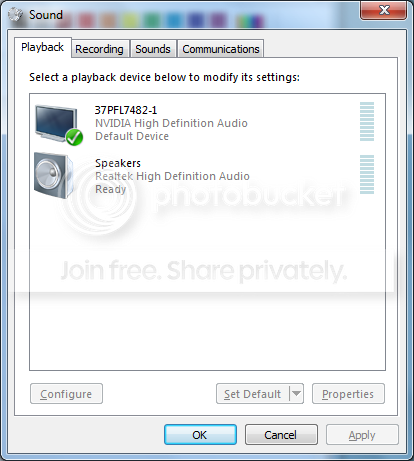
Proof.png


Here is the image. As you can see, the Telly is selected as the default device.
No sound comes out. Even if the bar goes up and SAYS there is.
I checked the level and balance, and the TV is not muted. All should be well.
 

My Computer My Computer

At a glance

Windows 7 Home Premium 64x
OS
Windows 7 Home Premium 64x
Have you checked the TV speaker settings on the TV itself?

There should be an option to choose between the TV's internal speakers or external speakers.
 

My Computer My Computer

At a glance

Windows 7 Ultimate SP1 64-BitIntel Core i7 870 @ 2.93GHz8Gb Dual-Channel DDR3 @ 664MHznVidia GeForce GTX 460 1024MB dedicated RAM
Computer Manufacturer/Model Number
HP Pavilion Elite 495UK
OS
Windows 7 Ultimate SP1 64-Bit
CPU
Intel Core i7 870 @ 2.93GHz
Motherboard
MSI 2A9C (CPU1)
Memory
8Gb Dual-Channel DDR3 @ 664MHz
Graphics Card(s)
nVidia GeForce GTX 460 1024MB dedicated RAM
Sound Card
Realtek HD Audio
Monitor(s) Displays
HP2310i
Screen Resolution
1920 x 1080
Hard Drives
1x1954GB Hitachi HDS22020ALA 330 (RAID), 1x1954GB Hitachi External for backup and storage
PSU
460W
Case
HP Elite
Cooling
Air cooled
Keyboard
Logitech K750 solar-powered keyboard
Mouse
Logitech Wireless M180 mouse
Internet Speed
2Mb
Other Info
Pure Avanti Flow Internet Radio with iPod Dock, 64Gb iPod, HP USB Speakers, Sony MDR-V500 Headphones, Sony Vaio F-Series Laptop
There seems to be no such option seavixen. Any help? This seems to be an old model Philips HDTV. Got it second hand from my aunt.

Even then, I used this TV for my PS3 before the PS gave up the ghost, and it worked then. Does this change things?
 

My Computer My Computer

At a glance

Windows 7 Home Premium 64x
OS
Windows 7 Home Premium 64x

My Computer My Computer

At a glance

Windows 7 Home Premium 64x
OS
Windows 7 Home Premium 64x
Hey, I actually just made an account so I could share this information with you guys. I ran into the same HDMI not playing audio problem on my computer, and the solution had NOTHING to do with drivers/sound cards/anything else like that. I use VLC player (not sure what the original poster uses for his media playback), and in the sound settings the audio device was set to "Stereo". All I had to do was switch it to "Mono", and boom, sound over HDMI. Hopefully this helps!
 

My Computer My Computer

At a glance

Windows 7 Home Premium - 64 BitIntel Core i5 @2.40 ghz4gb RAM
Computer Manufacturer/Model Number
Sony Vaio VPCEB
OS
Windows 7 Home Premium - 64 Bit
CPU
Intel Core i5 @2.40 ghz
Memory
4gb RAM
You may have tried this so I hope Im not being redundant. But, Im here to try and help:)

Alright, go to the control panel and make sure the "classic view" is selected. Then go to administrative tools and select computer management. So once you are there, click on the device manager and a bunch of stuff will line up in the right window with plus signs to the left of the icons. If there is a red X or yellow circle with an exclamation point next to any of those icons, you have a possible hardware conflict or problem. If its there, screen shoot it and I may be able to walk you through simple ways to fix it. Please provide as much detail as possible if this is the case.

So if this check seems ok and there are no yellow or red things around, you may have to dig into your BIOS. Your computer should have came with a manual on how to get into bios and possibly help you with resolving the issue.

While you are in the BIOS, check for the version and see online if you have the most recent one. If not, that might be your problem too. You can google on how to do it yourself and I would recommend to take your time and back up your data.

I hope this helps and as an FYI, these are just the main things you can check that will possibly keep you from having to chase your tail. It's hard to armchair quaterback a computer repair on the internet!!!

Good luck,

Bryan
 

My Computer My Computer

At a glance

Windows 7 Professional 64 BitIntel Centrino 24gb Ram, 320 GB HDDGeForce 9800M GS 512MB Dedicated Vram
Computer Manufacturer/Model Number
Asus G50VT (Best Buy)
OS
Windows 7 Professional 64 Bit
CPU
Intel Centrino 2
Motherboard
Asus
Memory
4gb Ram, 320 GB HDD
Graphics Card(s)
GeForce 9800M GS 512MB Dedicated Vram
Sound Card
?
Monitor(s) Displays
1
Hard Drives
320GB 5400RPM
PSU
na
Case
na
Cooling
na
Back
Top